
k8s 安装 istio 的坑
本文针对于二进制部署的k8s安装istio1.67版本
没有设置admin.conf的小伙伴请参考
https://www.cnblogs.com/Tempted/p/13469772.html
1、检查k8s dns svc 启动是否正常

访问不到svc错误,请检查K8S 上dns服务是否正常
error citadelclient Failed to create certificate: rpc error: code = Unavailable desc = connection error: desc = "transport: Error while dialing dial tcp: lookup istiod.istio-system.svc on 10.254.0.2:53: read udp 172.30.1.57:52724->10.254.0.2:53: i/o timeout"
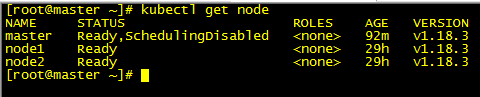
2、master 上需要部署一个node节点,并设置为不可调度
1,不可调度

kubectl cordon master

kubectl uncordon master       #取消

2,驱逐已经运行的业务容器

kubectl drain --ignore-daemonsets --delete-local-data  master

3,如果想删除node 节点,则进行这个步骤

kubectl delete node master
自动注入错误
Error creating: Internal error occurred: failed calling webhook "sidecar-injector.istio.io": Post https://istio-sidecar-injector.istio-system.svc:443/inject?timeout=30s: net/http: request canceled while waiting for connection (Client.Timeout exceeded while awaiting headers)
此错误是因为master节点访问不了集群内部的Service(istio-sidecar-injector),导致自动注入失败。
安装istio
一、下载
官方地址:
https://preliminary.istio.io/latest/zh/docs/setup/getting-started/
github 下载地址
https://github.com/istio/istio/releases/
二、配置
[root@master ~]#  tar -zxf istio-1.6.-linux-amd64.tar.gz

[root@master ~]#  cd istio-1.6.

添加istioctl 环境变量

[root@master ~]#  vi ~/.bash_profile

# .bash_profile

# Get the aliases and functions

if [ -f ~/.bashrc ]; then

        . ~/.bashrc

fi

# User specific environment and startup programs

PATH=$PATH:$HOME/bin

PATH=$PATH:/root/istio-1.6./bin

export PATH

[root@master ~]#  source ~/.bash_profile

添加istio自动补全工具

[root@master ~]# cp  tools/istioctl.bash ~/.istioctl.bash

[root@master ~]# source  ~/.istioctl.bash
c-bash: _get_comp_words_by_ref: command not found 碰到这样的错误解决方法:
yum install bash-completion -y

source /usr/share/bash-completion/bash_completion

source ~/.istioctl.bash
三、安装
以官方为主:https://preliminary.istio.io/latest/zh/docs/setup/getting-started/
1、安装demo配置
istioctl manifest apply --set profile=demo
2、添加自动注入
kubectl create ns name
kubectl label namespace <namespace> istio-injection=enabled
kubectl apply -n <namespace> -f <your-app-spec>.yaml
一个自动注入yaml demo
apiVersion: apps/v1

kind: Deployment

metadata:

  name: demo

  labels:

    app: demo

spec:

  replicas:

  selector:

    matchLabels:

      app: demo

  template:

    metadata:

      labels:

        app: demo

    spec:

      containers:

      - name: nginx

        image: nginx:1.14-alpine

        imagePullPolicy: IfNotPresent

        ports:

        - containerPort:
3、卸载
istioctl manifest generate --set profile=demo | kubectl delete -f -
k8s 安装 istio 的坑的更多相关文章
- k8s 安装并试用Istio service mesh
本文根据官网的文档整理而成,步骤包括安装istio 0.5.1并创建一个bookinfo的微服务来测试istio的功能. 文中使用的yaml文件可以在kubernetes-handbook的manif ...
- 在k3d上快速安装Istio,助你在本地灵活使用K8S!
作者丨Mitsuyuki Shiiba 原文链接: https://dev.to/bufferings/tried-k8s-istio-in-my-local-machine-with-k3d-52g ...
- k8s1.13.3安装istio(helm方式)
官方文档:https://istio.io/zh/docs/setup/kubernetes/install/helm/ 一.环境信息 centos7 k8s1.13.3 主机名 ip cpu ram ...
- 服务网格Istio入门-详细记录Kubernetes安装Istio并使用
我最新最全的文章都在南瓜慢说 www.pkslow.com,文章更新也只在官网,欢迎大家来喝茶~~ 1 服务网格Istio Istio是开源的Service Mesh实现,一般用于Kubernetes ...
- 在Mac上安装Istio并使用,有丰富的监控Kiali、Grafana、Jaeger
我最新最全的文章都在南瓜慢说 www.pkslow.com,文章更新也只在官网,欢迎大家来喝茶~~ 1 简介 之前在文章<服务网格Istio入门-详细记录Kubernetes安装Istio并使用 ...
- CentOS7.4安装MySQL踩坑记录
CentOS7.4安装MySQL踩坑记录 time: 2018.3.19 CentOS7.4安装MySQL时网上的文档虽然多但是不靠谱的也多, 可能因为版本与时间的问题, 所以记录下自己踩坑的过程, ...
- ubuntu 下安装docker 踩坑记录
ubuntu 下安装docker 踩坑记录 # Setp : 移除旧版本Docker sudo apt-get remove docker docker-engine docker.io # Step ...
- Charles 抓包工具安装和采坑记录
Charles 抓包工具安装和采坑记录 网络抓包是解决网络问题的第一步,也是网络分析的基础.网络出现问题,第一步肯定是通过抓包工具进行路径分析,看哪一步出现异常.做网络爬虫,第一步就是通过抓包工具对目 ...
- 安装istio v1.0 详细过程和步骤
创建 istio 目录 [root@centos-110 ~]# mkdir istio [root@centos-110 ~]# cd istio 方案一: # 去下面的地址下载压缩包 # ...
随机推荐
- Hadoop之HDFS常用文件操作命令
命令基本格式:hadoop fs -cmd < args > 1. ls 列出hdfs文件系统根目录下的目录和文件hadoop fs -ls /dirhadoop fs -ls -R /d ...
- @Autowired @Qualifier
spring2.1中允许用户通过@Autowired注解对Bean的属性变量.属性Setter方法以及构造函数进行标注,配合AutowiredAnnotationBeanProcessor完成Bean ...
- 附025.kubeadm部署Kubernetes更新证书
一 查看证书 1.1 查看过期时间-方式一 1 [root@master01 ~]# tree /etc/kubernetes/pki/ 2 [root@master01 ~]# for tls in ...
- String字符串缓冲区、StringBuffer
String字符串缓冲区 1.StringBuffer类 StringBuffer又称为可变字符序列,字符串缓冲区支持可变的字符串, StringBuffer是个字符串的缓冲区,即就是它是一个容器,容 ...
- 项目总结,彻底掌握NodeJS中如何使用Sequelize
前言 sequelize是什么? sequelize是基于NodeJs的ORM框架,它适用于不同的数据库,如:Postgres.MySQL.SQLite.MariaDB,我们可以通过sequelize ...
- 手写 promies
简单的 Promies 封装 function Promiss(fn) { this.state = 'pending' //当前状态 this.value = null // 成功执行时得到的数据 ...
- Python break语句
Python break语句:当运行到 break 语句时,终止包含 break 的循环语句. 注:无论判断条件是否达到 False 或 序列是否遍历完都会停止执行循环语句和该 break 下的所有语 ...
- Label 组件基本写法
1.width,height 指定区域大小 文本 汉字 2 个字节 2.font 指定字体和字体大小 font(font_name,size) 3.image 显示在 Label 上的图像 支持 gi ...
- 如何使用 PHP 语言来编码和解码 JSON 对象
PHP JSON 本章节我们将为大家介绍如何使用 PHP 语言来编码和解码 JSON 对象. 环境配置 在 php5.2.0 及以上版本已经内置 JSON 扩展. JSON 函数 函数 描述 json ...
- PHP preg_grep() 函数
preg_grep 函数用于返回匹配模式的数组条目.高佣联盟 www.cgewang.com 语法 array preg_grep ( string $pattern , array $input [ ...