
ribbon 详解
ribbon 详解
1. 顶层架构
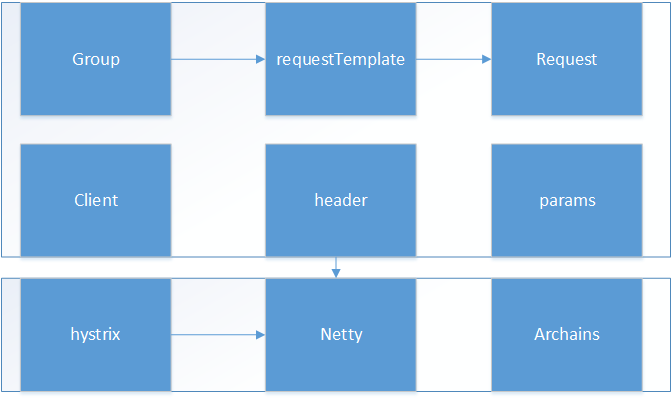
2. 简单的示例:使用ResourceTemplate方式
@Test

public void testGroup(){

    HttpResourceGroup httpResourceGroup = Ribbon.createHttpResourceGroup("test",

            ClientOptions.create().withMaxAutoRetries(3).

                    withConfigurationBasedServerList("localhost:8081,localhost:8080"));

    HttpRequestTemplate<ByteBuf> recommendationsByUserIdTemplate = httpResourceGroup.newTemplateBuilder("recommendationsByUserId", ByteBuf.class)

            .withMethod("GET")

            .withUriTemplate("/aa/index")

            .withHeader("X-Auth-Token", "abc")

            //.withFallbackProvider(new RecommendationServiceFallbackHandler())

            //.withResponseValidator(new RecommendationServiceResponseValidator())

            .build();

    RibbonRequest<ByteBuf> request = recommendationsByUserIdTemplate.requestBuilder()

            .withRequestProperty("userId", "test")

            .build();

    ByteBuf buf = request.execute();

    byte[] bytes = new byte[buf.capacity()];

    buf.readBytes(bytes);

    System.out.println(new String(bytes));

}
3.实现:
3.1 关键对象
public interface RibbonRequest<T> {

    /**

     * Blocking API that returns a single (or last element if there is a sequence of objects from the execution) element

     */

    public T execute();

    /**

     * Non blocking API that returns a {@link Future}, where its {@link Future#get()} method is blocking and returns a

     * single (or last element if there is a sequence of objects from the execution) element

     */

    public Future<T> queue();

    /**

     * Non blocking API that returns an {@link Observable} while the execution is started asynchronously.

     * Subscribing to the returned {@link Observable} is guaranteed to get the complete sequence from

     * the beginning, which might be replayed by the framework. Use this API for "fire and forget".

     */

    public Observable<T> observe();

    /**

     * Non blocking API that returns an Observable. The execution is not started until the returned Observable is subscribed to.

     */

    public Observable<T> toObservable();

    /**

     * Create a decorated {@link RequestWithMetaData} where you can call its similar blocking or non blocking

     * APIs to get {@link RibbonResponse}, which in turn contains returned object(s) and

     * some meta data from Hystrix execution.

     */

    public RequestWithMetaData<T> withMetadata();

}
明显,最终生成的关键对象RibbonRequest,使用的时观察者模式,底层实现肯定会使用RxJava或者Hystrix。
3.2 关键实现:HystrixObservableCommandChain
HystrixObservableCommandChain<T> createHystrixCommandChain() {

    List<HystrixObservableCommand<T>> commands = new ArrayList<HystrixObservableCommand<T>>(2);

    if (cacheProvider != null) {

        commands.add(new CacheObservableCommand<T>(cacheProvider.getCacheProvider(), cacheProvider.getKey(), cacheHystrixCacheKey,

                requestProperties, template.cacheHystrixProperties()));

    }

    commands.add(new HttpResourceObservableCommand<T>(client, httpRequest, hystrixCacheKey, requestProperties, template.fallbackHandler(),

            template.responseValidator(), template.getClassType(), template.hystrixProperties()));

    return new HystrixObservableCommandChain<T>(commands);

}
在HystrixObservableCommandChain执行toObservable的时候,会依次便利集合中所有的HystrixObservableCommand,知道其toObservable不为null。
所以,如果cacheProvider不为null会调用CacheObservableCommand的toObservable,如果cacheProvider为null,则直接调用HttpResourceObservableCommand的toObservable.
3.3 http请求:
Observable<HttpClientResponse<ByteBuf>> httpResponseObservable = httpClient.submit(httpRequest);
Observable<T> o =

  (server == null ? selectServer() : Observable.just(server))

      .concatMap(new Func1<Server, Observable<T>>() {

        @Override

        // Called for each server being selected

        public Observable<T> call(Server server) {

          context.setServer(server);

          final ServerStats stats = loadBalancerContext.getServerStats(server);

          // Called for each attempt and retry

          Observable<T> o = Observable

          .just(server)

          .concatMap(new Func1<Server, Observable<T>>() {

            ...

            });

            if (maxRetrysSame > 0)

            o = o.retry(retryPolicy(maxRetrysSame, true));

            return o;

          }

        }

if (maxRetrysSame > 0)

  o = o.retry(retryPolicy(maxRetrysSame, true));

      return o;
会调用统一服务器n次,后调用下一个服务器m次(n,m为设定的最大调用次数)。
4.简单示例:使用注解方式
public interface AAIndex {

    @Http(  method = Http.HttpMethod.GET,

            uri = "http://localhost:8080/aa/index")

    RibbonRequest<ByteBuf> index();

}
@Test

public void testRibbonAnnotation(){

    AAIndex aaIndex = Ribbon.from(AAIndex.class);

    ByteBuf buf = aaIndex.index().execute();

    byte[] bytes = new byte[buf.capacity()];

    buf.readBytes(bytes);

    System.out.println(new String(bytes));

}
5.实现:
5.1 动态代理:
return (T) Proxy.newProxyInstance(

        Thread.currentThread().getContextClassLoader(),

        new Class[]{clientInterface, ProxyLifeCycle.class},

        new RibbonDynamicProxy<T>(clientInterface, resourceGroupFactory, configFactory, transportFactory, processors)

);
使用JDK自带的代理类实现,代理了client接口,和ProxyLifeCycle,其实现具体类为RibbonDynamicProxy。
5.2 支持的注解:
static void registerAnnotationProcessors(AnnotationProcessorsProvider processors) {

    processors.register(new HttpAnnotationProcessor());

    processors.register(new HystrixAnnotationProcessor());

    processors.register(new CacheProviderAnnotationProcessor());

    processors.register(new ClientPropertiesProcessor());

}
最终的实现跟非注解方式的实现是一致的。
@SuppressWarnings("unchecked")

public <O> RibbonRequest<O> executeFromTemplate(Object[] args) {

    HttpRequestBuilder<?> requestBuilder = httpRequestTemplateBuilder.build().requestBuilder();

    withParameters(requestBuilder, args);

    withContent(requestBuilder, args);

    return (RibbonRequest<O>) requestBuilder.build();

}
ribbon 详解的更多相关文章
- Ribbon详解
转自Ribbon详解 简介 Spring Cloud Ribbon是一个基于HTTP和TCP的客户端负载均衡工具,它基于Netflix Ribbon实现.通过Spring Cloud的封装,可以让 ...
- Spring Cloud:使用Ribbon实现负载均衡详解(下)
在上一篇文章(Spring Cloud:使用Ribbon实现负载均衡详解(上))中,我对 Ribbon 做了一个介绍,Ribbon 可以实现直接通过服务名称对服务进行访问.这一篇文章我详细分析一下如何 ...
- VC++ 2010 创建高级Ribbon界面详解(1)
运用 VC++ 2010 创建高级 Ribbon 界面详解,包括 Ribbon 界面的结构层次.Ribbon 控件的使用等,ribbon 用户界面,ribbon interface ,ribbon 高 ...
- (2-3)Eureka详解
基础架构 服务注册中心 服务提供者 服务消费者 服务治理 服务提供者 服务注册.在服务注册时,需要确认一下eureka.client.registerwith-eurek=ture参数是否正确,默认是 ...
- Spring Cloud Zuul 限流详解(附源码)(转)
在高并发的应用中,限流往往是一个绕不开的话题.本文详细探讨在Spring Cloud中如何实现限流. 在 Zuul 上实现限流是个不错的选择,只需要编写一个过滤器就可以了,关键在于如何实现限流的算法. ...
- Zuul之Filter详解
Zuul详解 官方文档:https://github.com/Netflix/zuul/wiki/How-it-Works Zuul的中心是一系列过滤器,能够在HTTP请求和响应的路由过程中执行一系列 ...
- Spring Cloud限流详解
转自:https://blog.csdn.net/tracy38/article/details/78685707 在高并发的应用中,限流往往是一个绕不开的话题.本文详细探讨在Spring Cloud ...
- springcloud中Feign配置详解
Spring Cloud中Feign配置详解 到目前为止,小伙伴们对Feign的使用已经掌握的差不多了,我们在前文也提到Feign是对Ribbon和Hystrix的整合,那么在Feign中,我们要如何 ...
- Spring Cloud(十二):Spring Cloud Zuul 限流详解(附源码)(转)
前面已经介绍了很多zuul的功能,本篇继续介绍它的另一大功能.在高并发的应用中,限流往往是一个绕不开的话题.本文详细探讨在Spring Cloud中如何实现限流. 在 Zuul 上实现限流是个不错的选 ...
随机推荐
- CVPR2018: Unsupervised Cross-dataset Person Re-identification by Transfer Learning of Spatio-temporal Patterns
论文可以在arxiv下载,老板一作,本人二作,也是我们实验室第一篇CCF A类论文,这个方法我们称为TFusion. 代码:https://github.com/ahangchen/TFusion 解 ...
- C语言第八次博客作业--字符数组
一.PTA实验作业 题目1:查验身份证 1. 本题PTA提交列表 2. 设计思路 定义i,flag=1,z,m[11],a[19] 输入次数n for i=1 to n+1 gets(a) 加权求和在 ...
- new Date的兼容性问题
标准浏览器下正常,结果ie.老版本的IOS微信公众号不支持,搞不懂,原来有兼容性问题 //beginData格式为'yyyy-mm-dd' 1 var _date = new Date(Date.pa ...
- ES6 中 Promise 详解
Promise,简单说就是一个容器,里面保存着某个未来才会结束的事件(通常是一个异步操作)的结果.从语法上说,Promise 是一个对象,从它可以获取异步操作的消息.Promise 提供统一的 API ...
- 58 同城 iOS 客户端 iOS11 及 iPhone X 适配实践
一.前言 前段时间 WWDC 大会上苹果推出了 iOS11 系统 和 iPhone X 新机型,相信各个 iOS 团队的开发者都已经在计划新系统和新机型的适配工作了.不得不说,新系统和新机型的发布确实 ...
- 中文分词 sphni与scws
1.安装sphnixcd /usr/local/srcwget http://sphinxsearch.com/files/sphinx-2.2.11-release.tar.gztar -zxvf ...
- machine learning 之 多元线性回归
整理自Andrew Ng的machine learning课程 week2. 目录: 多元线性回归 Multivariates linear regression /MLR Gradient desc ...
- C语言第六周博客作业--数据类型
一.PTA实验作业 题目1: 7-6 掉入陷阱的数字 1. 本题PTA提交列表 2.设计思路 定义变量N,i,g=1表示位数,a表示各位数字相加的和,b=0,j,N1,c,d用于储存N do{ for ...
- Alpha阶段报告-hywteam
一.Alpha版本测试报告 1. 在测试过程中总共发现了多少Bug?每个类别的Bug分别为多少个? BUG名 修复的BUG 不能重现的BUG 非BUG 没能力修复的BUG 下个版本修复 文件路径的表示 ...
- Beta开始前准备
Beta准备 1. 讨论组长是否重选的议题和结论. 经过讨论,我们认为,经过一段时间的磨合,现任组长是不需要更换的. 2. 下一阶段需要改进完善的功能. 增加关于征信的功能,贴近选题主题 美化界面,尽 ...