
使用C# (.NET Core) 实现组合设计模式 (Composite Pattern)
本文的概念性内容来自深入浅出设计模式一书.
本文需结合上一篇文章(使用C# (.NET Core) 实现迭代器设计模式)一起看.
上一篇文章我们研究了多个菜单一起使用的问题.
需求变更
就当我们感觉我们的设计已经足够好的时候, 新的需求来了, 我们不仅要支持多种菜单, 还要支持菜单下可以拥有子菜单.
例如我想在DinerMenu下添加一个甜点子菜单(dessert menu). 以我们目前的设计, 貌似无法实现该需求.
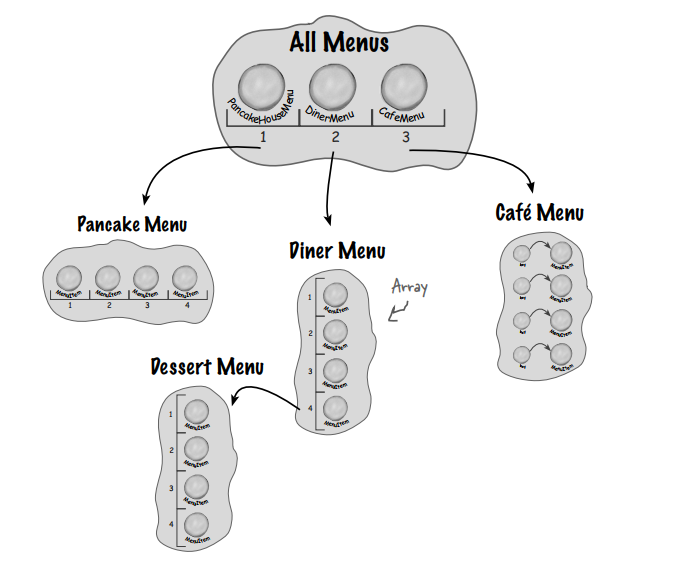
目前我们无法把dessertmenu放到MenuItem的数组里.
我们应该怎么做?
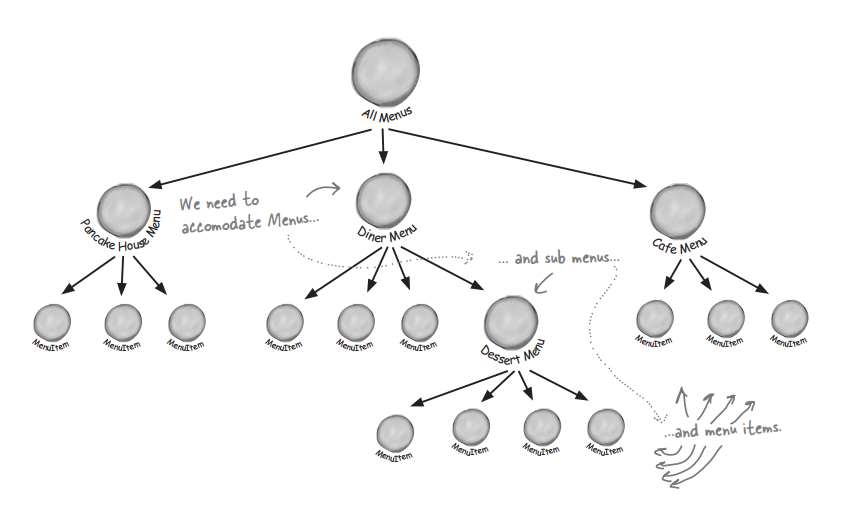
- 我们需要一种类似树形的结构, 让其可以容纳/适应菜单, 子菜单以及菜单项.
- 我们还需要维护一种可以在该结构下遍历所有菜单的方法, 要和使用遍历器一样简单.
- 遍历条目的方法需要更灵活, 例如, 我可能只遍历DinerMenu下的甜点菜单(dessert menu), 或者遍历整个Diner Menu, 包括甜点菜单.
组合模式定义
组合模式允许你把对象们组合成树形的结构, 从而来表示整体的层次. 通过组合, 客户可以对单个对象或对象们的组合进行一致的处理.
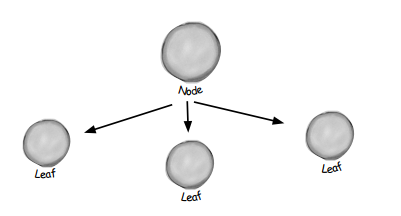
先看一下树形的结构, 拥有子元素的元素叫做节点(node), 没有子元素的元素叫做叶子(leaf).
针对我们的需求:
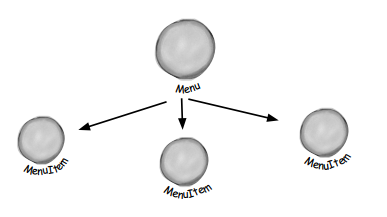
菜单Menu就是节点, 菜单项MenuItem就是叶子.
针对需求我们可以创建出一种树形结构, 它可以把嵌套的菜单或菜单项在相同的结构下进行处理.
组合和单个对象是指什么呢?
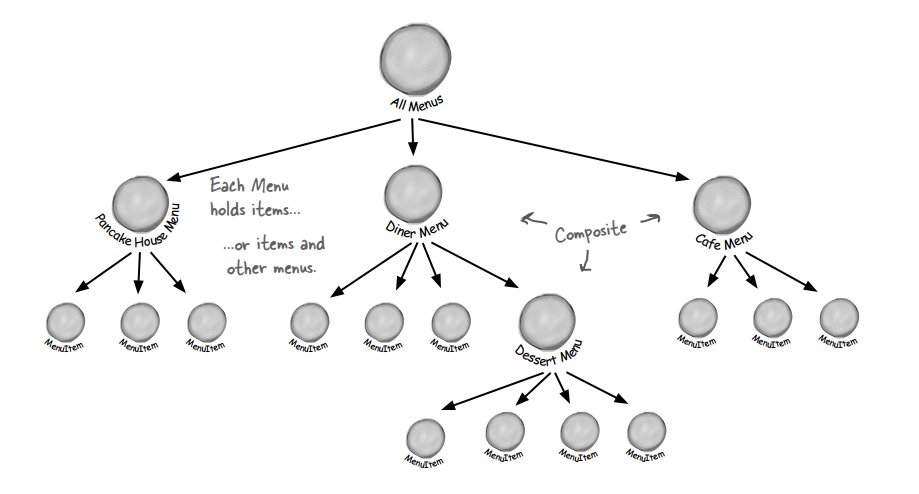
如果我们拥有一个树形结构的菜单, 子菜单, 或者子菜单和菜单项一起, 那么就可以说任何一个菜单都是一个组合, 因为它可以包含其它菜单或菜单项.
而单独的对象就是菜单项, 它们不包含其它对象.
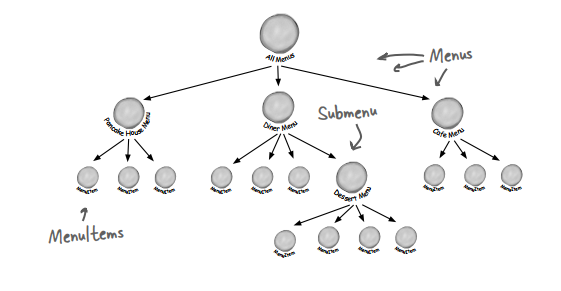

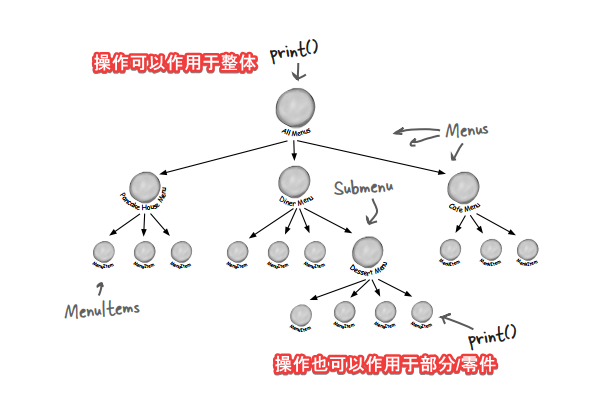
使用组合模式, 我们可以把相同的操作作用于组合或者单个对象上. 也就是说, 大多数情况下我们可以忽略对象们的组合与单个对象之间的差别.
该模式的类图:
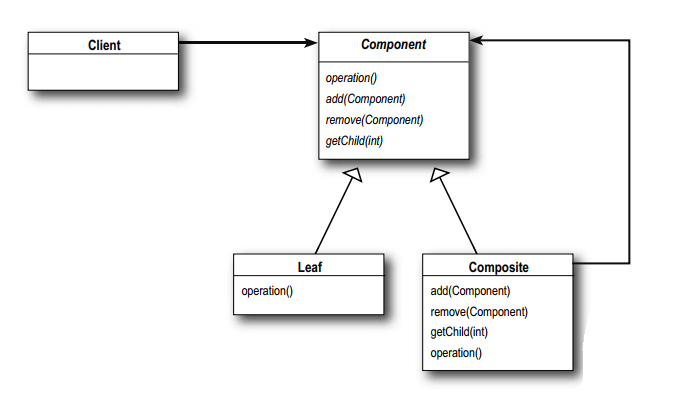
客户Client, 使用Component来操作组合中的对象.
Component定义了所有对象的接口, 包括组合节点与叶子. Component接口也可能实现了一些默认的操作, 这里就是add, remove, getChild.
叶子Leaf会继承Component的默认操作, 但是有些操作也许并不适合叶子, 这个过会再说.
叶子Leaf没有子节点.
组合Composite需要为拥有子节点的组件定义行为. 同样还实现了叶子相关的操作, 其中有些操作可能不适合组合, 这种情况下异常可能会发生.
使用组合模式来设计菜单
首先, 需要创建一个component接口, 它作为菜单和菜单项的共同接口, 这样就可以在菜单或菜单项上调用同样的方法了.
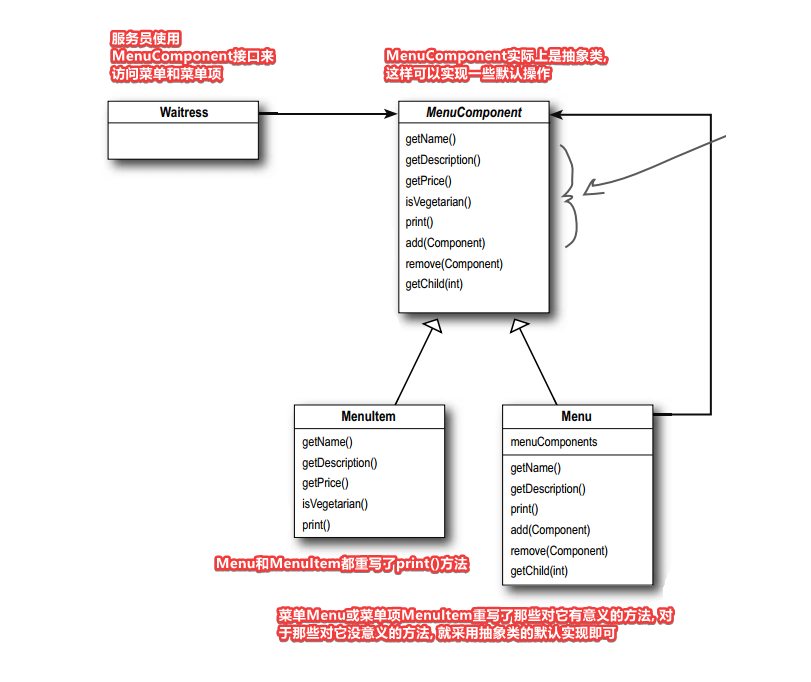
由于菜单和菜单项必须实现同一个接口, 但是毕竟它们的角色还是不同的, 所以并不是每一个接口里(抽象类里)的默认实现方法对它们都有意义. 针对毫无意义的默认方法, 有时最好的办法是抛出一个运行时异常. 例如(NotSupportedException, C#).
MenuComponent:
using System;

namespace CompositePattern.Abstractions

{

    public abstract class MenuComponent

    {

        public virtual void Add(MenuComponent menuComponent)

        {

            throw new NotSupportedException();

        }

        public virtual void Remove(MenuComponent menuComponent)

        {

            throw new NotSupportedException();

        }

        public virtual MenuComponent GetChild(int i)

        {

            throw new NotSupportedException();

        }

        public virtual  string Name => throw new NotSupportedException();

        public virtual  string Description => throw new NotSupportedException();

        public virtual  double Price => throw new NotSupportedException();

        public virtual bool IsVegetarian => throw new NotSupportedException();

        public virtual void Print()

        {

            throw new NotSupportedException();

        }

    }

}
MenuItem:
using System;

using CompositePattern.Abstractions;

namespace CompositePattern.Menus

{

    public class MenuItem : MenuComponent

    {

        public MenuItem(string name, string description, double price, bool isVegetarian)

        {

            Name = name;

            Description = description;

            Price = price;

            IsVegetarian = isVegetarian;

        }

        public override string Name { get; }

        public override string Description { get; }

        public override double Price { get; }

        public override bool IsVegetarian { get; }

        public override void Print()

        {

            Console.Write($"\t{Name}");

            if (IsVegetarian)

            {

                Console.Write("(v)");

            }

            Console.WriteLine($", {Price}");

            Console.WriteLine($"\t\t -- {Description}");

        }

    }

}
Menu:
using System;

using System.Collections.Generic;

using CompositePattern.Abstractions;

namespace CompositePattern.Menus

{

    public class Menu : MenuComponent

    {

        readonly List<MenuComponent> _menuComponents;

        public Menu(string name, string description)

        {

            Name = name;

            Description = description;

            _menuComponents = new List<MenuComponent>();

        }

        public override string Name { get; }

        public override string Description { get; }

        public override void Add(MenuComponent menuComponent)

        {

            _menuComponents.Add(menuComponent);

        }

        public override void Remove(MenuComponent menuComponent)

        {

            _menuComponents.Remove(menuComponent);

        }

        public override MenuComponent GetChild(int i)

        {

            return _menuComponents[i];

        }

        public override void Print()

        {

            Console.Write($"\n{Name}");

            Console.WriteLine($", {Description}");

            Console.WriteLine("------------------------------");

        }

    }

}
注意Menu和MenuItem的Print()方法, 它们目前只能打印自己的东西, 还无法打印出整个组合. 也就是说如果打印的是菜单Menu的话, 那么它下面挂着的菜单Menu和菜单项MenuItems都应该被打印出来.
那么我们现在修复这个问题:
        public override void Print()

        {

            Console.Write($"\n{Name}");

            Console.WriteLine($", {Description}");

            Console.WriteLine("------------------------------");

            foreach (var menuComponent in _menuComponents)

            {

                menuComponent.Print();

            }

        }
服务员 Waitress:
using CompositePattern.Abstractions;

namespace CompositePattern.Waitresses

{

    public class Waitress

    {

        private readonly MenuComponent _allMenus;

        public Waitress(MenuComponent allMenus)

        {

            _allMenus = allMenus;

        }

        public void PrintMenu()

        {

            _allMenus.Print();

        }

    }

}
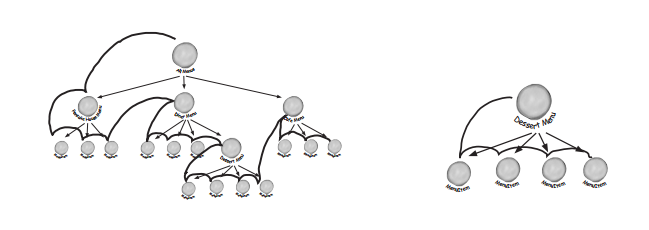
按照这个设计, 菜单组合在运行时将会是这个样子:
下面我们来测试一下:
using System;

using CompositePattern.Menus;

using CompositePattern.Waitresses;

namespace CompositePattern

{

    class Program

    {

        static void Main(string[] args)

        {

            MenuTestDrive();

            Console.ReadKey();

        }

        static void MenuTestDrive()

        {

            var pancakeHouseMenu = new Menu("PANCAKE HOUSE MENU", "Breakfast");

            var dinerMenu = new Menu("DINER MENU", "Lunch");

            var cafeMenu = new Menu("CAFE MENU", "Dinner");

            var dessertMenu = new Menu("DESSERT MENU", "Dessert of courrse!");

            var allMenus = new Menu("ALL MENUS", "All menus combined");

            allMenus.Add(pancakeHouseMenu);

            allMenus.Add(dinerMenu);

            allMenus.Add(cafeMenu);

            pancakeHouseMenu.Add(new MenuItem("Vegetarian BLT", "(Fakin’) Bacon with lettuce & tomato on whole wheat", true, 2.99));

            pancakeHouseMenu.Add(new MenuItem("K&B’s Pancake Breakfast", "Pancakes with scrambled eggs, and toast", true, 2.99));

            pancakeHouseMenu.Add(new MenuItem("Regular Pancake Breakfast", "Pancakes with fried eggs, sausage", false, 2.99));

            pancakeHouseMenu.Add(new MenuItem("Blueberry Pancakes", "Pancakes made with fresh blueberries", true, 3.49));

            pancakeHouseMenu.Add(new MenuItem("Waffles", "Waffles, with your choice of blueberries or strawberries", true, 3.59));

            dinerMenu.Add(new MenuItem("Vegetarian BLT", "(Fakin’) Bacon with lettuce & tomato on whole wheat", true, 2.99));

            dinerMenu.Add(new MenuItem("BLT", "Bacon with lettuce & tomato on whole wheat", false, 2.99));

            dinerMenu.Add(new MenuItem("Soup of the day", "Soup of the day, with a side of potato salad", false, 3.29));

            dinerMenu.Add(new MenuItem("Hotdog", "A hot dog, with saurkraut, relish, onions, topped with cheese", false, 3.05));

            dinerMenu.Add(new MenuItem("Pasta", "Spaghetti with Marinara Sauce, and a slice of sourdough bread", true, 3.89));

            dinerMenu.Add(dessertMenu);

            dessertMenu.Add(new MenuItem("Apple pie", "Apple pie with a flakey crust, topped with vanilla ice cream", true, 1.59));

            dessertMenu.Add(new MenuItem("Cheese pie", "Creamy New York cheessecake, with a chocolate graham crust", true, 1.99));

            dessertMenu.Add(new MenuItem("Sorbet", "A scoop of raspberry and a scoop of lime", true, 1.89));

            cafeMenu.Add(new MenuItem("Veggie Burger and Air Fries", "Veggie burger on a whole wheat bun, lettuce, tomato, and fries", true, 3.99));

            cafeMenu.Add(new MenuItem("Soup of the day", "A cup of the soup of the day, with a side salad", false, 3.69));

            cafeMenu.Add(new MenuItem("Burrito", "A large burrito, with whole pinto beans, salsa, guacamole", true, 4.29));

            var waitress = new Waitress(allMenus);

            waitress.PrintMenu();

        }

    }

}
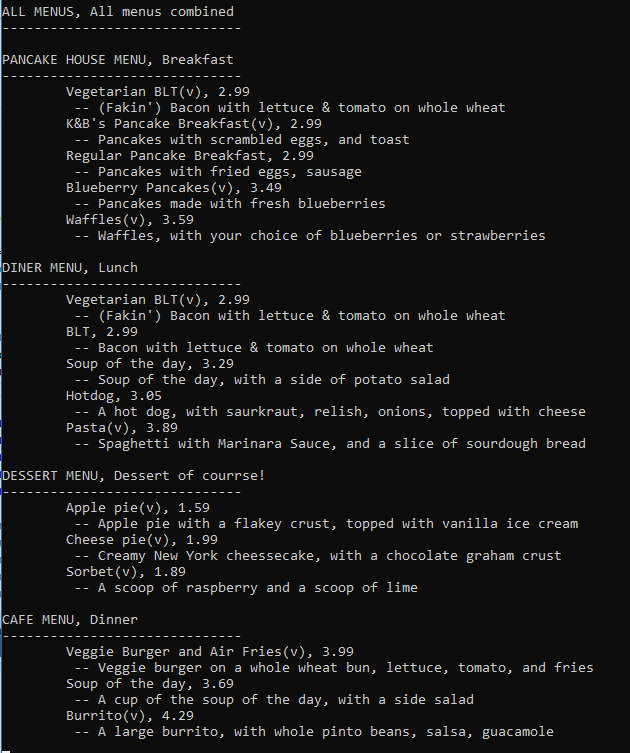
Ok.
慢着, 之前我们讲过单一职责原则. 现在一个类拥有了两个职责...
确实是这样的, 我们可以这样说, 组合模式用单一责任原则换取了透明性.
透明性是什么? 就是允许组件接口(Component interface)包括了子节点管理操作和叶子操作, 客户可以一致的对待组合节点或叶子; 所以任何一个元素到底是组合节点还是叶子, 这件事对客户来说是透明的.
当然这么做会损失一些安全性. 客户可以对某种类型的节点做出毫无意义的操作, 当然了, 这也是设计的决定.
组合迭代器
服务员现在想打印所有的菜单, 或者打印出所有的素食菜单项.
这里我们就需要实现组合迭代器.
要实现一个组合迭代器, 首先在抽象类MenuComponent里添加一个CreateEnumerator()的方法.
        public virtual IEnumerator<MenuComponent> CreateEnumerator()

        {

            return new NullEnumerator();

        }
注意NullEnumerator:
using System.Collections;

using System.Collections.Generic;

using CompositePattern.Abstractions;

namespace CompositePattern.Iterators

{

    public class NullEnumerator : IEnumerator<MenuComponent>

    {

        public bool MoveNext()

        {

            return false;

        }

        public void Reset()

        {

        }

        public MenuComponent Current => null;

        object IEnumerator.Current => Current;

        public void Dispose()

        {

        }

    }

}
我们可以用两种方式来实现NullEnumerator:
- 返回null
- 当MoveNext()被调用的时候总返回false. (我采用的是这个)
这对MenuItem, 就没有必要实现这个创建迭代器(遍历器)方法了.
请仔细看下面这个组合迭代器(遍历器)的代码, 一定要弄明白, 这里面就是递归, 递归:
using System;

using System.Collections;

using System.Collections.Generic;

using CompositePattern.Abstractions;

using CompositePattern.Menus;

namespace CompositePattern.Iterators

{

    public class CompositeEnumerator : IEnumerator<MenuComponent>

    {

        private readonly Stack<IEnumerator<MenuComponent>> _stack = new Stack<IEnumerator<MenuComponent>>();

        public CompositeEnumerator(IEnumerator<MenuComponent> enumerator)

        {

            _stack.Push(enumerator);

        }

        public bool MoveNext()

        {

            if (_stack.Count == )

            {

                return false;

            }

            var enumerator = _stack.Peek();

            if (!enumerator.MoveNext())

            {

                _stack.Pop();

                return MoveNext();

            }

            return true;

        }

        public MenuComponent Current

        {

            get

            {

                var enumerator = _stack.Peek();

                var menuComponent = enumerator.Current;

                if (menuComponent is Menu)

                {

                    _stack.Push(menuComponent.CreateEnumerator());

                }

                return menuComponent;

            }

        }

        object IEnumerator.Current => Current;

        public void Reset()

        {

            throw new NotImplementedException();

        }

        public void Dispose()

        {

        }

    }

}
服务员 Waitress添加打印素食菜单的方法:
        public void PrintVegetarianMenu()

        {

            var enumerator = _allMenus.CreateEnumerator();

            Console.WriteLine("\nVEGETARIAN MENU\n--------");

            while (enumerator.MoveNext())

            {

                var menuComponent = enumerator.Current;

                try

                {

                    if (menuComponent.IsVegetarian)

                    {

                        menuComponent.Print();

                    }

                }

                catch (NotSupportedException e)

                {

                }

            }

        }
注意这里的try catch, try catch一般是用来捕获异常的. 我们也可以不这样做, 我们可以先判断它的类型是否为MenuItem, 但这个过程就让我们失去了透明性, 也就是说 我们无法一致的对待Menu和MenuItem了.
我们也可以在Menu里面实现IsVegetarian属性Get方法, 这可以保证透明性. 但是这样做不一定合理, 也许其它人有更合理的原因会把Menu的IsVegetarian给实现了. 所以我们还是使用try catch吧.
测试:
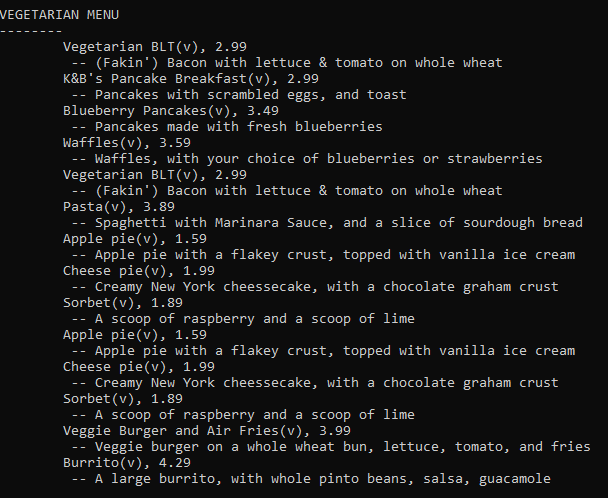
Ok.
总结
设计原则: 一个类只能有一个让它改变的原因.
迭代器模式: 迭代器模式提供了一种访问聚合对象(例如集合)元素的方式, 而且又不暴露该对象的内部表示.
组合模式: 组合模式允许你把对象们组合成树形的结构, 从而来表示整体的层次. 通过组合, 客户可以对单个对象或对象们的组合进行一致的处理.
针对C#来说, 上面的代码肯定不是最简单最直接的实现方式, 但是通过这些比较原始的代码可以对设计模式理解的更好一些.
改系列的源码在: https://github.com/solenovex/Head-First-Design-Patterns-in-CSharp
使用C# (.NET Core) 实现组合设计模式 (Composite Pattern)的更多相关文章
- php组合设计模式(composite pattern)
过十点. <?php /* The composite pattern is about treating the hierarchy of objects as a single object ...
- 乐在其中设计模式(C#) - 组合模式(Composite Pattern)
原文:乐在其中设计模式(C#) - 组合模式(Composite Pattern) [索引页][源码下载] 乐在其中设计模式(C#) - 组合模式(Composite Pattern) 作者:weba ...
- 设计模式系列之组合模式(Composite Pattern)——树形结构的处理
说明:设计模式系列文章是读刘伟所著<设计模式的艺术之道(软件开发人员内功修炼之道)>一书的阅读笔记.个人感觉这本书讲的不错,有兴趣推荐读一读.详细内容也可以看看此书作者的博客https:/ ...
- 浅谈设计模式--组合模式(Composite Pattern)
组合模式(Composite Pattern) 组合模式,有时候又叫部分-整体结构(part-whole hierarchy),使得用户对单个对象和对一组对象的使用具有一致性.简单来说,就是可以像使用 ...
- 二十四种设计模式:组合模式(Composite Pattern)
组合模式(Composite Pattern) 介绍将对象组合成树形结构以表示"部分-整体"的层次结构.它使得客户对单个对象和复合对象的使用具有一致性.示例有一个Message实体 ...
- 【设计模式】组合模式 Composite Pattern
树形结构是软件行业很常见的一种结构,几乎随处可见, 比如: HTML 页面中的DOM,产品的分类,通常一些应用或网站的菜单,Windows Form 中的控件继承关系,Android中的View继承 ...
- 设计模式 - 组合模式(composite pattern) 迭代器(iterator) 具体解释
组合模式(composite pattern) 迭代器(iterator) 具体解释 本文地址: http://blog.csdn.net/caroline_wendy 參考组合模式(composit ...
- python 设计模式之组合模式Composite Pattern
#引入一 文件夹对我们来说很熟悉,文件夹里面可以包含文件夹,也可以包含文件. 那么文件夹是个容器,文件夹里面的文件夹也是个容器,文件夹里面的文件是对象. 这是一个树形结构 咱们生活工作中常用的一种结构 ...
- 设计模式-12组合模式(Composite Pattern)
1.模式动机 很多时候会存在"部分-整体"的关系,例如:大学中的部门与学院.总公司中的部门与分公司.学习用品中的书与书包.在软件开发中也是这样,例如,文件系统中的文件与文件夹.窗体 ...
随机推荐
- React Native 轻松集成统计功能(Android 篇)
关于推送的集成请参考这篇文章,本篇文章将引导你集成统计功能,只需要简单的三个步骤就可以集成统计功能. 第一步 安装 在你的项目路径下执行命令: npm install janalytics-react ...
- Beta No.2
今天遇到的困难: 组员对github极度的不适应 Android Studio版本不一致项目难以打开运行 移植云端的时候,愚蠢的把所有项目开发环境全部搬上去.本身云的内存小,性能差,我们花费了太多时间 ...
- 团队作业9——事后分析(Beta版本)
事后诸葛亮分析 1. 总结 团队合照 a. 项目管理之事后诸葛亮会 ·设想和目标 (1)我们的软件要解决什么问题?是否定义得很清楚?是否对典型用户和典型场景有清晰的描述? 个人学习 ...
- Linux下进程间通信--消息队列
消息队列的定义遍地都是,不想移驾,请看下文: 一.定义: 消息队列提供了一种从一个进程向另一个进程发送一个数据块的方法. 每个数据块都被认 为是有一个类型,接收者进程接收的数据块可以有不同的类型值.我 ...
- Struts2之配置
Struts2的默认配置文件是struts.xml放在/web-inf/classes目录下,struts配置文件的最大作用就是配置Action与请求之间的对应关系,并配置逻辑视图名和物理视图名之间的 ...
- D的下L
D的小L 时间限制:4000 ms | 内存限制:65535 KB 难度:2 描述 一天TC的匡匡找ACM的小L玩三国杀,但是这会小L忙着哩,不想和匡匡玩但又怕匡匡生气,这时小L给 ...
- Ajax 的onreadystatechange事件注意事项.
<script type="text/javascript"> function createXHR() { var request = false; try { re ...
- python端口扫描用多线程+线程安全的队列+Thread类实现
用线程安全的队列Queue实现扫描端口数据存储 用多线程扫描端口 用Thread类实现程序组织 #coding:utf-8 import sys import socket import sys im ...
- 微信浏览器的页面在PC端访问
微信浏览器的页面在PC端访问: 普通的在微信浏览器看的页面如果不在php代码中解析一下,然后复制链接在PC打开就出现无法访问,因为它复制的地址是: https://open.weixin.qq.com ...
- 【ASP.NET Core】依赖注入高级玩法——如何注入多个服务实现类
依赖注入在 ASP.NET Core 中起中很重要的作用,也是一种高大上的编程思想,它的总体原则就是:俺要啥,你就给俺送啥过来.服务类型的实例转由容器自动管理,无需我们在代码中显式处理. 因此,有了依 ...