
vue store用法
import Vue from 'vue'
import Vuex from 'vuex'
Vue.use(Vuex)
首字母不能大写
export default new Vuex.Store({
state: {
//这里放全局参数
     调用 this.$store.state.online
     模块调用this.$store.state.a.online
test1:‘1111’,
test2:‘2222’,
     userId: userJs.getUserId() || "", // 用户id
     username: userJs.getUsername() || "", // 登录名
     name: userJs.getName() || "" // 姓名
},
getters: {
//这里是get方法,并且每次打开浏览器优先执行该方法,获取所有的状态
//不能传递参数 ,只能对state数值进行计算不能修改
调用this.$store.getters.getTest
this.$store.getters.计算属性名 // 不分模块
this.$store.getters['模块名/计算属性名'] // 分模块
import { mapGetters } from'vuex'computed: {
// 不分模块 ...mapGetters(['计算属性名']) // 分模块,不重命名计算属性 ...mapGetters('模块名', ['计算属性名']) // 分模块,重命名计算属性 ...mapGetters('模块名', {'新计算属性名': '旧计算属性名'}) } getTest(state) {
// return state.test1 + state.test2;
},
//getTest: state =>state.test1 + state.test2,
          多模块多个state 找全局变量还需要分模块找,也可以通过getters把所有模块的共有变量都集成在一起
          /*
const getters = {
  userInfo: state => state.user.userInfo,
  sidebar: state => state.app.sidebar,
  visitedViews: state => state.tagsView.visitedViews,
  permission_routes: state => state.permission.routes,
  dictionaryList: state => state.base.dictionaryList,
}
export default getters
*/
},
mutations: {
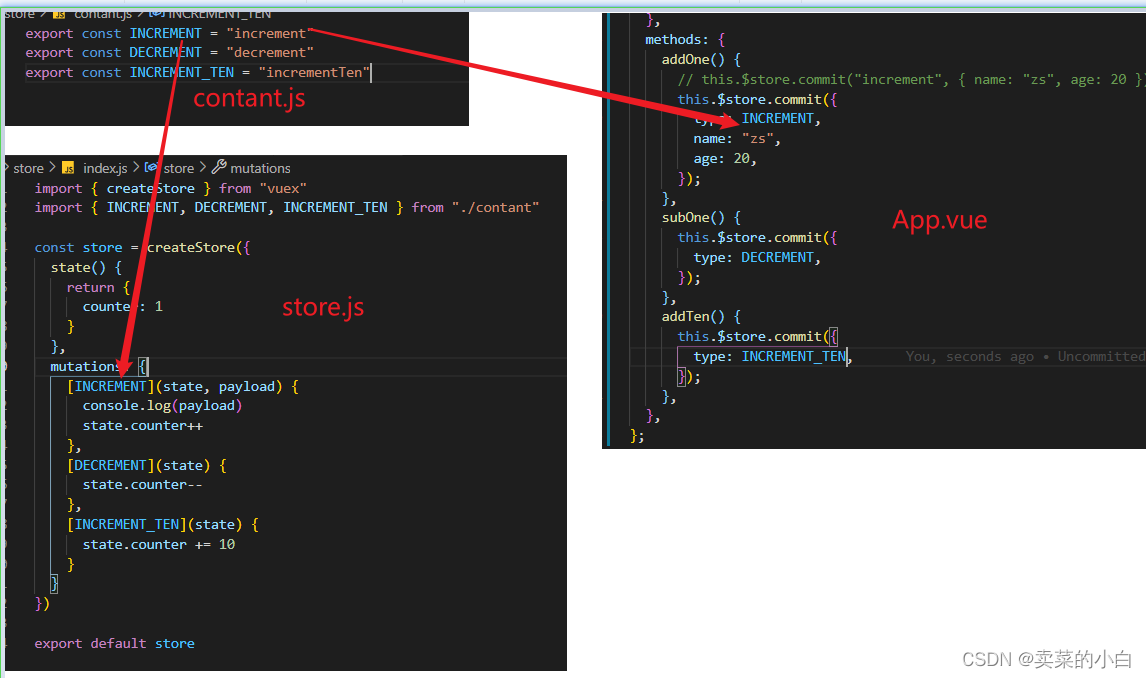
//mutations中的方法一般用常量(大写)不是常量大小写都行
//这里是set方法,mutation是修改state的唯一方法。函数中只能执行 同步函数
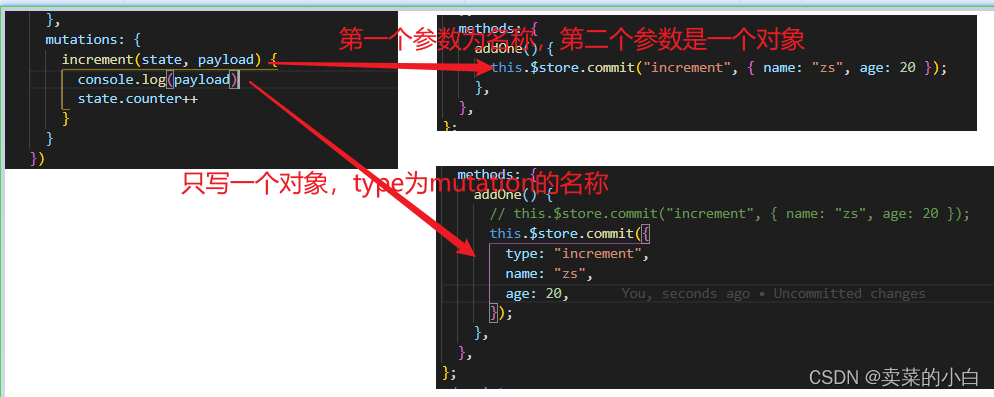
    mutation调用方法
    this.$store.commit(“mutation函数名”,发送到mutation中的数据)
       模块调用this.$store.commit('modulesB/UPDATE_TO_VIP2')
     m_set_ajax_loading (state, bl) {
        state.ajax_loading = bl
    }
},
actions: {
      action的功能和mutation是类似的,都是去变更store里的state,不过action和mutation有两点不同:
      1.action主要处理的是异步的操作,mutation必须同步执行,而action就不受这样的限制,也就是说action中我们既可以处理同步,也可以处理异步的操作
            action函数中能执行异步函数, mutation函数中不可以
      2.action改变状态,最后是通过提交mutation,就是action只能通过mutation中修改state的值。

      action调用方法
      this.$store.dispatch(‘action中的函数名’,发送到action中的数据)
          模块调用this.$store.dispatch('modulesB/UPDATE_TO_VIP2')
}
})
store
普通加载模块
const store = new Vuex.Store({
    modules: {
        user: user,
        tagsView: tagsView
    },
    state,
    getters,
    mutations,
    actions
});

==============================================================================
自动加载模块
import Vue from 'vue'
import Vuex from 'vuex'
import getters from './getters'

Vue.use(Vuex)

// https://webpack.js.org/guides/dependency-management/#requirecontext
const modulesFiles = require.context('./modules', true, /\.js$/)

// you do not need `import app from './modules/app'`
// it will auto require all vuex module from modules file
const modules = modulesFiles.keys().reduce((modules, modulePath) => {
  // set './app.js' => 'app'
  const moduleName = modulePath.replace(/^\.\/(.*)\.\w+$/, '$1')
  const value = modulesFiles(modulePath)
  modules[moduleName] = value.default
  return modules
}, {})

const store = new Vuex.Store({
  modules,
  getters
})

export default store
vue store用法的更多相关文章
- vue store存储commit和dispatch
vue store存储commit和dispatch this.$store.commit('toShowLoginDialog', true);this.$store.dispatch('toSho ...
- Vue props用法详解
Vue props用法详解 组件接受的选项之一 props 是 Vue 中非常重要的一个选项.父子组件的关系可以总结为: props down, events up 父组件通过 props 向下传递数 ...
- vue-learning:41 - Vuex - 第二篇:const store = new Vue.Store(option)中option选项、store实例对象的属性和方法
vuex 第二篇:const store = new Vue.Store(option)中option选项.store实例对象的属性和方法 import Vuex from 'vuex' const ...
- vue setTimeout用法 jquery滚动到某一个div的底部
//vue 中setTimeOut用法 var $this = this; setTimeout(function(){ $this.goEnd() }, 10); goEnd:function(){ ...
- vue better-scroll用法
滚动位置固定:在vue中通过路由切换页面时组件会自动滚动到顶部,需要监听滚动行为才能让滚动位置固定,better-scroll解决了这个问题. 常用效果:移动端很常见的效果,当滑动右边部分的时候,左边 ...
- vue之用法
一.安装 对于新手来说,强烈建议大家使用<script>引入 二. 引入vue.js文件 我们能发现,引入vue.js文件之后,Vue被注册为一个全局的变量,它是一个构造函数. 三.使用V ...
- Vue 基本用法
Vue的基本用法 模板语法{{ }} 关闭掉 django中提供的模板语法{{ }} 指令系统 v-text v-html v-show和v-if v-bind和v-on v-for v-model ...
- Vue基本用法
在学习Vue的基本用法之前,我们先简单的了解一些es6的语法 let: 特点:1.局部作用域 2.不会存在变量提升 3.变量不能重复声明 const: 特点:1.局部作用域 2.不会存在变量提升 3. ...
- vue——store全局存储
业务场景:刷新页面时,首次拉取所有配置,存储到store状态管理用于全局调用: import Vue from 'vue' import Vuex from 'vuex' import userInf ...
- vue插槽用法(极客时间Vue视频笔记)
vue插槽 插槽是用来传递复杂的内容,类似方法 <!DOCTYPE html> <html lang="en"> <head> <meta ...
随机推荐
- 第七周作业-N67044-张铭扬
1. 说明自动化运维的路径,原理,实践方法. 所谓自动化运维是指通过将日常IT运维中大量的重复性工作(小到简单的日常检查.配置变更和软件安装,大到整个变更流程的组织调度)由过去的手工执行转为标准化.流 ...
- Day 23 23.2.1:微信公众平台案例
微信公众平台案例 注意:接下来将的内容,请忽视具体网站,重点专注逆向的分析思路! 接下来就是爬什么网站,什么数据,什么形式都统统不重要!重点是分析思路 微信公众平台案例 url:https://mp. ...
- ComWin’ round 11部分题解
https://vjudge.net/contest/325913#overview A.Threehouses 题意:一直二维平面上的$n$个点中,前$e$个点落在小岛周围,并且有$p$条边已经连接 ...
- [BOM] 封装一下cookie
function get_cookie(key) { var arr, reg = new RegExp("(^| )" + key + "=([^;]*)(;|$)&q ...
- M1芯片的Mac上如何安装Windows系统
其实和安装非M1的mac没什么区别,唯一就是找到arm版本的win10镜像文件. 一.安装 Parallels Desktop 16 1. 双击打开dmg格式的安装包,并双击 「Install P ...
- 设置导航栏的title
self.navigationController.navigationBar.titleTextAttributes = [NSDictionary dictionaryWithObjectsAnd ...
- winform 子控件触发父控件事件
private void circlePanel_Click(object sender, EventArgs e) { var panel=sender as UIPanel; if (panel. ...
- git remote prune origin删除本地有但在远程库已经不存在的分支
先调用git remote show origin 该命令能够获取远端分支信息,你可以看到和本地和远端不同步的地方: 过时的就是和本地不同步的分支,本地已过时的表示你需要移除这个分支了. 这个时候你需 ...
- springmvc的Interceptor拦截器和servlet的filter过滤器
springmvc的Interceptor拦截器和servlet的filter过滤器 1.springmvc的Interceptor拦截器和servlet的filter过滤器springboot实现方 ...
- python 操作 ES 一、基础操作
示例代码环境 python:3.8 es:7.8.0环境安装 pip install elasticsearch==7.8.0 from elasticsearch import Elasticsea ...