
springsecurity 配置swagger
最近在学习springsecurity 安全框架,具体是什么概念在这里不一一赘述了。下面呢,咱们一起搭建一下简单的springsecurity swagger 项目感受一下。
- 首先初始化spring initializer 项目。在项目中引入springsecurity starter。
- 编写测试类
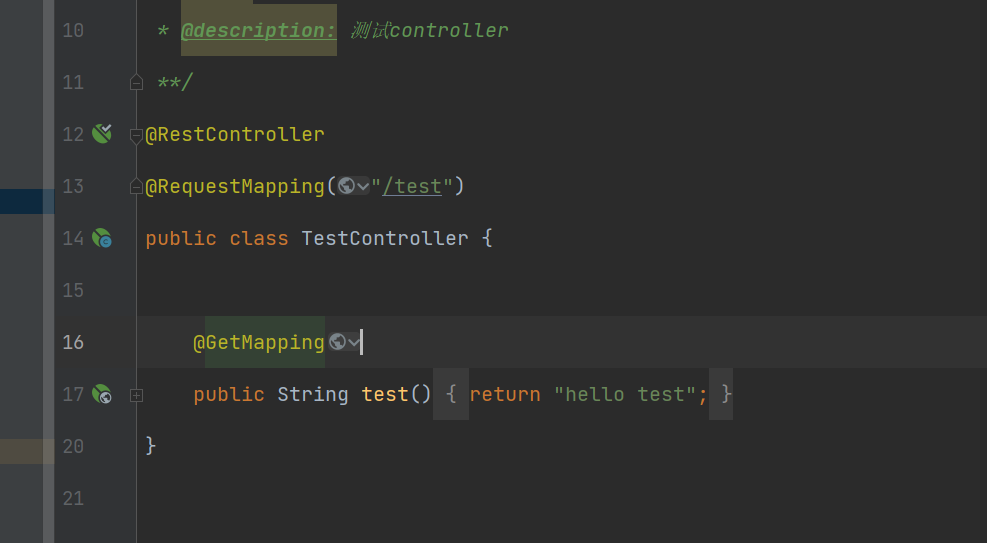
- 启动项目。访问项目地址 localhost:8080/test
- 接着浏览器中出现了一个登录页面 如下
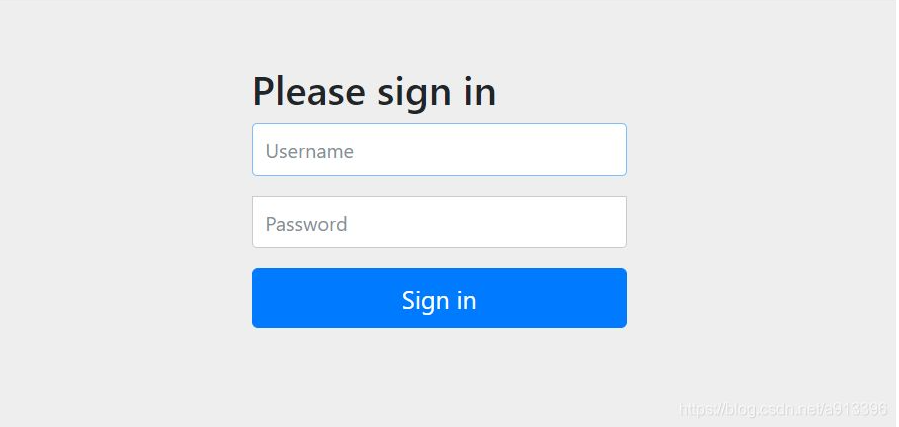
ps:这个登录页面默认是springsecurity自带的登录页面。 默认的登录账号是 ** user** 密码 是控制台 打印的 一串字符串 例子:Using generated security password: 5334856d-1259-42e2-947b-435bdaa9faf1 每次重启项目都会刷新这个密码。 - 登录后才能访问接口。
然后在来说一下在springsecurity 中如何配置swagger呢。
首先还是先引入 swagger的 pom配置。 如下
`
<io.springfox.version>2.9.2</io.springfox.version>
    <dependency>

        <groupId>io.springfox</groupId>

        <artifactId>springfox-swagger2</artifactId>

        <version>${io.springfox.version}</version>

        <exclusions>

            <exclusion>

                <groupId>org.mapstruct</groupId>   // 当然 这个东西可以去掉

                <artifactId>mapstruct</artifactId>

            </exclusion>

        </exclusions>

    </dependency>

    <!-- swagger -->

    <dependency>

        <groupId>io.springfox</groupId>

        <artifactId>springfox-swagger-ui</artifactId>

        <version>${io.springfox.version}</version>

    </dependency>

    <dependency>

        <groupId>io.springfox</groupId>

        <artifactId>springfox-bean-validators</artifactId>

        <version>${io.springfox.version}</version>

    </dependency>

    <dependency>

        <groupId>com.github.xiaoymin</groupId>

        <artifactId>knife4j-spring-ui</artifactId>

        <version>2.0.9</version>

    </dependency>

    <dependency>

        <groupId>com.github.xiaoymin</groupId>

        <artifactId>knife4j-spring-boot-starter</artifactId>

        <version>2.0.1</version>

        <exclusions>

            <exclusion>

                <artifactId>guava</artifactId>

                <groupId>com.google.guava</groupId>

            </exclusion>

        </exclusions>

    </dependency>
`
- 引入后开始编写Swagger2Config 代码如下
`
import org.springframework.context.annotation.Bean;
import org.springframework.context.annotation.Configuration;
import springfox.documentation.builders.ApiInfoBuilder;
import springfox.documentation.builders.PathSelectors;
import springfox.documentation.builders.RequestHandlerSelectors;
import springfox.documentation.service.ApiInfo;
import springfox.documentation.service.Contact;
import springfox.documentation.spi.DocumentationType;
import springfox.documentation.spring.web.plugins.Docket;
import springfox.documentation.swagger2.annotations.EnableSwagger2;
@Configuration
@EnableSwagger2
public class Swagger2Config {
@Bean
public Docket createRestApi() {
return new Docket(DocumentationType.SWAGGER_2)
.apiInfo(apiInfo())
.select()
//为当前包下的controller生成api文档
.apis(RequestHandlerSelectors.basePackage("com.cloud.service.xxx.controller"))
.paths(PathSelectors.any())
.build();
}
private ApiInfo apiInfo() {

    //设置文档信息

    return new ApiInfoBuilder()

            .title("XXX接口文档")

            .description("XXX接口文档")

            .contact(new Contact("xxxx", "http:localhost:8080/doc.html",

                    "xxxx@xxxx.com"))

            .version("1.0")

            .build();

}
}
`
- 特别说明
如果你的spring 的版本是最新版本,建议你把版本改成2.4.2以下或者是2.4.2 等等版本。启动类不要加什么 @EnableWebMvc 等等注解。 也不要升级guava,它是和springfox 版本同步的。
当然 你还要配置SpringSecurityConfig extends WebSecurityConfigurerAdapter
重写 WebSecurity 方法
`
@Override
public void configure(WebSecurity web) throws Exception {
//放行静态资源
web.ignoring().antMatchers(
"/login",
"/logout",
"/css/",
"/js/",
"/index.html",
"/favicon.ico",
"/doc.html",
"/swagger-ui.html",
"/webjars/",
"/swagger-resources/",
"/v2/api-docs/**");
}
`
springsecurity 配置swagger的更多相关文章
- .net core在网关中统一配置Swagger
最近在做微服务的时候,由于我们是采用前后端分离来开发的,提供给前端的直接是Swagger,如果Swagger分布在各个API中,前端查看Swagger的时候非常不便,因此,我们试着将Swagger集中 ...
- .net core在Ocelot网关中统一配置Swagger
最近在做微服务的时候,由于我们是采用前后端分离来开发的,提供给前端的直接是Swagger,如果Swagger分布在各个API中,前端查看Swagger的时候非常不便,因此,我们试着将Swagger集中 ...
- asp.net core Api配置swagger
这个很简单的一篇文章用来记录以下使用swagger的过程,以后有用. 1.nuget 下载install-package Swashbuckle.AspNetCore 2.startup里面confi ...
- .net core 配置swagger遇到的坑
Swagger能成为最受欢迎的REST APIs文档生成工具之一,有以下几个原因: Swagger 可以生成一个具有互动性的API控制台,开发者可以用来快速学习和尝试API. Swagger 可以生成 ...
- SpringSecurity02 表单登录、SpringSecurity配置类
1 功能需求 springSecuriy默认的登录窗口是一个弹出窗口,而且会默认对所有的请求都进行拦截:要求更改登录页面(使用表单登录).排除掉一些请求的拦截 2 编写一个springSecurity ...
- Swagger学习(二、配置swagger)
基于上一篇 其实只是在SwaggerConfig.class中配置docket,apiInfo @Configuration //变成配置文件 @EnableSwagger2 //开启swagger2 ...
- SpringSecurity配置,简单梳理
生活加油:摘一句子: “我希望自己能写这样的诗.我希望自己也是一颗星星.如果我会发光,就不必害怕黑暗.如果我自己是那么美好,那么一切恐惧就可以烟消云散.于是我开始存下了一点希望—如果我能做到,那么我就 ...
- MVC-WebApi配置 Swagger(Web Api可视化文档)
一.从创建MVC WebApi开始 第一步创建MVC WebApi就创建好了,接下来就进入正题,上干货 ================================================ ...
- 【Docker】 .Net Core 3.1 webapi 集成EF Code First,使用MySql进行业务操作 、配置swagger (三)
系列目录: [Docker] CentOS7 安装 Docker 及其使用方法 ( 一 ) [Docker] 使用Docker 在阿里云 Centos7 部署 MySQL 和 Redis (二) [D ...
- SpringMVC 中配置 Swagger 插件.
一.简介 Swagger的目标是为REST API定义一个与语言无关的标准接口,允许用户发现和理解计算机服务的功能,而无需访问源代码.当通过Swagger正确定义时,用户可以用最少量的实现逻辑理解远程 ...
随机推荐
- 16.java八皇后问题
问题描述:在 8×8 格的国际象棋上摆放八个皇后,使其不能互相攻击,即: 任意两个皇后都不能处于同一行 .同一列或同一斜线上,问有多少种摆法(92). 思路分析:1) 第一个皇后先放第一行第一列2) ...
- html表白代码
1.在电脑桌面右击鼠标选择新建--文本文档 2.并命名为:biaobai.txt 3.打开并且把一下代码复制并粘贴到biaobai.txt <!DOCTYPE html PUBLIC " ...
- Python学习的第二次总结
有限循环 for i in range()# i自动加一 # for语句中若有break被执行,则跟着for后面的else语句就不会被正常执行:反之亦然 for i in range(3) ...
- Java07 异常
一.Error 和 Exception 1.什么是异常 实际工作中,遇到的情况不可能是非常完美的.比如:你写的某个模块,用户输入不一定符合你的要求.你的程序要打开某个文件,这个文件可能不存在或者文件格 ...
- zookeeper在关闭服务时报could not find file /opt/module/zookeeper-3.5.10/zkData/zookeeper_server.pid
遇到了个问题,zookeeper在执行 bin/zkServer.sh stop时 会报题目中的错误,我搜了一下博客,好像是因为第一次启动的不是zkServer.sh中的服务 我先 kill -9 加 ...
- 树莓派3B 查看GPU、CPU温度
参考:How to find out Raspberry Pi GPU and ARM CPU temperature on Linux GPU温度: /opt/vc/bin/vcgencmd mea ...
- windows terminal用ssh连接已重装的服务器提示REMOTE HOST IDENTIFICATION HAS CHANGED!
连接过程提示: @@@@@@@@@@@@@@@@@@@@@@@@@@@@@@@@@@@@@@@@@@@@@@@@@@@@@@@@@@@ @ WARNING: REMOTE HOST IDENTIFIC ...
- oracle 索引创建
--查询表里的索引 select t.*,i.index_type from user_ind_columns t,user_indexes i where t.index_name = i.inde ...
- shell—if + case条件语句
if 条件语句 1. 概述 在shell的各种条件结构和流程控制结构中都要进行各种测试,然后根据测试结果执行不同的操作,有时候也会与 if 等条件语句相结合,来完成测试判断,以减少程序运行错误. 2. ...
- 解决mysql使用sql文件不能还原数据库的问题
来源:https://bbs.sangfor.com.cn/forum.php?mod=viewthread&tid=109605 解决ERROR 1231 (42000): Variable ...