
gin 使用gorilla 关闭 websocket 时候设置close code 和message
gin 使用gorilla 时建立websocket的教程很多博客都有写,但是很少有人讲关闭websocket时自定义 close code 和message。主要是使用:websocket.FormatCloseMessage, WriteControl 两个方法 。可用close code 的范围见文档:https://developer.mozilla.org/zh-CN/docs/Web/API/CloseEvent#属性。 下面给出示例:
import (

	"fmt"

	"net/http"

	"sync"

	"github.com/gin-gonic/gin"

	"github.com/gorilla/websocket"

)

var (

	upGrader = websocket.Upgrader{

		CheckOrigin: func(r *http.Request) bool {

			return true

		},

	}

	wsPriceOnce sync.Once

)

func Test(c *gin.Context) {

	//升级get请求为webSocket协议

	ws, err := upGrader.Upgrade(c.Writer, c.Request, nil)

	if err != nil {

		c.Writer.Write([]byte(err.Error()))

		return

	}

	m := map[string]interface{}{

		"msg" :"ok",

	}

	er := ws.WriteJSON(m)

	fmt.Println(er)

	// 自定义关闭消息

	closeCode := 4001

	message := "server closed ! "

	closeMessage := websocket.FormatCloseMessage(closeCode, message)

	deadline := time.Now().Add(time.Second)

	e := ws.WriteControl(websocket.CloseMessage, closeMessage, deadline)

	if e != nil {

		fmt.Println(e)

	}

}
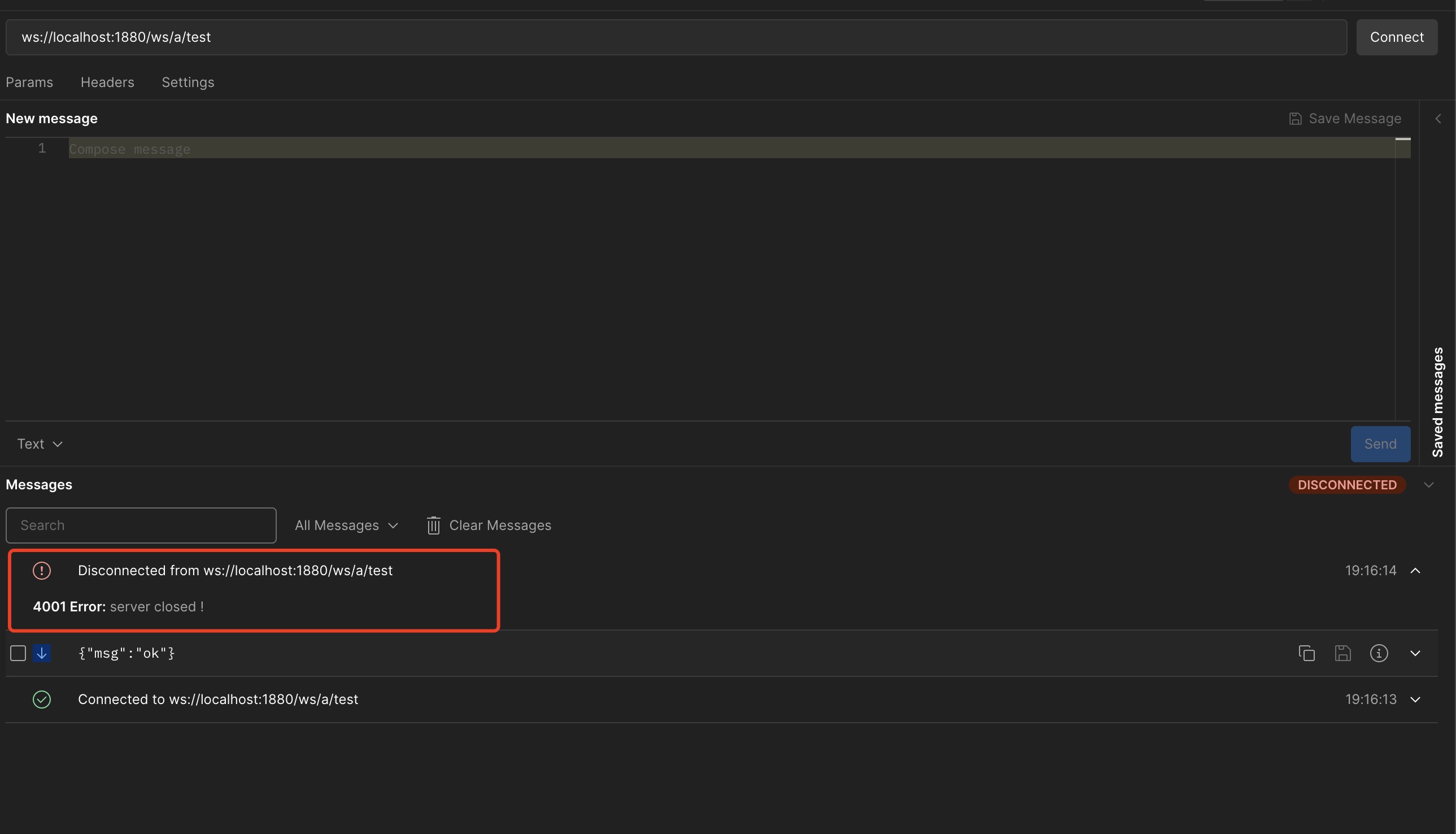
在postman中测试效果图,我们看到close code 为4001, message 也是我们设置的 "server closed !" :
gin 使用gorilla 关闭 websocket 时候设置close code 和message的更多相关文章
- 7.1.1.关闭WebSocket连接
7.1.定义 7.1.1.关闭WebSocket连接 为_关闭WebSocket连接_,端点需关闭底层TCP连接.端点应该使用一个方法完全地关闭TCP连接,以及TLS会话,如果合适,丢弃任何可能已经接 ...
- Ubuntu中启用关闭Network-manager网络设置问题!
Ubuntu中启用关闭Network-manager网络设置问题! [Server版本] 在UbuntuServer版本中,因为只存有命令行模式,所以要想进行网络参数设置,只能通过修改/etc/net ...
- 关于宽带接两台路由,并且第二台需要关闭DHCP的设置
关于宽带接两台路由,并且第二台需要关闭DHCP的设置 https://wenku.baidu.com/view/e317a12d4b35eefdc8d333cb?pcf=2#1
- easyswoole报错:failed: Error during WebSocket handshake: Unexpected response code: 200
WebSocket connection to 'ws://www.xxxx.com/xxx/xx' failed: Error during WebSocket handshake: Unexpec ...
- WebSocket connection to,Error during WebSocket handshake: Unexpected response code: 404
使用标准的JSR 356注解时,需要使用tomcat 8.x版本,如果使用tomcat 7.x的版本,则需要继承WebSocketServlet,否则会报WebSocket connection to ...
- WebSocket handshake: Unexpected response code: 404
在执行 http://www.cnblogs.com/best/p/5695570.html 提供的 websocket时候, 报错了 “WebSocket handshake: Unexpe ...
- nginx反向代理 报错:Error during WebSocket handshake: Unexpected response code: 403
遇到nginx报错:websocket wss failed: Error during WebSocket handshake: Unexpected response code: 403 serv ...
- Linux Firewall 开启与关闭 以及sudo 设置
Linux 系统下,普通用户经常需要使用root 用户的权限,所以要经常切换到root用户,比较麻烦,因此可以给普通用户添加root 权限,需要在常规命令前面加上sudo 切换到root vi /e ...
- websocket如何设置?
根据之前写的步骤到当前的websocket设置 一.websocket设置: 1)在线程租下右键单击选择Sampler如图: 2)进行它的设置 2.保存 3.添加查看结果数和聚合报告(此处不详细说明, ...
- Ubuntu中启用关闭Network-manager网络设置问题! 【Server版本】
在UbuntuServer版本中,因为只存有命令行模式,所以要想进行网络参数设置,只能通过修改/etc/network/interfaces.具体设置方法如下: (1) UbuntuServer 修改 ...
随机推荐
- appium:appium上手
记录一下appium上手,如果用过selenium,appium就可以在一天上手. 准备: 1.去网上下载一个安卓sdk 2.通过android sdk中aapt dump badging xx.ap ...
- .Netframework下WebAPI发布在IIS方法
当前项目是前后端分离的架构,前端使用html做页面,后端使用WebAPI做接口,因为涉及到多节点响应的问题,今天进行了WebAPI发布测试,将发布流程记录如下 1.API发布 a.右键API项目,单击 ...
- springboot集成xxl-job问题
Client-error:unknown code for readObject at 0x3c (<) 原因之一是classNotFoundRxception :com.caucho.hess ...
- QT控件使用--QPlainTextEdit
QPlainTextEdit是一个多行文本编辑器,用于显示和编辑多行简单文本. 一些常用的函数有: appendPlainText(const QString) 向 PlainTextEdit 组件添 ...
- 【DM论文阅读杂记】推荐系统 注意力机制
Paper Title Real-time Attention Based Look-alike Model for Recommender System Basic algorithm and ma ...
- SDN第二次实验
一.实验目的能够对Open vSwitch进行基本操作:能够通过命令行终端使用OVS命令操作Open vSwitch交换机,管理流表:能够通过Mininet的Python代码运行OVS命令,控制网络拓 ...
- 注释:MARK与TODO、FIXME
MARK: 在OC中的用法: #pragma mark -说明文字(可以不加-) 在swift中的用法:// MARK: - 说明文字(可以不加-) TODO.FIXME(不区分OC.swift) / ...
- python APScheduler用法
参考: https://blog.csdn.net/weixin_44799217/article/details/127353134 https://blog.csdn.net/weixin_428 ...
- Vue3学习笔记(1)
安装 //使用yarn构建 //安装yarn 需要管理员权限 sudo npm i yarn -g yarn create vite cd .. yarn yarn dev 目录结构 见名知义 四种语 ...
- List集合增删元素时,UnsupportedOperationException报错问题
我的情况是这样:从数组转集合,操作集合删除元素. // Tab页面标题第一步:String[] mTitles = getResources().getStringArray(R.array.lead ...