
gin 使用gorilla 关闭 websocket 时候设置close code 和message
gin 使用gorilla 时建立websocket的教程很多博客都有写,但是很少有人讲关闭websocket时自定义 close code 和message。主要是使用:websocket.FormatCloseMessage, WriteControl 两个方法 。可用close code 的范围见文档:https://developer.mozilla.org/zh-CN/docs/Web/API/CloseEvent#属性。 下面给出示例:
import (

	"fmt"

	"net/http"

	"sync"

	"github.com/gin-gonic/gin"

	"github.com/gorilla/websocket"

)

var (

	upGrader = websocket.Upgrader{

		CheckOrigin: func(r *http.Request) bool {

			return true

		},

	}

	wsPriceOnce sync.Once

)

func Test(c *gin.Context) {

	//升级get请求为webSocket协议

	ws, err := upGrader.Upgrade(c.Writer, c.Request, nil)

	if err != nil {

		c.Writer.Write([]byte(err.Error()))

		return

	}

	m := map[string]interface{}{

		"msg" :"ok",

	}

	er := ws.WriteJSON(m)

	fmt.Println(er)

	// 自定义关闭消息

	closeCode := 4001

	message := "server closed ! "

	closeMessage := websocket.FormatCloseMessage(closeCode, message)

	deadline := time.Now().Add(time.Second)

	e := ws.WriteControl(websocket.CloseMessage, closeMessage, deadline)

	if e != nil {

		fmt.Println(e)

	}

}
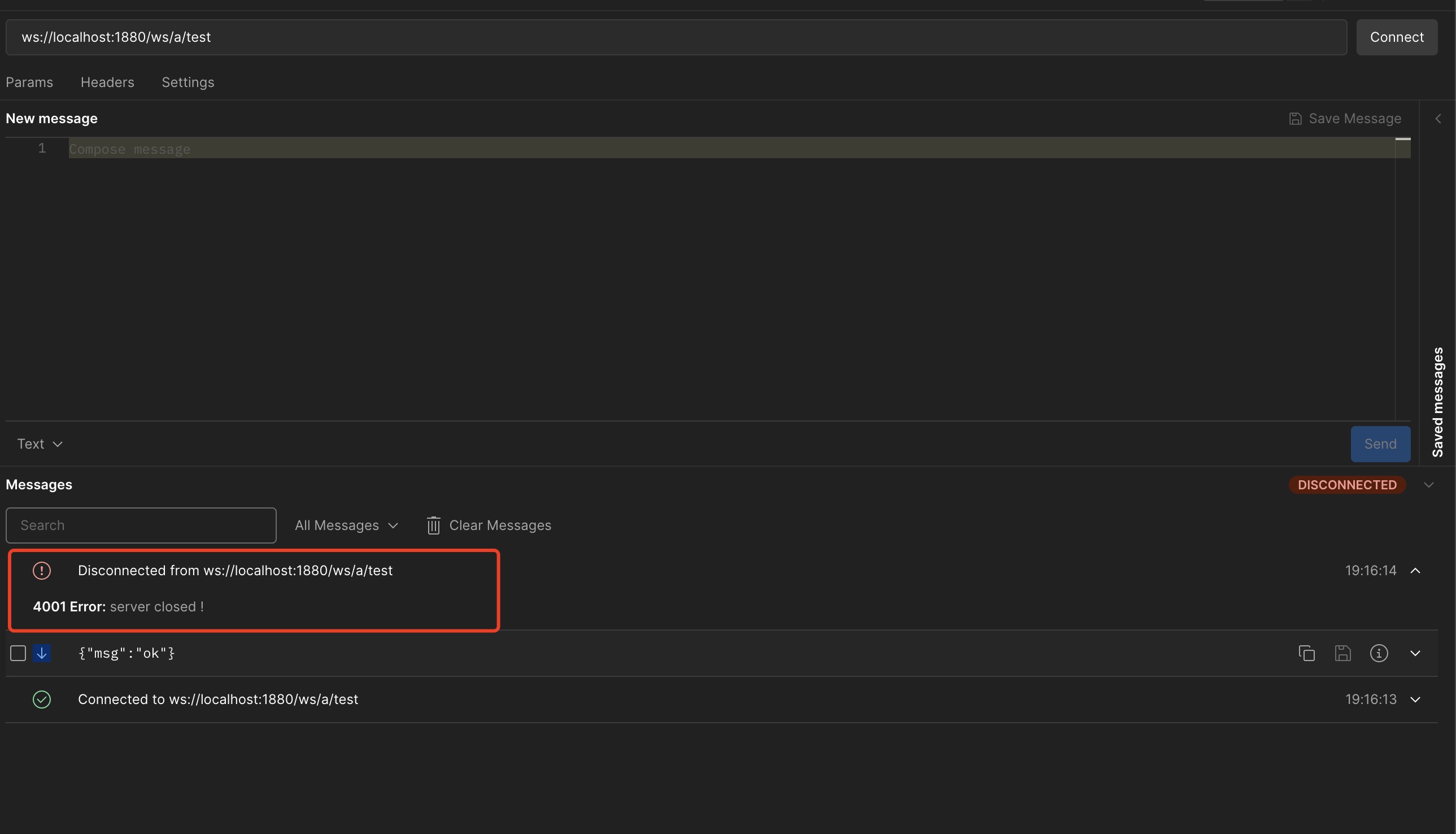
在postman中测试效果图,我们看到close code 为4001, message 也是我们设置的 "server closed !" :
gin 使用gorilla 关闭 websocket 时候设置close code 和message的更多相关文章
- 7.1.1.关闭WebSocket连接
7.1.定义 7.1.1.关闭WebSocket连接 为_关闭WebSocket连接_,端点需关闭底层TCP连接.端点应该使用一个方法完全地关闭TCP连接,以及TLS会话,如果合适,丢弃任何可能已经接 ...
- Ubuntu中启用关闭Network-manager网络设置问题!
Ubuntu中启用关闭Network-manager网络设置问题! [Server版本] 在UbuntuServer版本中,因为只存有命令行模式,所以要想进行网络参数设置,只能通过修改/etc/net ...
- 关于宽带接两台路由,并且第二台需要关闭DHCP的设置
关于宽带接两台路由,并且第二台需要关闭DHCP的设置 https://wenku.baidu.com/view/e317a12d4b35eefdc8d333cb?pcf=2#1
- easyswoole报错:failed: Error during WebSocket handshake: Unexpected response code: 200
WebSocket connection to 'ws://www.xxxx.com/xxx/xx' failed: Error during WebSocket handshake: Unexpec ...
- WebSocket connection to,Error during WebSocket handshake: Unexpected response code: 404
使用标准的JSR 356注解时,需要使用tomcat 8.x版本,如果使用tomcat 7.x的版本,则需要继承WebSocketServlet,否则会报WebSocket connection to ...
- WebSocket handshake: Unexpected response code: 404
在执行 http://www.cnblogs.com/best/p/5695570.html 提供的 websocket时候, 报错了 “WebSocket handshake: Unexpe ...
- nginx反向代理 报错:Error during WebSocket handshake: Unexpected response code: 403
遇到nginx报错:websocket wss failed: Error during WebSocket handshake: Unexpected response code: 403 serv ...
- Linux Firewall 开启与关闭 以及sudo 设置
Linux 系统下,普通用户经常需要使用root 用户的权限,所以要经常切换到root用户,比较麻烦,因此可以给普通用户添加root 权限,需要在常规命令前面加上sudo 切换到root vi /e ...
- websocket如何设置?
根据之前写的步骤到当前的websocket设置 一.websocket设置: 1)在线程租下右键单击选择Sampler如图: 2)进行它的设置 2.保存 3.添加查看结果数和聚合报告(此处不详细说明, ...
- Ubuntu中启用关闭Network-manager网络设置问题! 【Server版本】
在UbuntuServer版本中,因为只存有命令行模式,所以要想进行网络参数设置,只能通过修改/etc/network/interfaces.具体设置方法如下: (1) UbuntuServer 修改 ...
随机推荐
- CentOS7安裝 Nginx + php7 + php-fpm
原文 : https://ivanagyro.medium.com/於centos7安裝-nginx-php7-php-fpm-laravel5-6-df8631681acf安装nginx 1/ 用y ...
- mybatis中多条件模糊查询不显示数据的问题
在写查询语句时:
- 20203412马畅若 实验三 《Python程序设计》Socket编程技术实验报告
实验三 Socket编程技术 课程:<Python程序设计>班级: 2034姓名: 马畅若学号:20203412实验教师:王志强实验日期:2020年5月30日必修/选修: 公选课 ##1. ...
- pycharm—python__________windows下安装
参考地址:https://www.runoob.com/w3cnote/pycharm-windows-install.html 一.安装python 1.pip 和 setuptools ...
- 前端之Vue day 05 父子通信、ref、动态组件、插槽、计算监听属性
一.父传子 因为组件间数据不共享,所以我们要想办法打通父子之间的数据联系 自定义属性: 在父级中,给在使用的子组件标签加一个自定义的属性,因为要用到data,所以要写成 :自定义属性名='' #注意, ...
- shell脚本变量加减
#! /bin/bash test_1=1 test_2=2 test = $(expr $test_1 - $test_2) #减法 test = $(expr $test_1 + $test_2 ...
- [转]有限状态机FSM(finite state machine) 一
有限状态机FSM(finite state machine) 一 有限状态机又称有限自动状态机,它拥有有限数量的状态,每个状态代表不同的意义,每个状态可以切换到 零-多 个状态.任意时刻状态机有且只能 ...
- UI工具
sketch figma Adobe Photoshop Adobe Illustrator adobe xd
- Java Swing 防止键入手Key 的实现方法
实现思路,启动一个线程每隔0.1秒去比较文本里字符长度变化,如果文本变长了,这个情况间隔时间超过2秒,则认为是人工键入. 对于字符串较多,且包含数字和字母的情况,比较适用. class KeyCode ...
- 运行Django项目报错
运行 pip install -r requirements.txt -i https://pypi.douban.com/simple