
js-模态框的拖动
效果如下:
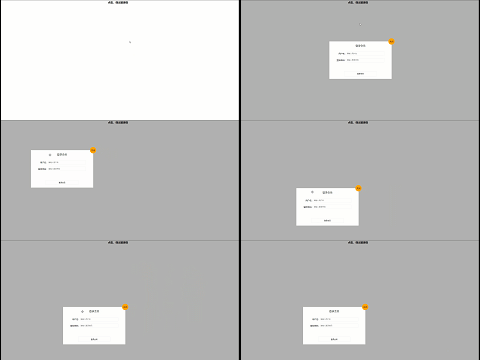
代码如下:
<div class="clickBtn">点击,弹出登录框</div>

    <div class="login">

        <h3>登录会员</h3>

        <table>

            <tr>

                <td class="left">用户名:</td>

                <td><input type="text" placeholder="请输入用户名" name="" id=""></td>

            </tr>

            <tr>

                <td class="left">登陆密码:</td>

                <td><input type="text" placeholder="请输入登录密码" name="" id=""></td>

            </tr>

        </table>

        <button>登录会员</button>

        <div class="closebtn">关闭</div>

    </div>

    <div class="mask"></div>
style:
<style>

    * {

        margin: 0;

        padding: 0;

    }

    .mask {

        display: none;

        position: absolute;

        top: 0;

        left: 0;

        height: 100vh;

        width: 100%;

        background-color: rgba(0, 0, 0, .3);

    }

    .clickBtn {

        margin: 10px auto;

        width: 200px;

        border: 0px;

        font-size: 20px;

        font-weight: 700;

        background-color: #fff;

        cursor: pointer;

    }

    .login {

        visibility: hidden;

        position: absolute;

        top: 50%;

        left: 50%;

        transform: translate(-50%, -50%);

        display: flex;

        flex-direction: column;

        align-items: center;

        padding: 20px;

        box-sizing: border-box;

        width: 500px;

        height: 300px;

        border: 1px solid #eee;

        background-color: #fff;

        z-index: 1;

    }

    .login h3 {

        margin-bottom: 20px;

        font-size: 20px;

        font-weight: 400;

        height: 30px;

        width: 100%;

        text-align: center;

        cursor: move;

    }

    .login table {

        flex: 1;

        display: flex;

        margin: 0;

        padding: 0;

    }

    .login table tr {

        height: 50px;

        text-align: right;

    }

    .login table tr input {

        width: 300px;

        height: 30px;

        border-radius: 2px;

        border: 1px solid #eee;

    }

    .login table .left {

        font-weight: 400;

        width: 40%;

    }

    .login button {

        width: 260px;

        height: 40px;

        background-color: #fff;

        border: 1px solid #eee;

        border-radius: 2px;

        cursor: pointer;

    }

    .login button:hover {

        color: #fff;

        background-color: skyblue;

    }

    .login .closebtn {

        position: absolute;

        right: 0;

        top: 0;

        transform: translate(50%, -50%);

        width: 50px;

        height: 50px;

        text-align: center;

        line-height: 50px;

        background-color: orange;

        border-radius: 50%;

        cursor: pointer;

    }

</style>
js:
<script>

        let btn = document.querySelector('.clickBtn')

        let login = document.querySelector('.login')

        let closebtn = document.querySelector('.closebtn')

        let mask = document.querySelector('.mask')

        let title = document.querySelector('h3')

        let body = document.querySelector('body')

        btn.addEventListener('click', function () {

            mask.style.display = 'block'

            login.style.visibility = 'visible'

        })

        closebtn.addEventListener('click', function () {

            mask.style.display = 'none'

            login.style.visibility = 'hidden'

        })

        title.addEventListener('mousedown', function (e) {

            let x = e.pageX - login.offsetLeft

            let y = e.pageY - login.offsetTop

            function move(e) {

                // 如果此处仍然用 x=e.pageX - x;login.style.left=x+'px' 就会出现错误,因为这里是浅拷贝,引用的是同一个地址,而mousedown事件一直触发mousemove事件,导致x对应地址的值一直在改变,且login.style.left=x+'px' 指向的也是这个地址,所以页面的区域就会出现晃动

                var xx = e.pageX - x;

                var yy = e.pageY - y;

                console.log(x, y);

                login.style.top = yy + 'px';

                login.style.left = xx + 'px';

            }

            // 在页面任何地方都应触发mousemove,故监听document的mousemove事件

            document.addEventListener('mousemove', move)

            // 在页面任何地方都应触发mouseup,故监听document的mouseup事件

            document.addEventListener('mouseup', function () {

                document.removeEventListener('mousemove', move)

            })

        })

    </script>
js-模态框的拖动的更多相关文章
- 完美解决bootstrap模态框允许拖动后拖出边界的问题
使用bootstrap3版本 在网上看了很多方法,我觉得jquery-ui的实现方法是最简单有效的,具体实现方法 1.下载并引入jquery-ui插件 2.全局添加模态框允许拖动事件 $(docume ...
- [TimLinux] JavaScript 模态框可拖动功能实现——jQuery版
<!DOCTYPE html> <html> <head> <meta charset="utf-8"> <title> ...
- JS模态框 简单案例
演示: <!doctype html> <html lang="en"> <head> <meta charset="UTF-8 ...
- js模态框实现原理
<!DOCTYPE> <html> <head> <style>/* 定义模态对话框外面的覆盖层样式 */ #modal-overlay { visib ...
- 原生js模态框实现
<!DOCTYPE html> <html lang="zh"> <head> <meta charset="UTF-8&quo ...
- [TimLinux] JavaScript 模态框可拖动功能实现——节流版
<!DOCTYPE html> <html> <head> <meta charset="utf-8"> <title> ...
- [TimLinux] JavaScript 模态框可拖动功能实现——原始版
<!DOCTYPE html> <html> <head> <meta charset="utf-8"> <title> ...
- js弹框3秒后自动消失
开发中有时候会需要最出弹框后,过几秒自动消失的效果,下面给大家分享一下我自己做的一个小案例. 案例中的弹框使用的是bootstrap里面的模态框,实现自动消失则用的是js中的setInterval方法 ...
- Bootstrap——可拖动模态框(Model)
还是上一个小项目,o(╥﹏╥)o,要实现点击一个div或者button或者一个东西然后可以弹出一个浮在最上面的弹框.网上找了找,发现Bootstrap的Model弹出框可以实现该功能,因此学习了一下, ...
- js控制Bootstrap 模态框(Modal)插件
js控制Bootstrap 模态框(Modal)插件 http://www.cnblogs.com/zzjeny/p/5564400.html
随机推荐
- Linux系统Shell脚本第六章:文件三剑客之sed
Shell编程三剑客之sed 前言 一.Sed编辑器 (1)Sed概述 (2)Sed工作流程 (3)Sed基本语法 二.Sed用法示例 (1)Sed输出指定行 (2)插入符合条件的行 (3)删除符合条 ...
- flask中的线程隔离技术
一.引入: 在无线程隔离情况下,通过线程调用函数,函数内部改变传入对象的属性值(排除非线程安全情况),都将更改传入的对象属性 1 import threading 2 3 class TestThre ...
- boost asio 网络编程案例简单改写
boost教程:http://zh.highscore.de/cpp/boost/ 改写7.4网络编程案例,服务器支持连接多个客户端 服务端: #include <iostream> #i ...
- ES5中对象的继承
1.继承的类型 在oo语言中,继承有两种方式,借口继承和实现继承,因为ECMAScript不支持方法签名,所以ECMAScript只支持实现继承. 2.原型链继承的实现 2.1.原型链 ES5继承可以 ...
- 使用vue渲染大量数据时应该怎么优化?
Object.freeze 适合一些 big data的业务场景.尤其是做管理后台的时候,经常会有一些超大数据量的 table,或者一个含有 n 多数据的图表,这种数据量很大的东西使用起来最明显的感受 ...
- 403 forbidden 与 413Too Large
http://www.ccschy.com/shuma/12846.html https://blog.51cto.com/u_15127556/4543159 查的有关资料如下,最后的原因是服务器网 ...
- 文本超出换行添加white-space:wrap无效
场景描述: 在vue项目中,在Modal弹窗里面使用Form表单组件,然后在FormItem里面放一个div标签用来装文字内容.有时会出现内容超出Form表单宽度但是不换行的问题. 解决方法: 给di ...
- Javascript格式化数字字符串,如手机号,银行卡号的格式化
手机号13312341234转化成133 1234 1234 //方式一 function format_tel(tel){ tel = String(tel); return tel.replace ...
- 接口拿到的id和传到后台的id不一致,导致查询详情和编辑报错
碰到这个问题真是百思不得其解.接口上打印的值和数据库一致,浏览器查看response的反馈也一致.但是一在页面打印请求回来的值,就变了,变成了另一个id,但是其他数据又和数据库一致. 查了一圈也没有查 ...
- C# goto 语法
test: Console.WriteLine("yest"); goto test;