
物理核与逻辑核-转 perf
Linux和Windows 物理CPU、物理核、逻辑核——区别、关系和查看
cat /proc/cpuinfo命令部分输出信息的含义
physical id    物理封装的处理器的id
processor      逻辑核的id
core id           一颗处理器中的每个物理核的id
cpu cores      位于相同物理封装的处理器中的物理核的数量
siblings         位于相同物理封装的处理器中的逻辑核的数量
这个现场和intel的fae交流了一下,同一个物理核上的2个逻辑核(core 0, core 28),共享L1,L12cache,指令发射、执行电路。当同一个硬核上的2个逻辑核,只有一个在使用的时候,他的cache 命中率,IPC(instructions per cycle)都会提高,执行相同的工作任务,由于执行效率提高,cpu 利用率就会下降(当然,具体还和cpu利用率计算的方式也有关系)。
下面是perf的数据, core 0和core28属于同一个物理核,core6和core34属于同一个物理核,可以看到core28的ipc明显高于core6和core34的。用perf观察cache-miss的数据,也有类似结论,不在邮件里面列出了。
perf stat -C 28
946726278451 instructions # 1.19 insns per cycle (100.00%)
perf stat -C 6
101232784938 instructions # 1.00 insns per cycle (100.00%)
perf stat -C 34
43894836578 instructions # 0.87 insns per cycle (100.00%)
概念区分和查看方法
1. CPU(处理器)数量:主板插槽上(物理封装上)的CPU芯片的个数
在cat /proc/cpuinfo 命令的输出中,每颗物理CPU都有唯一id号(即 physical id,从0开始标号),CPU数量即不同 physical id 的数量。
所以,查看CPU数量的命令:
# cat /proc/cpuinfo | grep "physical id" // 查看所有的physical id,有多少个不同physical id就有多少颗CPU
# cat /proc/cpuinfo | grep "physical id" | sort -u | wc -l // 查看不同physical id的数量,直接输出CPU数量
2. CPU物理核数(Core):一颗物理CPU中包含的内核数量(Core)
在cat /proc/cpuinfo 命令的输出中,每颗CPU里的每个物理核(核心,内核)都有id号(即 core id,从0开始标号)。相同物理封装的CPU的物理核数即不同 core id 的数量。cpu cores的值也直接表示CPU物理核数。
所以,查看CPU物理核数的命令:
# cat /proc/cpuinfo | grep "cpu cores" // 查看cpu cores的值,即CPU物理核数
# cat /proc/cpuinfo | grep "core id" | sort -u | wc -l // 查看不同core id的数量,直接输出CPU物理核数(注意:输出的是一颗CPU的物理核数)
3. CPU逻辑核数(CPU线程数,Thread):通过超线程技术,能将一个物理核分成多个逻辑核
一般情况,一颗物理CPU可以有多个物理内核,加上intel的超线程技术(HT, Hyper-Threading)能够把一个物理处理器(核心,内核)在软件层变成两个逻辑处理器,可以使处理器在某一时刻,同步并行处理更多指令和数据(即有多个线程并行工作)。
在cat /proc/cpuinfo 命令的输出中,processor的值表示逻辑处理器(逻辑核)的id号,CPU逻辑核数即不同 processor 的数量。
所以,查看CPU逻辑核数的命令:
# cat /proc/cpuinfo | grep "processor" | sort -u | wc -l // 查看不同 processor 的数量,直接输出CPU逻辑核数总数(注意:输出的是本服务器所有CPU的逻辑核的总数)
查看CPU是否支持超线程
命令:cat /proc/cpuinfo
若:
siblings = cpu cores 不支持超线程 或 未启用超线程
siblings > cpu cores 支持并已启用超线程
“siblings”指的是一颗物理CPU有几个逻辑核,“cpu cores”指的是一颗物理CPU有几个物理核。
计算服务器的物理核、逻辑核的总数
服务器的CPU物理核总数 = CPU数量 × 每颗CPU的物理核数(cpu cores)
服务器的CPU逻辑核总数 = CPU数量 × 每颗CPU的逻辑核数(siblings)
Linux和Windows查看CPU信息
- linux系统: cat /proc/cpuinfo 或 lscpu
- Windows系统:ctrl + alt + delete 打开“任务管理器”-->“性能”
============================== 分割线 ==================================
实际操作——分别在 CentOS 和 Windows10 查看CPU信息
1、CentOS(1 CPU四核四线程):
[root@localhost ~]# cat /proc/cpuinfo
processor : 0 # 逻辑核 id号
vendor_id : GenuineIntel
cpu family : 6
model : 61
model name : Intel Core Processor (Broadwell)
stepping : 2
microcode : 0x1
cpu MHz : 2095.146
cache size : 16384 KB
physical id : 0 # 物理CPU id号
siblings : 4 # 该逻辑核所在的物理CPU的逻辑核数
core id : 0 # 物理核 id号
cpu cores : 4 # 该逻辑核所在的物理CPU的物理核数
apicid : 0
initial apicid : 0
fpu : yes
fpu_exception : yes
cpuid level : 13
wp : yes
flags : fpu de pse tsc msr pae mce cx8 apic sep mtrr pge mca cmov pat pse36 clflush mmx fxsr sse sse2 ht syscall nx rdtscp lm constant_tsc rep_good nopl xtopology eagerfpu pni pclmulqdq ssse3 fma cx16 pcid sse4_1 sse4_2 x2apic movbe popcnt tsc_deadline_timer aes xsave avx f16c hypervisor lahf_lm abm 3dnowprefetch fsgsbase bmi1 avx2 smep bmi2 erms invpcid rdseed adx smap xsaveopt arat
bogomips : 4190.29
clflush size : 64
cache_alignment : 64
address sizes : 46 bits physical, 48 bits virtual
power management:
processor : 1
vendor_id : GenuineIntel
cpu family : 6
model : 61
model name : Intel Core Processor (Broadwell)
stepping : 2
microcode : 0x1
cpu MHz : 2095.146
cache size : 16384 KB
physical id : 0
siblings : 4
core id : 1
cpu cores : 4
apicid : 1
initial apicid : 1
fpu : yes
fpu_exception : yes
cpuid level : 13
wp : yes
flags : fpu de pse tsc msr pae mce cx8 apic sep mtrr pge mca cmov pat pse36 clflush mmx fxsr sse sse2 ht syscall nx rdtscp lm constant_tsc rep_good nopl xtopology eagerfpu pni pclmulqdq ssse3 fma cx16 pcid sse4_1 sse4_2 x2apic movbe popcnt tsc_deadline_timer aes xsave avx f16c hypervisor lahf_lm abm 3dnowprefetch fsgsbase bmi1 avx2 smep bmi2 erms invpcid rdseed adx smap xsaveopt arat
bogomips : 4190.29
clflush size : 64
cache_alignment : 64
address sizes : 46 bits physical, 48 bits virtual
power management:
processor : 2
vendor_id : GenuineIntel
cpu family : 6
model : 61
model name : Intel Core Processor (Broadwell)
stepping : 2
microcode : 0x1
cpu MHz : 2095.146
cache size : 16384 KB
physical id : 0
siblings : 4
core id : 2
cpu cores : 4
apicid : 2
initial apicid : 2
fpu : yes
fpu_exception : yes
cpuid level : 13
wp : yes
flags : fpu de pse tsc msr pae mce cx8 apic sep mtrr pge mca cmov pat pse36 clflush mmx fxsr sse sse2 ht syscall nx rdtscp lm constant_tsc rep_good nopl xtopology eagerfpu pni pclmulqdq ssse3 fma cx16 pcid sse4_1 sse4_2 x2apic movbe popcnt tsc_deadline_timer aes xsave avx f16c hypervisor lahf_lm abm 3dnowprefetch fsgsbase bmi1 avx2 smep bmi2 erms invpcid rdseed adx smap xsaveopt arat
bogomips : 4190.29
clflush size : 64
cache_alignment : 64
address sizes : 46 bits physical, 48 bits virtual
power management:
processor : 3
vendor_id : GenuineIntel
cpu family : 6
model : 61
model name : Intel Core Processor (Broadwell)
stepping : 2
microcode : 0x1
cpu MHz : 2095.146
cache size : 16384 KB
physical id : 0
siblings : 4
core id : 3
cpu cores : 4
apicid : 3
initial apicid : 3
fpu : yes
fpu_exception : yes
cpuid level : 13
wp : yes
flags : fpu de pse tsc msr pae mce cx8 apic sep mtrr pge mca cmov pat pse36 clflush mmx fxsr sse sse2 ht syscall nx rdtscp lm constant_tsc rep_good nopl xtopology eagerfpu pni pclmulqdq ssse3 fma cx16 pcid sse4_1 sse4_2 x2apic movbe popcnt tsc_deadline_timer aes xsave avx f16c hypervisor lahf_lm abm 3dnowprefetch fsgsbase bmi1 avx2 smep bmi2 erms invpcid rdseed adx smap xsaveopt arat
bogomips : 4190.29
clflush size : 64
cache_alignment : 64
address sizes : 46 bits physical, 48 bits virtual
power management:
[root@localhost ~]# lscpu
Architecture: x86_64
CPU op-mode(s): 32-bit, 64-bit
Byte Order: Little Endian
CPU(s): 4
On-line CPU(s) list: 0-3
Thread(s) per core: 1 # 每个物理核的线程数(逻辑核数)
Core(s) per socket: 4 # 每个颗物理CPU的物理核数
Socket(s): 1 # 物理CPU插槽数
NUMA node(s): 1
Vendor ID: GenuineIntel
CPU family: 6
Model: 61
Model name: Intel Core Processor (Broadwell)
Stepping: 2
CPU MHz: 2095.146
BogoMIPS: 4190.29
Hypervisor vendor: KVM
Virtualization type: full
L1d cache: 32K
L1i cache: 32K
L2 cache: 4096K
L3 cache: 16384K
NUMA node0 CPU(s): 0-3
Flags: fpu de pse tsc msr pae mce cx8 apic sep mtrr pge mca cmov pat pse36 clflush mmx fxsr sse sse2 ht syscall nx rdtscp lm constant_tsc rep_good nopl xtopology eagerfpu pni pclmulqdq ssse3 fma cx16 pcid sse4_1 sse4_2 x2apic movbe popcnt tsc_deadline_timer aes xsave avx f16c hypervisor lahf_lm abm 3dnowprefetch fsgsbase bmi1 avx2 smep bmi2 erms invpcid rdseed adx smap xsaveopt arat
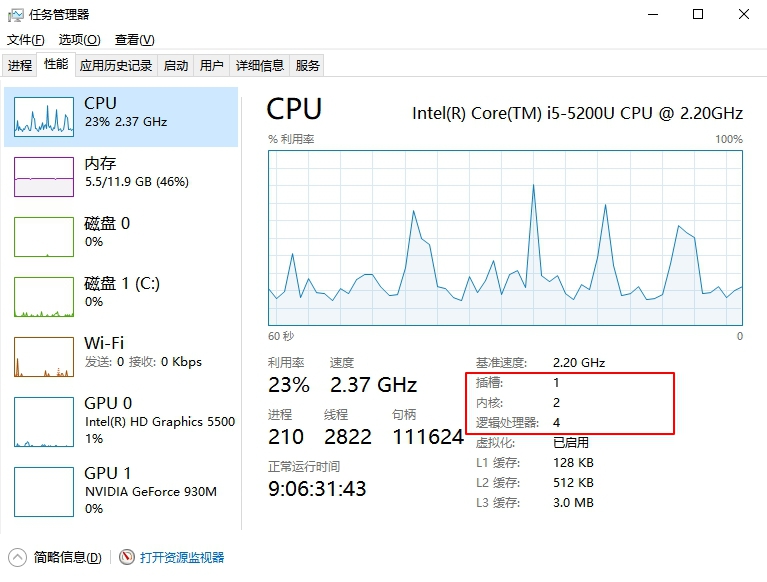
2、 Windows10(1 CPU两核四线程):
ctrl + alt + delete 打开“任务管理器”,点击“性能”
完~
2019.12.06更新
物理核与逻辑核-转 perf的更多相关文章
- 物理CPU、物理核跟逻辑核的区分
一般来说,物理CPU个数×每颗核数就应该等于逻辑CPU的个数,如果不相等的话,则表示服务器的CPU支持超线程技术 ,所以您的电脑是双核的. 一 概念① 物理CPU 实际Server中插槽上的CPU个数 ...
- powershell 获取 CPU 物理 / 逻辑核心数
转载请注明: 仰望高端玩家的小清新 http://www.cnblogs.com/luruiyuan/ 获取 CPU 逻辑核心数的方法为:总逻辑核心数 = 物理核心数 * 每核逻辑核心数 其中 ...
- 物理CPU,物理核,逻辑CPU,虚拟CPU(vCPU)区别 (转)
在做虚拟化时候,遇到划分CPU的问题,因此考虑到CPU不知道具体怎么划分,查询一些资料后就写成本文. a. 物理CPU:物理CPU是相对于虚拟CPU而言的概念,指实际存在的处理器,就是我们可以看的见, ...
- Linux下判断cpu物理个数、几核
自己服务器的输出 1. 查看物理CPU的个数 #cat /proc/cpuinfo |grep "physical id"|sort |uniq|wc -l 1 2. 查 ...
- linux下查看cpu物理个数和逻辑个数 - chw1989的专栏 - 博客频道 - CSDN.NET
body { font-family: 微软雅黑,"Microsoft YaHei", Georgia,Helvetica,Arial,sans-serif,宋体, PMingLi ...
- 物理cpu和逻辑cpu
1 物理cpu 插槽里面实际插入的cpu的个数. 通过不重复的physical id可以获取实际的物理cpu的个数. 2 逻辑cpu cat /proc/info processor 1 proces ...
- 物理cpu与逻辑cpu概述
物理cpu与逻辑cpu概述(本博客属于转载部分内容:主要学习目的用于大数据平台Hadoop之yarn资源调度的配置) 一.yarn资源调度器中主要的资源分类 1.memory(内存) 2. ...
- CPU | 物理 CPU vs 逻辑 CPU vs 核心 vs 线程 vs Socket
当我们试着通过 Linux 命令 nproc 和 lscpu 了解一台计算机 CPU 级的架构和性能时,我们总会发现无法正确地理解相应的结果,因为我们会被好几个术语搞混淆:物理 CPU.逻辑 CPU. ...
- SQL SERVER 2005修改数据库名称,包括物理文件名和逻辑名称
SQL SERVER 2005修改数据库名称,包括物理文件名和逻辑名称 原来数据库名称为 aa,物理文件名称为 aa.mdf 和 aa_log.ldf: 需要修改数据库名称为 bb,物理文件名 ...
- CPU相关知识---物理CPU数、物理核数、逻辑核数、逻辑CPU数 ?
一.物理CPU数.物理核数.逻辑核数.逻辑CPU数 相互关系??? 物理CPU数 ---> 每个物理CPU对应物理核数 ---> (每个物理核数对应逻辑核数)物理CPU对应逻辑核数 --- ...
随机推荐
- ctfshow_web入门 命令执行
命令执行 刚刚开始学习命令执行,萌新一个 因为是学习嘛,所以东西写的杂乱了 web 29 error_reporting(0); if(isset($_GET['c'])){ $c = $_GET[' ...
- ElasticSearch7.6入门
笔记记录 B站狂神说Java的ElasticSearch课程:https://www.bilibili.com/video/BV17a4y1x7zq 一.ElasticSearch概述 官网:http ...
- 基于Docker部署Dubbo+Nacos服务
一.说明 本文介绍基于 Docker 部署一套 Dubbo + Nacos 的微服务环境,并解决容器里的 IP 及端口的访问问题. 基于上文<基于jib-maven-plugin快速构建微服务d ...
- 【C++复习】运算符优先级(简)
只讨论个大概,不管细节不同优先级的运算符混在一起,就根据优先级算相同优先级的运算符混在一起,就看它们的结合性(这里不谈) 一定要记住:括号>基本计算>关系>逻辑>底层选手 1. ...
- mysql 数据库的一些参数,常用模版和调优方式
innodb_buffer_pool_size :这个参数是Mysql数据库最重要的参数之一,表示InnoDB类型的 表 和索引的最大缓存 .它不仅仅缓存 索引数据 ,还会缓存 表的数据 .这个值越大 ...
- 关于centos8yum源失效问题
[CentOS8遇到错误]Error: Failed to download metadata for repo 'powertools'... 原因: CentOS Linux 8 已于 2021 ...
- CLIP改进工作串讲(上)学习笔记
看了跟李沐学AI系列朱毅老师讲的CLIP改进工作串讲,这里记录一下. 1.分割 分割的任务其实跟分类很像,其实就是把图片上的分类变成像素级别上的分类,但是往往图片上能用的技术都能用到像素级别上来.所以 ...
- PHP常见方法封装
1.get请求 function get_curl($url, $timeout = 5) { $ch = curl_init(); curl_setopt($ch,CURLOPT_URL,$url) ...
- vue双向数据绑定原理简单实现
vue双向数据绑定原理实现 准备工作 新建一个index.js文件, 一个index.html文件 index.js文件中, 定义Vue类, 并将Vue并称全局变量 window.Vue = ...
- C++ 手动实现栈(stack) (课后作业版)
栈,一种遵循先进先出原则的数据结构,可以用顺序表实现,也可以用链表进行实现. 这里我使用数组实现方法,包含了进栈,出栈,访问栈顶等功能,以及一些辅助功能. 栈Stack类定义如下: template ...