
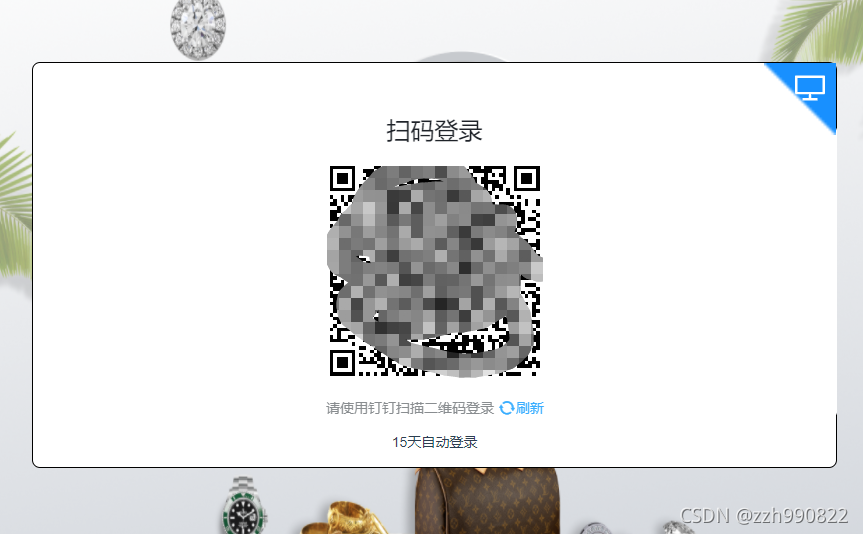
钉钉登录二维码嵌套在vue页面中
转自 https://www.csdn.net/tags/OtDacg3sMjQ2NTgtYmxvZwO0O0OO0O0O.html
<template>
<div id="app">
<div id="login_container"></div>
</div>
</template>
<script>
import axios from "axios"; export default {
name: "App",
components: {},
data() {
return {
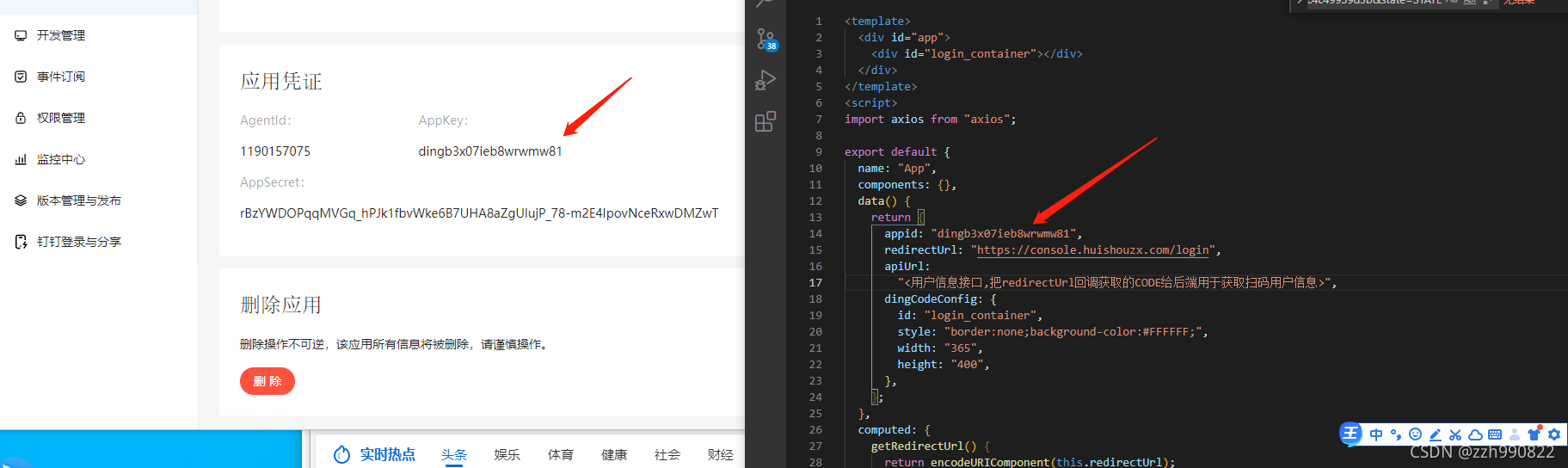
appid: "dingb3x07ieb8wrwmw81",
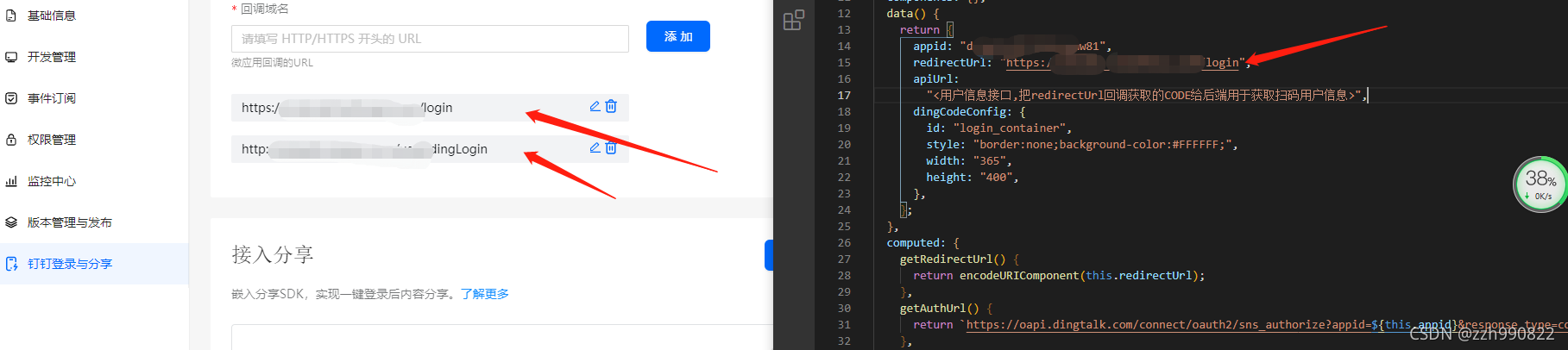
redirectUrl: "https://console.huishouzx.com/login",
apiUrl:
"<用户信息接口,把redirectUrl回调获取的CODE给后端用于获取扫码用户信息>",
dingCodeConfig: {
id: "login_container",
style: "border:none;background-color:#FFFFFF;",
width: "365",
height: "400",
},
};
},
computed: {
getRedirectUrl() {
return encodeURIComponent(this.redirectUrl);
},
getAuthUrl() {
returnhttps://oapi.dingtalk.com/connect/oauth2/sns_authorize?appid=${this.appid}&response_type=code&scope=snsapi_login&state=STATE&redirect_uri=${this.getRedirectUrl};
},
getGoto() {
return encodeURIComponent(this.getAuthUrl);
},
getDingCodeConfig() {
return { ...this.dingCodeConfig, goto: this.getGoto };
},
},
created() {
//调用
this.initDingJs();
},
mounted() {
this.addDingListener();
this.initDingLogin();
this.getUser();
},
methods: {
initDingJs() {
!(function (window, document) {
function d(a) {
var e,
c = document.createElement("iframe"),
d = "https://login.dingtalk.com/login/qrcode.htm?goto=" + a.goto;
(d += a.style ? "&style=" + encodeURIComponent(a.style) : ""),
(d += a.href ? "&href=" + a.href : ""),
(c.src = d),
(c.frameBorder = "0"),
(c.allowTransparency = "true"),
(c.scrolling = "no"),
(c.width = a.width ? a.width + "px" : "365px"),
(c.height = a.height ? a.height + "px" : "400px"),
(e = document.getElementById(a.id)),
(e.innerHTML = ""),
e.appendChild(c);
}window.DDLogin = d;
})(window, document);
},
addDingListener() {
let self = this; let handleLoginTmpCode = function (loginTmpCode) {
window.location.href =
self.getAuthUrl + `&loginTmpCode=${loginTmpCode}`;
}; let handleMessage = function (event) {
if (event.origin == "https://login.dingtalk.com") {
handleLoginTmpCode(event.data);
}
}; if (typeof window.addEventListener != "undefined") {
window.addEventListener("message", handleMessage, false);
} else if (typeof window.attachEvent != "undefined") {
window.attachEvent("onmessage", handleMessage);
}
},
initDingLogin() {
window.DDLogin(this.getDingCodeConfig);
},
getUser() {
let getQueryString = function (name) {
var reg = new RegExp("(^|&)" + name + "=([^&]*)(&|$)", "i");
var r = window.location.search.substr(1).match(reg);
if (r != null) {
return unescape(r[2]);
}
return null;
}; let code = getQueryString("code"); if (code !== null) {
axios
.get(`${this.apiUrl}?code=${code}`)
.then((response) => {
console.log(response);
})
.catch((error) => {
console.log(error);
});
}
},
},
};
</script><style>
app {
font-family: Avenir, Helvetica, Arial, sans-serif;
-webkit-font-smoothing: antialiased;
-moz-osx-font-smoothing: grayscale;
text-align: center;
color: #2c3e50;
margin-top: 60px;
}
</style>

钉钉登录二维码嵌套在vue页面中的更多相关文章
- 微信长按识别二维码,在 vue 项目中的实现
微信长按识别二维码是 QQ 浏览器的内置功能,该功能的基础一定要使用 img 标签引入图片,其他方式的二维码无法识别. 在 vue 中使用 QrcodeVue 插件 demo1 在 template ...
- C#生成二维码,把二维码图片放入Excel中
/// <summary> /// 把图片保存到excel中 /// </summary> /// <param name="excelFilePath&quo ...
- 基于SignalR的消息推送与二维码描登录实现
1 概要说明 使用微信扫描登录相信大家都不会陌生吧,二维码与手机结合产生了不同应用场景,基于二维码的应用更是比较广泛.为了满足ios.android客户端与web短信平台的结合,特开发了基于Singl ...
- 网站实现微信登录之嵌入二维码——基于yii2开发的描述
之前写了一篇yii2获取登录前的页面url地址的文章,然后发现自己对于网站实现微信扫码登录功能的实现不是很熟悉,所以,我会写2-3篇的文章来描述下一个站点如何实现微信扫码登录的功能,来复习下微信扫码登 ...
- spring boot高性能实现二维码扫码登录(上)——单服务器版
前言 目前网页的主流登录方式是通过手机扫码二维码登录.我看了网上很多关于扫码登录博客后,发现基本思路大致是:打开网页,生成uuid,然后长连接请求后端并等待登录认证相应结果,而后端每个几百毫秒会循环查 ...
- spring boot高性能实现二维码扫码登录(中)——Redis版
前言 本打算用CountDownLatch来实现,但有个问题我没有考虑,就是当用户APP没有扫二维码的时候,线程会阻塞5分钟,这反而造成性能的下降.好吧,现在回归传统方式:前端ajax每隔1秒或2秒发 ...
- spring boot高性能实现二维码扫码登录(下)——订阅与发布机制版
前言 基于之前两篇(<spring boot高性能实现二维码扫码登录(上)——单服务器版>和<spring boot高性能实现二维码扫码登录(中)——Redis版>)的基础, ...
- .net实现扫描二维码登录webqq群抓取qq群信息
一.流程 1. //获得二维码的qrsig,cookie标志 2. //登录二维码获得二维码的状态,及最新的url 3. //登录此网址,获得Cookies 4.//cookies,筛选出skey信息 ...
- PC 商城扫描二维码登录
需求分析: 扫码入口,在pc登录首页新增二维码登录入口 点击扫码入口显示二维码 二维码有效时间为一分钟 超时后显示二维码失效,点击刷新后生成新的二维码 在app端用户登录并扫码后,点击确认登录,进行跳 ...
随机推荐
- java中什么是内部类?它有什么用?如何使用?
什么是内部类?马克-to-win:一句话:类中还有类.里边的叫内部类, 外边的叫外层类.有什么用?1)像文件夹一样,文件放文件夹里更清晰,内部类放外层类中, 清晰.主要从编程序的逻辑角度出发,有用.比 ...
- PAT B1091 N-自守数
输入样例: 3 92 5 233 输出样例: 3 25392 1 25 No '解题思路:判断的时候将结果转换成字符串,判断后面几位数字和输入数字是否相同,掉进了N是从1到10的坑,而不是1到9 ...
- js判断时间格式不能超过30天
let first = this.data.date //开始时间 let second = e.detail.value //结束时间 var data1 = Date.parse(first.re ...
- vue上拉加载下拉加载
npm i vue-scroller <scroller :on-refresh="refresh" :on-infinite="infinite" :n ...
- LC-141andLC-142
142. 环形链表 II 思路: 设链表共有 a+b 个节点,其中 链表头部到链表入口 有 a 个节点(不计链表入口节点), 链表环 有 b 个节点. 再设两指针分别走了 f,s 步,则有: f = ...
- 能直接调试的开放API?这个API Hub绝了
01 此前时不时会有一些研发小伙伴和我诉苦,说很多企业由于人力财力限制或者需求不强,会直接购买使用第三方的开放API,这样一来, 一则由于开放项目不是量身定制的,寻找自己合适的接口也要搜索调研蛮多 ...
- JavaWeb学习第一阶段结束
模仿狂神实现简单的用户增删改查,增加了前端登录时的密码验证 JavaWeb学习第一阶段结束,相较于第一阶段的一味学习,第二阶段想拿出更多的时间来阅读别人的源码以及跟着做简单的小项目,同时进一步深入学习 ...
- redis无损数据迁移
在dba眼中,redis仅仅是一个缓存,不适合作为存储来使用,不管是redis-sentinel集群还是cluster集群,在redis主节点发生意外宕机时没有机制来保证主从节点数据的一致性.但是,很 ...
- 2021.08.01 P3377 左偏树模板
2021.08.01 P3377 左偏树模板 P3377 [模板]左偏树(可并堆) - 洛谷 | 计算机科学教育新生态 (luogu.com.cn) #include<iostream> ...
- jsp第六次作业
1. <%@ page language="java" import="java.util.*" pageEncoding="utf-8&quo ...