
WPF、Silverlight项目中使用柱状图、饼状图、折线图
在开发的过程中,可能会遇到柱状图、饼状图、折线图来更好的显示数据,最近整理了一下,遂放出来望需要的朋友可以参考。本文仅仅是简单显示,如需复杂显示效果请参考官网代码示例。----本文代码使用WPF,Silverlight类似代码,使用第三方wpf_visifire_v5.1.2-0_trial控件。
后续会放上Html5示例。
代码下载地址:代码下载
先放上一组截图吧:
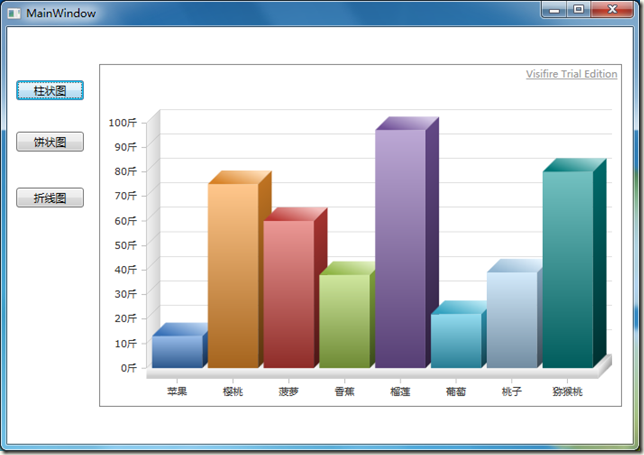
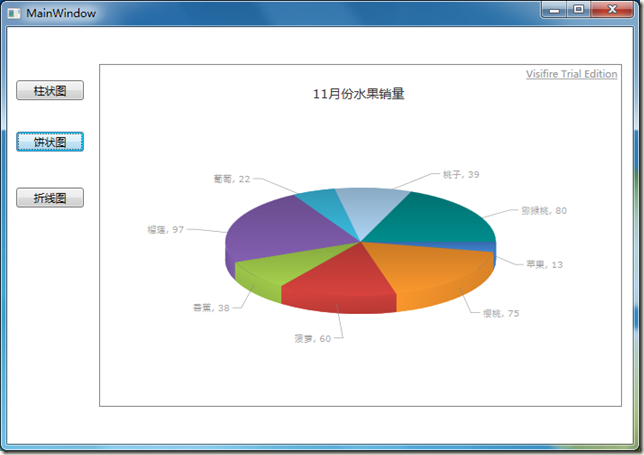
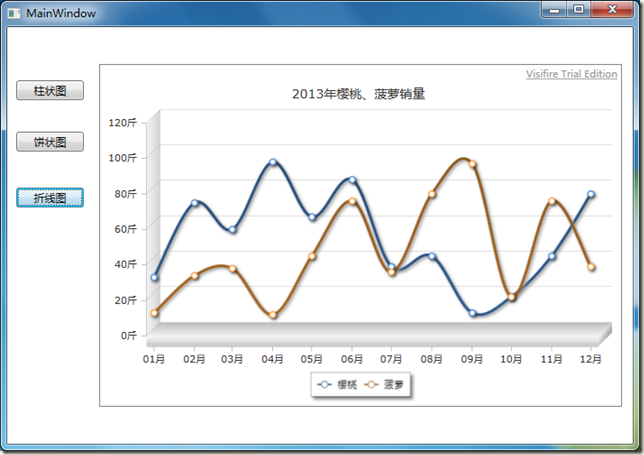
公共数据:
private List<string> strListx = new List<string>() { "苹果", "樱桃", "菠萝", "香蕉", "榴莲", "葡萄", "桃子", "猕猴桃" };

        private List<string> strListy = new List<string>() { "13", "75", "60", "38", "97", "22", "39", "80" };

        private List<DateTime> LsTime = new List<DateTime>()

            {

               new DateTime(2012,1,1),

               new DateTime(2012,2,1),

               new DateTime(2012,3,1),

               new DateTime(2012,4,1),

               new DateTime(2012,5,1),

               new DateTime(2012,6,1),

               new DateTime(2012,7,1),

               new DateTime(2012,8,1),

               new DateTime(2012,9,1),

               new DateTime(2012,10,1),

               new DateTime(2012,11,1),

               new DateTime(2012,12,1),

            };

        private List<string> cherry = new List<string>() { "33", "75", "60", "98", "67", "88", "39", "45", "13", "22", "45", "80" };

        private List<string> pineapple = new List<string>() { "13", "34", "38", "12", "45", "76", "36", "80", "97", "22", "76", "39" };
柱状图:
public void CreateChartColumn(string name, List<string> valuex, List<string> valuey)

        {

            //创建一个图标

            Chart chart = new Chart();

            //设置图标的宽度和高度

            chart.Width = ;

            chart.Height = ;

            chart.Margin = new Thickness(, , , );

            //是否启用打印和保持图片

            chart.ToolBarEnabled = false;

            //设置图标的属性

            chart.ScrollingEnabled = false;//是否启用或禁用滚动

            chart.View3D = true;//3D效果显示

            //创建一个标题的对象

            Title title = new Title();

            //设置标题的名称

            title.Text = Name;

            title.Padding = new Thickness(, , , );

            //向图标添加标题

            chart.Titles.Add(title);

            Axis yAxis = new Axis();

            //设置图标中Y轴的最小值永远为0

            yAxis.AxisMinimum = ;

            //设置图表中Y轴的后缀

            yAxis.Suffix = "斤";

            chart.AxesY.Add(yAxis);

            // 创建一个新的数据线。

            DataSeries dataSeries = new DataSeries();

            // 设置数据线的格式

            dataSeries.RenderAs = RenderAs.StackedColumn;//柱状Stacked

            // 设置数据点

            DataPoint dataPoint;

            for (int i = ; i < valuex.Count; i++)

            {

                // 创建一个数据点的实例。

                dataPoint = new DataPoint();

                // 设置X轴点

                dataPoint.AxisXLabel = valuex[i];

                //设置Y轴点

                dataPoint.YValue = double.Parse(valuey[i]);

                //添加一个点击事件

                dataPoint.MouseLeftButtonDown += new MouseButtonEventHandler(dataPoint_MouseLeftButtonDown);

                //添加数据点

                dataSeries.DataPoints.Add(dataPoint);

            }

            // 添加数据线到数据序列。

            chart.Series.Add(dataSeries);

            //将生产的图表增加到Grid,然后通过Grid添加到上层Grid.

            Grid gr = new Grid();

            gr.Children.Add(chart);

            Simon.Children.Add(gr);

        }
饼状图:
public void CreateChartPie(string name, List<string> valuex, List<string> valuey)

        {

            //创建一个图标

            Chart chart = new Chart();

            //设置图标的宽度和高度

            chart.Width = ;

            chart.Height = ;

            chart.Margin = new Thickness(, , , );

            //是否启用打印和保持图片

            chart.ToolBarEnabled = false;

            //设置图标的属性

            chart.ScrollingEnabled = false;//是否启用或禁用滚动

            chart.View3D = true;//3D效果显示

            //创建一个标题的对象

            Title title = new Title();

            //设置标题的名称

            title.Text = name;

            title.Padding = new Thickness(, , , );

            //向图标添加标题

            chart.Titles.Add(title);

            //Axis yAxis = new Axis();

            ////设置图标中Y轴的最小值永远为0

            //yAxis.AxisMinimum = 0;

            ////设置图表中Y轴的后缀

            //yAxis.Suffix = "斤";

            //chart.AxesY.Add(yAxis);

            // 创建一个新的数据线。

            DataSeries dataSeries = new DataSeries();

            // 设置数据线的格式

            dataSeries.RenderAs = RenderAs.Pie;//柱状Stacked

            // 设置数据点

            DataPoint dataPoint;

            for (int i = ; i < valuex.Count; i++)

            {

                // 创建一个数据点的实例。

                dataPoint = new DataPoint();

                // 设置X轴点

                dataPoint.AxisXLabel = valuex[i];

                dataPoint.LegendText = "##" + valuex[i];

                //设置Y轴点

                dataPoint.YValue = double.Parse(valuey[i]);

                //添加一个点击事件

                dataPoint.MouseLeftButtonDown += new MouseButtonEventHandler(dataPoint_MouseLeftButtonDown);

                //添加数据点

                dataSeries.DataPoints.Add(dataPoint);

            }

            // 添加数据线到数据序列。

            chart.Series.Add(dataSeries);

            //将生产的图表增加到Grid,然后通过Grid添加到上层Grid.

            Grid gr = new Grid();

            gr.Children.Add(chart);

            Simon.Children.Add(gr);

        }
折线图:
public void CreateChartSpline(string name, List<DateTime> lsTime, List<string> cherry, List<string> pineapple)

        {

            //创建一个图标

            Chart chart = new Chart();

            //设置图标的宽度和高度

            chart.Width = ;

            chart.Height = ;

            chart.Margin = new Thickness(, , , );

            //是否启用打印和保持图片

            chart.ToolBarEnabled = false;

            //设置图标的属性

            chart.ScrollingEnabled = false;//是否启用或禁用滚动

            chart.View3D = true;//3D效果显示

            //创建一个标题的对象

            Title title = new Title();

            //设置标题的名称

            title.Text = name;

            title.Padding = new Thickness(, , , );

            //向图标添加标题

            chart.Titles.Add(title);

            //初始化一个新的Axis

            Axis xaxis = new Axis();

            //设置Axis的属性

            //图表的X轴坐标按什么来分类,如时分秒

            xaxis.IntervalType = IntervalTypes.Months;

            //图表的X轴坐标间隔如2,3,20等,单位为xAxis.IntervalType设置的时分秒。

            xaxis.Interval = ;

            //设置X轴的时间显示格式为7-10 11:20

            xaxis.ValueFormatString = "MM月";

            //给图标添加Axis

            chart.AxesX.Add(xaxis);

            Axis yAxis = new Axis();

            //设置图标中Y轴的最小值永远为0

            yAxis.AxisMinimum = ;

            //设置图表中Y轴的后缀

            yAxis.Suffix = "斤";

            chart.AxesY.Add(yAxis);

            // 创建一个新的数据线。

            DataSeries dataSeries = new DataSeries();

            // 设置数据线的格式。

            dataSeries.LegendText = "樱桃";

            dataSeries.RenderAs = RenderAs.Spline;//折线图

            dataSeries.XValueType = ChartValueTypes.DateTime;

            // 设置数据点

            DataPoint dataPoint;

            for (int i = ; i < lsTime.Count; i++)

            {

                // 创建一个数据点的实例。

                dataPoint = new DataPoint();

                // 设置X轴点

                dataPoint.XValue = lsTime[i];

                //设置Y轴点

                dataPoint.YValue = double.Parse(cherry[i]);

                dataPoint.MarkerSize = ;

                //dataPoint.Tag = tableName.Split('(')[0];

                //设置数据点颜色

                // dataPoint.Color = new SolidColorBrush(Colors.LightGray);

                dataPoint.MouseLeftButtonDown += new MouseButtonEventHandler(dataPoint_MouseLeftButtonDown);

                //添加数据点

                dataSeries.DataPoints.Add(dataPoint);

            }

            // 添加数据线到数据序列。

            chart.Series.Add(dataSeries);

            // 创建一个新的数据线。

            DataSeries dataSeriesPineapple = new DataSeries();

            // 设置数据线的格式。

            dataSeriesPineapple.LegendText = "菠萝";

            dataSeriesPineapple.RenderAs = RenderAs.Spline;//折线图

            dataSeriesPineapple.XValueType = ChartValueTypes.DateTime;

            // 设置数据点

            DataPoint dataPoint2;

            for (int i = ; i < lsTime.Count; i++)

            {

                // 创建一个数据点的实例。

                dataPoint2 = new DataPoint();

                // 设置X轴点

                dataPoint2.XValue = lsTime[i];

                //设置Y轴点

                dataPoint2.YValue = double.Parse(pineapple[i]);

                dataPoint2.MarkerSize = ;

                //dataPoint2.Tag = tableName.Split('(')[0];

                //设置数据点颜色

                // dataPoint.Color = new SolidColorBrush(Colors.LightGray);

                dataPoint2.MouseLeftButtonDown += new MouseButtonEventHandler(dataPoint_MouseLeftButtonDown);

                //添加数据点

                dataSeriesPineapple.DataPoints.Add(dataPoint2);

            }

            // 添加数据线到数据序列。

            chart.Series.Add(dataSeriesPineapple);

            //将生产的图表增加到Grid,然后通过Grid添加到上层Grid.

            Grid gr = new Grid();

            gr.Children.Add(chart);

            Simon.Children.Add(gr);

        }
WPF、Silverlight项目中使用柱状图、饼状图、折线图的更多相关文章
- Python的可视化包 – Matplotlib 2D图表(点图和线图,.柱状或饼状类型的图),3D图表(曲面图,散点图和柱状图)
Python的可视化包 – Matplotlib Matplotlib是Python中最常用的可视化工具之一,可以非常方便地创建海量类型地2D图表和一些基本的3D图表.Matplotlib最早是为了可 ...
- Intellij IDEA 中如何查看maven项目中所有jar包的依赖关系图(转载)
Intellij IDEA 中如何查看maven项目中所有jar包的依赖关系图 2017年04月05日 10:53:13 李学凯 阅读数:104997更多 所属专栏: Intellij Idea ...
- 【Excel】绘图案例_常见复合图:簇状图+堆积图+折线图
前言 最近有朋友让我帮忙用excel画图,老实说我很讨厌用excel画图,点来点去,复杂一些还不能复用,非常繁琐.当然,入门也很简单.需求时不同城市.不同产品的2016和2017销量及环比数据,这应该 ...
- HighCharts中的无主题的2D折线图
HighCharts中的无主题的2D折线图 1.设计源码 <!DOCTYPE html> <html> <head> <meta charset=" ...
- HighCharts中的Ajax请求的2D折线图
HighCharts中的Ajax请求的2D折线图 设计源码: <!DOCTYPE html> <html> <head> <meta charset=&quo ...
- PSP 进度条 柱状图 饼状图
9号 类别 开始时间 结束时间 间隔 净时间 燃尽图 8::00 8:20 0 20分钟 站立会议 8:20 8:50 0 30分钟 读构建之法 9:20 13:20 120分钟 120分钟 四人小组 ...
- AngularJS in Action读书笔记5(实战篇)——在directive中引入D3饼状图显示
前言: "宁肯像种子一样等待 也不愿像疲惫的陀螺 旋转得那样勉强" 这是前几天在查资料无意间看到的一位园友的签名,看完后又读了两遍,觉得很有味道.后来一寻根究底才知这是出资大诗 ...
- JupyterLab绘制:柱状图,饼状图,直方图,散点图,折线图
JupyterLab绘图 喜欢python的同学,可以到 https://v3u.cn/(刘悦的技术博客) 里面去看看,爬虫,数据库,flask,Django,机器学习,前端知识点,JavaScrip ...
- 使用WinForm Chart控件 制作饼装,柱状,折线图
http://blog.csdn.net/dream2050csdn/article/details/53510340 chart控件的属性很多,主要用到Chart控件图表区域的属性有五个属性 1.A ...
随机推荐
- wikioi 1214 线段覆盖
题目描述 Description 给定x轴上的N(0<N<100)条线段,每个线段由它的二个端点a_I和b_I确定,I=1,2,--N.这些坐标都是区间(-999,999)的整数.有些线段 ...
- UVA1395
// UVa1395 Slim Span // Rujia Liu #include<cstdio> #include<cmath> #include<cstring&g ...
- Navicat for mysql 11.0破解方法
Navicat for mysql破解器 首先下载破解器,然后解压至随意一个目录下.最后双击exe程序,按照提示找到你安装好的navicat for mysql文件夹下的navicat.exe程序,之 ...
- 【不积跬步,无以致千里】AMQP协议介绍
国内私募机构九鼎控股打造APP,来就送 20元现金领取地址:http://jdb.jiudingcapital.com/phone.html内部邀请码:C8E245J (不写邀请码,没有现金送)国内私 ...
- 常用小方法 or 语法
--> 获取外部文件 def groovyUtils = new GroovyUtils( context ) def xmlFilePath = groovyUtils.getProjectP ...
- 分析代码的利器 - ctags
比方我们在分析代码的时候,须要看某一个方法或类的定义,我们须要临时跳转过去看一下,然后还能非常方便的回来.这时候ctags就派上用场了. 比方你有一个src目录,先用ctags对其生成索引: ctag ...
- BW性能优化
少写例程,减少ABAP处理时间,例程要有效率减少查询数据库表先加载主数据,然后加载事务数据创建聚集进行数据压缩M:N关系的数据不能放到一个维度减少计算指标数量,提高上载效率并行加载建模型时如果有日的分 ...
- delphi 插入 HTML代码 播放器
Delphi在Webbrowser中插入 HTML/java script代码 使用方法将下面的代码赋值到1个记事本里保存,然后保存为xxx.htm就可以看到效果使用PasteHtml实现功能 的事件 ...
- delphi 取得汉字的第一个字母
功能说明://取得汉字的第一个字母 function GetPYIndexChar( hzchar:string):char;begin caseWORD(hzchar[1])shl8+WORD(h ...
- 理解WebKit和Chromium: 调试Android系统上的Chromium
转载请注明原文地址:http://blog.csdn.net/milado_nju 1. Android上的调试技术 在Android系统上,开发人员能够使用两种不同的语言来开发应用程序,一种是Jav ...