
SpringBoot项目示例
一、准备工作
环境及工具:Eclipse+JDK8+Maven+SpringBoot
二、源码:
1.项目架构:
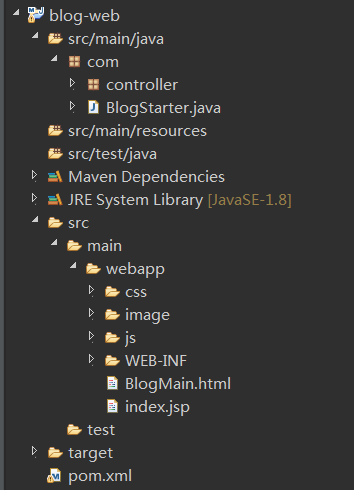
2.引入pom.xml
<project xmlns="http://maven.apache.org/POM/4.0.0" xmlns:xsi="http://www.w3.org/2001/XMLSchema-instance" xsi:schemaLocation="http://maven.apache.org/POM/4.0.0 http://maven.apache.org/maven-v4_0_0.xsd">

  <modelVersion>4.0.0</modelVersion>

  <groupId>blog-web</groupId>

  <artifactId>blog-web</artifactId>

  <packaging>war</packaging>

  <version>0.0.1-SNAPSHOT</version>

  <name>blog-web Maven Webapp</name>

  <url>http://maven.apache.org</url>

  <!-- 父级项目 -->

  <parent>

    <groupId>org.springframework.boot</groupId>

    <artifactId>spring-boot-starter-parent</artifactId>

    <version>2.1.0.RELEASE</version>

    <relativePath /> <!-- lookup parent from repository -->

  </parent>

  <dependencies>

    <!-- 测试 -->

    <dependency>

      <groupId>org.springframework.boot</groupId>

      <artifactId>spring-boot-starter-test</artifactId>

      <scope>test</scope>

    </dependency>

    <!-- springmvc -->

    <dependency>

      <groupId>org.springframework.boot</groupId>

      <artifactId>spring-boot-starter-web</artifactId>

    </dependency>

    <!-- jpa(持久层) -->

    <dependency>

      <groupId>org.springframework.boot</groupId>

      <artifactId>spring-boot-starter-data-jpa</artifactId>

    </dependency>

    <!-- https://mvnrepository.com/artifact/javax.servlet/javax.servlet-api -->

    <dependency>

      <groupId>javax.servlet</groupId>

      <artifactId>javax.servlet-api</artifactId>

      <scope>provided</scope>

    </dependency>

    <!-- https://mvnrepository.com/artifact/commons-fileupload/commons-fileupload -->

    <dependency>

      <groupId>commons-fileupload</groupId>

      <artifactId>commons-fileupload</artifactId>

      <version>1.3</version>

    </dependency>

    <!-- https://mvnrepository.com/artifact/commons-io/commons-io -->

    <dependency>

      <groupId>commons-io</groupId>

      <artifactId>commons-io</artifactId>

      <version>2.6</version>

    </dependency>

    <!-- https://mvnrepository.com/artifact/org.codehaus.jackson/jackson-core-asl -->

    <dependency>

      <groupId>org.codehaus.jackson</groupId>

      <artifactId>jackson-core-asl</artifactId>

      <version>1.9.13</version>

    </dependency>

  </dependencies>

  <!-- 编译 -->

  <build>

    <!-- 插件 -->

    <plugins>

      <!-- maven插件 -->

      <plugin>

        <groupId>org.springframework.boot</groupId>

        <artifactId>spring-boot-maven-plugin</artifactId>

        <configuration>

          <source>1.8</source>

          <target>1.8</target>

          <encoding>UTF-8</encoding>

        </configuration>

      </plugin>

    </plugins>

  </build>

</project>
3.启动类
package com;

import org.springframework.boot.SpringApplication;

import org.springframework.boot.autoconfigure.SpringBootApplication;

import org.springframework.boot.autoconfigure.jdbc.DataSourceAutoConfiguration;

import org.springframework.context.annotation.ComponentScan;

@SpringBootApplication(exclude= {DataSourceAutoConfiguration.class})

public class BlogStarter {

    public static void main(String[] args) {

        SpringApplication.run(BlogStarter.class, args);

     }

}
4.页面
<!DOCTYPE html>

<html>

<head>

<meta charset="UTF-8">

<title>Insert title here</title>

<script type="text/javascript"src="https://cdn.bootcss.com/jquery/3.2.1/jquery.js"></script>

</head>

<body>

</body>

</html>
SpringBoot项目示例的更多相关文章
- SpringBoot项目创建与第一个SSM项目示例
本节介绍SpringBoot创建第一个示例SSM项目的完整过程,使用工具STS,与IDEA操作基本类似. 示例代码在:https://github.com/laolunsi/spring-boot-e ...
- SpringBoot入门最简单的一个项目示例
使用IDEA创建一个SpringBoot项目 1.1 打开IDEA,文件-New-Project 1.2下一步,选择版本8(根据自己安装的JDK版本来选择) 1.3 下一步后点击Web,勾选Sprin ...
- 补习系列(1)-springboot项目基础搭建课
目录 前言 一.基础结构 二.添加代码 三.应用配置 四.日志配置 五.打包部署 小结 前言 springboot 最近火的不行,目前几乎已经是 spring 家族最耀眼的项目了.抛开微服务.技术社区 ...
- Springboot 项目启动后执行某些自定义代码
Springboot 项目启动后执行某些自定义代码 Springboot给我们提供了两种"开机启动"某些方法的方式:ApplicationRunner和CommandLineRun ...
- SpringBoot入门教程(二)CentOS部署SpringBoot项目从0到1
在之前的博文<详解intellij idea搭建SpringBoot>介绍了idea搭建SpringBoot的详细过程, 并在<CentOS安装Tomcat>中介绍了Tomca ...
- linux下后台启动springboot项目
linux下后台启动springboot项目 我们知道启动springboot的项目有三种方式: 运行主方法启动 使用命令 mvn spring-boot:run”在命令行启动该应用 运行“mvn p ...
- springboot 项目中读取资源文件内容 如图片、文档文件
1 问题描述:在 springboot 项目中有时候会需要读取一些资源文件,例如 office的 docx 文档或者 png.jpg的图片.在多模块项目中资源文件需要放到启动项目的 Resources ...
- Springboot项目打包成jar运行2种方式
最近公司有个项目需要移植到SpringBoot框架上,项目里面又有许多第三方jar包,在linux服务器上最方便的就是用jar的方式来运行SpringBoot项目了,因此我研究了2种打jar包的方式, ...
- Springboot项目使用aop切面保存详细日志到ELK日志平台
上一篇讲过了将Springboot项目中logback日志插入到ELK日志平台,它只是个示例.这一篇来看一下实际使用中,我们应该怎样通过aop切面,拦截所有请求日志插入到ELK日志系统.同时,由于往往 ...
随机推荐
- 漫谈计算机组成原理(七)I/O系统
本文讲什么? 这个系列的文章其实可以分成两个部分,计算机系统的其他硬件结构和CPU. 而我们今天要讲述的内容,就是其他硬件结构中的最后一个部分--I/O(输入输出)系统. 这篇文章主要讲述的就是I/O ...
- C语言预处理理论
C语言预处理理论1.从源码到可执行文件的过程(1)源码.c->(编译)->elf可执行程序(2)源码.c->(编译)->目标文件.o->(链接)->elf可执行程序 ...
- Day2-T1
原题目 Describe:贪心,左边和右边中选字典序小的 code: #include<bits/stdc++.h> using namespace std; int n,step,hea ...
- 63.Python中contains和icontains
1. contains: 进行大小写敏感的判断,某个字符串是否包含在指定的字段中,这个判断条件使用大小写敏感进行判断,因此在被翻译成"SQL"语句的时候,会使用"like ...
- Centos7.4系统 httpd模式搭建文件服务器
环境:服务环境:centos7.4 说明:搭建Apache文件服务器,下载路径为/opt/ymyg(下载路径根据实际需要自己定义) 步骤: 1.安装httpd服务 [root@localhost ...
- 黑马oracle_day01:03.oracle的查询
01.oracle体系结构 02.oracle的基本操作 03.oracle的查询 04.oracle对象 05.oracle编程 黑马oracle_day01:03.oracle的查询 09scot ...
- PHP实现简易微信红包算法
<?php /** * PHP实现简易的微信红包算法 * @version v1.0 * @author quetiezheng */ function getMoney($total, $pe ...
- mybatis+maven+父子多模块进行crud以及动态条件查询
使用IDEA创建maven项目,File→New→Project→maven→Next→填写GroupId(例:com.zyl)和ArtifactId(mybatis-demo-parent)→Nex ...
- 第一章:MySQL架构和历史
1.MySQL逻辑架构 MySQL存储引擎架构:将查询处理以及其他任务系统和数据的存储处理分离开来,这样做的好处在于可以根据需要灵活选择存储引擎. 第一层架构 -- 连接处理.授权认证.安全等. 第二 ...
- js数组,字符转换;key_value获取
js 数组转字符串js 字符串转数组arr.join(",");String.split(","); 对象的所有keys Object.keys(val)对象的 ...