
uniapp 小程序实现自定义底部导航栏(tarbar)
在小程序开发中,默认底部导航栏很难满足实际需求,好在官方给出了自定义形式,效果如下:
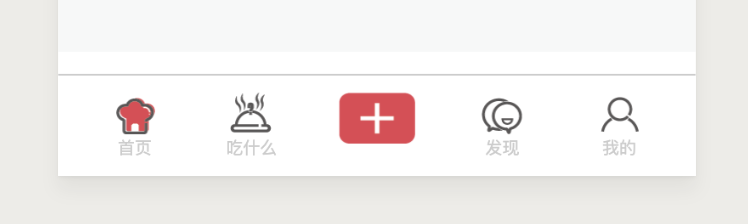
话不多说,直接上代码
1.组件
custom-tarbar.vue文件
<template>

    <view class="tarbar">

        <view

            class=".tarbar-list"

            :style="{

                background: tabBar.backgroundColor,

                color: tabBar.color,

                'border-top': tabBar.position == 'bottom' ? '1rpx solid ' + tabBar.borderStyle : 0,

                'border-bottom': tabBar.position == 'top' ? '1rpx solid ' + tabBar.borderStyle : 0

            }"

        >

            <view class="tarbar-list-ul">

                <view class="tarbar-list-li" :class="index == 2 ? 'tarbar-list-li-center' : ''" v-for="(item, index) in tabBar.list" :key="index" @click.top="setSelected(index)">

                    <block v-if="index != 2">

                        <view class="tarbar-list-li-icon"><image :src="selected == index ? item.selectedIconPath : item.iconPath" mode=""></image></view>

                        <view class="tarbar-list-li-name">{{ item.text }}</view>

                    </block>

                    <block v-else>

                        <view class="tarbar-list-li-icon"><image :src="item.selectedIconPath" mode=""></image></view>

                    </block>

                </view>

            </view>

        </view>

        <block v-if="isShowMask"><release-popup @close-mask="closeMask"></release-popup></block>

    </view>

</template>

<script>

import releasePopup from './release-popup.vue';

export default {

    components: {

        'release-popup': releasePopup

    },

    props: ['selected'],

    data() {

        return {

            tabBar: {

                color: '#ccc',

                selectedColor: '#E84351',

                borderStyle: '#ccc',

                backgroundColor: '#fff',

                position: 'bottom',

                list: [

                    {

                        pagePath: '/pages/index/index',

                        iconPath: '/static/tarbar/home1.png',

                        selectedIconPath: '/static/tarbar/home2.png',

                        text: '首页'

                    },

                    {

                        pagePath: '/pages/foodie/foodie',

                        iconPath: '/static/tarbar/foodie1.png',

                        selectedIconPath: '/static/tarbar/foodie2.png',

                        text: '吃什么'

                    },

                    {

                        pagePath: '/pages/releaseBtn/releaseBtn',

                        iconPath: '',

                        selectedIconPath: '/static/tarbar/release.png'

                    },

                    {

                        pagePath: '/pages/discover/discover',

                        iconPath: '/static/tarbar/discover1.png',

                        selectedIconPath: '/static/tarbar/discover2.png',

                        text: '发现'

                    },

                    {

                        pagePath: '/pages/personal/personal',

                        iconPath: '/static/tarbar/personal1.png',

                        selectedIconPath: '/static/tarbar/personal2.png',

                        text: '我的'

                    }

                ]

            },

            oldSelected: 0, // 记录之前访问的索引; 值为2的时候显示遮罩

            isShowMask: false

        };

    },

    onLoad() {},

    methods: {

        setSelected(index) {

            console.log(index);

            if (index != 2) {

                uni.switchTab({

                    url: this.tabBar.list[index].pagePath

                });

            } else {

                this.isShowMask = true;

            }

            this.$forceUpdate();

        },

        closeMask() {

            this.isShowMask = false;

        }

    }

};

</script>

<style>

.tarbar {

    width: 100%;

    z-index: 9999;

    position: fixed;

}

.tarbar-list {

    width: 100%;

    height: 120upx;

    background: #4d586f;

    position: fixed;

    left: 0;

    bottom: 0;

}

.tarbar-list-ul {

    width: 100%;

    height: 100%;

    padding: 20upx 50upx;

    display: flex;

    justify-content: space-between;

    box-sizing: border-box;

}

.tarbar-list-li {

    width: 80upx;

    height: 80upx;

}

.tarbar-list-li-icon {

    width: 50upx;

    height: 50upx;

    margin: 0 auto;

}

.tarbar-list-li-icon image {

    width: 50upx;

    height: 50upx;

}

.tarbar-list-li-name {

    width: 100%;

    text-align: center;

    line-height: 30upx;

    font-size: 20upx;

    height: 30upx;

}

.tarbar-list-li-center {

    width: 100upx;

}

.tarbar-list-li-center .tarbar-list-li-icon,

.tarbar-list-li-center .tarbar-list-li-icon image {

    width: 90upx;

    height: 60upx;

}

</style>
custom-tarbar.vue
release-popup.vue文件(弹窗)
<template>

    <view class="mask">

        <view class="mask-top">

            <view class="mask-title">唯美食与爱不可辜负</view>

            <view class="mask-desc">对于美食的热爱,如果用一句话来形容,那就是:唯美食与爱不可辜负。</view>

            <view class="mask-btn">

                <view class="mask-btn-list" v-for="(item, index) in btnList" :key="index" @click.stop="toRelease(index)">

                    <view class="mask-btn-list-icon iconfont" :class="item.icon"></view>

                    <view class="mask-btn-list-name">{{ item.name }}</view>

                </view>

            </view>

        </view>

        <view class="mask-close iconfont iconfabu-guanbi" @click.stop="closeMask"></view>

    </view>

</template>

<script>

export default {

    data() {

        return {

            btnList: [

                { icon: 'iconfabu-fashipin', name: '发视频' },

                { icon: 'iconfabu-facaipu', name: '发菜谱' },

                { icon: 'iconfabu-shaimeishi', name: '晒美食' },

                { icon: 'iconfabu-caogaoxiang', name: '草稿箱' }

            ]

        };

    },

    methods: {

        closeMask() {

            this.$emit('close-mask');

        },

        toRelease(index) {

            let url = '';

            if (index == 1) {

                url = '';

            } else if (index == 2) {

                url = '/pages/release/release';

            } else if (index == 3) {

                url = '';

            } else {

                url = '';

            }

            if (!url) {

                this.getMessage('敬请期待', 0);

                return;

            }

            uni.navigateTo({

                url: url

            });

        },

        getMessage(title, icon = 0, duration = 2000, mask = true) {

            icon = icon == 1 ? 'success' : icon == 2 ? 'loading' : 'none';

            uni.showToast({

                title: title,

                icon: icon,

                duration: duration,

                mask: mask

            });

        }

    }

};

</script>

<style>

.mask {

    padding: 100upx 80upx 0;

    width: 100%;

    height: 100vh;

    background: #f6f7f7;

    position: relative;

    box-sizing: border-box;

    /* left: 0;

    top: 0; */

}

.mask-top {

    width: 100%;

    color: #595656;

}

.mask-title {

    height: 100upx;

    line-height: 100upx;

    font-size: 50upx;

}

.mask-desc {

    width: 100%;

    height: 260upx;

    line-height: 50upx;

    font-size: 30upx;

}

.mask-btn {

    width: 100%;

    height: 560upx;

    padding: 0 10upx;

    display: flex;

    flex-wrap: wrap;

    justify-content: space-between;

    align-content: space-between;

    box-sizing: border-box;

}

.mask-btn-list {

    width: 260upx;

    height: 260upx;

    border-radius: 20upx;

    background: #007aff;

    padding: 70upx;

    box-sizing: border-box;

}

.mask-btn-list:nth-child(1) {

    background: -webkit-linear-gradient(30deg, #fadde9, #eb68a3); /* Safari 5.1 - 6.0 */

    background: -o-linear-gradient(30deg, #fadde9, #eb68a3); /* Opera 11.1 - 12.0 */

    background: -moz-linear-gradient(30deg, #fadde9, #eb68a3); /* Firefox 3.6 - 15 */

    background: linear-gradient(30deg, #fadde9, #eb68a3); /* 标准的语法(必须放在最后) */

    color: #5d163a;

}

.mask-btn-list:nth-child(2) {

    background: -webkit-linear-gradient(30deg, #d7e378, #1eb7b6); /* Safari 5.1 - 6.0 */

    background: -o-linear-gradient(30deg, #d7e378, #1eb7b6); /* Opera 11.1 - 12.0 */

    background: -moz-linear-gradient(30deg, #d7e378, #1eb7b6); /* Firefox 3.6 - 15 */

    background: linear-gradient(30deg, #d7e378, #1eb7b6); /* 标准的语法(必须放在最后) */

    color: #113d41;

}

.mask-btn-list:nth-child(3) {

    background: -webkit-linear-gradient(30deg, #a7daf6, #7b4d9b); /* Safari 5.1 - 6.0 */

    background: -o-linear-gradient(30deg, #a7daf6, #7b4d9b); /* Opera 11.1 - 12.0 */

    background: -moz-linear-gradient(30deg, #a7daf6, #7b4d9b); /* Firefox 3.6 - 15 */

    background: linear-gradient(30deg, #a7daf6, #7b4d9b); /* 标准的语法(必须放在最后) */

    color: #2a274c;

}

.mask-btn-list:nth-child(4) {

    background: -webkit-linear-gradient(30deg, #ffef01, #ee7437); /* Safari 5.1 - 6.0 */

    background: -o-linear-gradient(30deg, #ffef01, #ee7437); /* Opera 11.1 - 12.0 */

    background: -moz-linear-gradient(30deg, #ffef01, #ee7437); /* Firefox 3.6 - 15 */

    background: linear-gradient(30deg, #ffef01, #ee7437); /* 标准的语法(必须放在最后) */

    color: #562f15;

}

.mask-btn-list-icon {

    width: 100%;

    height: 70upx;

    line-height: 70upx;

    text-align: center;

    font-size: 50upx;

}

.mask-btn-list-name {

    width: 100%;

    height: 50upx;

    line-height: 50upx;

    text-align: center;

    font-size: 30upx;

}

.mask-close {

    width: 80upx;

    height: 80upx;

    position: absolute;

    left: 50%;

    margin-left: -40upx;

    bottom: 40upx;

    font-size: 50upx;

    line-height: 80upx;

    text-align: center;

    color: #595656;

}

</style>
release-popup.vue
2.调用
<template>

    <view class="content">

        <custom-tarbar :selected="0"></custom-tarbar>

        <view class="home">

            home

        </view>

    </view>

</template>

<script>

import customTarbar from '@/wxcomponents/custom-tarbar/custom-tarbar.vue';

export default {

    components: {

        'custom-tarbar': customTarbar

    }

};

</script>

<style>

.content {

    width: 100%;

}

</style>
注意:组件传值(selected)索引对应默认从0开始
uniapp 小程序实现自定义底部导航栏(tarbar)的更多相关文章
- 小程序 mpvue自定义底部导航栏
1.在compontents新建文件放入 <template> <section class="tabBar-wrap"> <article clas ...
- uniapp 小程序 flex布局 v-for 4栏展示
注:本项目的图片资源来源于后端接口,所以使用的是v-for. 关键词:uniapp 小程序 flex布局 v-for 4栏展示 自适应 <view style="display: fl ...
- 微信小程序自定义底部导航栏组件+跳转
微信小程序本来封装有底部导航栏,但对于想自定义样式和方法的开发者来说,这并不是很好. 参考链接:https://github.com/ljybill/miniprogram-utils/tree/ma ...
- 小程序配置单个页面导航栏的属性(微信小程序交流群:604788754)
配置单个页面导航栏的属性: 就在所要配置页面相对应的json文件中写入以下想要设置的属性: { "navigationBarBackgroundColor": "#fff ...
- 初尝微信小程序2-Swiper组件、导航栏标题配置
swiper 滑块视图容器. 很多网页的首页都会有一个滚动的图片模块,比如天猫超市首页,滚动着很多优惠活动的图片,用来介绍优惠内容,以及供用户点击快速跳转到相应页面. Swiper不仅可以滚动图片,也 ...
- 微信小程序之自定义底部弹出框动画
最近做小程序时,会经常用到各种弹框.直接做显示和隐藏虽然也能达到效果,但是体验性太差,也比较简单粗暴.想要美美地玩,添加点动画还是非常有必要的.下面做一个底部上滑的弹框. wxml <view ...
- 自定义底部导航栏(tabBar)
前言如果大家用过微信提供的tabBar就会发现,他的tabBar有很大的局限性.暂且不说样式局限性了,他提供的app.json配置文件中没有function.这也就意味着使用它提供的这个组件,你只能用 ...
- 微信小程序开发之tab导航栏
实现功能: 点击不同的tab导航,筛选数据 UI: js: data:{ navbar: ['半月维保', '季度维保', '半年维保',"年度维保"], //count ...
- 微信小程序点击顶部导航栏切换样式
类似这样的效果 <view class='helpCateList'> <!-- 类别 --> <scroll-view class='scroll-view' scro ...
随机推荐
- CentOS7中Tomcat的安装和配置
Tomcat运行需要设置JRE目录,全局变量配置,请参见: Linux下JDK的安装和配置 当然也可以直接修改Tomcat的配置文件,请自行度娘 1.下载并解压 请先去官网找到需要下载的tom ...
- node.js绑定监听事件EventEmitter类
Node.js 有多个内置的事件,我们可以通过引入 events 模块,并通过实例化 EventEmitter 类来绑定和监听事件,如下: // 引入 events 模块 var events = r ...
- js通过cookie对两个没有关系的jsp页面进行传值
//Cookie取值 function readCookie (name) { var cookieValue = ""; var search = name + "=& ...
- Ubuntu下安装GTK的三种方法
我利用此方法成功在UBUNTU 10.04下安装GTK 2.20.1. 一.安装 1.安装gcc/g++/gdb/make 等基本编程工具 $sudo apt-get install build-es ...
- jmeter之JDBC请求遇到的问题
1. 时区设置问题 Cannot create PoolableConnectionFactory (The server time zone value '???��������??��??' is ...
- Gridview的stretchMode详解附自动宽度
<GridView android:id="@+id/grid" android:layout_width="fill_parent" android:l ...
- C# 篇基础知识4——.NET的基础概念
C#语言是与微软的.NET框架紧密地联系在一起的,而.NET框架是微软.NET战略的核心,为了更好的理解C#语言,我们必须了解一些.NET框架的基本知识..NET框架是为开发应用程序推出的一个编程平台 ...
- 嵊州普及Day6T1
题意:有一个矩形,由正负整数构成.一个位子的魅力值为相邻的格子,若与邻格同号则减去绝对值,若异号则加上绝对值. 思路:一个格子一个格子计算即可,没什么好说的. 见代码: #include<ios ...
- JSTL1.0和JSTL1.1的区别
这要从一个异常说起 According to TLD or attribute directive in tag file, attribute value does not accept any e ...
- Docker registry自签名证书
权威Registry 获取安全证书有两个办法:互联网认证的CA处获取.自建CA自己给自己签名. 1.从认证CA处获取签名证书,大多数是需要付出一定费用的,近些年也有认证CA提供免费证书,例如Let’s ...