
Vue点到子路由,父级,无法高亮问题解决
[问题] Vue点到子路由,父级,无法高亮
【原因】多是因为链接简写相对路径没有写完整导致
【解决】把子路由的router-link的to属性里链接写完整、并把router配置文件里path也写完整即可
1. hello.vue
【1】以下是路由链接 注意路径to要加上主组件,这样点到子路由里,主路由设置颜色才不会消失
<template>

  <div>

    <div id='left'>

      <h1>hello子组件</h1>

      <!-- 【1】以下是路由链接 注意路径to要加上主组件,这样点到子路由里,主路由设置颜色才不会消失-->

      <router-link to="/hello/heChild/hello1">hellow1</router-link><br/>

      <router-link to="/hello/heChild/hello2">hellow2</router-link><br/>

      <router-link to="/hello/heChild/hello3">hellow3</router-link><br/>

    </div>

    <div id='right'>

      <!-- 点路由后,其视频插入的位置 -->

      <router-view></router-view>

    </div>

  </div>

</template>

<script>

  export default{

    name:'hello',

    data(){

      return{}

    }

  }

</script>

<style scoped>

  /* 对页面进行布局 */

  #left {

    float:left;

    width:280px;

    min-height: 700px;

    background: lightskyblue;

  }

  #right {

    width:100%;

    min-height:700px;

  }

</style>
2. router.js
重点:【1】-【3】
import Vue from 'vue'

import VueRouter from 'vue-router' //引入路由

import Parent from './components/parent.vue'//引入组件

import Hello from './components/hello.vue'//引入组件2

import Hello1 from './components/heChild/hello1.vue'//以下3个为引入对应的子组件

import Hello2 from './components/heChild/hello2.vue'

import Hello3 from './components/heChild/hello3.vue'

import Wa from './components/wa.vue' //引入第3个组件

Vue.use(VueRouter)//使用路由

export default new VueRouter({

linkActiveClass:'active',//【0】设置路由链接处理激活状态的style样式class名(默认值: "router-link-active"

)

  routes: [

    {

    path: "/",

    name:'parent',

    component:Parent ,

    },

    //【1】带子路由的hello组件配置开始

    {

    path: "/hello",

    name:'hello',

    component:Hello ,

    redirect:'/hello/heChild/hello1',//【2】路径要写完整前面带上主路由 /hello/子路由路径/子路由

    //【3】子路由配置开始

      children:[{

          path:'/hello/heChild/hello1',//【4】子路由,注意路径

          name:'hello1',

          component:Hello1,

        },

        {

          path:'/hello/heChild/hello2',//【5】子路由,注意路径

          name:'hello2',

          component:Hello2,

        },

        {

          path:'/hello/heChild/hello3',// 【6】子路由,注意路径

          name:'hello3',

          component:Hello3,

        }]

    },

    {

      path: "/wa/:count/:name",

      name:'wa',

      component:Wa,

    },

]

})
3. App.vue里设置全局,路由处于active状态样式
<style>

.active {

  color:red;

}

</style>
效果:
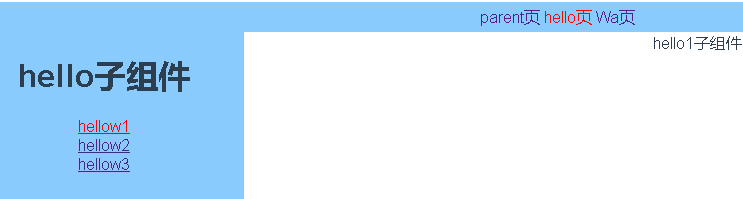
Vue点到子路由,父级,无法高亮问题解决的更多相关文章
- vue使用子路由时,默认的子路由视图不显示问题
解决办法是,将父级的name去掉.(大多数情况下是按name来跳转的,不过这样一改,调到父级就得用路径跳转了): 下面上一下路由的配置: { path: "/index", com ...
- vue 实现子向父传值
父组件 <template> <div id="app"> <child @onChange='onChildValue'></child ...
- JS 父页面调子页面(2种情况),子掉父级(1种)(转)
A :父级调用子级页面 ,非IFRAME情况,类似平级: window.open("子页面.html", "", "width=1024,height ...
- vue的子传父
子组件传值给父组件,需要触发一个事件. 在这个事件里,使用this.$emit("父组件使用的名称","子组件的数据") 在父组件中引用的子组件,在子组件的标签 ...
- vue $emit 子传父
我们使用子组件传递值给父组件使用 $emit 代码 <!DOCTYPE html> <html lang="en"> <head> <me ...
- vue传值 ---- >> 子传父,$emit()
划重点: $emit 绑定一个自定义事件event,当这个这个语句被执行到的时候,就会将参数arg传递给父组件,父组件通过@event监听并接收参数. 子组件: 1 <template& ...
- vue通过事件向父级组件发送消息(官网点击放大例子)
注意:Vue.component一定要写在new Vue之前 在页面中使用组件 整体代码示例
- vue 添加子路由,并对路由重定向
// 用户信息首页 { path: '/user/index', name: 'userIndex', component: userIndex, redirect: '/user/index/sho ...
- Sqlserver如何递归查询层级数据将父级字段和本级某个字段合并?如何自定义用户函数并调用?
开门见山,首先说下遇到的问题:前期系统地区字典表中,每个省市县只存了本级名称,没存完整的字段.如:肥西县隶属安徽省合肥市,表中就存了一个肥西县.现有需求需要将完整字段显示,由于系统已在线上运营,无法做 ...
随机推荐
- vs2010 c++中内嵌汇编代码
在研究汇编时,需要自己写点汇编代码测试,用Ollydbg写每次加载程序就没了,不是很方便. 可以考虑直接在程序中写入汇编代码,只需要加上关键字“_asm”宏(C++代码中). 如下示例 编写环境 :v ...
- Struts2学习(六)
拦截器原理 1.如图所示,Struts2拦截器的实现原理相对简单,当请求struts2的action时,Struts 2会查找配置文件,并根据其配置实例化相对的拦截器对象,然后串成一个列表,最后一个一 ...
- SpringMvc 初步配置
spring-aop.jarspring-bean.jarspring-context.jarspring-core.jarspring-web.jarspring-webmvc.jarcommons ...
- Intellij Idea 下包建包,无论怎么建都在同一级,已解决(附图)
1.很多新手,刚开始使用Intellij Idea的时候,项目建包都出现所建的包都在用一级. 2.这是因为,刚开始建项目的时候,Hide Empty Middle Packages是默认勾选的,只要去 ...
- MyuCMS_V2.1漏洞分析
前言 在CNVD看到一个MyuCMS的一个任意文件删除漏洞.然后去搜了下这个CMS,发现官网公告显示在V2.2.3版本修复了CNVD提供的多处漏洞. 怀着好奇的心里,去CNVD搜了下这个CMS,结果发 ...
- Java中小数精度问题
代码如下:主要是利用java中写好的DecimalFormat类进行设置(#,0,%) import java.text.DecimalFormat; import java.util.Arrays; ...
- 「SDOI2013」森林
「SDOI2013」森林 传送门 树上主席树 + 启发式合并 锻炼码力,没什么好说的. 细节见代码. 参考代码: #include <algorithm> #include <cst ...
- Django学习 之 HTTP与WEB为Django做准备
一.HTTP 1.HTTP 简介 HTTP协议(HyperText Transfer Protocol,超文本传输协议)是因特网上应用最为广泛的一种网络传输协议,所有的WWW文件都必须遵守这个标准. ...
- ubuntu14 安装Express及简单应用
参考资料 [1] 基于Express的Hello World实例 Express 是一个基于 Node.js 平台的极简.灵活的 web 应用开发框架. 1. 环境 工具名 版本 nodejs v11 ...
- CSS如何实现三列布局?如果两端固定、中间是自适应又该如何做?
使用浮动布局来实现 左侧元素与右侧元素优先渲染,分别向左和向右浮动 中间元素在文档流的最后渲染,并将 width 设为 100%,则会自动压到左右两个浮动元素的下面,随后在中间元素中再添加一个div元 ...