
SpringBoot--集成actuator
actuator是spring boot项目中非常强大一个功能,有助于对应用程序进行监视和管理,通过 restful api 请求来监管、审计、收集应用的运行情况,针对微服务而言它是必不可少的一个环节,本文只介绍如何集成actuator,及actuator最最简单的使用,对于自定义endPoint及actuator的实现原理后续单独介绍。
1、导入依赖包
        <dependency>

            <groupId>org.springframework.boot</groupId>

            <artifactId>spring-boot-starter-actuator</artifactId>

        </dependency>
如果要访问info接口访问maven中配置的内容,需要配置如下插件
            <plugin>

                <groupId>org.springframework.boot</groupId>

                <artifactId>spring-boot-maven-plugin</artifactId>

                <executions>

                    <execution>

                        <goals>

                            <goal>build-info</goal>

                        </goals>

                    </execution>

                </executions>

            </plugin>
2、增加相关配置
# 描述信息

info:

  blog-url: http://lcl.com

  author: lcl

  version: @project.version@

# 加载所有的端点/默认只加载了 info / health

management:

  endpoints:

    web:

      exposure:

        include: '*'

  endpoint:

    health:

      show-details: always

# 可以关闭制定的端点

    shutdown:

      enabled: false

# 路径映射,将 health 路径映射成 rest_health 那么在访问 health 路径将为404,因为原路径已经变成 rest_health 了,一般情况下不建议使用

# management.endpoints.web.path-mapping.health=rest_health
此处注意一点,如果使用的是properties配置文件,使用星号时,不需要加单引号,但是使用yml配置文件时,必须要加单引号,否则启动报错。
3、测试
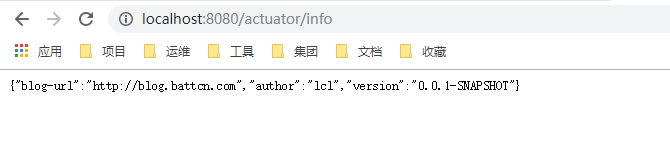
输入http://localhost:8080/actuator/info进行测试
4、自定义检测
虽然actuator拥有强大的功能,但是仍可能不满足我们的需求,就需要自定义端点进行测试,自定义端点测试主要有两种实现方式,实现HealthIndicator接口或继承
AbstractHealthIndicator类,话不多说,直接上代码。

(1)实现HealthIndicator接口:
package com.example.demo.health;

import org.springframework.boot.actuate.health.Health;

import org.springframework.boot.actuate.health.HealthIndicator;

import org.springframework.stereotype.Component;

@Component("myhealth1")

public class MyHealth implements HealthIndicator {

    private static final String VERSION = "v1.0.0";

    @Override

    public Health health() {

        int code = check();

        if(code != 0){

            Health.down().withDetail("code",code).withDetail("version", VERSION).build();

        }

        return Health.up().withDetail("code",code).withDetail("version", VERSION).up().build();

    }

    private int check() {

        return 0;

    }

}
测试:http://localhost:8080/actuator/health

(2)继承AbstractHealthIndicator类
package com.example.demo.health;

import org.springframework.boot.actuate.health.AbstractHealthIndicator;

import org.springframework.boot.actuate.health.Health;

import org.springframework.stereotype.Component;

@Component("myhealth2")

public class MyHealth2 extends AbstractHealthIndicator {

    private static final String VERSION = "v1.0.0";

    @Override

    protected void doHealthCheck(Health.Builder builder) throws Exception {

        int code = check();

        if (code != 0) {

            builder.down().withDetail("code", code).withDetail("version", VERSION).build();

        }

        builder.withDetail("code", code)

                .withDetail("version", VERSION).up().build();

    }

    private int check() {

        return 0;

    }

}
测试:http://localhost:8080/actuator/health

由上可以查看系统集成了redis、mysql和rabbitMQ,其中redis和mysql连接正常,rabbitMQ连接异常。
下列是依赖spring-boot-xxx-starter后相关HealthIndicator的实现(通过management.health.defaults.enabled 属性可以禁用它们),但想要获取一些额外的信息时,自定义的作用就体现出来了…
| 名称 | 描述 |
|---|---|
| CassandraHealthIndicator | 检查 Cassandra 数据库是否启动。 |
| DiskSpaceHealthIndicator | 检查磁盘空间不足。 |
| DataSourceHealthIndicator | 检查是否可以获得连接 DataSource。 |
| ElasticsearchHealthIndicator | 检查 Elasticsearch 集群是否启动。 |
| InfluxDbHealthIndicator | 检查 InfluxDB 服务器是否启动。 |
| JmsHealthIndicator | 检查 JMS 代理是否启动。 |
| MailHealthIndicator | 检查邮件服务器是否启动。 |
| MongoHealthIndicator | 检查 Mongo 数据库是否启动。 |
| Neo4jHealthIndicator | 检查 Neo4j 服务器是否启动。 |
| RabbitHealthIndicator | 检查 Rabbit 服务器是否启动。 |
| RedisHealthIndicator | 检查 Redis 服务器是否启动。 |
| SolrHealthIndicator | 检查 Solr 服务器是否已启动。 |
SpringBoot--集成actuator的更多相关文章
- springboot集成Actuator
Actuator监控端点,主要用来监控与管理. 原生端点主要分为三大类:应用配置类.度量指标类.操作控制类. 应用配置类:获取应用程序中加载的配置.环境变量.自动化配置报告等与SpringBoot应用 ...
- SpringBoot集成actuator模块的基本使用
© 版权声明:本文为博主原创文章,转载请注明出处 1. 版本 SpringBoot:2.0.0.RELEASE 2. 集成 SpringBoot集成actuator模块非常简单,只需要引入actuat ...
- SpringBoot集成Actuator监控管理
1.说明 本文详细介绍Spring Boot集成Actuator监控管理的方法, 基于已经创建好的Spring Boot工程, 然后引入Actuator依赖, 介绍监控管理相关功能的使用. Sprin ...
- SpringBoot集成Actuator端点配置
1.说明 Actuator端点可以监控应用程序并与之交互. Spring Boot包括许多内置的端点, 比如health端点提供基本的应用程序运行状况信息, 并允许添加自定义端点. 可以控制每个单独的 ...
- SpringBoot集成Actuator健康指示器health
1.说明 本文详细介绍Actuator提供的HealthIndicators, 即健康指示器的配置使用, 利用自动配置的健康指标, 检查正在运行的应用程序的状态, 以及自定义健康指标的方法. 监控软件 ...
- SpringBoot系列: Actuator监控
Sprng Boot 2 actuator变动加大, 网上很多资料都都已经过期. ============================配置项============================ ...
- SpringBoot之actuator
在springBoot中集成actuator可以很方便的管理和监控应用的状态. 暴露的Restful接口有: HTTP方法 路径 描述 鉴权 GET /autoconfig 查看自动配置的使用情况 t ...
- 0120 springboot集成Mybatis和代码生成器
在日常开发中,数据持久技术使用的架子使用频率最高的有3个,即spring-jdbc , spring-jpa, spring-mybatis.详情可以看我之前的一篇文章spring操作数据库的3个架子 ...
- 【springBoot】springBoot集成redis的key,value序列化的相关问题
使用的是maven工程 springBoot集成redis默认使用的是注解,在官方文档中只需要2步; 1.在pom文件中引入即可 <dependency> <groupId>o ...
- SpringBoot集成security
本文就SpringBoot集成Security的使用步骤做出解释说明.
随机推荐
- Rocket - diplomacy - LazyModuleImpLike
https://mp.weixin.qq.com/s/gDbUto1qd7uWbpnxovr5pg 介绍LazyModuleImpLike类的实现. 1. wrapper LazyMo ...
- 字符串去除空格的方式(用replace()实现)
去除所有空格: str = str.replace(/\s+/g,""); 去除两头空格: str = str.replace(/^\s+|\s+$/g,"") ...
- [统计信息系列7] Oracle 11g的自动统计信息收集
(一)统计信息收集概述 在Oracle 11g中,默认有3个自动任务,分别是:自动统计信息收集.SQL调优顾问.段空间调整顾问,查看方法如下: SQL> SELECT CLIENT_NAME,T ...
- Java实现 蓝桥杯 历届真题 数字拆分
正整数可以表示为若干正整数的累加和. 如,对于正整数n=6,可以分划为: 5+1 4+2 4+1+1 3+3 3+2+1 3+1+1+1 2+2+2 2+2+1+1 2+1+1+1+1 1+1+1+1 ...
- java实现高斯日记
题目标题: 高斯日记 大数学家高斯有个好习惯:无论如何都要记日记. 他的日记有个与众不同的地方,他从不注明年月日,而是用一个整数代替,比如:4210 后来人们知道,那个整数就是日期,它表示那一天是高斯 ...
- java实现第四届蓝桥杯幸运数
幸运数 题目描述 幸运数是波兰数学家乌拉姆命名的.它采用与生成素数类似的"筛法"生成. 首先从1开始写出自然数1,2,3,4,5,6,- 1 就是第一个幸运数. 我们从2这个数开始 ...
- PAT 说反话
给定一句英语,要求你编写程序,将句中所有单词的顺序颠倒输出. 输入格式: 测试输入包含一个测试用例,在一行内给出总长度不超过 80 的字符串.字符串由若干单词和若干空格组成,其中单词是由英文字母(大小 ...
- Mybatis连接池及事务
一:Mybatis连接池 我们在学习WEB技术的时候肯定接触过许多连接池,比如C3P0.dbcp.druid,但是我们今天说的mybatis中也有连接池技术,可是它采用的是自己内部实现了一个连接池技术 ...
- 哪些年,我们玩过的Git
作者:玩世不恭的Coder公众号:玩世不恭的Coder时间:2020-06-05说明:本文为原创文章,未经允许不可转载,转载前请联系作者 哪些年,我们玩过的Git 前言一.前期工作常用基本概念的理解G ...
- 数据误操作,删库跑路?教你使用ApexSQLLog工具从 SQLServer日志恢复数据!
前几天同事不小心误操作,将SQLServer库的一张表的一个状态字段给刷成了一个统一状态,由于是update执行所以原来的相关状态无法确定.发生这种事情的时候我的小伙伴背后 一凉,估计心里里面想这怕是 ...