
TNS-12540: TNS:internal limit restriction exceeded
应用程序以及客户端工具(Toad、PL/SQL Developer等)出现突然连接不上数据库服务器的情况,监听日志listener.log里面出现了TSN-12518与TSN-12540错误,如下所示,
27-JAN-2015 10:10:19 * (CONNECT_DATA=(SERVICE_NAME=scm2)(CID=(PROGRAM=c:\windows\system32\inetsrv\w3wp.exe)(HOST=POS)(USER=SYSTEM)))
* (ADDRESS=(PROTOCOL=tcp)(HOST=192.168.xxx.xxx)(PORT=1667)) * establish * scm2 * 12518
TNS-12518: TNS:listener could not hand off client connection
TNS-12540: TNS:internal limit restriction exceeded
27-JAN-2015 10:10:19 * (CONNECT_DATA=(SERVICE_NAME=scm2)(CID=(PROGRAM=c:\windows\system32\inetsrv\w3wp.exe)(HOST=CEGWEB1)(USER=NETWO
RK?SERVICE))) * (ADDRESS=(PROTOCOL=tcp)(HOST=192.168.xxx.xxx)(PORT=1284)) * establish * scm2 * 12518
TNS-12518: TNS:listener could not hand off client connection
TNS-12540: TNS:internal limit restriction exceeded
经过这几天的努力,终于解决了这个问题,所以修改、补充了这篇先前的文章,希望能对其他人有所借鉴。下面整理了一下解决问题的步骤。如下所示:
1:首先查看监听服务的进程是否正常,如下所示,监听服务完全正常
ps -ef | grep tnslsnr
oraescm 6669 5979 0 14:03 pts/5 00:00:00 grep tnslsnr
oraescm 29877 1 0 08:12 ? 00:00:11 /u01/app/oracle/product/10.2.0/db_1/bin/tnslsnr LISTENER -inherit
2:检查查看监听服务的状态(lsnrctl status)
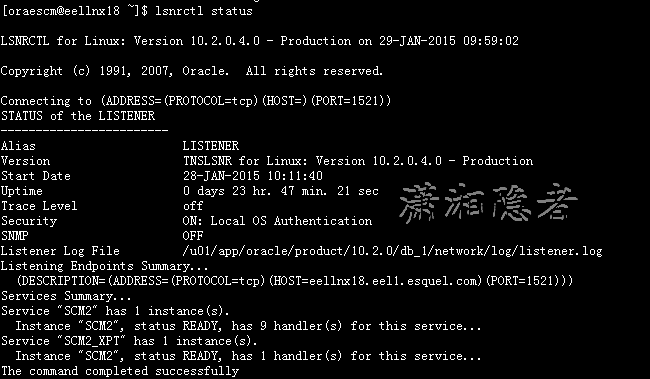
3: 检查lsnrctl services后, 发现一个奇怪的情况Dispatcher没有拒绝监听的记录,如下所示

4:检查Dispatcher进程的是否繁忙,结果查询时一直查询不出结果,立即取消了当前查询
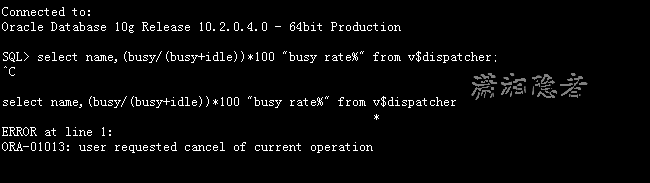
像平时查询时(如下所示)的速度是非常快的。如果”busy rate%“比例超过50%一般建议加SHARED SERVER OR DISPATCHER
SQL> select name,(busy/(busy+idle))*100 "busy rate%" from v$dispatcher;
NAME busy rate%
---- ----------
D000 .194393707
D001 .124595175
D002 .102238233
D003 .097416229
D004 .140182022
D005 .114123279
D006 .137454634
D007 .148511476
D008 .148901287
D009 .111103697
10 rows selected.
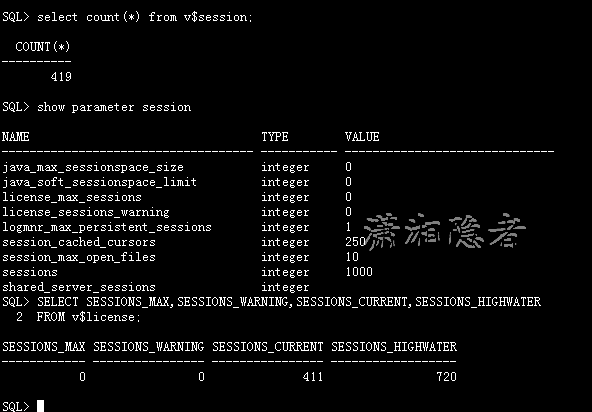
5:检查会话、进程数量。发现当前会话数为483,历史最大值为720. sessions最大值为1000 ,processes参数最大值为870, 应该可以排除processes与session参数值设置过小导致。
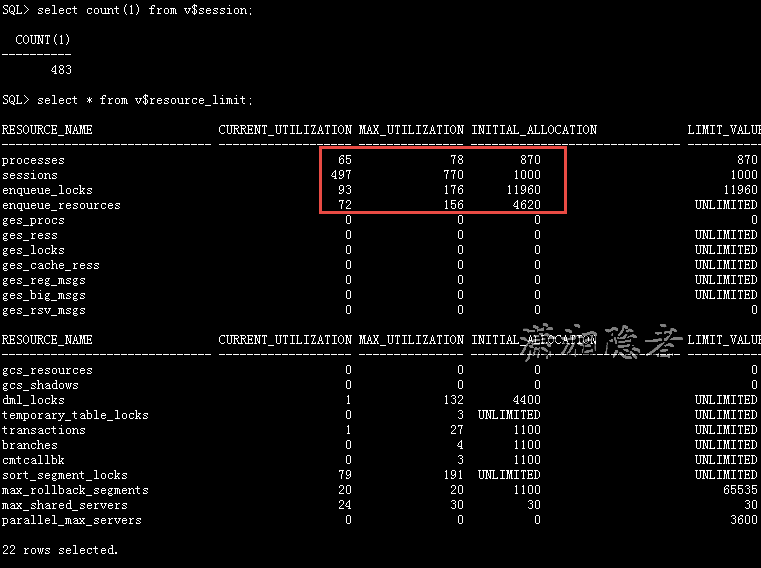
select * from v$resource_limit;
select count(1) from v$session;
SELECT SESSIONS_MAX,SESSIONS_WARNING,SESSIONS_CURRENT,SESSIONS_HIGHWATER
FROM v$license;
select count(1) from v$process;
select count(1) from v$session;
select busy/(busy+idle) from v$shared_server;
select name,busy/(busy+idle)*100 "Dispatcher Busy Rate" from v$dispatcher;
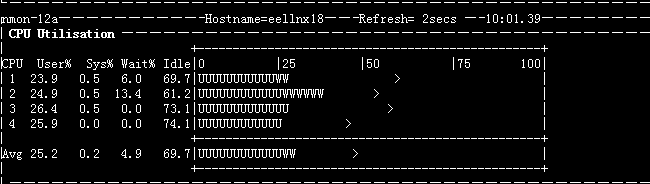
6:检查服务器CPU、RAM资源。如下所示,CPU利用率非常低。检查内存,发现物理内存只剩下204M大小,但是Swap还有13729M剩余。另外告警日志里面并没有发现任何错误信息。

在官方文档查看TSN-12540错误信息,如下所示:
TNS-12540: TNS:internal limit restriction exceeded
Cause: Too many TNS connections open simultaneously.
Action: Wait for connections to close and re-try.
http://docs.oracle.com/cd/B28359_01/network.111/b28316/troublestng.htm#CEGDGHBJ
TNS-12540/ORA-12540: TNS:internal limit restriction exceeded and TNS-00510: Internal limit restriction exceeded
Cause: An internal limit has been exceeded. Possible limits include:
Number of open connection that Oracle Net can process simultaneously
Number of memory buffers which can be used simultaneously
Number of processes a particular database instance is allowed
The first two are examples of hard limits. The third is an example of a limit which can be increased by setting PROCESSES parameter in the database initialization file to a larger value. In this case, a TNS-12500/ORA-12500 error is also returned. In some cases, these errors can be caused by the same conditions which cause TNS-12549/ORA-12549 and TNS-00519 errors.
Action: Perform these steps:
Wait for the open connections to close and retry. If the error persists, then check the sqlnet.log or listener.log file for detailed error stack information.
ORA-12540: TNS:internal limit restriction exceeded
Cause: Too many TNS connections open simultaneously.
Action: Wait for connections to close and re-try.
This error is not an indication of a network problem unless it occurs on all connections (in other words you have never been able to connect). If so it is a .ora configuration problem.
If you can make connections up to a certain point but then fails it is an indication of a resource limitation at the os level (this sounds like your scenario)
Typical problems are:
Out of system memory / swap
Out of process slots in the process table
Streams resources depleted
Physical connections allows by the kernal.
Out of File Handles
但是如下所示,检查了Linux系统的一些内核参数设置,也没有发现有设置不当的地方
[orxxm@xxxx ~]$ ulimit -a
core file size (blocks, -c) 0
data seg size (kbytes, -d) unlimited
scheduling priority (-e) 0
file size (blocks, -f) unlimited
pending signals (-i) 193217
max locked memory (kbytes, -l) 64
max memory size (kbytes, -m) unlimited
open files (-n) 65536
pipe size (512 bytes, -p) 8
POSIX message queues (bytes, -q) 819200
real-time priority (-r) 0
stack size (kbytes, -s) 4194302
cpu time (seconds, -t) unlimited
max user processes (-u) 16384
virtual memory (kbytes, -v) unlimited
file locks (-x) unlimited
check to count the number of existing socket handles on your db server (as root):
[oraescm@eellnx18 bdump]$ lsof -i 4 -a | wc -l
473
[oraescm@eellnx18 bdump]$ cat /proc/sys/fs/file-max
2414114
最后,我们决定增加Dispatcher的数量,从8改为10,尝试解决问题,结果问题不再重现。问题解决了。
SQL>alter system set dispatchers='(protocol=TCP)(disp=10)(serv=SCM2)' scope=both;
SQL> show parameter dispatchers
NAME TYPE VALUE
------------------------------------ ----------- ------------------------------
dispatchers string (protocol=TCP)(disp=10)(serv=S
CM2)
max_dispatchers integer
SQL>
205-02-03 添加:
几天过去了,悲催的是今天下午又出现了TSN-12540错误,纠结啊,这个问题已经把我折腾惨了!
参考资料:
http://t.askmaclean.com/forum.php?mod=viewthread&tid=1442
http://www.dba-oracle.com/t_ora_12540_tns_internal_limit_restriction_exceeded.htm
http://database.ccidnet.com/art/1105/20060601/569461_1.html
http://blog.itpub.net/81018/viewspace-812609/
http://www.bkjia.com/sjkqy/902979.html
http://www.cyberciti.biz/faq/linux-increase-the-maximum-number-of-open-files/
TNS-12540: TNS:internal limit restriction exceeded的更多相关文章
- Overflow sort stage buffered data usage of 33554495 bytes exceeds internal limit of 33554432 bytes
MongoDB执行错误: Overflow sort stage buffered data usage of 33554495 bytes exceeds internal limit of 335 ...
- [WebException: The underlying connection was closed: The message length limit was exceeded.]解决方法
[WebException: The underlying connection was closed: The message length limit was exceeded.] Syste ...
- 场景报错Error -27492: "HttpSendRequest" failed, Windows error code=12029 (cannot connect) and retry limit (0) exceeded for URL=""
1.现象:loadrunner场景执行,tps图是一段很平稳,然后直线触底,一段时间,直线恢复平稳,触底这段时间报错信息如下: Action.c(6): Error -27492: "Htt ...
- .net Core 解决Form value count limit 1024 exceeded. (文件上传过大)
异常清空如图 原因:.net core提交的表单限制太小导致页面表单提交失败 在控制器上使用 RequestFormLimits attribute [RequestFormLimits(ValueC ...
- Form key length limit 2048 exceeded ,提交数据时,数据的键过长 或者是上传文件过大
在ASP.NET Core MVC中,文件的key 默认最大为2048,文件上传的最大上传文件默认为20MB,如果我们想上传一些比较大的文件,就不知道怎么去设置了,没有了Web.Config我们应该如 ...
- ORACLE 博客文章目录(2015-05-27更新)
从接触ORACLE到深入学习,已有好几年了,虽然写的博客不多,质量也参差不齐,但是,它却是成长的历程的点点滴滴的一个见证,见证了我在这条路上的寻寻觅觅,朝圣的心路历程,现在将ORACLE方面的博客整理 ...
- C/S端开发问题汇总
0.先推荐几款工具,连接远程客户端DameWare Mini Remote Control,搜索本地文件Everything,以及sysinternals的系列工具: FileMon-监视所有文件修改 ...
- ORACLE 博客文章目录(2015
从接触ORACLE到深入学习,已有好几年了,虽然写的博客不多,质量也参差不齐,但是,它却是成长的历程的点点滴滴的一个见证,见证了我在这条路上的寻寻觅觅,朝圣的心路历程,现在将ORACLE方面的博客整理 ...
- Oracle内存全面分析
Oracle内存全面分析 Oracle的内存配置与oracle性能息息相关.而且关于内存的错误(如4030.4031错误)都是十分令人头疼的问题.可以说,关于内存的配置,是最影响Oracle性能的配置 ...
随机推荐
- MAT使用--转
原文地址: [1]http://ju.outofmemory.cn/entry/172684 [2]http://ju.outofmemory.cn/entry/129445 MAT使用入门 MAT简 ...
- ASP.NET的session操作方法总结
在开发ASP.NET程序时,需要对相关数据进行缓存,缓存较多的主要是用户的身份信息,现提供几个对session操作较为常用的方法: 1.添加session,对设置对应的时间: /// <summ ...
- 【JUC】JDK1.8源码分析之LockSupport(一)
一.前言 最开始打算分析ReentrantLock,但是分析到最后,发现离不开LockSuport的支持,所以,索性就先开始分析LockSupport,因为它是锁中的基础,是一个提供锁机制的工具类,所 ...
- C#基础知识四之override和new的区别
override override是派生类用来重写基类方法的.调用的派生类方法,如需调用基类方法用base关键字 override不能重写非虚方法或静态方法. override重写必须用abstrac ...
- c# 连接Mysql数据库
mysql.data.dll下载_c#连接mysql必要插件 全部版本下载:http://hovertree.com/h/bjaf/0sft36s9.htm mysql.data.dll是C#操作MY ...
- 【转】Mysql联合查询union和union all的使用介绍
Mysql的联合查询命令UNION和UNION ALL,总结了使用语法和注意事项,以及学习例子和项目例子,需要的朋友可以参考下 一.UNION和UNION ALL的作用和语法 UNION 用于合... ...
- Verilog学习笔记简单功能实现(二)...............全加器
先以一位全加器为例:Xi.Yi代表两个加数,Cin是地位进位信号,Cout是向高位的进位信号.列表有: Xi Yi Cin Sum Cout 0 0 0 0 0 0 0 1 1 0 ...
- 从零开始学 Java - Windows 下安装 JDK
关于未来 "我要死在火星.在我死去的时候能够想着人类能有一个美好的未来--有可持续的能源,同时能够殖民其他的星球来避免人类灭绝的最坏可能." 官网下载 直接打开官网:http:// ...
- jQuery演示8种不同的图片遮罩层动画效果
效果预览 下载地址 jQuery插件大全 实例代码 <div class="container"> <h1>jQuery图标和文章动画效果</h1&g ...
- jQuery基础知识总结
1. jQuery基本概念介绍 1.1 什么是jQuery 一个javascript库,把常用方法写到一个js文件中,需要的时候直接调用即可 学习jQuery就是学习一些方法 ...