
OpenResty应用实践
一. 安装OpenResty
创建OpenResty用户
# useradd -M www -s /usr/sbin/nologin
安装OpenResty
# apt-get install libpcre3-dev \

    libssl-dev perl make build-essential curl zlib1g-dev -y

# cd /usr/local/src/  && wget https://openresty.org/download/openresty-1.17.8.1rc1.tar.gz

# tar -xf openresty-1.17.8.1rc1.tar.gz

# cd openresty-1.17.8.1rc1

# ./configure --user=www -j2  #不指定--prefix, 默认安装位置在/usr/local/openresty

# make -j2

# make install
创建软连接
# ln -sv /usr/local/openresty/nginx/sbin/nginx /usr/local/sbin/
启动openresty
# nginx
更多安装方式请阅读官网文档: http://openresty.org/en/installation.html
二. 第一个"hello world"
在OpenResty中写lua代码,主要包含这两步
- 修改nginx配置文件,将lua代码嵌入其中
- 重载OpenResty使之生效
下面写一个最简单的nginx.conf,在根目录新增content_by_lua_block;,利用ngx.say将“hello,world”打印出来。
user www;

worker_processes  1;

events {

    worker_connections  1024;

}

http {

    include       mime.types;

    default_type  application/octet-stream;

    sendfile        on;

    keepalive_timeout  65;

    server {

        listen       80;

        location / {

            content_by_lua_block {

                ngx.say("hello world!")

            }

        }

    }

}
检测并重载OpenResty
# nginx -t

nginx: the configuration file /usr/local/openresty//nginx/conf/nginx.conf syntax is ok

nginx: configuration file /usr/local/openresty//nginx/conf/nginx.conf test is successful

# nginx -s reload
如果语法没有报错,并且重载成功,就可以在浏览器或者curl命令来查看返回结果了。
# curl -i 127.0.0.1

HTTP/1.1 200 OK

Server: openresty/1.17.8.1rc1

Date: Fri, 22 May 2020 10:29:58 GMT

Content-Type: application/octet-stream

Transfer-Encoding: chunked

Connection: keep-alive

hello world!
上面打印"hello world" 的方式是直接将lua代码嵌入到nginx配置文件中,我们也可以将lua代码抽离出来,保持代码的可读性和可维护性。
操作其实也很简单。
我们现在/usr/local/openresty/nginx/html目录下创建一个lua目录专门保存lua代码,将ngx.say 写到hello.lua文件中
# cd /usr/local/openresty/nginx/html

# mkdir lua

# cat lua/hello.lua

ngx.say("hello world!")
稍微修改一下上面nginx.conf配置文件,把content_by_lua_block 改成 content_by_lua_file。
user www;

worker_processes  1;

events {

    worker_connections  1024;

}

http {

    include       mime.types;

    default_type  application/octet-stream;

    sendfile        on;

    keepalive_timeout  65;

    server {

        listen       80;

        location / {

		    default_type 'text/plain';

            content_by_lua_file html/lua/hello.lua;

        }

    }

}
重载OpenResty
# nginx -t

nginx: the configuration file /usr/local/openresty//nginx/conf/nginx.conf syntax is ok

nginx: configuration file /usr/local/openresty//nginx/conf/nginx.conf test is successful

nginx -s reload
使用curl命令来查看返回结果。
# curl -i 127.0.0.1

HTTP/1.1 200 OK

Server: openresty/1.17.8.1rc1

Date: Fri, 22 May 2020 10:32:41 GMT

Content-Type: application/octet-stream

Transfer-Encoding: chunked

Connection: keep-alive

hello world!
content_by_lua_block 语法
content_by_lua_file 语法
三. 收集日志
从这部分开始,我们将一直使用lua代码抽离的方式去完成。
在lua目录创建get_log.lua文件,先尝试获取一下client端的ip地址。
# cat /usr/local/openresty/nginx/html/lua/get_log.lua

local headers = ngx.req.get_headers()

local ip = headers["X-REAL-IP"] or headers["X_FORWARDED_FOR"] or ngx.var.remote_addr or "0.0.0.0"

ngx.say(ip)
在nginx虚拟主机新增一个/log的location,将get_log.lua代码放置在/log下。
        location /log {

		        default_type 'text/plain';

                content_by_lua_file html/lua/get_log.lua;

        }
重载Openresty后用curl测试
# nginx  -t

nginx: the configuration file /usr/local/openresty//nginx/conf/nginx.conf syntax is ok

nginx: configuration file /usr/local/openresty//nginx/conf/nginx.conf test is successful

# nginx  -s reload

# curl  -i 127.0.0.1/log

HTTP/1.1 200 OK

Server: openresty/1.17.8.1rc1

Date: Fri, 22 May 2020 10:38:42 GMT

Content-Type: application/octet-stream

Transfer-Encoding: chunked

Connection: keep-alive

127.0.0.1
获取完client端ip后,我们再尝试获取更多的数据,举个栗子,获取url的请求参数和服务器时间。
继续编写get_log.lua代码文件
local dkjson = require "cjson"

local headers = ngx.req.get_headers()

local ip = headers["X-REAL-IP"] or headers["X_FORWARDED_FOR"] or ngx.var.remote_addr or "0.0.0.0"

local uri_args = ngx.req.get_uri_args()

local page_json = {}

if uri_args then

    for key,val in pairs(uri_args) do

        page_json[string.lower(key)] = val

    end

end

page_json["client_ip"] = ip

page_json['server_time'] = ngx.now() * 1000

ngx.say(dkjson.encode(page_json))
检测重载
# curl  -i '127.0.0.1/log?ak=abc&city=北京&name=guoew&age=18'

HTTP/1.1 200 OK

Server: openresty/1.17.8.1rc1

Date: Fri, 22 May 2020 10:47:28 GMT

Content-Type: application/octet-stream

Transfer-Encoding: chunked

Connection: keep-alive

{"client_ip":"127.0.0.1","city":"北京","ak":"abc","name":"guoew","age":"18","server_time":1590144448725}
我们也可以获取POST方式请求的data信息,利用
ngx.req.get_post_args方法,具体实现就不在这里写了。
当OpenResty接收到文件时,如果需要落地到本地磁盘,该怎么处理呢?
先在服务器创建/data/logs目录以存放日志文件。
# mkdir -p /data/logs/ && chown www.www -R /data/logs
继续修改get_log.lua代码文件,新增mylog函数,log文件命名为json_log.log。
local dkjson = require "cjson"

local headers = ngx.req.get_headers()

local log_file = 'json_log.log'

function mylog(msg,log_file)

    local file, err = io.open("/data/logs/" .. log_file,"aw+")

        if file == nil then

            ngx.say(err)

        else

            file:write (msg..'\n')

            file:flush();

            file:close();

        end

end

local ip = headers["X-REAL-IP"] or headers["X_FORWARDED_FOR"] or ngx.var.remote_addr or "0.0.0.0"

local uri_args = ngx.req.get_uri_args()

local page_json = {}

if uri_args then

    for key,val in pairs(uri_args) do

        page_json[string.lower(key)] = val

    end

end

page_json["client_ip"] = ip

page_json['server_time'] = ngx.now() * 1000

mylog(dkjson.encode(page_json),log_file)

ngx.say(dkjson.encode(page_json))
重载OpenResty,使用curl测试,会发现/data/logs/目录下生成json_log.log文件,内容如下
# cat /data/logs/json_log.log

{"client_ip":"127.0.0.1","city":"北京","ak":"abc","name":"guoew","age":"18","server_time":1590144899538}
ngx.req.get_headers用法
ngx.req.get_uri_args用法
ngx.req.get_post_args用法
四. 限流控制
限流控制会根据客户端ip与uri作为校验值进行判断,这部分将会使用到lua_share_dict。限流控制是参考赵班长的 使用Nginx+Lua实现的WAF改编而来。实现了 单个客户端ip访问某一个接口 30s内最多只能访问3次,否则返回403。
在/usr/local/openresty/nginx/html/lua/下创建 waf目录,作为限流相关代码的workspace。
# mkdir /usr/local/openresty/nginx/html/lua/waf
在nginx.conf的http context中申请名称为limit,大小为50m的共享内存。并添加waf目录到lua PATH路径中去。
    lua_shared_dict limit 50m;

    lua_package_path "/usr/local/openresty/nginx/html/lua/waf/?.lua;;";
方便日后进行横向扩展(IP黑白名单,URL黑白名单,SQL注入,User-Agent过滤,等等),将代码按功能拆分,编写对应代码,目录结构如下
waf/

├── access.lua   #统一入口脚本

├── config.lua   #配置开关

├── init.lua     #初始化函数

└── lib.lua      #依赖函数
对应代码如下
config.lua
--WAF config file,enable = "on",disable = "off"

-- Define waf switch

config_waf_enable = "on"

-- Define cc switch

config_cc_check = "on"

-- Define cc rate(CCcount/CCseconds)

config_cc_rate = "3/30"
lib.lua
--Get the client IP

function get_client_ip()

    local headers = ngx.req.get_headers()

    local CLIENT_IP = headers["X-REAL-IP"] or headers["X_FORWARDED_FOR"] or ngx.var.remote_addr

    if CLIENT_IP == nil then

        CLIENT_IP  = "unknown"

    end

    return CLIENT_IP

end

--Get the client user agent

function get_user_agent()

    local USER_AGENT = ngx.var.http_user_agent

    if USER_AGENT == nil then

        USER_AGENT = "unknown"

    end

    return USER_AGENT

end

--WAF log record for json,(use logstash codec => json)

function log_record(method,url,data,ruletag)

    local cjson = require("cjson")

    local io = require 'io'

    local LOG_PATH = "/data/logs/"

    local CLIENT_IP = get_client_ip()

    local USER_AGENT = get_user_agent()

    local SERVER_NAME = ngx.var.server_name

    local LOCAL_TIME = ngx.localtime()

    local log_json_obj = {

        client_ip = CLIENT_IP,

        local_time = LOCAL_TIME,

        server_name = SERVER_NAME,

        user_agent = USER_AGENT,

        attack_method = method,

        req_url = url,

        req_data = data,

        rule_tag = ruletag,

    }

    local LOG_LINE = cjson.encode(log_json_obj)

    local LOG_NAME = LOG_PATH..'/'..ngx.today().."_waf.log"

    local file, err = io.open(LOG_NAME,"aw+")

    if file == nil then

        return

    else

        file:write(LOG_LINE.."\n")

        file:flush()

        file:close()

    end

end
access.lua
require "init"

local function waf_main()

    if cc_attack_check() then

    else

        return

    end

end

-- main

waf_main()
init.lua
require 'lib'

require 'config'

--deny cc attack

function cc_attack_check()

    if config_cc_check == "on" then

        local ATTACK_URI = ngx.var.uri

        local CC_TOKEN = get_client_ip() .. ATTACK_URI

        local limit = ngx.shared.limit

        local CCcount=tonumber(string.match(config_cc_rate,'(.*)/'))

        local CCseconds=tonumber(string.match(config_cc_rate,'/(.*)'))

        local req,_ =  limit:get(CC_TOKEN)

        if req then

            if req >= CCcount then

                log_record('CC_Acttack',ngx.var.request_uri,"-","-")

                if config_waf_enable == "on" then

                    ngx.exit(403)

                end

            else

                limit:incr(CC_TOKEN,1)

            end

        else

            limit:set(CC_TOKEN,1,CCseconds)

        end

    end

    return

end
在nginx.conf 中http context 添加初始化和入口脚本。截止当前,如下是nginx.conf所有的配置。
user www;

worker_processes  1;

events {

    worker_connections  1024;

}

http {

    include       mime.types;

    default_type  application/octet-stream;

    sendfile        on;

    keepalive_timeout  65;

    lua_shared_dict limit 50m;

    lua_package_path "/usr/local/openresty/nginx/html/lua/waf/?.lua;;";

    init_by_lua_file "/usr/local/openresty/nginx/html/lua/waf/init.lua";

    access_by_lua_file "/usr/local/openresty/nginx/html/lua/waf/access.lua";

    server {

        listen       80;

        location / {

            default_type 'text/plain';

            content_by_lua_file html/lua/hello.lua;

        }

        location /log {

                default_type 'text/plain';

                content_by_lua_file html/lua/get_log.lua;

        }

    }

}
重启nginx使之生效,然后使用curl进行10次测试,会发现同一个url地址在访问第四次时,直接返回403。
# for i in `seq 1 10` ; do curl -I 127.0.0.1/log  2>/dev/null | awk '/^HTTP/{print $2}' ; done

200

200

200

403

403

403

403

403

403

403
在这里再解释一下限流的功能,单个客户端ip访问某一个接口 30s内最多只能访问3次,否则返回403,也就是说该限流限制的是访问接口的频次,而非访问服务端域名的频次。
当客户端超过限制时,如果感觉返回403不太友好,也可以自定义内容,或者考虑重定向到其他页面。下面是重定向到 阿拉丁指数 首页的一段伪代码。
...

                if config_waf_enable == "on" then

                    ngx.redirect('https://www.aldzs.com')

                    --ngx.exit(403)

                end

...
lua_share_dict 用法
init_by_lua_file 用法
access_by_lua_file 用法
ngx.redirect 用法
五. 白名单
六. 灰度发布
灰度发布demo是基于客户端IP来实现的,是参考Openresty+Lua+Redis灰度发布 完成。流程图如下,在管理后台设置灰度IP名单,允许一部分用户(灰度IP名单)访问预发布环境,其他用户则访问原有生产环境。
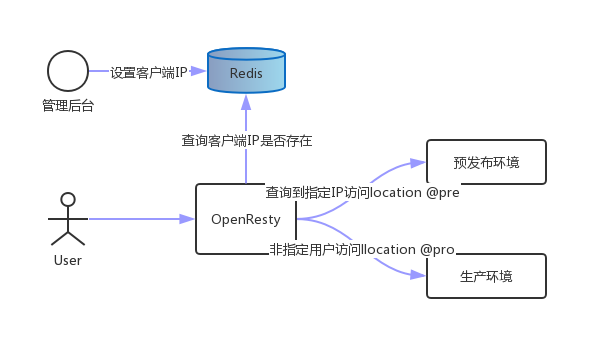
执行过程:
- 当用户请求到达前端web(代理)服务器Openresty,内嵌的lua模块解析Nginx配置文件中的lua脚本代码;
- Lua获取客户端IP地址,去查询Redis中是否有该键值,如果有返回值执行@pre,否则执行@pro。
- Location @pre把请求转发给预发布服务器,location @pro把请求转发给生产服务器,服务器返回结果,整个过程完成。
安装redis-server
# apt install redis-server -y
OpenResty部分配置如下
user www;

worker_processes  1;

events {

    worker_connections  1024;

}

http {

    include       mime.types;

    default_type  application/octet-stream;

    keepalive_timeout  65;

    upstream pro {

        server 127.0.0.1:81; #模拟生产环境

    }

    upstream pre {

        server 127.0.0.1:82; #模拟预发布环境

    }

    lua_shared_dict limit 50m;

    lua_package_path "/usr/local/openresty/nginx/html/lua/waf/?.lua;;";

    init_by_lua_file "/usr/local/openresty/nginx/html/lua/waf/init.lua";

    access_by_lua_file "/usr/local/openresty/nginx/html/lua/waf/access.lua";

    server {

        listen       80;

        location /gray {

                default_type 'text/plain';

                content_by_lua_file html/lua/gray.lua ;

        }

        location @pro {

            proxy_pass http://pro;

        }

        location @pre {

            proxy_pass http://pre;

        }

    }

    server {

        listen 81;

        default_type 'text/plain';

        add_header Content-Type 'text/html; charset=htf-8';

        return 200 "<h1>This is pro</h1>" ;

    }

    server {

        listen 82;

        default_type 'text/plain';

        add_header Content-Type 'text/html; charset=htf-8';

        return 200 "<h1>This is pre</h1>";

    }

    error_log /data/logs/error.log debug ;

}
在/usr/local/openresty/nginx/html/lua/下编写 gray.lua脚本,内容如下
require "lib"

local redis = require "resty.redis"

local red = redis:new()

red:set_timeouts(1000, 1000, 1000) -- 1 sec

local ok, err = red:connect("127.0.0.1", 6379)

if not ok then

    ngx.say("failed to connect: ", err)

    return

end

local local_ip = get_client_ip()

local intercept = red:get(local_ip)

if intercept == local_ip then

    ngx.exec("@pre")

    return

end

ngx.exec("@pro")

local ok, err = red:close()

if not ok then

    ngx.say("failed to close:", err)

    return

end
在redis里set本机回环ip的键值对,使用curl进行测试
# redis-cli

127.0.0.1:6379> set 127.0.0.1 127.0.0.1

OK

127.0.0.1:6379> exit

root@VM-0-2-ubuntu:/usr/local/openresty/nginx/html/lua# curl  -i 127.0.0.1/gray

HTTP/1.1 200 OK

Server: openresty/1.17.8.1rc1

Date: Wed, 27 May 2020 09:10:27 GMT

Content-Type: text/plain

Content-Length: 11

Connection: keep-alive

<h1>This is pre</h1>
通过其他服务器进行curl测试
# curl -i  118.24.64.250/gray

HTTP/1.1 200 OK

Server: openresty/1.17.8.1rc1

Date: Wed, 27 May 2020 09:11:21 GMT

Content-Type: text/plain

Content-Length: 11

Connection: keep-alive

<h1>This is pro</h1>
为了方便进行测试验证,在118.24.64.250这个web服务,增加了一个/set接口,可以直接将客户端IP设置到redis中,过期时间15s。测试如下
# curl   118.24.64.250/set ; curl  118.24.64.250/gray ; sleep 16 ; curl  118.24.64.250/gray

{"code": 200,"message": "This key(182.254.208.xxx) is set successfully!"}

<h1>This is pre</h1>

<h1>This is pro</h1>
lua-resty-redis 用法
ngx.exec 用法
END
OpenResty应用实践的更多相关文章
- OpenResty 最佳实践 lua与nginx的结合 --引用自https://moonbingbing.gitbooks.io/openresty-best-practices/content/
系统的说明了lua在nginx上的开发 请大家到源址查看 OpenResty最佳实践
- OpenResty 最佳实践 1
建议先搜索<OpenResty最佳实践.pdf> 到网上下载openresty-1.13.6.1-win32 考虑到操作方便性,建议建立个bin目录,放入系统目录中,生成 nginx-st ...
- OpenResty 最佳实践 (2)
此文已由作者汤晓静授权网易云社区发布. 欢迎访问网易云社区,了解更多网易技术产品运营经验. lua 协程与 nginx 事件机制结合 文章前部分用大量篇幅阐述了 lua 和 nginx 的相关知识,包 ...
- OpenResty 最佳实践
OpenResty 最佳实践 https://moonbingbing.gitbooks.io/openresty-best-practices/content/index.html
- OpenResty 最佳实践 (1)
此文已由作者汤晓静授权网易云社区发布. 欢迎访问网易云社区,了解更多网易技术产品运营经验. OpenResty 发展起源 OpenResty(也称为 ngx_openresty)是一个全功能的 Web ...
- 《OpenResty 最佳实践》学习开篇
前言:对openresty学习中,收集了一些相关知识的参考网站,有兴趣的可以看看.另附网盘分享. lua菜鸟教程 openresty最佳实战 lua在线解析工具 Nginx Lua API Nginx ...
- 转: OpenResty最佳实践
https://moonbingbing.gitbooks.io/openresty-best-practices/content/ centOS安装另加内容 ln -sf luajit-2.1.0- ...
- 转:OpenResty最佳实践(推荐了解lua语法)
看点: 1. Lua 语法的说明, 排版清晰易懂. 转: https://moonbingbing.gitbooks.io/openresty-best-practices/content/lua/m ...
- OpenResty最佳实践
https://moonbingbing.gitbooks.io/openresty-best-practices/content/
随机推荐
- codeforce 227D Naughty Stone Piles (贪心+递归+递推)
Description There are n piles of stones of sizes a1, a2, -, an lying on the table in front of you. D ...
- 2019 ICPC 银川网络赛 H. Fight Against Monsters
It is my great honour to introduce myself to you here. My name is Aloysius Benjy Cobweb Dartagnan Eg ...
- python(MD5 单向加密)
import hashlib m3 = hashlib.md5() #定义加密方式 src = bytes(", encoding="utf-8") #定义一个需要加密的 ...
- python(索引/切片)
一.索引 1.索引值从左到右-->从0开始,索引值从右到左-->从-1开始 取值格式var[index] >>> name = "xinfangshuo&quo ...
- U盘安装Proxmox VE(一)
转自我的个人博客:U盘安装Proxmox VE(一) 年前搞了个星际蜗牛B款机箱,利用手头之前海淘dq77kb组装了个四盘位的Server. 组装完毕后,直接在实体机安装了centos 7.使用这几个 ...
- C# 9.0 新特性预览 - 类型推导的 new
C# 9.0 新特性预览 - 类型推导的 new 前言 随着 .NET 5 发布日期的日益临近,其对应的 C# 新版本已确定为 C# 9.0,其中新增加的特性(或语法糖)也已基本锁定,本系列文章将向大 ...
- 算法——Java实现队列
顺序队列: 概念: 队列是一种先进先出的线性表,只允许在一端插入,另一端删除.允许插入的一端称为队尾,允许删除的一端称为队头 顺序队列的实现: import org.junit.jupiter.api ...
- Z - New Year Tree CodeForces - 620E 线段树 区间种类 bitset
Z - New Year Tree CodeForces - 620E 这个题目还没有写,先想想思路,我觉得这个题目应该可以用bitset, 首先这个肯定是用dfs序把这个树转化成线段树,也就是二叉树 ...
- Q - Play With Sequence HDU - 3971 线段树 重新排序建树
Q - Play With Sequence HDU - 3971 这个题目是一个线段树,比较特别的线段树,就是c询问一定次数之后重新排序建树来优化减低复杂度. 第一次碰到这种题目有点迷. 这个题目写 ...
- CSS中的间距设置与盒子模型
CSS间距 内补白 外补白 盒子模型 CSS间距 很多时候我们为了美观,需要对内容进行留白设置,这时候就需要设置间距了. 内补白 设置元素的内间距 padding: 检索或设置对象四边的内部边距 pa ...