
mycat+mysql搭建高可用集群1--垂直分库
mycat垂直分库
本文主要介绍了如何使用mycat对mysql数据库进行垂直分库,包括:
- 垂直分库的步骤
- 垂直分库的环境准备
- 配置mycat垂直分库
1. 垂直分库的步骤
- 收集分析业务模块间的关系
- 复制数据库到其他实例(减轻业务影响)
- 配置mycat垂直分库
- 通过mycat访问DB
- 删除原库中已迁移表
2. 垂直分库的环境准备
假定:node1主机为mysql数据库服务器,有dolphin_db数据库,访问压力大,要进行垂直分库。即将该数据库分为order_db,product_db,customer_db。
| 主机名 | IP | 角色 | 数据库 | 部署软件及版本 |
| node1 | 172.31.11.134 | mycat mysql | dolphin_db | mysql-5.7 mycat-1.6.7.3 xtrabackup-2.4.12 |
| node2 | 172.31.11.135 | mysql | order_db | mysql-5.7 xtrabackup-2.4.12 |
| node3 | 172.31.11.136 | mysql | product_db | mysql-5.7 xtrabackup-2.4.12 |
| node4 | 172.31.11.138 | mysql | customer_db | mysql-5.7 xtrabackup-2.4.12 |
2.1 node1备份
1. 进行物理备份
[root@node1 ~]# innobackupex --defaults-file=/data/mysql/my.cnf --user=root --password=abcd@ --socket=/data/mysql/run/mysql.sock /data/backup
2. 将备份文件复制到node2-4
[root@node1 ~]# scp -r /data/backup/--18_09--/ node2:/data/backup/

[root@node1 ~]# scp -r /data/backup/--18_09--/ node3:/data/backup/

[root@node1 ~]# scp -r /data/backup/--18_09--/ node4:/data/backup/
3.创建复制用户
mysql> grant replication slave on *.* to repluser@'172.31.11.%' identified by 'replpass';
2.2 node2还原
1. 准备一个备份
innobackupex --defaults-file=/data/mysql/my.cnf --socket=/data/mysql/run/mysql.sock --user=root --password='abcd@1234' --apply-log /data/backup/--18_09--
2. 恢复数据前需要清空/data/mysql/data(数据目录)和cd /data/mysql/log/iblog(innodb日志目录)的内容,否则报错
rm -rf /data/mysql/data/*

rm -rf /data/mysql/log/iblog/*
3. 恢复数据
innobackupex --defaults-file=/data/mysql/my.cnf --user=root --password --socket=/data/mysql/run/mysql.sock --copy-back /data/backup/--18_09--
4. 修改目录权限
chown -R mysql:mysql /data/mysql
5. 重启mysqld服务
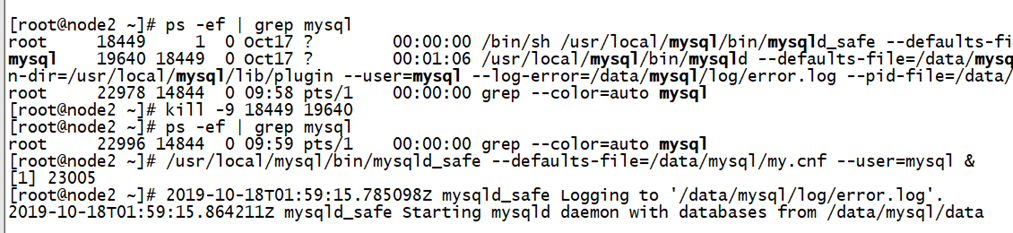
/usr/local/mysql/bin/mysqld_safe --defaults-file=/data/mysql/my.cnf --user=mysql &
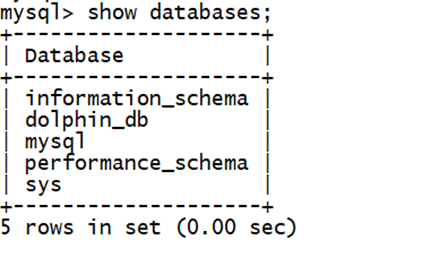
6. 由于恢复过来的数据库时dolphin_db,需要将其改为order_db,由于不能直接修改数据库名称,可通过修改表名的方式间接修改。
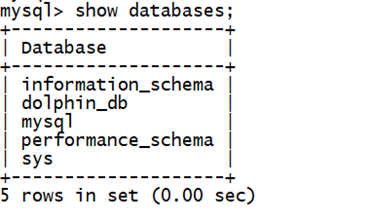
修改数据库名称脚本:
  [root@node2 ~]# cat rename.sh

#!/bin/bash

#作者:fafu_li

#时间:2015.08.

#mysql数据库改名,官方没有直接修改数据库名称的命令

#只有通过修改表名方式实现

source /etc/profile        #加载系统环境变量

source ~/.bash_profile    #加载用户环境变量

set -o nounset             #引用未初始化变量时退出

mysqlconn="mysql -hlocalhost -uroot -pabcd@1234"

#需要修改的数据库名

olddb="dolphin_db"

#修改后的数据库名

newdb="order_db"

#创建新数据库

$mysqlconn -e "drop database if exists ${newdb};create database ${newdb};"

#获取所有表名

tables=$($mysqlconn -N -e "select table_name from information_schema.tables where table_schema='${olddb}'")

#修改表名

for name in $tables;do

    $mysqlconn -e "rename table ${olddb}.${name} to ${newdb}.${name}"

done

#删除老的空库

$mysqlconn -e "drop database ${olddb}"
7. 重置二进制日志
mysql> reset master;
8. 连接至主服务器,配置主从复制
mysql> change master to master_host='172.31.11.134', master_user='repluser', master_password = 'replpass', master_auto_position=;
9. 由于主从复制过程中可以使主从数据库的名称不一致(node1:dolphin_db,node2:order_db)
mysql> change replication filter replicate_rewrite_db=((dolphin_db, order_db));
10. 开启复制
mysql> start slave;
node3、node4都执行和node2相同的操作,只是数据库名称为:product_db和customer_db。
3. 配置mycat垂直分库
1. 需要修改的配置文件介绍
- 使用schema.xml配置逻辑库、
- 使用server.xml配置系统变量及用户权限
- 由于没有用到水平分片,不需要配置rule.xml
2. 配置schema.xml,配置逻辑库
 <?xml version="1.0"?>

 <!DOCTYPE mycat:schema SYSTEM "schema.dtd">

 <mycat:schema xmlns:mycat="http://io.mycat/">

         <schema name="dolphin_db" checkSQLschema="false" sqlMaxLimit="100">

            <table name="order_master" primaryKey="order_id" dataNode="ordb"/>

            <table name="order_detail" primaryKey="order_detail_id" dataNode="ordb"/>

            <table name="order_customer_addr" primaryKey="customer_addr_id" dataNode="ordb"/>

            <table name="order_cart" primaryKey="cart_id" dataNode="ordb"/>

            <table name="region_info" primaryKey="region_id" dataNode="ordb"/>

            <table name="shipping_info" primaryKey="ship_id" dataNode="ordb"/>

            <table name="warehouse_info" primaryKey="w_id" dataNode="ordb"/>

            <table name="warehouse_proudct" primaryKey="wp_id" dataNode="ordb"/>

            <table name="product_brand_info" primaryKey="brand_id" dataNode="prodb"/>

            <table name="product_category" primaryKey="category_id" dataNode="prodb"/>

            <table name="product_comment" primaryKey="comment_id" dataNode="prodb"/>

            <table name="product_info" primaryKey="product_id" dataNode="prodb"/>

            <table name="product_pic_info" primaryKey="product_pic_id" dataNode="prodb"/>

            <table name="product_supplier_info" primaryKey="supplier_id" dataNode="prodb"/>

            <table name="customer_balance_log" primaryKey="balance_id" dataNode="custdb"/>

            <table name="customer_inf" primaryKey="customer_inf_id" dataNode="custdb"/>

            <table name="customer_level_inf" primaryKey="customer_level" dataNode="custdb"/>

            <table name="customer_login" primaryKey="customer_id" dataNode="custdb"/>

            <table name="customer_login_log" primaryKey="login_id" dataNode="custdb"/>

            <table name="customer_point_log" primaryKey="point_id" dataNode="custdb"/>

         </schema>

         <dataNode name="ordb" dataHost="node2" database="order_db" />

         <dataNode name="prodb" dataHost="node3" database="product_db" />

         <dataNode name="custdb" dataHost="node4" database="customer_db" />

         <dataHost name="node2" maxCon="1000" minCon="10" balance="3" writeType="0" dbType="mysql" dbDriver="native" switchType="1"  slaveThreshold="100">

                 <heartbeat>select user()</heartbeat>

                 <writeHost host="172.31.11.135" url="172.31.11.135:3306" user="mycat" password="mycat"></writeHost>

         </dataHost>

         <dataHost name="node3" maxCon="1000" minCon="10" balance="3" writeType="0" dbType="mysql" dbDriver="native" switchType="1"  slaveThreshold="100">

                 <heartbeat>select user()</heartbeat>

                 <writeHost host="172.31.11.136" url="172.31.11.136:3306" user="mycat" password="mycat"></writeHost>

         </dataHost>

         <dataHost name="node4" maxCon="1000" minCon="10" balance="3" writeType="0" dbType="mysql" dbDriver="native" switchType="1"  slaveThreshold="100">

                 <heartbeat>select user()</heartbeat>

                 <writeHost host="172.31.11.138" url="172.31.11.138:3306" user="mycat" password="mycat"></writeHost>

         </dataHost>

 </mycat:schema>
Normal
0
7.8 磅
0
2
false
false
false
EN-US
ZH-CN
X-NONE
/* Style Definitions */
table.MsoNormalTable
{mso-style-name:普通表格;
mso-tstyle-rowband-size:0;
mso-tstyle-colband-size:0;
mso-style-noshow:yes;
mso-style-priority:99;
mso-style-parent:"";
mso-padding-alt:0cm 5.4pt 0cm 5.4pt;
mso-para-margin:0cm;
mso-para-margin-bottom:.0001pt;
mso-pagination:widow-orphan;
font-size:10.5pt;
mso-bidi-font-size:11.0pt;
font-family:等线;
mso-ascii-font-family:等线;
mso-ascii-theme-font:minor-latin;
mso-fareast-font-family:等线;
mso-fareast-theme-font:minor-fareast;
mso-hansi-font-family:等线;
mso-hansi-theme-font:minor-latin;
mso-font-kerning:1.0pt;}
注意:由于mycat在和node2 node3 node4节点的mysql通信时,使用的是mycat用户,密码是mycat。因此我们需要在node2 node3 node4中分别创建该用户并授权
mysql> grant select, insert, update, delete, execute on *.* to 'mycat'@'172.31.11.%' identified by 'mycat';
3. 配置server.xml,添加用户,让其可访问该逻辑库
 <user name="dolphin" defaultAccount="true">

             <property name="usingDecrypt">1</property>

             <property name="password">PtBAuXp5Fi0b8riGxcG5SFzxqRHGVLD/bcXi+66Q/tppwZxy2P2DnhNm0mj+8u1JGyW/bLvqSXMDlntRy+n3ig==</property>

             <property name="schemas">dolphin_db</property>

 </user>
注意:这里对password进行了加密,方法如下:
[root@node1 ~]# cd /usr/local/mycat/lib

[root@node1 lib]# java -cp Mycat-server-1.6.7.3-release.jar io.mycat.util.DecryptUtil :dolphin:dolphin
4. 通过mycat连接数据库
[root@node1 bin]# ./mycat start
Normal
0
7.8 磅
0
2
false
false
false
EN-US
ZH-CN
X-NONE
/* Style Definitions */
table.MsoNormalTable
{mso-style-name:普通表格;
mso-tstyle-rowband-size:0;
mso-tstyle-colband-size:0;
mso-style-noshow:yes;
mso-style-priority:99;
mso-style-parent:"";
mso-padding-alt:0cm 5.4pt 0cm 5.4pt;
mso-para-margin:0cm;
mso-para-margin-bottom:.0001pt;
mso-pagination:widow-orphan;
font-size:10.5pt;
mso-bidi-font-size:11.0pt;
font-family:等线;
mso-ascii-font-family:等线;
mso-ascii-theme-font:minor-latin;
mso-fareast-font-family:等线;
mso-fareast-theme-font:minor-fareast;
mso-hansi-font-family:等线;
mso-hansi-theme-font:minor-latin;
mso-font-kerning:1.0pt;}
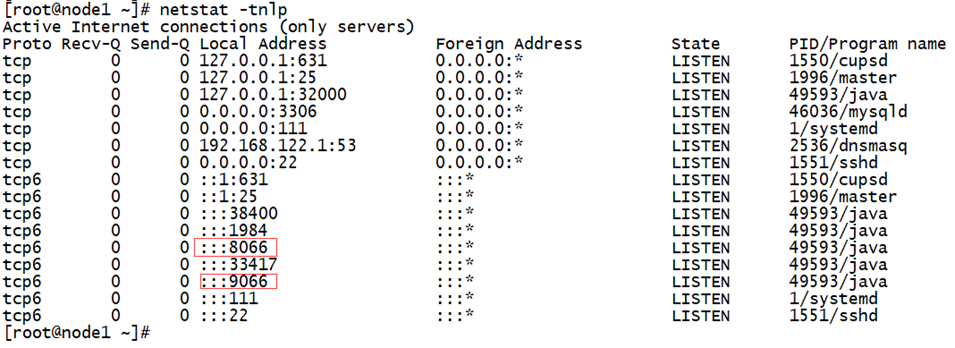
发现9066和8066端口已经开启,则说明mycat已经启动成功。
5. 通过8066端口,访问逻辑数据库dolphin_db
[root@node1 bin]# mysql -udolphin -p -P8066 -h127.0.0.

Enter password:

Welcome to the MySQL monitor.  Commands end with ; or \g.

Your MySQL connection id is

Server version: 5.6.-mycat-1.6.7.3-release- MyCat Server (OpenCloudDB)

Copyright (c) , , Oracle and/or its affiliates. All rights reserved.

Oracle is a registered trademark of Oracle Corporation and/or its

affiliates. Other names may be trademarks of their respective

owners.

Type 'help;' or '\h' for help. Type '\c' to clear the current input statement.

mysql> show databases;

+------------+

| DATABASE   |

+------------+

| dolphin_db |

+------------+

 row in set (0.01 sec)

mysql> use dolphin_db

Reading table information for completion of table and column names

You can turn off this feature to get a quicker startup with -A

Database changed

mysql> show tables;

+-----------------------+

| Tables in dolphin_db  |

+-----------------------+

| customer_balance_log  |

| customer_inf          |

| customer_level_inf    |

| customer_login        |

| customer_login_log    |

| customer_point_log    |

| order_cart            |

| order_customer_addr   |

| order_detail          |

| order_master          |

| product_brand_info    |

| product_category      |

| product_comment       |

| product_info          |

| product_pic_info      |

| product_supplier_info |

| region_info           |

| shipping_info         |

| warehouse_info        |

| warehouse_proudct     |

+-----------------------+

 rows in set (0.00 sec)
6. 取消
Normal
0
7.8 磅
0
2
false
false
false
EN-US
ZH-CN
X-NONE
/* Style Definitions */
table.MsoNormalTable
{mso-style-name:普通表格;
mso-tstyle-rowband-size:0;
mso-tstyle-colband-size:0;
mso-style-noshow:yes;
mso-style-priority:99;
mso-style-parent:"";
mso-padding-alt:0cm 5.4pt 0cm 5.4pt;
mso-para-margin:0cm;
mso-para-margin-bottom:.0001pt;
mso-pagination:widow-orphan;
font-size:10.5pt;
mso-bidi-font-size:11.0pt;
font-family:等线;
mso-ascii-font-family:等线;
mso-ascii-theme-font:minor-latin;
mso-fareast-font-family:等线;
mso-fareast-theme-font:minor-fareast;
mso-hansi-font-family:等线;
mso-hansi-theme-font:minor-latin;
mso-font-kerning:1.0pt;}
node2 node3 node4 与node1的主从复制关系,顺便删除node2 node3 node4中多余的表。
node2:
mysql> stop slave;
mysql> reset slave all;
将多余的表都drop掉。
Normal
0
7.8 磅
0
2
false
false
false
EN-US
ZH-CN
X-NONE
/* Style Definitions */
table.MsoNormalTable
{mso-style-name:普通表格;
mso-tstyle-rowband-size:0;
mso-tstyle-colband-size:0;
mso-style-noshow:yes;
mso-style-priority:99;
mso-style-parent:"";
mso-padding-alt:0cm 5.4pt 0cm 5.4pt;
mso-para-margin:0cm;
mso-para-margin-bottom:.0001pt;
mso-pagination:widow-orphan;
font-size:10.5pt;
mso-bidi-font-size:11.0pt;
font-family:等线;
mso-ascii-font-family:等线;
mso-ascii-theme-font:minor-latin;
mso-fareast-font-family:等线;
mso-fareast-theme-font:minor-fareast;
mso-hansi-font-family:等线;
mso-hansi-theme-font:minor-latin;
mso-font-kerning:1.0pt;}
node3、node4上的操作同理。
4. 配置和应用全局表
mysql> select supplier_name, b.region_name as '省', c.region_name as '市', d.region_name as '区' from product_supplier_info a join region_info b on b.region_id = a.province join region_info c on c.region_id = a.city join region_info d on d.region_id = a.district;

ERROR  (HY000): invalid route in sql, multi tables found but datanode has no intersection  sql:select supplier_name, b.region_name as '省', c.region_name as '市', d.region_name as '区' from product_supplier_info a join region_info b on b.region_id = a.province join region_info c on c.region_id = a.city join region_info d on d.region_id = a.district
Normal
0
7.8 磅
0
2
false
false
false
EN-US
ZH-CN
X-NONE
/* Style Definitions */
table.MsoNormalTable
{mso-style-name:普通表格;
mso-tstyle-rowband-size:0;
mso-tstyle-colband-size:0;
mso-style-noshow:yes;
mso-style-priority:99;
mso-style-parent:"";
mso-padding-alt:0cm 5.4pt 0cm 5.4pt;
mso-para-margin:0cm;
mso-para-margin-bottom:.0001pt;
mso-pagination:widow-orphan;
font-size:10.5pt;
mso-bidi-font-size:11.0pt;
font-family:等线;
mso-ascii-font-family:等线;
mso-ascii-theme-font:minor-latin;
mso-fareast-font-family:等线;
mso-fareast-theme-font:minor-fareast;
mso-hansi-font-family:等线;
mso-hansi-theme-font:minor-latin;
mso-font-kerning:1.0pt;}
由于表product_supplier_info位于node2上的product_db库中,表region_info位于node1上的order_db库中,两个表并不位于同一物理库中,因此当联合查询时会报错。
此外,region_info表在其他物理库中也会使用到,因此可以考虑将region_info表定义为全局表。
4.1 配置步骤
1. 将region_info表备份,并在node3和node4上各恢复一份
Normal
0
7.8 磅
0
2
false
false
false
EN-US
ZH-CN
X-NONE
/* Style Definitions */
table.MsoNormalTable
{mso-style-name:普通表格;
mso-tstyle-rowband-size:0;
mso-tstyle-colband-size:0;
mso-style-noshow:yes;
mso-style-priority:99;
mso-style-parent:"";
mso-padding-alt:0cm 5.4pt 0cm 5.4pt;
mso-para-margin:0cm;
mso-para-margin-bottom:.0001pt;
mso-pagination:widow-orphan;
font-size:10.5pt;
mso-bidi-font-size:11.0pt;
font-family:等线;
mso-ascii-font-family:等线;
mso-ascii-theme-font:minor-latin;
mso-fareast-font-family:等线;
mso-fareast-theme-font:minor-fareast;
mso-hansi-font-family:等线;
mso-hansi-theme-font:minor-latin;
mso-font-kerning:1.0pt;}
主机node2上:获取建表语句
CREATE TABLE `region_info` (

  `region_id` smallint() NOT NULL AUTO_INCREMENT COMMENT '主键id',

  `parent_id` smallint() NOT NULL DEFAULT '' COMMENT '上级地区id',

  `region_name` varchar() COLLATE utf8mb4_bin NOT NULL COMMENT '城市名称',

  `region_level` tinyint() NOT NULL COMMENT '级别',

  PRIMARY KEY (`region_id`)

) ENGINE=InnoDB DEFAULT CHARSET=utf8mb4 COLLATE=utf8mb4_bin COMMENT='地区信息表';
主机node3上:
- 创建表
CREATE TABLE `region_info` (

  `region_id` smallint() NOT NULL AUTO_INCREMENT COMMENT '主键id',

  `parent_id` smallint() NOT NULL DEFAULT '' COMMENT '上级地区id',

 `region_name` varchar() COLLATE utf8mb4_bin NOT NULL COMMENT '城市名称',

  `region_level` tinyint() NOT NULL COMMENT '级别',

 PRIMARY KEY (`region_id`)

) ENGINE=InnoDB DEFAULT CHARSET=utf8mb4 COLLATE=utf8mb4_bin COMMENT='地区信息表';
- 删除表空间,只剩表结构
mysql> ALTER TABLE region_info DISCARD TABLESPACE;
- 从xtrabackup的全备中,找到这个文件复制过去
cp /data/backup/--18_09--/dolphin_db/region_info.ibd /data/mysql/data/product_db/

chown mysql:mysql region_info.ibd
- 导入表空间
mysql> ALTER TABLE region_info IMPORT TABLESPACE;
Normal
0
7.8 磅
0
2
false
false
false
EN-US
ZH-CN
X-NONE
/* Style Definitions */
table.MsoNormalTable
{mso-style-name:普通表格;
mso-tstyle-rowband-size:0;
mso-tstyle-colband-size:0;
mso-style-noshow:yes;
mso-style-priority:99;
mso-style-parent:"";
mso-padding-alt:0cm 5.4pt 0cm 5.4pt;
mso-para-margin:0cm;
mso-para-margin-bottom:.0001pt;
mso-pagination:widow-orphan;
font-size:10.5pt;
mso-bidi-font-size:11.0pt;
font-family:等线;
mso-ascii-font-family:等线;
mso-ascii-theme-font:minor-latin;
mso-fareast-font-family:等线;
mso-fareast-theme-font:minor-fareast;
mso-hansi-font-family:等线;
mso-hansi-theme-font:minor-latin;
mso-font-kerning:1.0pt;}
主机node4上的操作与node3相同。
2. 修改mycat的配置文件schema.xml中表region_info的配置
Normal
0
7.8 磅
0
2
false
false
false
EN-US
ZH-CN
X-NONE
/* Style Definitions */
table.MsoNormalTable
{mso-style-name:普通表格;
mso-tstyle-rowband-size:0;
mso-tstyle-colband-size:0;
mso-style-noshow:yes;
mso-style-priority:99;
mso-style-parent:"";
mso-padding-alt:0cm 5.4pt 0cm 5.4pt;
mso-para-margin:0cm;
mso-para-margin-bottom:.0001pt;
mso-pagination:widow-orphan;
font-size:10.5pt;
mso-bidi-font-size:11.0pt;
font-family:等线;
mso-ascii-font-family:等线;
mso-ascii-theme-font:minor-latin;
mso-fareast-font-family:等线;
mso-fareast-theme-font:minor-fareast;
mso-hansi-font-family:等线;
mso-hansi-theme-font:minor-latin;
mso-font-kerning:1.0pt;}
该行修改后为:
<table name="region_info" primaryKey="region_id" dataNode="ordb,prodb,custdb" type="global"/>
3. 重启mycat服务
[root@node1 bin]# ./mycat stop

[root@node1 bin]# ./mycat start
4. 再运行上面的语句,发现没有报错。(由于数据不全,因此查询为空)
mysql> select supplier_name, b.region_name as '省', c.region_name as '市', d.region_name as '区' from product_supplier_info a join region_info b on b.region_id = a.province join region_info c on c.region_id = a.city join region_info d on d.region_id = a.district;

Empty set (1.76 sec)
Normal
0
7.8 磅
0
2
false
false
false
EN-US
ZH-CN
X-NONE
/* Style Definitions */
table.MsoNormalTable
{mso-style-name:普通表格;
mso-tstyle-rowband-size:0;
mso-tstyle-colband-size:0;
mso-style-noshow:yes;
mso-style-priority:99;
mso-style-parent:"";
mso-padding-alt:0cm 5.4pt 0cm 5.4pt;
mso-para-margin:0cm;
mso-para-margin-bottom:.0001pt;
mso-pagination:widow-orphan;
font-size:10.5pt;
mso-bidi-font-size:11.0pt;
font-family:等线;
mso-ascii-font-family:等线;
mso-ascii-theme-font:minor-latin;
mso-fareast-font-family:等线;
mso-fareast-theme-font:minor-fareast;
mso-hansi-font-family:等线;
mso-hansi-theme-font:minor-latin;
mso-font-kerning:1.0pt;}
mycat+mysql搭建高可用集群1--垂直分库的更多相关文章
- (转)基于keepalived搭建MySQL的高可用集群
基于keepalived搭建MySQL的高可用集群 原文:http://www.cnblogs.com/ivictor/p/5522383.html MySQL的高可用方案一般有如下几种: keep ...
- MySQL MHA 高可用集群部署及故障切换
MySQL MHA 高可用集群部署及故障切换 1.概念 2.搭建MySQL + MHA 1.概念: a)MHA概念 : MHA(MasterHigh Availability)是一套优秀的MySQL高 ...
- Nginx 笔记(四)nginx 原理与优化参数配置 与 nginx 搭建高可用集群
个人博客网:https://wushaopei.github.io/ (你想要这里多有) 一.nginx 原理与优化参数配置 master-workers 的机制的好处 首先,对于每个 ...
- MyCAT+MySQL搭建高可用企业级数据库集群视频课程
原文地址:https://www.guangboyuan.cn/mycatmysql%E6%90%AD%E5%BB%BA%E9%AB%98%E5%8F%AF%E7%94%A8%E4%BC%81%E4% ...
- CentOS 7下搭建高可用集群
一 .安装集群软件 必须软件pcs,pacemaker,corosync,fence-agents-all,如果需要配置相关服务,也要安装对应的软件. 二.配置防火墙1.禁止防火墙和selinux# ...
- 基于keepalived搭建MySQL的高可用集群
MySQL的高可用方案一般有如下几种: keepalived+双主,MHA,MMM,Heartbeat+DRBD,PXC,Galera Cluster 比较常用的是keepalived+双主,MHA和 ...
- MyCAT+MySQL 搭建高可用企业级数据库集群——第2章 MyCat入门
2-1 章节综述 2-2 什么是MyCat 2-3 什么是数据库中间层 2-4 MyCat的主要作用 2-5 MyCat基本元素 2-6 MyCat的安装 2-1 章节综述 1.掌握Mycat的基础概 ...
- MySQL数据库高可用集群搭建-PXC集群部署
Percona XtraDB Cluster(下文简称PXC集群)提供了MySQL高可用的一种实现方法.集群是有节点组成的,推荐配置至少3个节点,但是也可以运行在2个节点上. PXC原理描述: 分布式 ...
- MySQL mha 高可用集群搭建
[mha] MHA作为MySQL故障切换和主从提升的高可用软件,在故障切换过程中,MHA能做到在0~30秒之内自动完成数据库的故障切换操作,并且在进行故障切换的过程中,MHA能在最大程度上保证数据的一 ...
随机推荐
- Ubuntu18.04安装测试TensorFlow-GPU
1 安装Ubuntu18.04.03 lts spt@spt-ts:~$ lsb_release -a No LSB modules are available. Distributor ID: Ub ...
- Hadoop入门 之 Hadoop常识
1.Hadoop是什么? 答:Hadoop是开源的分布式存储和分布式计算平台. 2.Hadoop的组成是什么? 答:Hadoop由HDFS和MapReduce这两个核心部分组成. HDFS(Hadoo ...
- Linux初识之VMWare中Centos7的安装
Windows平台下VMWare 14安装Centos 7 一.虚拟机硬件配置 1.选择创建新的虚拟机: 2.选择自定义(高级)进行自定义配置,单击下一步: 3.选择虚拟机硬件兼容性为默认,单击下一步 ...
- Linux Centos7部署环境安装-CentOS
Linux Centos7部署环境安装-CentOS Centos7部署环境安装及Linux常用命令 centos系统下各文件夹的作用 centos7修改系统默认语言 centos7安装rz/sz命令 ...
- 给idea设置默认使用的JDK
一,前言 在文章给idea设置默认使用的maven配置中我给我的idea设置了默认使用的maven,并且在setting.xml文件中,设置了本地的maven仓库,这样就不会使用maven默认在C盘的 ...
- asp.net core3.0 mvc 用 autofac
好久没有写文章了,最近在用.net core3.0,一些开发中问题顺便记录: 1.首先nuget引入 Autofac Autofac.Extensions.DependencyInjection 2. ...
- windows下虚拟环境virtualenv的简单操作
使用豆瓣源安装(推荐) [推荐] python3.X安装和pip安装方法 pip install -i https://pypi.douban.com/simple XXX 1.安装virtualen ...
- ubuntu linux重置密码
(和网上的有点不一样,记录一下) 1)重启系统,同时长时间按住shift键进入grub菜单:GNU GRUB version 1.99-12ubuntu5(如图一) 2)选择Ubuntu, with ...
- 基于Docker搭建大数据集群(五)Mlsql部署
主要内容 mlsql部署 前提 zookeeper正常使用 spark正常使用 hadoop正常使用 安装包 微云下载 | tar包目录下 mlsql-cluster-2.4_2.11-1.4.0.t ...
- Spring MVC-从零开始-@RequestMapping 注解headers 属性
package com.jt; import org.springframework.stereotype.Controller; import org.springframework.web.bin ...