
"(error during evaluation)" computed
在vue-cli搭建的去哪网app项目中使用了 computed 计算属性
computed计算属性在chrome插件中的 vue devtools 插件中报错
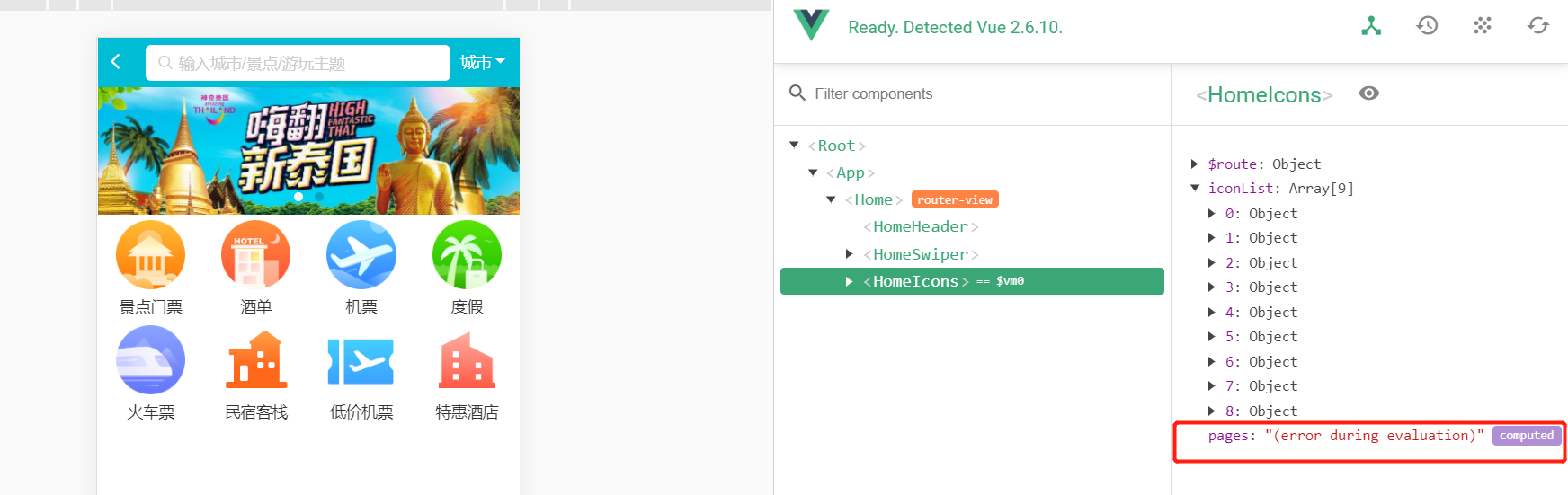
应该显示出来 computed 属性的下拉列。
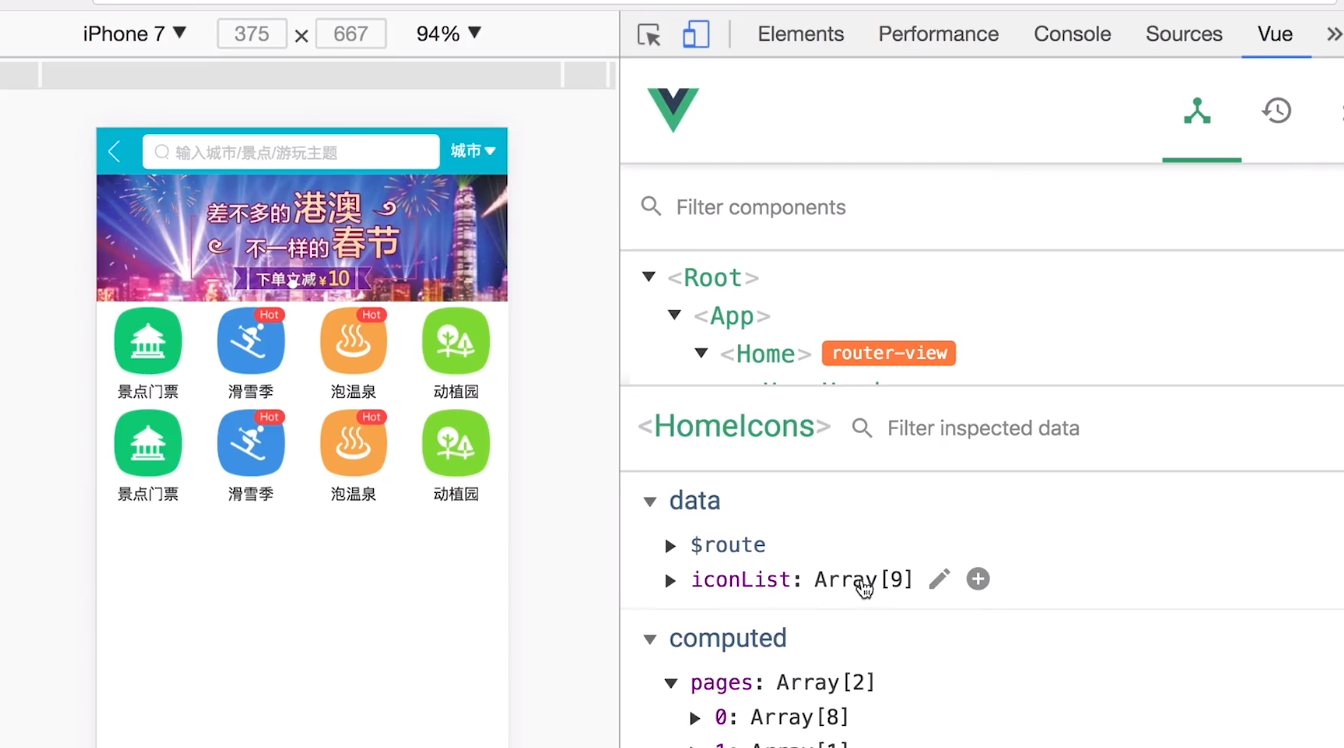
正确显示如下,这里右下角正确的显示出了computed , 求助报错原因!!!
代码如下:(红色代码处!)
<template>

    <div class="icons">

        <swiper>

            <swiper-slide>

                <div class="icon" v-for="item of iconList" :key="item.id">

                    <div class="icon-img">

                        <img class="icon-img-content" :src="item.imgUrl">

                    </div>

                    <p class="icon-desc">{{ item.desc }}</p>

                </div>

            </swiper-slide>

        </swiper>

    </div>

</template>

<script>

export default {

    name: 'HomeIcons',

    data() {

        return {

            iconList: [{

                id: '0001',

                imgUrl: '//s.qunarzz.com/homenode/images/touchheader/piao.png',

                desc: '景点门票'

            },

            {

                id: '0002',

                imgUrl: '//s.qunarzz.com/homenode/images/touchheader/hotel.png',

                desc: '酒单'

            },

            {

                id: '0003',

                imgUrl: '//s.qunarzz.com/homenode/images/touchheader/flight.png',

                desc: '机票'

            },

            {

                id: '0004',

                imgUrl: '//s.qunarzz.com/homenode/images/touchheader/package.png',

                desc: '度假'

            },

            {

                id: '0005',

                imgUrl: '//s.qunarzz.com/homenode/images/touchheader/train.png',

                desc: '火车票'

            },

            {

                id: '0006',

                imgUrl: '//s.qunarzz.com/homenode/images/touchheader/innBnb.png',

                desc: '民宿客栈'

            },

            {

                id: '0007',

                imgUrl: '//s.qunarzz.com/homenode/images/touchheader/bargainflight.png',

                desc: '低价机票'

            },

            {

                id: '0008',

                imgUrl: '//s.qunarzz.com/homenode/images/touchheader/group.png',

                desc: '特惠酒店'

            },

            {

                id: '0009',

                imgUrl: '//s.qunarzz.com/homenode/images/touchheader/haiwai.png',

                desc: '海外酒店'

            }]

        }

    },

    computed: {

        pages () {

            const pages = []

            this.iconList.forEach((item, index) => {

                const page = Math.floor(index / 8)

                if(!pages[page]) {

                    this.pages = []

                }

                pages[page].push(item)

            })

            return pages

        }

    }

}

</script>

<style lang="stylus" scoped>

    @import '~styles/varibles.styl'

    .icons >>> .swiper-container

        height 0

        padding-bottom 50%

    .icon

        position relative

        overflow hidden

        float left

        width 25%

        height 0

        padding-bottom 25%

        .icon-img

            position absolute

            left 0

            right 0

            top 0

            bottom .44rem

            box-sizing border-box

            padding .1rem

            .icon-img-content

                height 100%

                display block

                margin 0 auto

        .icon-desc

            position absolute

            left 0

            right 0

            bottom 0

            height .44rem

            line-height .44rem

            text-align center

            color $darkTextColor

</style>
"(error during evaluation)" computed的更多相关文章
- Python2.7.6标准库内建函数
Built-in Functions abs() divmod() input() open() staticmethod() all() enumerate() int() ord( ...
- Python中的内置函数
2.1 Built-in Functions The Python interpreter has a number of functions built into it that are alway ...
- 论文翻译——Dynamic Pooling and Unfolding Recursive Autoencoders for Paraphrase Detection
Dynamic Pooling and Unfolding Recursive Autoencoders for Paraphrase Detection 动态池和展开递归自动编码器的意译检测 论文地 ...
- Junit4断言
Junit4断言API: http://junit.org/javadoc/latest/index.html Constructor Summary protected Assert() ...
- 深入浅出OOP(六): 理解C#的Enums
MSDN定义:枚举类型(也称为枚举)为定义一组可以赋给变量的命名整数常量提供了一种有效的方法. 例如,假设您必须定义一个变量,该变量的值表示一周中的一天. 该变量只能存储七个有意义的值. 若要定义这 ...
- Matrix Chain Multiplication[HDU1082]
Matrix Chain Multiplication Time Limit: 2000/1000 MS (Java/Others) Memory Limit: 65536/32768 K (J ...
- UVA 442 二十 Matrix Chain Multiplication
Matrix Chain Multiplication Time Limit:3000MS Memory Limit:0KB 64bit IO Format:%lld & %l ...
- UVa 442 矩阵链乘(栈)
Input Specification Input consists of two parts: a list of matrices and a list of expressions. The f ...
- Cross Validation done wrong
Cross Validation done wrong Cross validation is an essential tool in statistical learning 1 to estim ...
随机推荐
- HDU3849-By Recognizing These Guys, We Find Social Networks Useful(无向图的桥)
By Recognizing These Guys, We Find Social Networks Useful Time Limit: 2000/1000 MS (Java/Others) ...
- Socket无法通过防火墙的问题
无论是配好端口还是例外的应用程序都不行 更改本地终结点为 socket.Bind()); IPAddress.Any 不要使用127.0.0.1 不要使用127.0.0.1 不要使用127.0.0.1
- Python3 面向对象进阶1
目录 组合 概念 目的 实现方式 封装 概念 目的 实现方式 访问限制 概念 目的 实现方式 property 概念 目的 实现方式 多态 概念 目的 抽象类 概念 目的 实现方法 鸭子类型 组合 概 ...
- 【Webpack】320- Webpack4 入门手册(共 18 章)(下)
介绍 1. 背景 最近和部门老大,一起在研究团队[EFT - 前端新手村]的建设,目的在于:帮助新人快速了解和融入公司团队,帮助零基础新人学习和入门前端开发并且达到公司业务开发水平. 本文也是属于[E ...
- httpBasic 认证的URL访问
httpBasic 认证 要在发送请求的时候添加HTTP Basic Authentication认证信息到请求中,有两种方法: 1.在请求头中添加Authorization: Authorizati ...
- 什么是jsp(java server pages)
JSP是一种运行在服务器端的脚本语言,是用来开发动态网页的技术,它是JAVA Web 程序开发的重要技术.本章介绍JSP技术的相关概念以及如何开发JSP程序,主要内容包括JSP技术简介.JSP的处理过 ...
- Hadoop相关问题解决
Hadoop相关问题解决 Hive 1.查询hivemeta信息,查到的numRows为-1 集群厂商 集群版本 是否高可用 是否开启认证 cdh 不限 不限 不限 在hivemeta库中可以通过以下 ...
- Nginx学习一路向西
Nginx 学习一路向北 Java大猿帅成长手册,GitHub JavaEgg ,N线互联网开发必备技能兵器谱 1. Nginx简介 1.1 Nginx 概述 NGINX是一个免费.开源.高性能.轻量 ...
- 《Java基础知识》Java包的概念
一.什么是java中的包 Java程序中,为了开发方便,会将功能相似的类放入一个文件夹中,这个文件结构就是包. 二.java中的包的命名规范 域名反写,例如:com.baidu. 三.java中的包的 ...
- C# 几种常见数据结构
一.内存上连续存储,节约空间,可以索引访问,读取快,增删慢 Array:在内存上连续分配的,而且元素类型是一样的,可以坐标访问;读取快--增删慢,长度不变 { //Array:在内存上连续分配的,而且 ...