
Orleans在.net core的开发
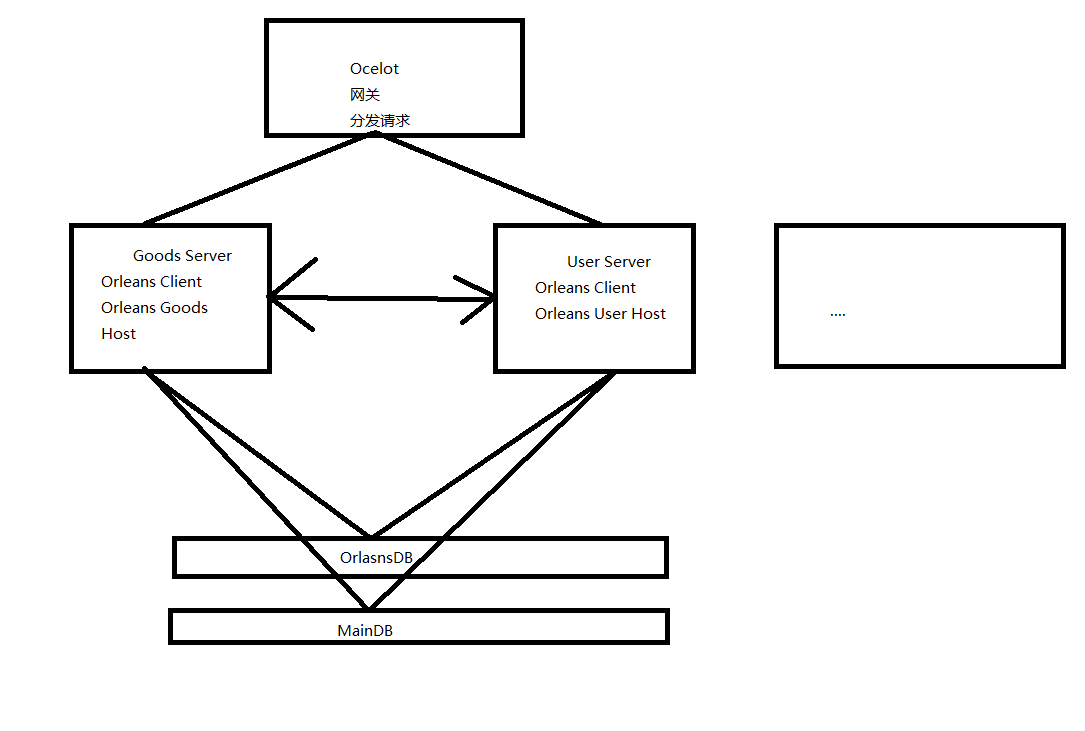

Goods 服务 启动
using System;

using System.Collections.Generic;

using System.Linq;

using System.Net;

using System.Reflection;

using System.Threading;

using System.Threading.Tasks;

using Entity;

using Microsoft.AspNetCore.Builder;

using Microsoft.AspNetCore.Hosting;

using Microsoft.AspNetCore.HttpsPolicy;

using Microsoft.AspNetCore.Mvc;

using Microsoft.Extensions.Configuration;

using Microsoft.Extensions.DependencyInjection;

using Microsoft.Extensions.Logging;

using Microsoft.Extensions.Options;

using Orleans;

using Orleans.Configuration;

using Orleans.Hosting;

using Orleans.Serialization;

namespace Order

{

    public class Startup

    {

        public Startup(IConfiguration configuration)

        {

            Configuration = configuration;

        }

        public IConfiguration Configuration { get; }

        // This method gets called by the runtime. Use this method to add services to the container.

        public void ConfigureServices(IServiceCollection services)

        {

            services.AddMvc().SetCompatibilityVersion(CompatibilityVersion.Version_2_1);

            int silePort = ; int gatewayPort = ; int mainSiloPort = ;

            //启动Host

            StartAsyncHost(silePort, gatewayPort, mainSiloPort, services);

            //启动本地服务

            StartAsyncClient(mainSiloPort, gatewayPort, silePort, services).Wait();

            services.ServerInjectionADD();

        }

        // This method gets called by the runtime. Use this method to configure the HTTP request pipeline.

        public void Configure(IApplicationBuilder app, Microsoft.AspNetCore.Hosting.IHostingEnvironment env)

        {

            if (env.IsDevelopment())

            {

                app.UseDeveloperExceptionPage();

            }

            else

            {

                app.UseHsts();

            }

            app.UseHttpsRedirection();

            app.UseMvc();

        }

        /// <summary>

        /// 在本地启动一个Host

        /// </summary>

        /// <returns></returns>

        async Task<ISiloHost> StartAsyncHost(int silePort, int gatewayPort, int mainSiloPort, IServiceCollection servicesCollection)

        {

            var builder = new SiloHostBuilder()

                   .Configure<SerializationProviderOptions>(d => { d.SerializationProviders.Add(typeof(ProtobufSerializer).GetTypeInfo()); d.FallbackSerializationProvider = typeof(ProtobufSerializer).GetTypeInfo(); })

                    .UseDevelopmentClustering(new IPEndPoint(IPAddress.Loopback, mainSiloPort))

                    .ConfigureEndpoints(siloPort: silePort, gatewayPort: gatewayPort)

                    .Configure<ClusterOptions>(options =>

                    {

                        //ClusterId为集群名称 相同的名称才能被分配到一个集群中

                        options.ClusterId = "dev";

                        //当前服务的名称

                        options.ServiceId = "GoodsServer";

                    })

                    .AddStartupTask(

                      async (IServiceProvider services, CancellationToken cancellation) =>

                      {

                          var grainFactory = services.GetRequiredService<IGrainFactory>();

                          //var grain = grainFactory.GetGrain<IMyGrain>(0);

                          //注册本机服务

                      })

                     //注入打印消息的入口

                     .ConfigureLogging(logging => logging.AddConsole());

            //进行构建

            var host = builder.Build();

            //启动服务

            await host.StartAsync();

            Console.WriteLine("服务启动成功");

            return host;

        }

        async Task StartAsyncClient(int mainSiloProt, int gatewayProt, int siloProt, IServiceCollection servicesCollection)

        {

            IClusterClient client = new ClientBuilder()

                 .Configure<SerializationProviderOptions>(d => { d.SerializationProviders.Add(typeof(ProtobufSerializer).GetTypeInfo()); d.FallbackSerializationProvider = typeof(ProtobufSerializer).GetTypeInfo(); })

                 //与主简仓进行连接

                 .UseStaticClustering(new IPEndPoint[] { new IPEndPoint(GetInternalIp(), gatewayProt) })

               .Configure<ClusterOptions>(options =>

               {

                   options.ClusterId = "dev";

                   options.ServiceId = "GoodsClient";

               })

           //配置刷新简仓的时间 一般来说不会这么短

           //.Configure<GatewayOptions>(d => d.GatewayListRefreshPeriod = TimeSpan.FromSeconds(5))

           .ConfigureLogging(logging => logging.AddConsole()).Build();

           await client.Connect();

            Console.WriteLine("Orleans客户端已经启动");

            servicesCollection.AddSingleton(client);

        }

        public static IPAddress GetInternalIp()

        {

            IPHostEntry myEntry = Dns.GetHostEntry(Dns.GetHostName());

            return myEntry.AddressList.FirstOrDefault(e => e.AddressFamily.ToString().Equals("InterNetwork"));

        }

    }

}
using Microsoft.AspNetCore.Mvc;

using Microsoft.Extensions.DependencyInjection;

using Orleans;

using System;

using System.Collections.Generic;

using System.Linq;

using System.Threading.Tasks;

namespace Order

{

    /// <summary>

    /// 注入本地服务

    /// </summary>

    public static class ServerInjection

    {

        /// <summary>

        /// 服务注入  在最后使用

        /// </summary>

        /// <param name="services"></param>

        public static void ServerInjectionADD(this IServiceCollection services) {

            services.AddSingleton<IShoppingRecord.IShoppingRecord, OrderServer.OrderServer>();

            //引用对象留在最后

            serviceProvider = services.BuildServiceProvider();

        }

        public static ServiceProvider serviceProvider { get; set; }

        public static T GetServer<T>(this Controller controller) where T:class, IGrainWithIntegerKey

        {

           var TService = serviceProvider.GetService<T>();

            if (TService==null)

            {

                var client = serviceProvider.GetService<IClusterClient>();

                if (client==null)

                {

                    throw new Exception("客户端没有启动 或者没有被注入");

                }

                TService = client.GetGrain<T>();

                if (TService==null)

                {

                    throw new Exception("没有找到该类型" + TService.GetType());

                }

                return TService;

            }

            return TService;

        }

    }

}
截图
Goods服务
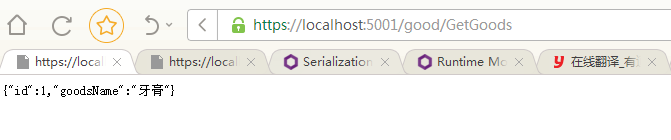
Order服务

GitHub地址:
Orleans在.net core的开发的更多相关文章
- ASP.NET Core WebAPI 开发-新建WebAPI项目
ASP.NET Core WebAPI 开发-新建WebAPI项目, ASP.NET Core 1.0 RC2 即将发布,我们现在来学习一下 ASP.NET Core WebAPI开发. 网上已经有泄 ...
- ASP.NET Core Web开发学习笔记-1介绍篇
ASP.NET Core Web开发学习笔记-1介绍篇 给大家说声报歉,从2012年个人情感破裂的那一天,本人的51CTO,CnBlogs,Csdn,QQ,Weboo就再也没有更新过.踏实的生活(曾辞 ...
- [.net 面向对象程序设计深入](9).NET Core 跨平台开发环境搭建
[.net 面向对象程序设计深入](9).NET Core 跨平台开发环境搭建 1.概述 读前必备:认识.NET Core 上篇介绍了.NET 新的生态环境:包括.NET Framework..NET ...
- ASP.NET Core 企业级开发架构简介及框架汇总
企业开发框架包括垂直方向架构和水平方向架构.垂直方向架构是指一个应用程序的由下到上叠加多层的架构,同时这样的程序又叫整体式程序.水平方向架构是指将大应用分成若干小的应用实现系统功能的架构,同时这样的系 ...
- 使用.NET Core快速开发一个较正规的命令行应用程序
程序员的世界,命令行工具一直是"体验非常友好"的工具,也能自动化完成很多事情,同时还能结合shell来进行某项任务的批处理(脚本).在.NET Core中,命令行应用程序是基础,但 ...
- ASP.NET Core MVC+EF Core从开发到部署
笔记本电脑装了双系统(Windows 10和Ubuntu16.04)快半年了,平时有时间就喜欢切换到Ubuntu系统下耍耍Linux,熟悉熟悉Linux命令.Shell脚本以及Linux下的各种应用的 ...
- 《ASP.NET Core跨平台开发从入门到实战》Web API自定义格式化protobuf
<ASP.NET Core跨平台开发从入门到实战>样章节 Web API自定义格式化protobuf. 样章 Protocol Buffers 是一种轻便高效的结构化数据存储格式,可以用于 ...
- 使用Asp.Net Core MVC 开发项目实践[第一篇:项目结构说明]
先从下图看整体项目结构: Mango.Manager: 为后台管理项目 Mango.Web: 为前台项目 Mango.Framework.Core: 为常用的基础操作类项目 Mango.Framewo ...
- ASP.NET Core WebAPI 开发-新建WebAPI项目 转
转 http://www.cnblogs.com/linezero/p/5497472.html ASP.NET Core WebAPI 开发-新建WebAPI项目 ASP.NET Core We ...
随机推荐
- BASH 编程之变量高级篇
内部变量 • $$与$BASHPID都代表着执行程序的进程 ID,我们可以通过 echo 打印,并用 ps 指令检查得到相同的进程 ID [root@oracle ~]# echo $BASHPID ...
- 用这个库 3 分钟实现让你满意的表格功能:Bootstrap-Table
本文作者:HelloGitHub-kalifun 这是 HelloGitHub 推出的<讲解开源项目>系列,今天给大家推荐一个基于 Bootstrap 和 jQuery 的表格插件:Boo ...
- 前端与算法 leetcode 7. 整数反转
目录 # 前端与算法 leetcode 7. 整数反转 题目描述 概要 提示 解析 解法 算法 传入测试用例的运行结果 执行结果 GitHub仓库 # 前端与算法 leetcode 7. 整数反转 题 ...
- PHP 向数组头部插入数据
PHP 向数组头部插入数据 函数: array_unshift() 示例: $s = array('a' => 0, 'b' => 3); array_unshift($s, '5'); ...
- pat 1100 Mars Numbers(20 分)
1100 Mars Numbers(20 分) People on Mars count their numbers with base 13: Zero on Earth is called &qu ...
- pat 1136 A Delayed Palindrome(20 分)
1136 A Delayed Palindrome(20 分) Consider a positive integer N written in standard notation with k+1 ...
- nyoj 86-找球号(一)二分法
86-找球号(一) 内存限制:64MB 时间限制:3000ms 特判: No 通过数:14 提交数:48 难度:3 题目描述: 在某一国度里流行着一种游戏.游戏规则为:在一堆球中,每个球上都有一个整数 ...
- Web Scraper 翻页——利用 Link 选择器翻页 | 简易数据分析 14
这是简易数据分析系列的第 14 篇文章. 今天我们还来聊聊 Web Scraper 翻页的技巧. 这次的更新是受一位读者启发的,他当时想用 Web scraper 爬取一个分页器分页的网页,却发现我之 ...
- websrom编译器
webstorm less环境配置 备注: 安装node后,在命令行输入npm install -g less 即可安装less,打开webstorm setting-Tools-FileWatche ...
- Stream系列(四)Sorted方法使用
排序和反向排序 EmployeeTestCase.java package com.example.demo; import lombok.Data; import lombok.ToString; ...