
Easyui datagrid editor为combobox时指定数据源
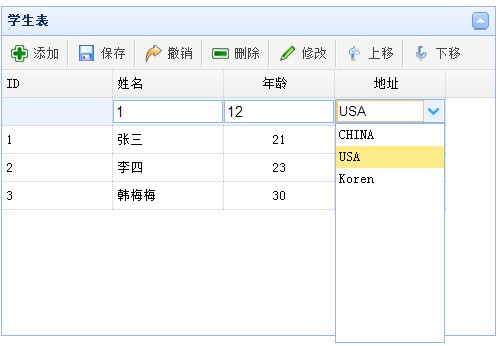
当在datagrid行内部应用添加编辑操作时,引入combobox是非常方便的操作,我在引入combobox时对数据源这快做个总结,在做demo的过程中遇到个问题,就是当你选择了下拉框的值后点击保存,此时显示的是value值,而不是text值,这时使用格式化函数解决此问题。
var Address = [{ "value": "1", "text": "CHINA" }, { "value": "2", "text": "USA" }, { "value": "3", "text": "Koren" }];

function unitformatter(value, rowData, rowIndex) {

    if (value == 0) {

        return;

    }

    for (var i = 0; i < Address.length; i++) {

        if (Address[i].value == value) {

            return Address[i].text;

        }

    }

}

function GetTable() {

    var editRow = undefined;

    $("#Student_Table").datagrid({

        height: 300,

        width: 450,

        title: '学生表',

        collapsible: true,

        singleSelect: true,

        url: '/Home/StuList',

        idField: 'ID',

        columns: [[

		 { field: 'ID', title: 'ID', width: 100 },

        	{ field: 'Name', title: '姓名', width: 100, editor: { type: 'text', options: { required: true } } },

        	{ field: 'Age', title: '年龄', width: 100, align: 'center', editor: { type: 'text', options: { required: true } } },

            { field: 'Address', title: '地址', width: 100, formatter: unitformatter, align: 'center', editor: { type: 'combobox', options: { data: Address, valueField: "value", textField: "text" } } }

        ]],

        toolbar: [{

            text: '添加', iconCls: 'icon-add', handler: function () {

                if (editRow != undefined) {

                    $("#Student_Table").datagrid('endEdit', editRow);

                }

                if (editRow == undefined) {

                    $("#Student_Table").datagrid('insertRow', {

                        index: 0,

                        row: {}

                    });

                    $("#Student_Table").datagrid('beginEdit', 0);

                    editRow = 0;

                }

            }

        }, '-', {

            text: '保存', iconCls: 'icon-save', handler: function () {

                $("#Student_Table").datagrid('endEdit', editRow);

                //如果调用acceptChanges(),使用getChanges()则获取不到编辑和新增的数据。

                //使用JSON序列化datarow对象,发送到后台。

                var rows = $("#Student_Table").datagrid('getChanges');

                var rowstr = JSON.stringify(rows);

                $.post('/Home/Create', rowstr, function (data) {

                });

            }

        }, '-', {

            text: '撤销', iconCls: 'icon-redo', handler: function () {

                editRow = undefined;

                $("#Student_Table").datagrid('rejectChanges');

                $("#Student_Table").datagrid('unselectAll');

            }

        }, '-', {

            text: '删除', iconCls: 'icon-remove', handler: function () {

                var row = $("#Student_Table").datagrid('getSelections');

            }

        }, '-', {

            text: '修改', iconCls: 'icon-edit', handler: function () {

                var row = $("#Student_Table").datagrid('getSelected');

                if (row != null) {

                    if (editRow != undefined) {

                        $("#Student_Table").datagrid('endEdit', editRow);

                    }

                    if (editRow == undefined) {

                        var index = $("#Student_Table").datagrid('getRowIndex', row);

                        $("#Student_Table").datagrid('beginEdit', index);

                        editRow = index;

                        $("#Student_Table").datagrid('unselectAll');

                    }

                } else {

                }

            }

        }, '-', {

            text: '上移', iconCls: 'icon-up', handler: function () {

                MoveUp();

            }

        }, '-', {

            text: '下移', iconCls: 'icon-down', handler: function () {

                MoveDown();

            }

        }],

        onAfterEdit: function (rowIndex, rowData, changes) {

            editRow = undefined;

        },

        onDblClickRow: function (rowIndex, rowData) {

            if (editRow != undefined) {

                $("#Student_Table").datagrid('endEdit', editRow);

            }

            if (editRow == undefined) {

                $("#Student_Table").datagrid('beginEdit', rowIndex);

                editRow = rowIndex;

            }

        },

        onClickRow: function (rowIndex, rowData) {

            if (editRow != undefined) {

                $("#Student_Table").datagrid('endEdit', editRow);

            }

        }

    });

}
效果图:
Easyui datagrid editor为combobox时指定数据源的更多相关文章
- 解决easyui datagrid加载数据时,checkbox列没有根据checkbox的值来确定是否选中
背景: 昨天帮朋友做一个easyui datagrid的小实例时,才发现easyui datagrid的checkbox列,没有根据值为true或false来选中checkbox,当时感觉太让人失 ...
- easyui datagrid editor combobox添加空选则清空combobox框
<script type='text/javascript'> var editIndex = undefined; $(function() { $('#tb1').datagrid({ ...
- easyUI datagrid editor扩展dialog
easyUI datagrid简单使用:着重两点1.editor对象的click事件:2.将dialog窗体内的值填写到当前正编辑的单元格内 <!DOCTYPE html> <htm ...
- 实现easyui datagrid在没有数据时显示相关提示内容
本示例实现easyui datagrid加载/查询数据时,如果没有相关记录,则在datagrid中显示没有相关记录的提示信息,效果如下图所示 本实例要实现如下图所示的效果: 本示例easyui版本为1 ...
- easyui datagrid editor checkbox 单击事件
Easyui datagrid treegrid中能够为行追加checkbox元素.比如: $('#tt').treegrid({ url:'get_data.php', idField:'id', ...
- easyui datagrid 中添加combobox
项目需要,如下图所示 <!DOCTYPE html> <html> <head> <meta charset="UTF-8"> &l ...
- easyui datagrid种编辑器combobox选择的值不显示解决方案
var combobox_json = [{ "combobox_value" : "GDLB01", "combobox_name" : ...
- Easyui datagrid加载数据时默认全选的问题
问题描述: 最近使用 Easyui datagrid 展示数据,之前一直使用很正常,今天出现了一个怪异问题 加载数据后,只要点击选中列 ck 的任意行或多行,再刷新时整个datagrid的所有数据都 ...
- 关于EasyUI datagrid editor combogrid搜索框的实现
首先需要datagrid editor对combogrid的扩展,这个是别人实现的: $.extend($.fn.datagrid.defaults.editors, { combogrid: { i ...
随机推荐
- 【codevs】刷题记录→_→(推荐看!)
注:本文是我原先在csdn内写的一篇博文,现转到这里,两篇博文尽量同时更新. //#include<iostream->shuati> //define 为什么刷 学长☞hzwer ...
- TreeView 使用方法:(在View.Details模式下)
1.建立TreeView的標題 2.建立TreeView的Item 3.在TreeView的Item中的建立SubItem 如果將各部 ...
- java读写Properties属性文件公用方法
Java中有个比较重要的类Properties(Java.util.Properties),主要用于读取Java的配置文件. 它提供了几个主要的方法: 1. getProperty ( String ...
- 多线程导出大规模excel文件
文章有点水,和前几篇没有太大区别,但是单线程处理大文件导出会非常耗时间,用到多线程才能更加合理的利用资源.大文件也可能会超出excel工作表范围.这里也有相应处理 参考:用DataGridView导入 ...
- 探索C#之虚拟桶分片
阅读目录 背景 虚拟桶(virtual buckets) 实现 总结 背景 关于数据分片讨论最多的是一致性hash,然而它并不是分布式设计中的银弹百试百灵. 在数据稳定性要求比较高的场景下它的缺点是不 ...
- ASP.NET MVC 路由(四)
ASP.NET MVC路由(四) 前言 在前面的篇幅中我们讲解路由系统在MVC中的运行过程以及粗略的原理,想必看过前面篇幅的朋友应该对路由有个概念性的了解了,本篇来讲解区域,在读完本篇后不会肯定的让你 ...
- CSharpGL(1)从最简单的例子开始使用CSharpGL
CSharpGL(1)从最简单的例子开始使用CSharpGL 2016-08-13 由于CSharpGL一直在更新,现在这个教程已经不适用最新的代码了.CSharpGL源码中包含10多个独立的Demo ...
- 花一分钟来看看Worktile是如何为团队协作而生的
团队协作,我们想的更深.更远.更多,花一分钟来看看我们特别奉献的故事,然后去注册一个账号,邀请小伙伴一起来工作,你会体会Worktile才是真正懂你的协作方式.
- Mac安装Bower
1.安装bower,得首先安装node: brew install npm //npm是nodejs的程序包管理器,如果安装过nodejs,可忽略此步. 2.安装Git(因为需要从Git仓库获取一些代 ...
- JSON数据的定义
<!DOCTYPE html PUBLIC "-//W3C//DTD XHTML 1.0 Transitional//EN" "http://www.w3.org/ ...