
openlayers6结合geoserver实现地图空间查询(附源码下载)
前言
之前写过一篇 openlayers4 版本的地图空间查询文章,但是由于是封装一层 js 代码写的,很多初学者看起来比较有点吃力,所以本篇文章重新写一篇地图空间查询文章,直接基于最新版本 openlayers6 写的,纯粹 html + js + css形式,没有任何封装。
内容概览
1.基于 openlayers6 实现地图空间查询
2.源代码 demo 下载
效果图如下: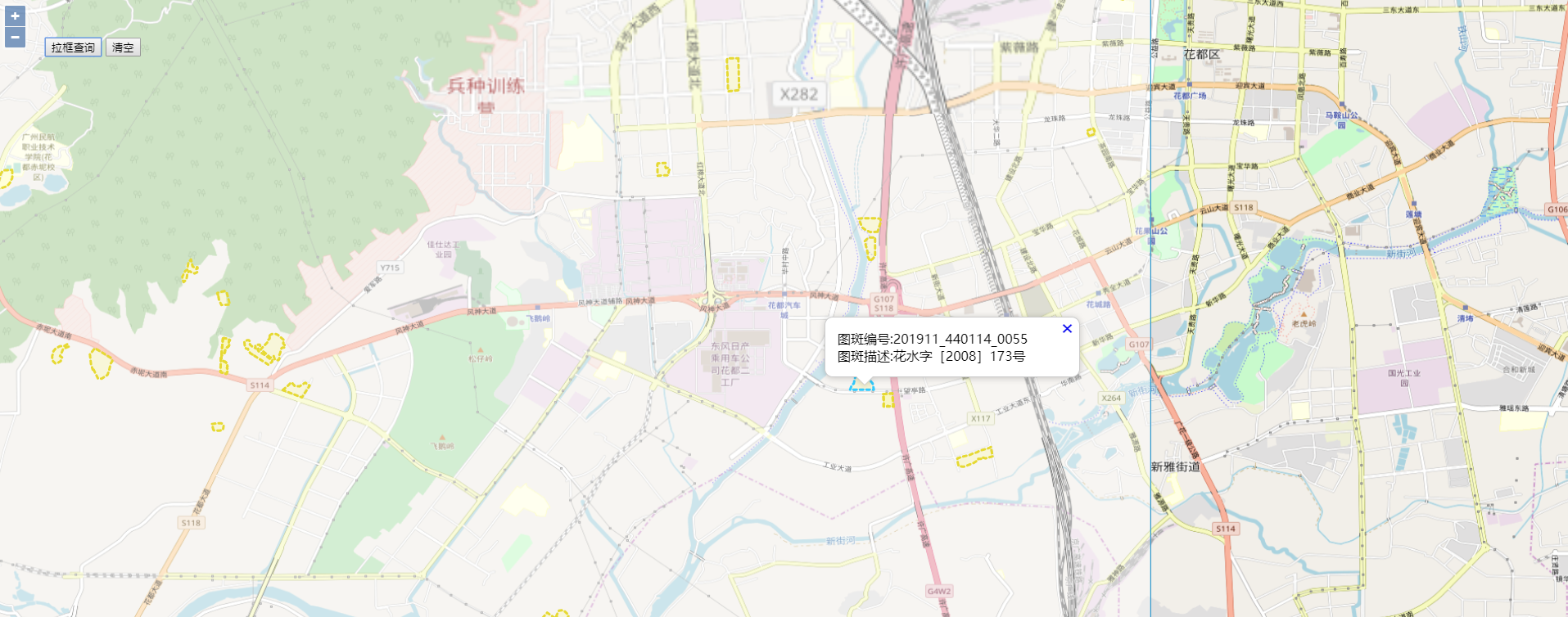
具体实现过程
- html 样式
html, body, #map {

height: 100%;

padding: 0;

margin: 0;

}

.ol-popup {

position: absolute;

background-color: white;

-webkit-filter: drop-shadow(0 1px 4px rgba(0,0,0,0.2));

filter: drop-shadow(0 1px 4px rgba(0,0,0,0.2));

padding: 15px;

border-radius: 10px;

border: 1px solid #cccccc;

bottom: 12px;

left: -50px;

min-width: 280px;

}

.ol-popup:after, .ol-popup:before {

top: 100%;

border: solid transparent;

content: " ";

height: 0;

width: 0;

position: absolute;

pointer-events: none;

}

.ol-popup:after {

border-top-color: white;

border-width: 10px;

left: 48px;

margin-left: -10px;

}

.ol-popup:before {

border-top-color: #cccccc;

border-width: 11px;

left: 48px;

margin-left: -11px;

}

.ol-popup-closer {

text-decoration: none;

position: absolute;

top: 2px;

right: 8px;

}

.ol-popup-closer:after {

content: "✖";

}
- 矢量图层默认样式以及高亮样式
//绘制geojson矢量图层样式

var geoJsonStyle = new ol.style.Style({

stroke: new ol.style.Stroke({

color: '#e6d933',

lineDash: [4],

width: 3

}),

fill: new ol.style.Fill({

color: 'rgba(255, 255, 0, 0.1)'

})

});

//绘制geojson矢量图层高亮样式

var geoJsonHLightStyle = new ol.style.Style({

stroke: new ol.style.Stroke({

color: '#33CCFF',

lineDash: [4],

width: 3

}),

fill: new ol.style.Fill({

color: 'rgba(255, 255, 0, 0.1)'

})

});
- 创建矢量图层以及绘制工具图层
var geojsonLayer = new ol.layer.Vector({

source: new ol.source.Vector(),

style: geoJsonStyle

});

//绘制工具图形

var drawsource = new ol.source.Vector();

var drawlayer = new ol.layer.Vector({

source: drawsource

});

var layers = [

new ol.layer.Tile({

source: new ol.source.OSM()

}),

/*new ol.layer.Tile({

source: new ol.source.TileArcGISRest({

url: 'https://server.arcgisonline.com/arcgis/rest/services/World_Imagery/MapServer'

})

}),*/

drawlayer,

geojsonLayer,

];
- 创建地图
var map = new ol.Map({

layers: layers,

overlays: [overlay],

target: 'map',

view: new ol.View({

projection: 'EPSG:4326',

center: [104.114129, 37.550339],

zoom: 4

})

});
- 监听地图鼠标移动事件,设置选择矢量图层要素高亮以及弹出气泡窗口效果
//监听地图鼠标移动事件

map.on('pointermove',function(e) {

if (e.dragging) {

return;

}

var feature =map.forEachFeatureAtPixel(e.pixel,

function(feature) {

return feature;

});

//console.log('feature',feature);

if(feature==undefined || !feature.values_.map_num){//捕捉不到矢量数据,设置矢量图层默认样式

geojsonLayer.getSource().forEachFeature(function(feature) {

feature.setStyle(geoJsonStyle);

});

//隐藏气泡窗口

overlay.setPosition(undefined);

closer.blur();

}else{//捕捉到矢量数据,设置矢量图层高亮样式

if(feature.values_ && feature.values_.map_num){

feature.setStyle(geoJsonHLightStyle);

//弹出气泡窗口

var coordinate = e.coordinate;

content.innerHTML = '图斑编号:'+feature.values_.map_num+'</br>图斑描述:'+feature.values_.description;

overlay.setPosition(coordinate);

}

}

})
- 空间查询核心函数
var geoserverUrl = 'http://localhost:8080/geoserver/GIS';

/*空间查询图层

*@method queryByPolygon

*@param polygon 空间范围

*@param typeName 图层名称

*@return null

*/

function queryByPolygon(polygon, typeName, callback){

var filter =

'<Filter xmlns="http://www.opengis.net/ogc" xmlns:gml="http://www.opengis.net/gml">';

filter += '<And>';

filter += '<Intersects>';

filter += '<PropertyName>geom</PropertyName>';

filter += '<gml:Polygon>';

filter += '<gml:outerBoundaryIs>';

filter += '<gml:LinearRing>';

filter += '<gml:coordinates>' + polygon + '</gml:coordinates>';

filter += '</gml:LinearRing>';

filter += '</gml:outerBoundaryIs>';

……
完整demo源码见小专栏文章尾部:GIS之家小专栏
文章尾部提供源代码下载,对本专栏感兴趣的话,可以关注一波
openlayers6结合geoserver实现地图空间查询(附源码下载)的更多相关文章
- cesium结合geoserver实现地图空间查询(附源码下载)
前言 cesium 官网的api文档介绍地址cesium官网api,里面详细的介绍 cesium 各个类的介绍,还有就是在线例子:cesium 官网在线例子,这个也是学习 cesium 的好素材. 内 ...
- leaflet 结合 geoserver 实现地图空间查询(附源码下载)
前言 leaflet 入门开发系列环境知识点了解: leaflet api文档介绍,详细介绍 leaflet 每个类的函数以及属性等等 leaflet 在线例子 leaflet 插件,leaflet ...
- openlayers6结合geoserver实现地图属性查询(附源码下载)
前言 之前写过一篇 openlayers4 版本的地图属性查询文章,但是由于是封装一层 js 代码写的,很多初学者看起来比较有点吃力,所以本篇文章重新写一篇地图属性查询文章,直接基于最新版本 open ...
- cesium 结合 geoserver 实现地图属性查询(附源码下载)
前言 cesium 官网的api文档介绍地址cesium官网api,里面详细的介绍 cesium 各个类的介绍,还有就是在线例子:cesium 官网在线例子,这个也是学习 cesium 的好素材. 内 ...
- openlayers6结合geoserver实现地图矢量瓦片(附源码下载)
内容概览 1.基于openlayers6结合geoserver实现地图矢量瓦片2.源代码demo下载 效果图如下: 实现思路:利用Geoserver发布矢量切片服务,然后openlayers调用矢量瓦 ...
- leaflet 结合 geoserver 实现地图属性查询(附源码下载)
前言 leaflet 入门开发系列环境知识点了解: leaflet api文档介绍,详细介绍 leaflet 每个类的函数以及属性等等 leaflet 在线例子 leaflet 插件,leaflet ...
- openlayers6实现webgl点图层渲染效果(附源码下载)
前言:openlayers6推出来的有一段时间,推出来的新特性见:https://github.com/openlayers/openlayers/releases/该版本的主要功能是能够组合具有不同 ...
- arcgis api 3.x for js 热力图优化篇-不依赖地图服务(附源码下载)
前言 关于本篇功能实现用到的 api 涉及类看不懂的,请参照 esri 官网的 arcgis api 3.x for js:esri 官网 api,里面详细的介绍 arcgis api 3.x 各个类 ...
- arcgis api 3.x for js 入门开发系列十一地图统计图(附源码下载)
前言 关于本篇功能实现用到的 api 涉及类看不懂的,请参照 esri 官网的 arcgis api 3.x for js:esri 官网 api,里面详细的介绍 arcgis api 3.x 各个类 ...
随机推荐
- 深入理解计算机系统 第三章 程序的机器级表示 part3
这周看了刘老师提供的相关视频,以及书中对应的章节“3.7 过程” 这一节分为运行时栈.转移控制.数据传送.栈上的局部存储.寄存器中的局部存储空间和递归过程这 6 个小节 其中前 3 小节看懂了一部分内 ...
- beyong Compare4解决30天的评估期结束
刚开始是删掉注册表的CacheId(无效) 1.在搜索栏中输入 regedit ,打开注册表2.删除项目CacheId :HKEY_CURRENT_USER\Software\Scooter Soft ...
- bat脚本知识总结
1常用基本命令 1.1 @ 它的作用是让执行窗口中不显示它后面这一行的命令本身 1.2 echo 它其实是一个开关命令,就是说它只有两种状态:打开和关闭.于是就有了echo on 和echo off两 ...
- scrapy介绍及使用
scrapy的流程 其流程可以描述如下: 调度器把requests-->引擎-->下载中间件--->下载器 下载器发送请求,获取响应---->下载中间件---->引擎-- ...
- 剑指Offer-23.二叉搜索树的后序遍历序列(C++/Java)
题目: 输入一个整数数组,判断该数组是不是某二叉搜索树的后序遍历的结果.如果是则输出Yes,否则输出No.假设输入的数组的任意两个数字都互不相同. 分析: 二叉树的后序遍历也就是先访问左子树,再访问右 ...
- aws msk
1. 建立3个私网子网 2. 建立msk
- ansible on aws linux 2
1. 安装epel yum install -y https://dl.fedoraproject.org/pub/epel/epel-release-latest-7.noarch.rpm 2. 安 ...
- kali下安装mobsf
1.查看kali版本,安装mobsf对kali版本的要求是大于3.0并且是64位 uname -a 2.安装docker,有选择的地方直接回车就好 apt-get install docker doc ...
- beta week 2/2 Scrum立会报告+燃尽图 01
此作业要求参见https://edu.cnblogs.com/campus/nenu/2019fall/homework/9954 一.小组情况 队名:扛把子 组长:孙晓宇 组员:宋晓丽 梁梦瑶 韩昊 ...
- 百度杯 十二月 what_the_fuck
对于这道题,我还真的想说 what_the_fuck !! 这道题拿到就只发觉一个格式化字符串漏洞,其他的就找不到了 . unsigned __int64 sub_4008C5() { char s; ...