
Linux Bash之通配符
通配符是我们在shell环境中不知不觉中都会用到的,有时甚至都不会考虑到去探究其实现过程,因为使用得太普遍了。而清晰地理解每一个过程,将有助于我们的分析和调试。
说白了,通配符就是在 shell 环境下用来选择匹配给定模式的文件簇的特殊字符。下面是一段相对正式的定义,援引自https://bash.cyberciti.biz/guide/Wildcards。
Wildcards is one of the most important features of Bash shell. It allows you to select a group of files. For example you can select all C programming files in

a GUI file manager with mouse. To select all C programming files in a Bash shell you use wildcards.

In short wildcards are nothing but special characters that allows you to select a group of files that matches certain pattern.
通配符一般只出现在命令的参数中,当 shell 在参数中遇到了通配符时,会将其当做路径或文件名区在磁盘上搜寻最可能的匹配,若符合要求的匹配存在,则进行代换,否则就将该通配符作为一个普通字符传递给命令,然后由命令进行处理。
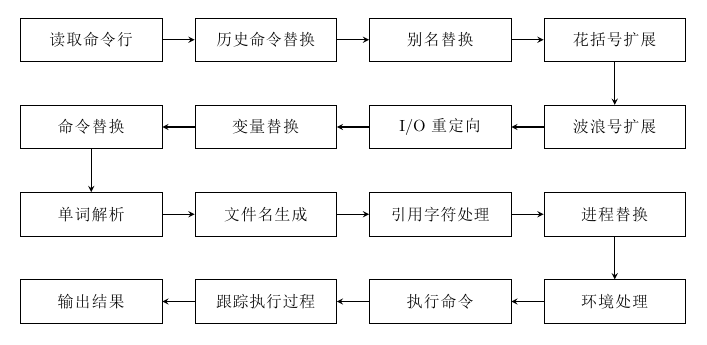
如下图1-1所示为 shell 进行命令行参数解析时的全过程,非常繁琐但很重要。
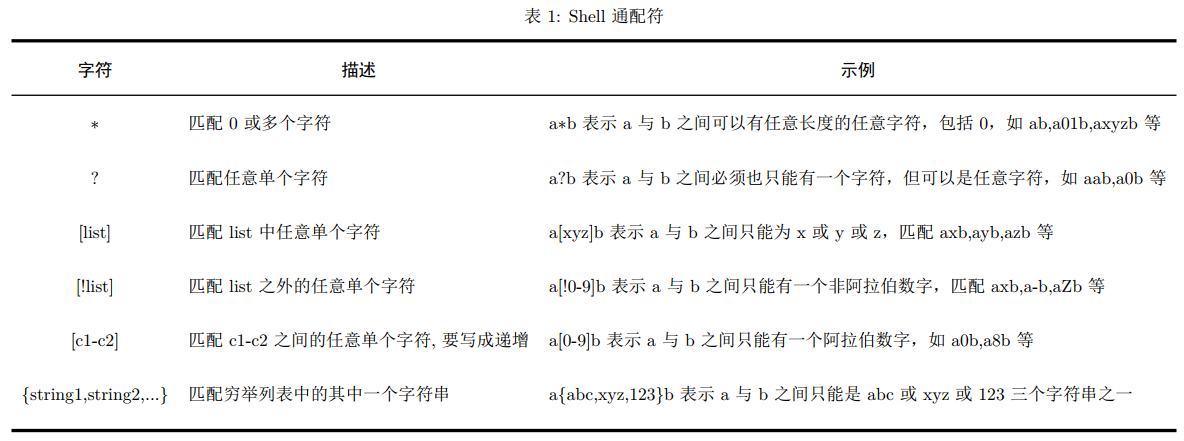
shell 常见通配符如表1所示。
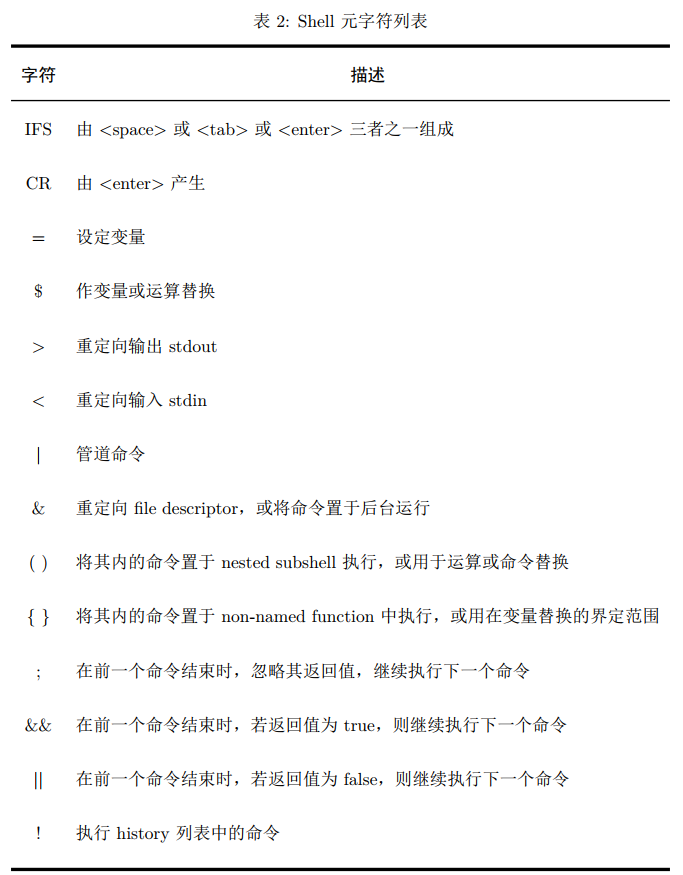
而除了有通配符之外,还有一系列特有的特殊元字符,如表2所示。这些元字符基本是作用在命令上面,用作多命令分割或参数分割。要注意这里的 {} ,因为表1里面也有类似的字符,实际上他们的作用范围并不相同,因此不会出现混淆。
metacharacter A character that, when unquoted, separates words. One of the following: | & ; ( ) < > space tab另外对于表1和表2中的特殊字符,如果我们想让其变成普通字符,就需要使用转义符,shell中提供三种转义符,如表3所示。
There are three quoting mechanisms: the escape character, single quotes, and double quotes.

A non-quoted backslash (\) is the escape character. It preserves the literal value of the next character that follows, with the exception of <newline>. If a \<newline>
pair appears, and the backslash is not itself quoted, the \<newline> is treated as a line continuation (that is, it is removed from the input stream and effectively ignored).
Enclosing characters in single quotes preserves the literal value of each character within the quotes. A single quote may not occur between single quotes, even when preceded by a backslash. Enclosing characters in double quotes preserves the literal value of all characters within the quotes, with the exception of $, `, \, and, when history expansion is enabled, !.
The characters $ and ` retain their special meaning within double quotes. The backslash retains its special meaning only when followed by one of the following characters: $, `, ", \, or <newline>.
A double quote may be quoted within double quotes by preceding it with a backslash. If enabled, history expansion will be performed unless an ! appearing in double quotes
is escaped using a backslash. The backslash preceding the ! is not removed.其中单引号与双引号的区别如下:
- 单引号属于强引用,它会忽略所有被引起来的字符的特殊处理,被引用起来的字符会被原封不动地使用,只是引号范围内不允许再引用单引号。
- 双引号属于弱引用,它会对其中几个被引用起来的字符做特殊处理,其它的则忽略。例如:
- 其中 $ 加变量名可以取变量的值;
- 反引号和 $() 括号里面的字符会被当做命令执行后替换原来的字符;
- 需要使用 $ ` " 时需要通过反斜杠转义。

参考资料
[1] shell脚本【命令解析过程】
[2] Linux Shell 通配符、元字符、转义符使用实例介绍
Linux Bash之通配符的更多相关文章
- [转帖]linux bash环境变量简单总结
linux bash环境变量简单总结 来源链接:http://www.178linux.com/8005 原创文章,如有转载,请注明原文地址 需要简单学习一下. 其实 我都是直接放一个 .sh文件到 ...
- 转: windows 10使用原生linux bash命令行
转: https://www.zybuluo.com/pandait/note/337430 windows 10使用原生linux bash命令行 linux bash windows-10 第一时 ...
- Linux Bash代码 利用for循环实现命令的多次执行
Linux Bash代码 [yuanhao15@lu01 libsvm-rank-2.81]$ for ((i=0; i<=19; i++)) do ./svm-train -s 5 -c 10 ...
- linux BASH shell设置字体与背景颜色
linux BASH shell下设置字体及背景颜色的方法. BASH shell下设置字体及背景颜色 echo -e "\e[31mtest\e[41m" \e[30m 将字 ...
- Linux:-bash: ***: command not found
Linux:-bash: ***: command not found,系统很多命令都用不了,均提示没有此命令. 突然之间linux很多命令都用不了,均提示没有此命令. 这应该是系统环境变量出现了问题 ...
- Linux Bash命令关于程序调试详解
转载:http://os.51cto.com/art/201006/207230.htm 参考:<Linux shell 脚本攻略>Page22-23 Linux bash程序在程序员的使 ...
- 禁用Linux bash rm --force
防止无意的Linux bash rm --force 二.禁用rm -rf 因为rm -rf 删除文件的时候,经常会不小心将系统文件或者多个有用的目录删除掉.有两种方法:1,每次删除都用-i(inte ...
- linux中的通配符、元字符、转义符
linux中的通配符.元字符.转义符 linux中的通配符元字符转义符 shell命令的构成 通配符 元字符meta 转义符 example reference shell命令的构成 每条linux命 ...
- linux bash关闭标准输出1(exec 1<&-)后重新打开
linux bash shell的再次学习. 文件描述符: stdin,stdout 和 stderr 的文件描述符分别是 0,1 和 2(一个文件描述符说白了就是文件系统为了跟踪这个打开的文件而分配 ...
随机推荐
- Python 编程语言要掌握的技能之一:使用数字与字符串的技巧
最佳实践 1. 少写数字字面量 “数字字面量(integer literal)” 是指那些直接出现在代码里的数字.它们分布在代码里的各个角落,比如代码 del users[0] 里的 0 就是一个数字 ...
- matlab-汉字unicode编码转换
str='黑大哥'bianma=unicode2native(str); disp(bianma); pp=native2unicode(bianma);disp(pp)
- PHP+Redis实现延迟任务,实现自动取消与完成订单
简单定时任务解决方案:使用redis的keyspace notifications(键失效后通知事件) : (A)业务场景: 1.当一个业务触发以后需要启动一个定时任务,在指定时间内再去执行一个任务( ...
- Dubbo实现登陆
一.目录展示 二.dubbo_logins_service 2.1 实体类和service层 2.2 logins实体类 package com.login.entity; import java.i ...
- Error : Program type already present: android.support.design.widget.CoordinatorLayout$
背景 因为公司一个app项目需要扩展,因为功能较多且较完整的流程与业务,而且和以前的业务关系不大,所以我整合到了 另外一个分包中(代号:newFunc,请注意是代号)进行依赖. 当我写完这部分业务开始 ...
- 如何平滑优雅地在Rancher 2.x中升级cert-manager?
作者: Nassos Michas丨European Dynamics SA, CTO 如果你正在使用由Rancher提供的Helm Chart在Rancher管理的Kubernetes集群中安装ce ...
- Prometheus PromQL 基础
目录 时序 4 种类型 Counter Gauge Histogram Summary Histogram vs Summary 操作符 时序 4 种类型 Prometheus 时序数据分为 Coun ...
- 单核苷酸多态性SNP(single nucleotide polymorphism)
定义 主要指基因组水平上由单个核苷酸的变异所引起的 DNA 序列多态性. 在基因组水平上由单个核苷酸的变异所引起的DNA序列多态性.即:在不同个体的同一条染色体或同一位点的核苷酸序列中,绝大多数核苷酸 ...
- C语言I作业10
问题 回答 这个作业属于哪个课程 C语言程序设计II 这个作业要求在哪里 https://edu.cnblogs.com/campus/zswxy/SE2019-2/homework/10100 我在 ...
- phpStudy搭建PHP服务器
目录 1 下载 2 安装 3 新建站点 4 配置host phpStudy是一个PHP调试环境的程序集成包. 该程序包集成最新的 Apache+Nginx+LightTPD PHP MySQL+php ...