
4.shell编程-文本处理三剑客之sed
4.1.sed的选项
sed,流编辑器。对标准输出或文件进行逐行处理。
语法格式
- 第一种:stdout | sed [option] "pattern command"
- 第二种:sed [option] "pattern command" file
选项
- -n 只打印模式匹配行
- -e 直接在命令行进行sed编辑,默认选项
- -f 编辑动作保存在文件中,指定文件执行
- -r 支持扩展正则表达式
- -i 直接修改文件内容
实例
[root@VM_0_9_centos shell_learn]# cat test.txt

I love python

I love PYTHON

Hadoop is bigdata frame

[root@VM_0_9_centos shell_learn]# sed -n 'p' test.txt

I love python

I love PYTHON

Hadoop is bigdata frame

[root@VM_0_9_centos shell_learn]# sed -n '/python/p' test.txt

I love python

[root@VM_0_9_centos shell_learn]# sed -n -e '/python/p' -e '/PYTHON/p' test.txt

I love python

I love PYTHON

[root@VM_0_9_centos shell_learn]#
-f 选项,把编辑动作放到文本中
[root@VM_0_9_centos shell_learn]# cat edit.txt

/python/p

[root@VM_0_9_centos shell_learn]# sed -n -f edit.txt test.txt

I love python

[root@VM_0_9_centos shell_learn]#
-i 修改
sed -i 's/love/like/g' test.txt
4.2.sed中的pattern详解
pattern用发表
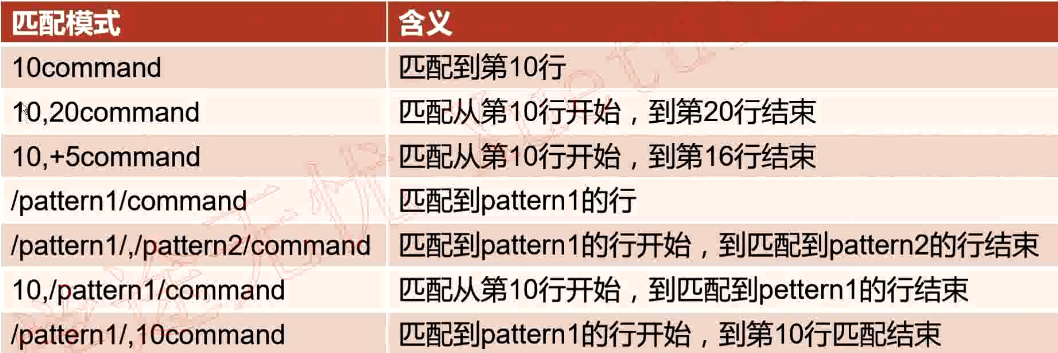
(1)直接指定行号
[root@VM_0_9_centos shell_learn]# sed -n '17p' /etc/passwd

dbus:x:81:81:System message bus:/:/sbin/nologin
(2)指定起始行号和结束行号
[root@VM_0_9_centos shell_learn]# sed -n '10,13p' /etc/passwd

operator:x:11:0:operator:/root:/sbin/nologin

games:x:12:100:games:/usr/games:/sbin/nologin

ftp:x:14:50:FTP User:/var/ftp:/sbin/nologin

nobody:x:99:99:Nobody:/:/sbin/nologin

[root@VM_0_9_centos shell_learn]#
(3)指定起始行号,然后后面N行
[root@VM_0_9_centos shell_learn]# sed -n '10,+5p' /etc/passwd

operator:x:11:0:operator:/root:/sbin/nologin

games:x:12:100:games:/usr/games:/sbin/nologin

ftp:x:14:50:FTP User:/var/ftp:/sbin/nologin

nobody:x:99:99:Nobody:/:/sbin/nologin

avahi-autoipd:x:170:170:Avahi IPv4LL Stack:/var/lib/avahi-autoipd:/sbin/nologin

systemd-bus-proxy:x:999:997:systemd Bus Proxy:/:/sbin/nologin

[root@VM_0_9_centos shell_learn]#
(4)/pattern1/ 正则表达式匹配的行
[root@VM_0_9_centos shell_learn]# sed -n '/derek/p' /etc/passwd

derektest:x:1001:1001::/home/derektest:/bin/bash

derek:x:1002:1002::/home/derek:/bin/bash

[root@VM_0_9_centos shell_learn]#
(5)/pattern1/,/pattern2/
[root@VM_0_9_centos shell_learn]# sed -n '/nginx/,/derek/p' /etc/passwd

nginx:x:993:991:Nginx web server:/var/lib/nginx:/sbin/nologin

memcached:x:992:990:Memcached daemon:/run/memcached:/sbin/nologin

redis:x:991:989:Redis Database Server:/var/lib/redis:/sbin/nologin

derektest:x:1001:1001::/home/derektest:/bin/bash

[root@VM_0_9_centos shell_learn]#
(6)linenumber,/pattern1/
从第30行开始匹配,直到匹配到derek行结尾
[root@VM_0_9_centos shell_learn]# sed -n '30,/derek/p' /etc/passwd

mysql:x:27:27:MySQL Server:/var/lib/mysql:/bin/bash

nginx:x:993:991:Nginx web server:/var/lib/nginx:/sbin/nologin

memcached:x:992:990:Memcached daemon:/run/memcached:/sbin/nologin

redis:x:991:989:Redis Database Server:/var/lib/redis:/sbin/nologin

derektest:x:1001:1001::/home/derektest:/bin/bash

[root@VM_0_9_centos shell_learn]#
(7)/pattern1/,linenumber
从nginx行开始到35行结束
[root@VM_0_9_centos shell_learn]# sed -n '/nginx/,35p' /etc/passwd

nginx:x:993:991:Nginx web server:/var/lib/nginx:/sbin/nologin

memcached:x:992:990:Memcached daemon:/run/memcached:/sbin/nologin

redis:x:991:989:Redis Database Server:/var/lib/redis:/sbin/nologin

derektest:x:1001:1001::/home/derektest:/bin/bash

derek:x:1002:1002::/home/derek:/bin/bash

[root@VM_0_9_centos shell_learn]#
4.3.sed中的删除
(1)p
查询
sed -n '1p' test.txt
(2)d 删除
删除1~3行
sed -i '1,3d' test.txt
删除以 ‘’Beau‘’开头,到以“Simp”开头,中间所有的行
test.txt
[root@VM_0_9_centos shell_learn]# cat test.txt

Beautiful is better than ugly.

Explicit is better than implicit.

Simple is better than complex.

Complex is better than complicated.

Flat is better than nested.

Sparse is better than dense.

Readability counts.

[root@VM_0_9_centos shell_learn]#
sed -i '/^Beau/,/^Simp/d' test.txt
[root@VM_0_9_centos shell_learn]# cat test.txt

Complex is better than complicated.

Flat is better than nested.

Sparse is better than dense.

Readability counts
4.4.sed中的增加
(3)a
匹配到的行后追加内容
[root@VM_0_9_centos shell_learn]# cat test.txt

Complex is better than complicated.

Flat is better than nested.

Sparse is better than dense.

Readability counts.

[root@VM_0_9_centos shell_learn]# sed -i '/Flat/a zhang-derek' test.txt

[root@VM_0_9_centos shell_learn]#

[root@VM_0_9_centos shell_learn]# cat test.txt

Complex is better than complicated.

Flat is better than nested.

zhang-derek

Sparse is better than dense.

Readability counts.

[root@VM_0_9_centos shell_learn]#
(4)i
匹配到的行前追加内容
[root@VM_0_9_centos shell_learn]# cat test.txt

Complex is better than complicated.

Flat is better than nested.

Sparse is better than dense.

Readability counts.

[root@VM_0_9_centos shell_learn]# sed -i '/Flat/i zhang-derek' test.txt

[root@VM_0_9_centos shell_learn]#

[root@VM_0_9_centos shell_learn]# cat test.txt

Complex is better than complicated.

zhang-derek

Flat is better than nested.

Sparse is better than dense.

Readability counts.

[root@VM_0_9_centos shell_learn]#
(5)r
将后面指定文件的内容追加到爬匹配的行后面
[root@VM_0_9_centos shell_learn]# cat list.txt

xxxxxxxxxxx

yyyyyyyyyyy

[root@VM_0_9_centos shell_learn]# cat test.txt

Complex is better than complicated.

Flat is better than nested.

Sparse is better than dense.

Readability counts.

[root@VM_0_9_centos shell_learn]# sed -i '/Flat/r list.txt' test.txt

[root@VM_0_9_centos shell_learn]#

[root@VM_0_9_centos shell_learn]# cat test.txt

Complex is better than complicated.

Flat is better than nested.

xxxxxxxxxxx

yyyyyyyyyyy

Sparse is better than dense.

Readability counts.

[root@VM_0_9_centos shell_learn]#
(6)w
将匹配到的行内容另存到其它文件
[root@VM_0_9_centos shell_learn]# cat test.txt

Complex is better than complicated.

Flat is better than nested.

xxxxxxxxxxx

yyyyyyyyyyy

Sparse is better than dense.

Readability counts.

[root@VM_0_9_centos shell_learn]# touch 1.txt

[root@VM_0_9_centos shell_learn]# sed -i '/^xxx/,/^yyy/w 1.txt' test.txt

[root@VM_0_9_centos shell_learn]#

[root@VM_0_9_centos shell_learn]# cat 1.txt

xxxxxxxxxxx

yyyyyyyyyyy

[root@VM_0_9_centos shell_learn]#
4.5.sed中的修改
- s/pattern/string 只替换一行中的第一个
- s/pattern/string/g 全部行内全部替换
- s/pattern/string/ig 全部替换,并且不区分大小写
实例
[root@VM_0_9_centos shell_learn]# cat 2.txt

i like python

i like english

I like django

I like flask,flask,flask

[root@VM_0_9_centos shell_learn]# sed -i 's/flask/Flask/g' 2.txt

[root@VM_0_9_centos shell_learn]#

[root@VM_0_9_centos shell_learn]# cat 2.txt

i like python

i like english

I like django

I like Flask,Flask,Flask
4.6.反向引用
实例一
[root@VM_0_9_centos shell_learn]# cat 3.txt

hadAAp

hadBBp

hadCCp

hadDDp

[root@VM_0_9_centos shell_learn]# sed -i 's/had..p/&ss/g' 3.txt

[root@VM_0_9_centos shell_learn]#

[root@VM_0_9_centos shell_learn]# cat 3.txt

hadAApss

hadBBpss

hadCCpss

hadDDpss

[root@VM_0_9_centos shell_learn]#
说明:“&”表示前面匹配到的内容,结果就是在匹配到的所有内容后面加上“ss”
实例二
[root@VM_0_9_centos shell_learn]# cat 3.txt

hadAApss

hadBBpss

hadCCpss

hadDDpss

[root@VM_0_9_centos shell_learn]# sed -i 's/\(had\)...../\1derek/g' 3.txt

[root@VM_0_9_centos shell_learn]#

[root@VM_0_9_centos shell_learn]# cat 3.txt

hadderek

hadderek

hadderek

hadderek

[root@VM_0_9_centos shell_learn]#
说明:“\1”和“&”的区别是“\1”可以反向引用匹配到的内容的一部分,然后对其修改,“&”只能对匹配的内容整体修改,不能拆分
4.shell编程-文本处理三剑客之sed的更多相关文章
- 文本处理三剑客之sed命令
第十八章.文本处理三剑客之sed命令 目录 sed介绍 sed命令常用选项 sed常用编辑命令 sed使用示例 sed高级语法 18.1.sed简介 sed全名stream editor,流编辑器,s ...
- Shell 编程 文本处理工具 sed
本篇主要写一些shell脚本文本处理工具sed的使用. 概述 sed(Stream EDitor)是一个强大而简单的文本解析转换工具,可以读取文本,并根据指定的条件对文本内容进行编辑(删除.替换.添加 ...
- shell 编程四剑客简介 find sed grep awk(微信公众号摘抄)
一,Shell编程四剑客之Find 通过如上基础语法的学习,读者对Shell编程有了更近一步的理解,Shell编程不再是简单命令的堆积,而是演变成了各种特殊的语句.各种语法.编程工具.各种命令的集合. ...
- 文本处理三剑客之 Sed ——一般编辑命令
sed简介 sed (stream editor for filtering and transforming text) 是Linux上的文本处理三剑客之一,另外两个是grep和awk. sed又称 ...
- Linux文本处理三剑客之sed
推荐新手阅读[酷壳]或[骏马金龙]开篇的教程作为入门.骏马兄后面的文章以及官方英文文档较难. [酷壳]:https://coolshell.cn/articles/9104.html [骏马金龙-博客 ...
- 文本处理三剑客之 sed详解
1.简介 sed是非交互式的编辑器,它不会修改文件,除非使用shell重定向来保存结果.默认情况下,所有的输出行都被打印到屏幕上. sed编辑器逐行处理文件(或输入),并将结果发送到屏幕.具体过程如下 ...
- 文本处理三剑客之sed
sed 1.简介 sed是一种流编辑器,它一次处理一行内容.处理时,把当前处理的行存储在临时缓冲区中,称为"模式空间"(patternspace),接着用sed命令处理缓冲区中的内 ...
- 文本处理三剑客之 sed
sed:文本流编辑器 主要是对文件的快速增删改查,查询功能中最常用的是过滤,取行 sed [选项] [sed内置命令字符] [输入文件] Options: -n:取消默认的sed输出,常与sed内置命 ...
- 文本处理三剑客之 Sed ——高级编辑命令
本篇介绍sed的高级编辑命令 高级编辑命令 P:打印模式空间开端至\n内容,并追加到默认输出之前 n: 读取匹配到的行的下一行覆盖至模式空间 N:读取匹配到的行的下一行追加至模式空间 h: 把模式空间 ...
随机推荐
- 由Maximum Gap,对话桶排序,基数排序和统计排序
一些非比较排序 在LeetCode中有个题目叫Maximum Gap.是求一个非排序的正数数列中按顺序排列后的最大间隔.这个题用桶排序和基数排序都能够实现.以下说一下桶排序.基数排序和计数排序这三种非 ...
- ASP.NET Core 使用 EF 框架查询数据 - ASP.NET Core 基础教程 - 简单教程,简单编程
原文:ASP.NET Core 使用 EF 框架查询数据 - ASP.NET Core 基础教程 - 简单教程,简单编程 ASP.NET Core 使用 EF 框架查询数据 上一章节我们学习了如何设置 ...
- IME输入法编程心得
原文:IME输入法编程心得 posted @ 2012-11-30 00:42 from [FreedomShe] 自然语言处理的输入法作业成品没有做出来,但不想再在蛋疼的Win32上面耗费时间了,整 ...
- OpenGL(九) 三维混色和深度缓存设置
颜色的混合在现实世界中非常常见,例如隔着有色玻璃观看物体,此时在观察者严重呈现出来物体的颜色就是玻璃的颜色和物体的颜色的混合. OpenGL在RGBA颜色模式下使用函数glenable(GL_BLEN ...
- [转]完美解决)Tomcat启动提示At least one JAR was scanned for TLDs yet contained no TLDs
一.文章前言 本文是亲测有效解决At least one JAR was scanned for TLDs yet contained no TLDs问题,绝对不是为了积分随便粘贴复制然后压根都 ...
- HTTP协议知识点 (11个知识点,比较详细)
(一) 对象更新校验方式: HTTP通过两种方式验证对象是否有更新if-non-match 或者 if-modified-since. 通过在Request中包含上述header向服务器发起询问. ...
- Stream转Byte数组
//获得当前文件目录 string rootPath = Directory.GetCurrentDirectory(); string path = rootPath + "Your Fi ...
- WPF DataGrid 触发器
<DataGrid.RowHeaderStyle> <Style TargetType="DataGridRowHeader"> <Style.Tri ...
- iphone开发技巧整合
1.NSCalendar用法 -(NSString *) getWeek:(NSDate *)d { NSCalendar *calendar = [[NSCalendar alloc] initWi ...
- WPF DataGrid自定义列DataGridTextColumn.ElementStyle和DataGridTemplateColumn.CellTemplate
<Window x:Class="DataGridExam.MainWindow" xmlns="http://schemas.microsoft.c ...