
4.shell编程-文本处理三剑客之sed
4.1.sed的选项
sed,流编辑器。对标准输出或文件进行逐行处理。
语法格式
- 第一种:stdout | sed [option] "pattern command"
- 第二种:sed [option] "pattern command" file
选项
- -n 只打印模式匹配行
- -e 直接在命令行进行sed编辑,默认选项
- -f 编辑动作保存在文件中,指定文件执行
- -r 支持扩展正则表达式
- -i 直接修改文件内容
实例
[root@VM_0_9_centos shell_learn]# cat test.txt

I love python

I love PYTHON

Hadoop is bigdata frame

[root@VM_0_9_centos shell_learn]# sed -n 'p' test.txt

I love python

I love PYTHON

Hadoop is bigdata frame

[root@VM_0_9_centos shell_learn]# sed -n '/python/p' test.txt

I love python

[root@VM_0_9_centos shell_learn]# sed -n -e '/python/p' -e '/PYTHON/p' test.txt

I love python

I love PYTHON

[root@VM_0_9_centos shell_learn]#
-f 选项,把编辑动作放到文本中
[root@VM_0_9_centos shell_learn]# cat edit.txt

/python/p

[root@VM_0_9_centos shell_learn]# sed -n -f edit.txt test.txt

I love python

[root@VM_0_9_centos shell_learn]#
-i 修改
sed -i 's/love/like/g' test.txt
4.2.sed中的pattern详解
pattern用发表
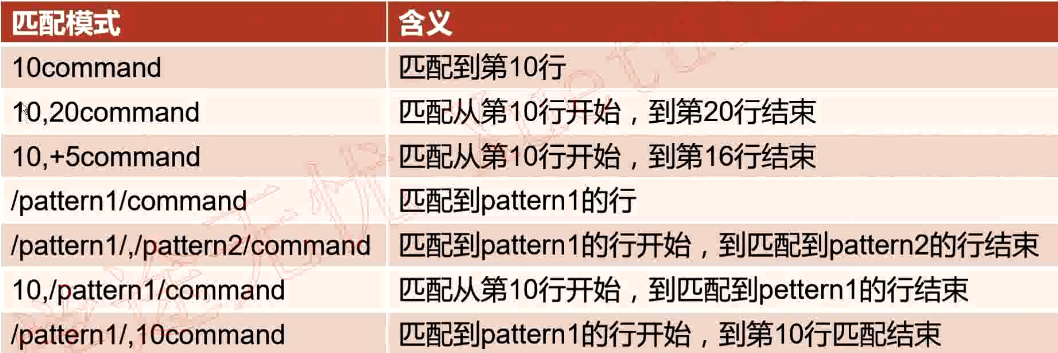
(1)直接指定行号
[root@VM_0_9_centos shell_learn]# sed -n '17p' /etc/passwd

dbus:x:81:81:System message bus:/:/sbin/nologin
(2)指定起始行号和结束行号
[root@VM_0_9_centos shell_learn]# sed -n '10,13p' /etc/passwd

operator:x:11:0:operator:/root:/sbin/nologin

games:x:12:100:games:/usr/games:/sbin/nologin

ftp:x:14:50:FTP User:/var/ftp:/sbin/nologin

nobody:x:99:99:Nobody:/:/sbin/nologin

[root@VM_0_9_centos shell_learn]#
(3)指定起始行号,然后后面N行
[root@VM_0_9_centos shell_learn]# sed -n '10,+5p' /etc/passwd

operator:x:11:0:operator:/root:/sbin/nologin

games:x:12:100:games:/usr/games:/sbin/nologin

ftp:x:14:50:FTP User:/var/ftp:/sbin/nologin

nobody:x:99:99:Nobody:/:/sbin/nologin

avahi-autoipd:x:170:170:Avahi IPv4LL Stack:/var/lib/avahi-autoipd:/sbin/nologin

systemd-bus-proxy:x:999:997:systemd Bus Proxy:/:/sbin/nologin

[root@VM_0_9_centos shell_learn]#
(4)/pattern1/ 正则表达式匹配的行
[root@VM_0_9_centos shell_learn]# sed -n '/derek/p' /etc/passwd

derektest:x:1001:1001::/home/derektest:/bin/bash

derek:x:1002:1002::/home/derek:/bin/bash

[root@VM_0_9_centos shell_learn]#
(5)/pattern1/,/pattern2/
[root@VM_0_9_centos shell_learn]# sed -n '/nginx/,/derek/p' /etc/passwd

nginx:x:993:991:Nginx web server:/var/lib/nginx:/sbin/nologin

memcached:x:992:990:Memcached daemon:/run/memcached:/sbin/nologin

redis:x:991:989:Redis Database Server:/var/lib/redis:/sbin/nologin

derektest:x:1001:1001::/home/derektest:/bin/bash

[root@VM_0_9_centos shell_learn]#
(6)linenumber,/pattern1/
从第30行开始匹配,直到匹配到derek行结尾
[root@VM_0_9_centos shell_learn]# sed -n '30,/derek/p' /etc/passwd

mysql:x:27:27:MySQL Server:/var/lib/mysql:/bin/bash

nginx:x:993:991:Nginx web server:/var/lib/nginx:/sbin/nologin

memcached:x:992:990:Memcached daemon:/run/memcached:/sbin/nologin

redis:x:991:989:Redis Database Server:/var/lib/redis:/sbin/nologin

derektest:x:1001:1001::/home/derektest:/bin/bash

[root@VM_0_9_centos shell_learn]#
(7)/pattern1/,linenumber
从nginx行开始到35行结束
[root@VM_0_9_centos shell_learn]# sed -n '/nginx/,35p' /etc/passwd

nginx:x:993:991:Nginx web server:/var/lib/nginx:/sbin/nologin

memcached:x:992:990:Memcached daemon:/run/memcached:/sbin/nologin

redis:x:991:989:Redis Database Server:/var/lib/redis:/sbin/nologin

derektest:x:1001:1001::/home/derektest:/bin/bash

derek:x:1002:1002::/home/derek:/bin/bash

[root@VM_0_9_centos shell_learn]#
4.3.sed中的删除
(1)p
查询
sed -n '1p' test.txt
(2)d 删除
删除1~3行
sed -i '1,3d' test.txt
删除以 ‘’Beau‘’开头,到以“Simp”开头,中间所有的行
test.txt
[root@VM_0_9_centos shell_learn]# cat test.txt

Beautiful is better than ugly.

Explicit is better than implicit.

Simple is better than complex.

Complex is better than complicated.

Flat is better than nested.

Sparse is better than dense.

Readability counts.

[root@VM_0_9_centos shell_learn]#
sed -i '/^Beau/,/^Simp/d' test.txt
[root@VM_0_9_centos shell_learn]# cat test.txt

Complex is better than complicated.

Flat is better than nested.

Sparse is better than dense.

Readability counts
4.4.sed中的增加
(3)a
匹配到的行后追加内容
[root@VM_0_9_centos shell_learn]# cat test.txt

Complex is better than complicated.

Flat is better than nested.

Sparse is better than dense.

Readability counts.

[root@VM_0_9_centos shell_learn]# sed -i '/Flat/a zhang-derek' test.txt

[root@VM_0_9_centos shell_learn]#

[root@VM_0_9_centos shell_learn]# cat test.txt

Complex is better than complicated.

Flat is better than nested.

zhang-derek

Sparse is better than dense.

Readability counts.

[root@VM_0_9_centos shell_learn]#
(4)i
匹配到的行前追加内容
[root@VM_0_9_centos shell_learn]# cat test.txt

Complex is better than complicated.

Flat is better than nested.

Sparse is better than dense.

Readability counts.

[root@VM_0_9_centos shell_learn]# sed -i '/Flat/i zhang-derek' test.txt

[root@VM_0_9_centos shell_learn]#

[root@VM_0_9_centos shell_learn]# cat test.txt

Complex is better than complicated.

zhang-derek

Flat is better than nested.

Sparse is better than dense.

Readability counts.

[root@VM_0_9_centos shell_learn]#
(5)r
将后面指定文件的内容追加到爬匹配的行后面
[root@VM_0_9_centos shell_learn]# cat list.txt

xxxxxxxxxxx

yyyyyyyyyyy

[root@VM_0_9_centos shell_learn]# cat test.txt

Complex is better than complicated.

Flat is better than nested.

Sparse is better than dense.

Readability counts.

[root@VM_0_9_centos shell_learn]# sed -i '/Flat/r list.txt' test.txt

[root@VM_0_9_centos shell_learn]#

[root@VM_0_9_centos shell_learn]# cat test.txt

Complex is better than complicated.

Flat is better than nested.

xxxxxxxxxxx

yyyyyyyyyyy

Sparse is better than dense.

Readability counts.

[root@VM_0_9_centos shell_learn]#
(6)w
将匹配到的行内容另存到其它文件
[root@VM_0_9_centos shell_learn]# cat test.txt

Complex is better than complicated.

Flat is better than nested.

xxxxxxxxxxx

yyyyyyyyyyy

Sparse is better than dense.

Readability counts.

[root@VM_0_9_centos shell_learn]# touch 1.txt

[root@VM_0_9_centos shell_learn]# sed -i '/^xxx/,/^yyy/w 1.txt' test.txt

[root@VM_0_9_centos shell_learn]#

[root@VM_0_9_centos shell_learn]# cat 1.txt

xxxxxxxxxxx

yyyyyyyyyyy

[root@VM_0_9_centos shell_learn]#
4.5.sed中的修改
- s/pattern/string 只替换一行中的第一个
- s/pattern/string/g 全部行内全部替换
- s/pattern/string/ig 全部替换,并且不区分大小写
实例
[root@VM_0_9_centos shell_learn]# cat 2.txt

i like python

i like english

I like django

I like flask,flask,flask

[root@VM_0_9_centos shell_learn]# sed -i 's/flask/Flask/g' 2.txt

[root@VM_0_9_centos shell_learn]#

[root@VM_0_9_centos shell_learn]# cat 2.txt

i like python

i like english

I like django

I like Flask,Flask,Flask
4.6.反向引用
实例一
[root@VM_0_9_centos shell_learn]# cat 3.txt

hadAAp

hadBBp

hadCCp

hadDDp

[root@VM_0_9_centos shell_learn]# sed -i 's/had..p/&ss/g' 3.txt

[root@VM_0_9_centos shell_learn]#

[root@VM_0_9_centos shell_learn]# cat 3.txt

hadAApss

hadBBpss

hadCCpss

hadDDpss

[root@VM_0_9_centos shell_learn]#
说明:“&”表示前面匹配到的内容,结果就是在匹配到的所有内容后面加上“ss”
实例二
[root@VM_0_9_centos shell_learn]# cat 3.txt

hadAApss

hadBBpss

hadCCpss

hadDDpss

[root@VM_0_9_centos shell_learn]# sed -i 's/\(had\)...../\1derek/g' 3.txt

[root@VM_0_9_centos shell_learn]#

[root@VM_0_9_centos shell_learn]# cat 3.txt

hadderek

hadderek

hadderek

hadderek

[root@VM_0_9_centos shell_learn]#
说明:“\1”和“&”的区别是“\1”可以反向引用匹配到的内容的一部分,然后对其修改,“&”只能对匹配的内容整体修改,不能拆分
4.shell编程-文本处理三剑客之sed的更多相关文章
- 文本处理三剑客之sed命令
第十八章.文本处理三剑客之sed命令 目录 sed介绍 sed命令常用选项 sed常用编辑命令 sed使用示例 sed高级语法 18.1.sed简介 sed全名stream editor,流编辑器,s ...
- Shell 编程 文本处理工具 sed
本篇主要写一些shell脚本文本处理工具sed的使用. 概述 sed(Stream EDitor)是一个强大而简单的文本解析转换工具,可以读取文本,并根据指定的条件对文本内容进行编辑(删除.替换.添加 ...
- shell 编程四剑客简介 find sed grep awk(微信公众号摘抄)
一,Shell编程四剑客之Find 通过如上基础语法的学习,读者对Shell编程有了更近一步的理解,Shell编程不再是简单命令的堆积,而是演变成了各种特殊的语句.各种语法.编程工具.各种命令的集合. ...
- 文本处理三剑客之 Sed ——一般编辑命令
sed简介 sed (stream editor for filtering and transforming text) 是Linux上的文本处理三剑客之一,另外两个是grep和awk. sed又称 ...
- Linux文本处理三剑客之sed
推荐新手阅读[酷壳]或[骏马金龙]开篇的教程作为入门.骏马兄后面的文章以及官方英文文档较难. [酷壳]:https://coolshell.cn/articles/9104.html [骏马金龙-博客 ...
- 文本处理三剑客之 sed详解
1.简介 sed是非交互式的编辑器,它不会修改文件,除非使用shell重定向来保存结果.默认情况下,所有的输出行都被打印到屏幕上. sed编辑器逐行处理文件(或输入),并将结果发送到屏幕.具体过程如下 ...
- 文本处理三剑客之sed
sed 1.简介 sed是一种流编辑器,它一次处理一行内容.处理时,把当前处理的行存储在临时缓冲区中,称为"模式空间"(patternspace),接着用sed命令处理缓冲区中的内 ...
- 文本处理三剑客之 sed
sed:文本流编辑器 主要是对文件的快速增删改查,查询功能中最常用的是过滤,取行 sed [选项] [sed内置命令字符] [输入文件] Options: -n:取消默认的sed输出,常与sed内置命 ...
- 文本处理三剑客之 Sed ——高级编辑命令
本篇介绍sed的高级编辑命令 高级编辑命令 P:打印模式空间开端至\n内容,并追加到默认输出之前 n: 读取匹配到的行的下一行覆盖至模式空间 N:读取匹配到的行的下一行追加至模式空间 h: 把模式空间 ...
随机推荐
- 新建py文件时取名千万要小心 不要和已有模块重名
这是因为我新建了一个email.py的文件 后来我将文件名rename成了myemail.py没有看改名提示,结果导致所有的对email的import和调用全部改成了对myemail的import和调 ...
- Scala(一) 环境搭建和HelloWorld
环境 scala 1.12.2 JDK 1.8.0_131 Win10 Eclipse 4.6.1 软件下载 官网:http://www.scala-lang.org/ 点击DOWNLOAD进 ...
- Poco logger 日志使用小析
Poco logger 日志使用小析 Poco logger 日志使用小析 日志 logger 库选择 Pocologger 架构简析 步骤一 生成消息 步骤二 写入logger 步骤三 导入chan ...
- JS数组操作:去重,交集,并集,差集
原文:JS数组操作:去重,交集,并集,差集 1. 数组去重 方法一: function unique(arr) { //定义常量 res,值为一个Map对象实例 const res = new Map ...
- 离散时间信号常见函数的实现(matlab)
1. 单位样本序列 δ(n−n0)={1,n=n00,n≠n0 function [x, n] = impseq(n0, n1, n2) n = n1:n2; x = [n == n0]; 2. 单位 ...
- Hadoop入门实验
一.实验目的 了解Hadoop的MapeReduce工作原理 二.实验内容 实现基于单机的伪分布式运行模拟 三.实验需要准备的软件和源 1.Jdk1.6以上 下载地址:http://www.oracl ...
- React实现checkbox group多组选项和标签组显示的联动
实现功能:勾选checkbox项,确定后,已勾选的checkbox项以tag标签的形式展示,tag标签可快捷删除. 实现过程: 使用React. 使用Ant Design的Checkbox.Tag组件 ...
- linux没有 conio.h解决的方式
conio.h不是C标准库中的头文件,在ISO和POSIX标准中均未定义. conio是Console Input/Output(控制台输入输出)的简写,当中定义了通过控制台进行数据输入和数据输出的函 ...
- 【C#】获取任意文件的缩略图
原文:[C#]获取任意文件的缩略图 因为用shell取缩略图时,对于损坏的文件,读出来的图有黑边,所以就诞生了以下方法,不过这个效率要比用shell取的低3-4倍. 1.添加类WindowsThumb ...
- Delphi7下安装TMS component控件
1.启动delphi7.2.File-->Open Project ...打开TMS component 源目录下的“tmsd7.bpg”. 3.在打开的窗口列表中,依次在各选项上点击鼠标右键, ...