
CMake入门-04-自定义编译选项
工作环境
- 系统:macOS Mojave 10.14.6
- CMake: Version 3.15.0-rc4
Hello,World! - 自定义编译选项
CMake 允许为项目增加编译选项,从而可以根据用户的环境和需求选择最合适的编译方案。
例如,可以将 MathFunctions 库设为一个可选的库,如果该选项为 ON ,就使用该库定义的数学函数来进行运算。否则就调用标准库中的数学函数库。
(0) 初始化项目
$ mkdir hello

$ cd hello

$ mkdir math build

$ touch CMakeLists.txt main.cpp math/MathFunctions.h math/MathFunctions.cpp math/CMakeLists.txt

$ tree

.

├── build

├── CMakeLists.txt

├── main.cpp

└── math

    ├── CMakeLists.txt

    ├── MathFunctions.cpp

    └── MathFunctions.h
- math/MathFunctions.h
int power(int base, int exponent);
- math/MathFunctions.cpp
#include <stdio.h>

#include <stdlib.h>

#include "MathFunctions.h"

int power(int base, int exponent) {

    int result = base;

    int i;

    if (exponent == 0) {

        return 1;

    }

    for(i = 1; i < exponent; ++i){

        result = result * base;

    }

    return result;

}
- main.cpp
#include <iostream>

#include "MathFunctions.h"

using namespace std;

int main(int argc, char const *argv[]) {

  printf("%s power(2,3)=%d \n", "Hello,World!", power(2, 3));

  return 0;

}
- CMakeLists.txt
# CMake 最低版本号要求

cmake_minimum_required(VERSION 3.15.0)

# 项目名

project(hello)

# 查找当前目录下的所有源文件,并将名称保存到 SRC_LIST 变量

aux_source_directory(. SRC_LIST)

# 查找 math 目录下的所有源文件,并将名称保存到 MATH_SRC_LIST 变量

# aux_source_directory(${PROJECT_SOURCE_DIR}/math MATH_SRC_LIST)

# 添加 math 子目录 (math 目录里必须有 CMakeLists.txt),这样 math 目录下的 CMakeLists.txt 文件和源代码也会被处理

add_subdirectory(math)

# 添加头文件路径

include_directories(${PROJECT_SOURCE_DIR}/math)

# 指定生成目标

add_executable(hello ${SRC_LIST} ${MATH_SRC_LIST})

# 添加链接库

target_link_libraries(hello MathFunctions)
- math/CMakeLists.txt
# 查找当前目录下的所有源文件,并将名称保存到 DIR_LIB_SRCS 变量

aux_source_directory(. DIR_LIB_SRCS)

# 生成链接库

add_library (MathFunctions ${DIR_LIB_SRCS})
(1) 修改根目录 CMakeLists.txt
cmake_minimum_required(VERSION 3.15.0)

# 项目名

project(hello)

# 查找当前目录下的所有源文件,并将名称保存到 SRC_LIST 变量

aux_source_directory(. SRC_LIST)

# 加入一个配置头文件,用于处理 CMake 对源码的设置

configure_file (

  "${PROJECT_SOURCE_DIR}/config.h.in"

  "${PROJECT_SOURCE_DIR}/config.h"

)

# 是否使用自己的 MathFunctions 库

# 这里设置的变量 USE_MYMATH、中间的提示文字、默认值,在 ccmake 命令中会展示

option (USE_MYMATH

  "Use provided math implementation"

  ON

)

# 是否加入 MathFunctions 库

if (USE_MYMATH)

  # 添加头文件路径

  include_directories ("${PROJECT_SOURCE_DIR}/math")

  # 添加 math 子目录 (math 目录里必须有 CMakeLists.txt)

  add_subdirectory (math)

  set (EXTRA_LIBS ${EXTRA_LIBS} MathFunctions)

endif (USE_MYMATH)

# 指定生成目标

add_executable(hello ${SRC_LIST} ${MATH_SRC_LIST})

# 添加链接库

target_link_libraries(hello ${EXTRA_LIBS})
- configure_file 命令用于加入一个配置头文件 config.h,这个文件由 CMake 从 config.h.in 生成,通过这样的机制,将可以通过预定义一些参数和变量来控制代码生成。
- option 命令添加了一个 USE_MYMATH 选项,并且默认值为 ON。
- 根据 USE_MYMATH 变量的值来决定是否使用我们自己编写的 MathFunctions 库。
(2) 修改 main.cpp 文件
#include <iostream>

#include "config.h"

#ifdef USE_MYMATH

  // 如果定义了 USE_MYMATH,导入 "MathFunctions.h"

  #include "MathFunctions.h"

#else

  // 如果 USE_MYMATH 未定义,导入 <cmath>

  #include <cmath>

#endif

using namespace std;

int main(int argc, char const *argv[]) {

  #ifdef USE_MYMATH

    printf("Here define USE_MYMATH \n");

    printf("%s power(2,3)=%d \n", "Hello,World!", power(2, 3));

  #else

    printf("Here undefine USE_MYMATH \n");

    printf("%s power(2,3)=%f \n", "Hello,World!", pow(2, 3));

  #endif

  return 0;

}
(3) 新建 config.h.in 文件
#cmakedefine USE_MYMATH
- 这样 CMake 会自动根据 config.h.in 配置文件中的设置自动生成 config.h 文件。
(4) 编译 & 运行
- cmake 命令编译
$ cd Desktop/hello/build

# cmake 指定 USE_MYMATH=ON

$ cmake -DUSE_MYMATH=ON ..

-- The C compiler identification is AppleClang 10.0.1.10010046

-- The CXX compiler identification is AppleClang 10.0.1.10010046

-- Check for working C compiler: /Applications/Xcode.app/Contents/Developer/Toolchains/XcodeDefault.xctoolchain/usr/bin/cc

-- Check for working C compiler: /Applications/Xcode.app/Contents/Developer/Toolchains/XcodeDefault.xctoolchain/usr/bin/cc -- works

-- Detecting C compiler ABI info

-- Detecting C compiler ABI info - done

-- Detecting C compile features

-- Detecting C compile features - done

-- Check for working CXX compiler: /Applications/Xcode.app/Contents/Developer/Toolchains/XcodeDefault.xctoolchain/usr/bin/c++

-- Check for working CXX compiler: /Applications/Xcode.app/Contents/Developer/Toolchains/XcodeDefault.xctoolchain/usr/bin/c++ -- works

-- Detecting CXX compiler ABI info

-- Detecting CXX compiler ABI info - done

-- Detecting CXX compile features

-- Detecting CXX compile features - done

-- Configuring done

-- Generating done

-- Build files have been written to: /Users/staff/Desktop/hello/build

$  make

Scanning dependencies of target MathFunctions

[ 25%] Building CXX object math/CMakeFiles/MathFunctions.dir/MathFunctions.cpp.o

[ 50%] Linking CXX static library libMathFunctions.a

[ 50%] Built target MathFunctions

Scanning dependencies of target hello

[ 75%] Building CXX object CMakeFiles/hello.dir/main.cpp.o

[100%] Linking CXX executable hello

[100%] Built target hello

# 这里输出的 ”Here define USE_MYMATH“

$ ./hello

Here define USE_MYMATH

Hello,World! power(2,3)=8

# cmake 指定 USE_MYMATH=OFF

$ cmake -DUSE_MYMATH=OFF ..

-- Configuring done

-- Generating done

-- Build files have been written to: /Users/staff/Desktop/hello/build

$ make

Scanning dependencies of target hello

[ 50%] Building CXX object CMakeFiles/hello.dir/main.cpp.o

[100%] Linking CXX executable hello

[100%] Built target hello

# 这里输出的 ”Here undefine USE_MYMATH“

$ ./hello

Here undefine USE_MYMATH

Hello,World! power(2,3)=8.000000
- ccmake 命令编译
$ cd Desktop/hello/build

$ ccmake ..
可以看到 USE_MYMATH 选项
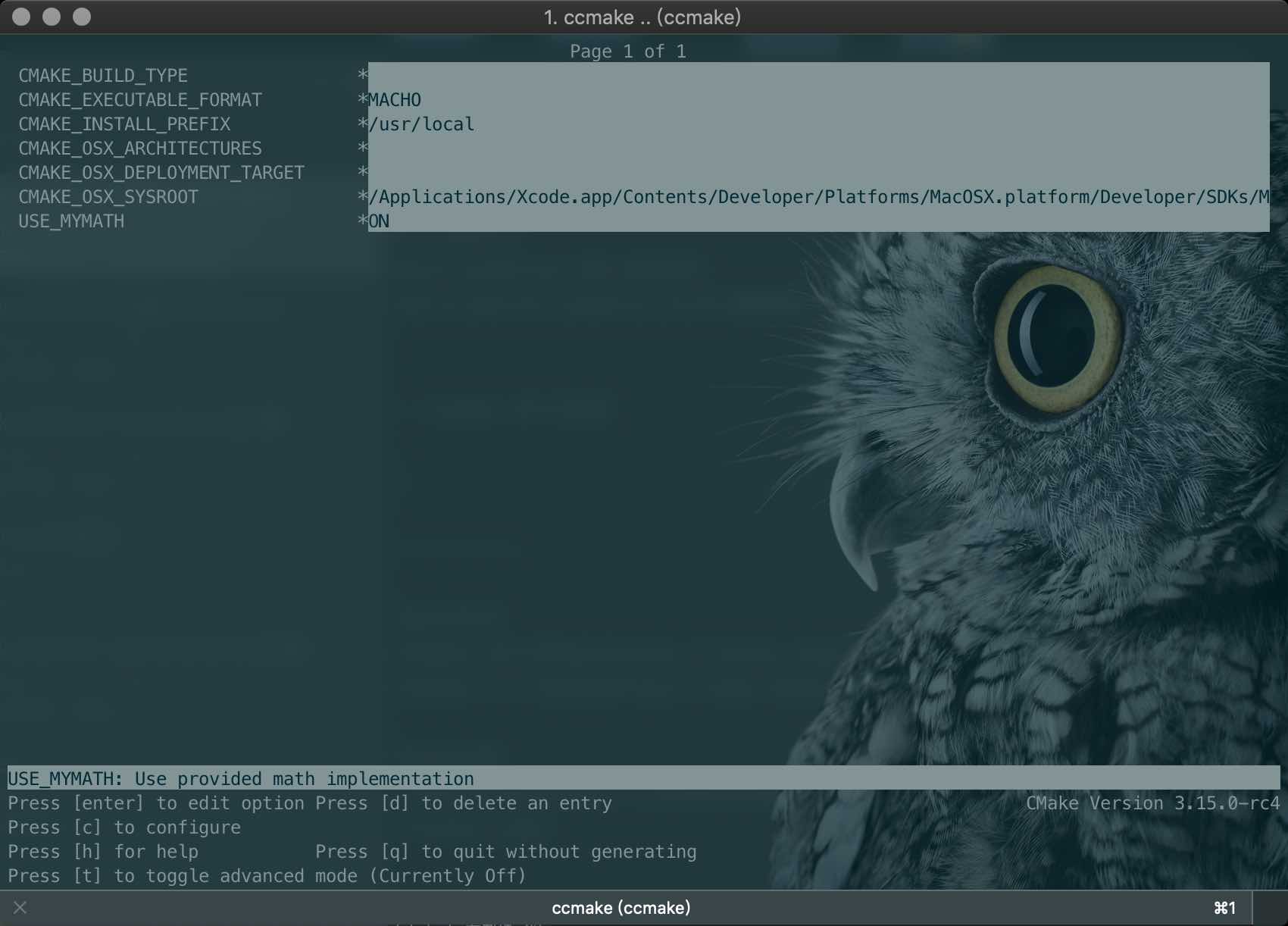
- 键盘的方向键可以在不同的选项间切换
- 按下 enter 键可以修改该选项
- 修改完成后可以按下 c 选项完成配置,之后再按 g 键确认生成 Makefile
- ccmake 的其他操作可以参考窗口下方给出的指令提示
相关参考:
CMake 官方网站
CMake 入门实战
联系作者:

CMake入门-04-自定义编译选项的更多相关文章
- CMake 自定义编译选项
自定义编译选项 CMake 允许为项目增加编译选项,从而可以根据用户的环境和需求选择最合适的编译方案. 例如,可以将 MathFunctions 库设为一个可选库,如果该选项为 ON ,就使用该库定义 ...
- CMake 入门实战【转】
本文转载自:http://www.hahack.com/codes/cmake/ 什么是 CMake All problems in computer science can be solved by ...
- C++ CMake 入门实战[转载]
C++ CMake 入门实战 2016-11-05 CMake用于跨平台的编译系统,对于通常的c/c++工程,都是通过make来进行编译的,CMake可以通过指令生成Makefile文件来指导整个项目 ...
- VScode 使用 CMake 入门
参考 CMake 入门实战 在 linux 平台下使用 CMake 生成 Makefile 并编译的流程如下: 编写 CMake 配置文件 CMakeLists.txt . 执行命令 cmake PA ...
- CMake入门教程(转帖)
本文转自:https://www.cnblogs.com/never--more/p/6921837.html CMake入门教程 参考文献:http://www.ibm.com/developerw ...
- JavaScript基础入门04
目录 JavaScript 基础入门04 JavaScript 对象 介绍 关于键名 对象的引用 语句和表达式需要注意的地方 对象属性常见的操作 with语句 JSON 特点 语法规则 JSON合法示 ...
- ASP.NET 5 入门 (2) – 自定义配置
ASP.NET 5 入门 (2) – 自定义配置 ASP.NET 5 理解和入门 建立和开发ASP.NET 5 项目 初步理解ASP.NET5的配置 正如我的第一篇文章ASP.NET 5 (vNext ...
- 【博客美化】04.自定义地址栏logo
博客园美化相关文章目录: [博客美化]01.推荐和反对炫酷样式 [博客美化]02.公告栏显示个性化时间 [博客美化]03.分享按钮 [博客美化]04.自定义地址栏logo [博客美化]05.添加Git ...
- CMake 入门实战 | HaHack
CMake 入门实战 | HaHack undefined
随机推荐
- git 删除目录及子目录下的同名文件
find . -name ".git" | xargs rm -Rf find . -name ".gitignore" | xargs rm -Rf
- OR(Convex_Optimization_读书杂记)
今天心血来潮,看了一下ConvexOptimization,看到一开始描述直线的部分,真的感觉翻译得很棒.$$ y = \theta x_1 + (1-\theta) x_2 \qquad x1, ...
- NLP 文本预处理
1.不同类别文本量统计,类别不平衡差异 2.文本长度统计 3.文本处理,比如文本语料中简体与繁体共存,这会加大模型的学习难度.因此,他们对数据进行繁体转简体的处理. 同时,过滤掉了对分类没有任何作用的 ...
- 如何准备算法工程师面试,斩获一线互联网公司机器学习岗offer?
原文:https://zhuanlan.zhihu.com/p/76827460?utm_source=wechat_session&utm_medium=social&utm_oi= ...
- celery的介绍和在爬虫的中使用
https://mp.weixin.qq.com/s/FzvZHQpF5mhV9t_HBzlcwg
- es6语法中的arrow function=>
(x) => x + 相当于 function(x){ ; }; var ids = this.sels.map(item => item.id).join() var ids = thi ...
- 自定义控件之canvas变换和裁剪
1.平移 //构造两个画笔,一个红色,一个绿色 Paint paint_green = generatePaint(Color.GREEN, Paint.Style.STROKE, 3); Paint ...
- Docker 部署 ELK 收集 Nginx 日志
一.简介 1.核心组成 ELK由Elasticsearch.Logstash和Kibana三部分组件组成: Elasticsearch是个开源分布式搜索引擎,它的特点有:分布式,零配置,自动发现,索引 ...
- Java遍历日期代码
import java.util.ArrayList; import java.util.List; public class DateTraveller { public static List&l ...
- Python3之错误处理
在程序运行的过程中,如果发生了错误,可以事先约定返回一个错误代码,这样,就可以知道是否有错,以及错误的原因.在操作系统提供的调用中,返回错误码非常常见.比如打开文件的函数open(),成功时返回文件描 ...