
Layui 上传图片到磁盘上 + Tomcat 配置虚拟路径
Layui 上传图片到磁盘上 + Tomcat 配置虚拟路径
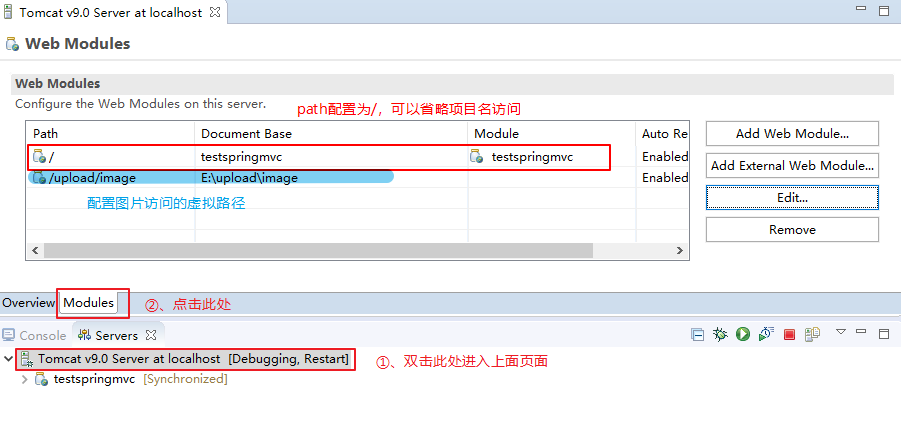
Tomcat 配置虚拟路径
找到 eclipse 中 tomcat 下面的 server.xml 文件,在 Host 标签里面添加 <Context docBase="E:\upload\image\" path="/upload/image" reloadable="true"/>。
其中,docBase 表示的是图片的实际路径, path 表示的是图片的虚拟路径。


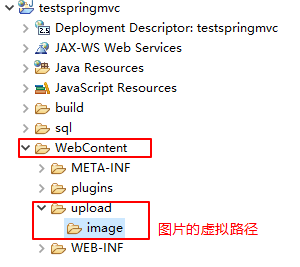
在项目根目录下面建立图片的访问路径,即 path 指向的是图片的虚拟路径,如下所示:
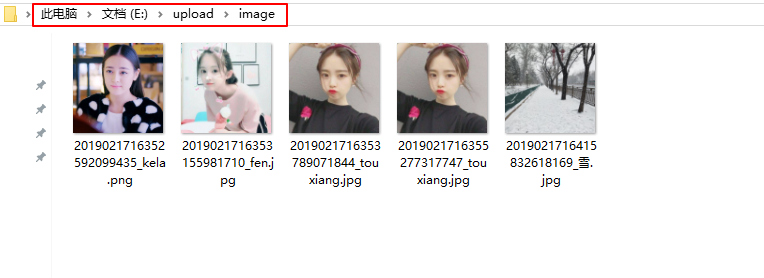
图片在磁盘上的实际保存地址如下:
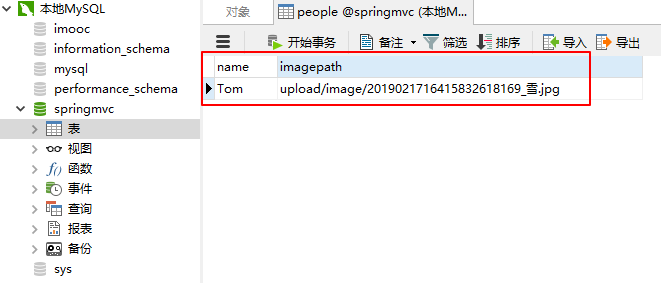
数据库中存放图片的访问路径:
Layui 上传图片到磁盘上
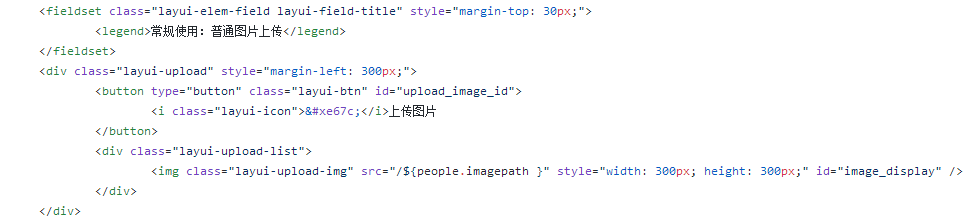
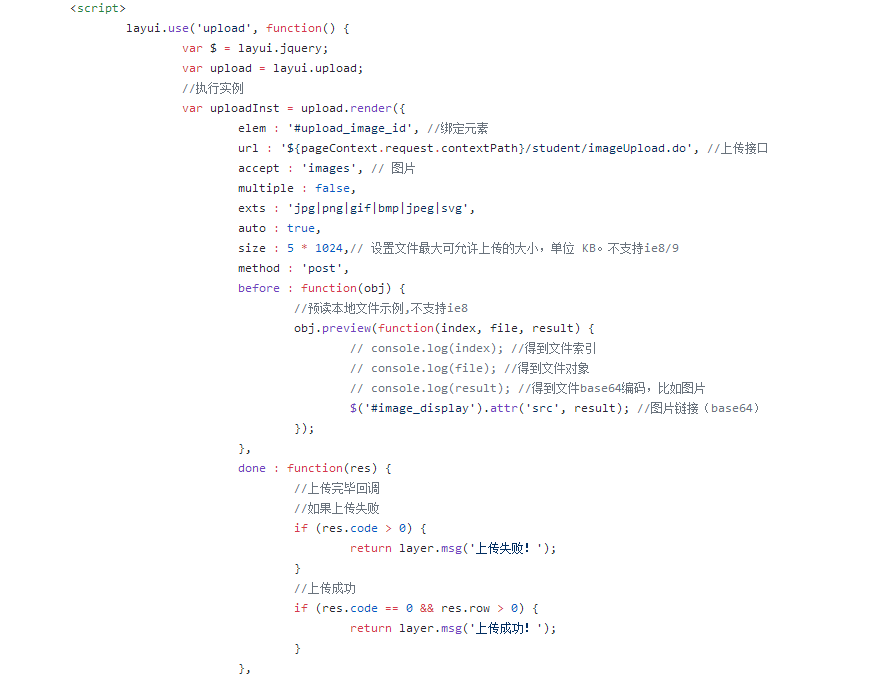

index.jsp 文件
${webTitle}
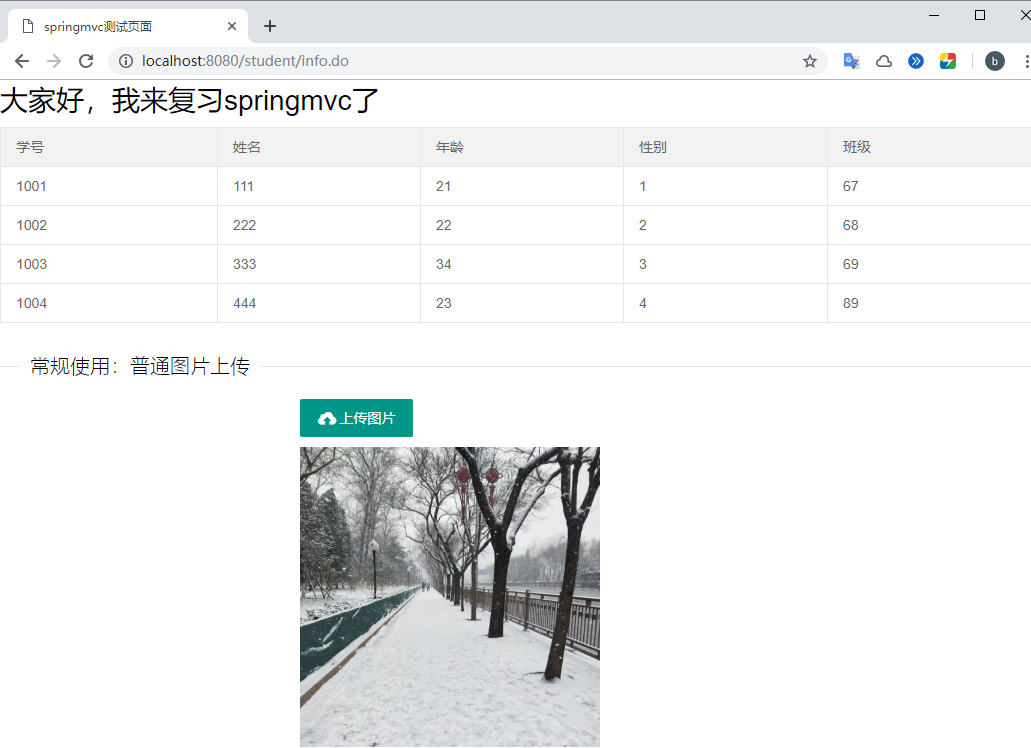
大家好,我来复习springmvc了
| 学号 | 姓名 | 年龄 | 性别 | 班级 |
|---|---|---|---|---|
| ${student.sno } | ${student.sname } | ${student.age } | ${student.gender } | ${student.grade } |
常规使用:普通图片上传
上传图片
```
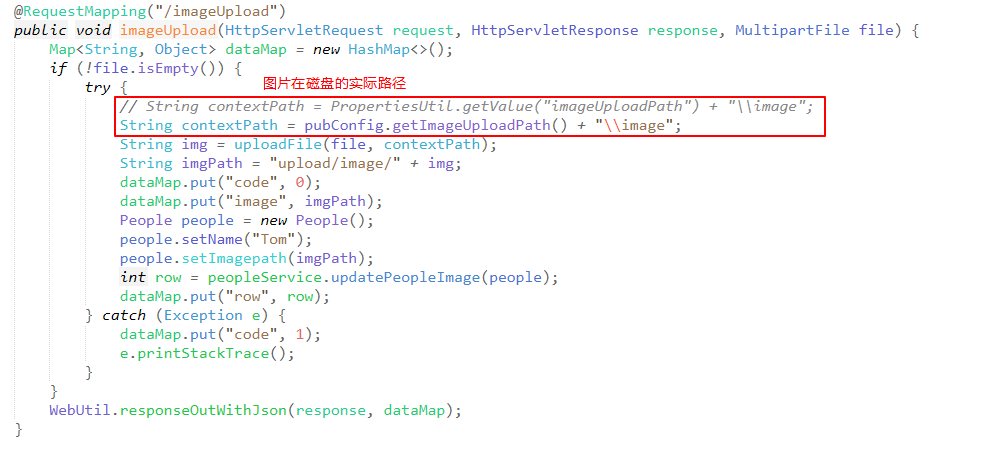
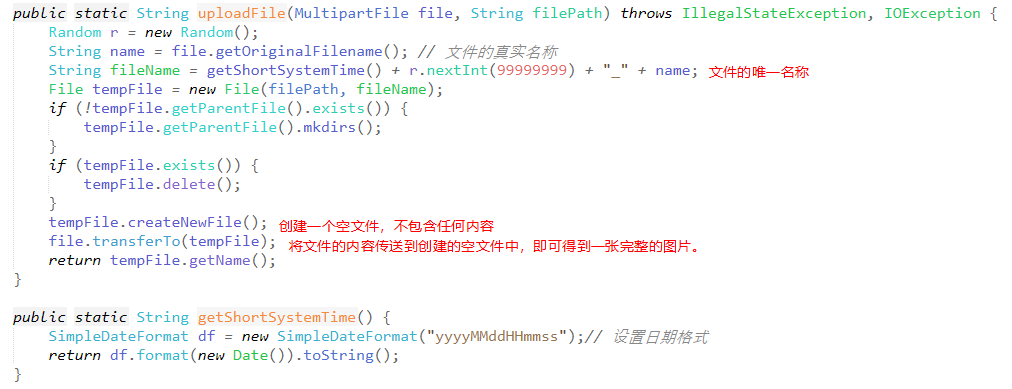
StudentInfoSelect.java 文件
package com.libin.springmvc.controller;
import java.io.File;
import java.io.IOException;
import java.text.SimpleDateFormat;
import java.util.Date;
import java.util.HashMap;
import java.util.List;
import java.util.Map;
import java.util.Random;
import javax.annotation.Resource;
import javax.servlet.http.HttpServletRequest;
import javax.servlet.http.HttpServletResponse;
import org.springframework.beans.factory.annotation.Autowired;
import org.springframework.stereotype.Controller;
import org.springframework.ui.Model;
import org.springframework.web.bind.annotation.RequestMapping;
import org.springframework.web.multipart.MultipartFile;
import com.libin.springmvc.entity.People;
import com.libin.springmvc.entity.Student;
import com.libin.springmvc.pub.PubConfig;
import com.libin.springmvc.service.PeopleService;
import com.libin.springmvc.service.StudentService;
import com.libin.springmvc.utils.WebUtil;
@RequestMapping("/student")
@Controller
public class StudentInfoSelect {
@Resource

private StudentService studentService;

@Resource

private PeopleService peopleService;

@Autowired

private PubConfig pubConfig;

@RequestMapping("/info")

public String studentInfo(Model model, Student student) {

	List<Student> list = studentService.findAllStudent();

	People peopleName = new People();

	peopleName.setName("Tom");

	People people = peopleService.getPeopleByName(peopleName);

	model.addAttribute("list", list);

	model.addAttribute("people", people);

	return "index";

}

@RequestMapping("/imageUpload")

public void imageUpload(HttpServletRequest request, HttpServletResponse response, MultipartFile file) {

	Map<String, Object> dataMap = new HashMap<>();

	if (!file.isEmpty()) {

		try {

			// String contextPath = PropertiesUtil.getValue("imageUploadPath") + "\\image";

			String contextPath = pubConfig.getImageUploadPath() + "\\image";

			String img = uploadFile(file, contextPath);

			String imgPath = "upload/image/" + img;

			dataMap.put("code", 0);

			dataMap.put("image", imgPath);

			People people = new People();

			people.setName("Tom");

			people.setImagepath(imgPath);

			int row = peopleService.updatePeopleImage(people);

			dataMap.put("row", row);

		} catch (Exception e) {

			dataMap.put("code", 1);

			e.printStackTrace();

		}

	}

	WebUtil.responseOutWithJson(response, dataMap);

}

public static String uploadFile(MultipartFile file, String filePath) throws IllegalStateException, IOException {

	Random r = new Random();

	String name = file.getOriginalFilename(); // 文件的真实名称

	String fileName = getShortSystemTime() + r.nextInt(99999999) + "_" + name;

	File tempFile = new File(filePath, fileName);

	if (!tempFile.getParentFile().exists()) {

		tempFile.getParentFile().mkdirs();

	}

	if (tempFile.exists()) {

		tempFile.delete();

	}

	tempFile.createNewFile();

	file.transferTo(tempFile);

	return tempFile.getName();

}

public static String getShortSystemTime() {

	SimpleDateFormat df = new SimpleDateFormat("yyyyMMddHHmmss");// 设置日期格式

	return df.format(new Date()).toString();

}
}
</div>
## 显示界面
<b style="color:red;">完整项目地址:</b>[testspringmvc](https://github.com/hglibin/shiyanlou/tree/master/testspringmvc)
**项目运行界面如下:**
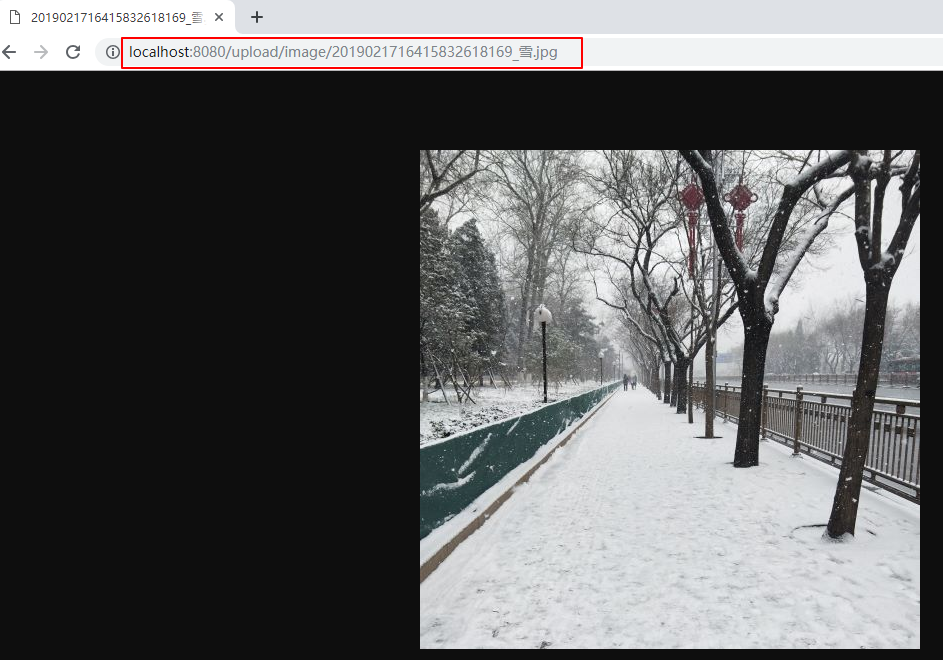
**访问图片如下:**
Layui 上传图片到磁盘上 + Tomcat 配置虚拟路径的更多相关文章
- Tomcat配置虚拟路径访问容器外的硬盘资源
问题: 如果tomcat中上传了很多的图片,会导致tomcat启动的时候会慢,所以应该把图片上传到tomcat容器外部 那么,问题来了: tomcat出于安全考虑,禁止了直接访问外部硬盘资源. 解决: ...
- myeclipse中tomcat配置虚拟路径,用于存储及上传图片
由于双击tomcat后只出现了overview窗口,没有出现Models窗口,如下图所示,故eclipse中的方法不能用. 采用另一种方法 在自己的tomcat的安装目录下 ( 我安装目录的是 D:\ ...
- tomcat配置虚拟路径保存、访问图片
一些项目中往往需要上传一些图片文件之类,一般不建议直接保存在数据库内,往往是讲图片等资源保存在服务器的某个文件夹下,传统做法是上传到部署目录下,通过相对路径进行访问.这样当我们系统需要进行升级,进行全 ...
- 关于Tomcat配置虚拟路径保存、访问图片
在项目中往往需要上传一些图片文件之类,一般不建议直接保存在数据库内,往往是讲图片等资源保存在服务器的某个文件夹下,传统做法是上传到部署目录下,通过相对路径进行访问. 这样当我们系统需要进行升级,进行全 ...
- Tomcat 配置虚拟路径保存、访问图片
转载自:https://www.cnblogs.com/magic101/p/7756402.html 配置tomcat的虚拟映射路径 1.修改Tomcat的server.xml文件 <Host ...
- springboot内置tomcat配置虚拟路径
在Springboot中默认的静态资源路径有:classpath:/METAINF/resources/,classpath:/resources/,classpath:/static/,classp ...
- tomcat 配置虚拟路径
把图片或者其他的文件传到webapps以外的目录 <Context docBase= "e:\image\" path= "/uploads" rel ...
- eclipse配置虚拟路径后,每次启动tomcat都会虚拟路径失效的问题解决
由于,eclipse启动tomcat部署项目并不是直接把项目放到tomcat的webapps目录下的,而是从我们在eclipse配置的外部tomcat中取出二进制文件,在eclipse内部插件中作为t ...
- Tomcat映射虚拟路径到指定磁盘(eclipse)
用WangEditor富文本编辑,上传图片的时候,本文主要记录一下Tomcat映射虚拟路径到指定磁盘,保存到指定路径中,且能实现页面预览. 在实现之前wangeditor的简单实用请参照博主小道仙的后 ...
随机推荐
- 工作流学习之--PHP工作流插件
一.支持的PHP的工作流插件有: 1. TPFlow(thinkphp work flow):是一款开源的ThinkPHP工作流插件,用来解决OA.ERP.CRM.CMS等等办公软件的审核审批的问题. ...
- Centos 如何扩充/增加磁盘
1:使用背景 废话不多说,磁盘空间不足,增加磁盘,然后扩充现有不足空间磁盘. 本次以Vmware进行测验. 2:我们本次要增加的就是这个 3:我们先添加一个磁盘,20G,添加过程不在赘述 4:添加完成 ...
- dashucoding记录2019.6.7
购买阿里云ECS主机 购买域名 申请备案 环境配置 安装wordpress 域名解析 在"产品与服务"中选择云服务器ECS 购买完域名之后建议去实名认证 域名购买链接:http:/ ...
- mac apache 管理
sudo apachectl start sudo apachectl stop sudo apachectl restart
- 链家网爬虫同步VS异步执行时间对比
异步执行时间 import time import asyncio import aiohttp from lxml import etree start_time = time.time() asy ...
- 搭建docusaurus博客
搭建docusaurus博客: docusaurus是facebook的开源的用于简化构建,部署,和维护的博客网站. 特点: 快速启动 支持本地化 页面可自定义 安装要求: Node >= 8. ...
- Oracle plsql 触发器 查询/启用/停止
在PLSQL中查询某个表的触发器脚本 select * from user_triggers where table_name='xxx' oracle触发器的启用和停用 1.禁用 table_nam ...
- synchronized是什么,用法及原理
文章转Hollis博客 大家可以关注下,很多技术类型的文章 在再有人问你Java内存模型是什么,就把这篇文章发给他.中我们曾经介绍过,Java语言为了解决并发编程中存在的原子性.可见性和有序性问题,提 ...
- Java项目开发
项目开发整体构建: MVC+DAO设计模式 用面向对象的方式理解和使用数据库,一个数据库对应一个java项目 数据库--项目 表--类 字段--属性 表中的一条数据--类的一个对象 M:模型层 Jav ...
- Hive SQL NVL 相关函数
1.NVL函数 NVL函数的格式如下:NVL(expr1,expr2)含义是:如果oracle第一个参数为空那么显示第二个参数的值,如果第一个参数的值不为空,则显示第一个参数本来的值. NVL(exp ...