
关于MapReduce的测试
题目:数据清洗以及结果展示
要求:
Result文件数据说明:
Ip:106.39.41.166,(城市)
Date:10/Nov/2016:00:01:02 +0800,(日期)
Day:10,(天数)
Traffic: 54 ,(流量)
Type: video,(类型:视频video或文章article)
Id: 8701(视频或者文章的id)
测试要求:
1、 数据清洗:按照进行数据清洗,并将清洗后的数据导入hive数据库中。
两阶段数据清洗:
(1)第一阶段:把需要的信息从原始日志中提取出来
ip: 199.30.25.88
time: 10/Nov/2016:00:01:03 +0800
traffic: 62
文章: article/11325
视频: video/3235
(2)第二阶段:根据提取出来的信息做精细化操作
ip: 城市 city(IP)
time: 2016-11-10 00:01:03
day: 10
traffic: 62
type: article/video
id: 11325
(3)hive数据库表结构:
create table data01(ip string, time string, day string, traffic bigint, type string, id string)
2、数据处理:
·统计最受欢迎的视频/文章的Top10访问次数 (video/article)
·按照地市统计最受欢迎的Top10课程 (ip)
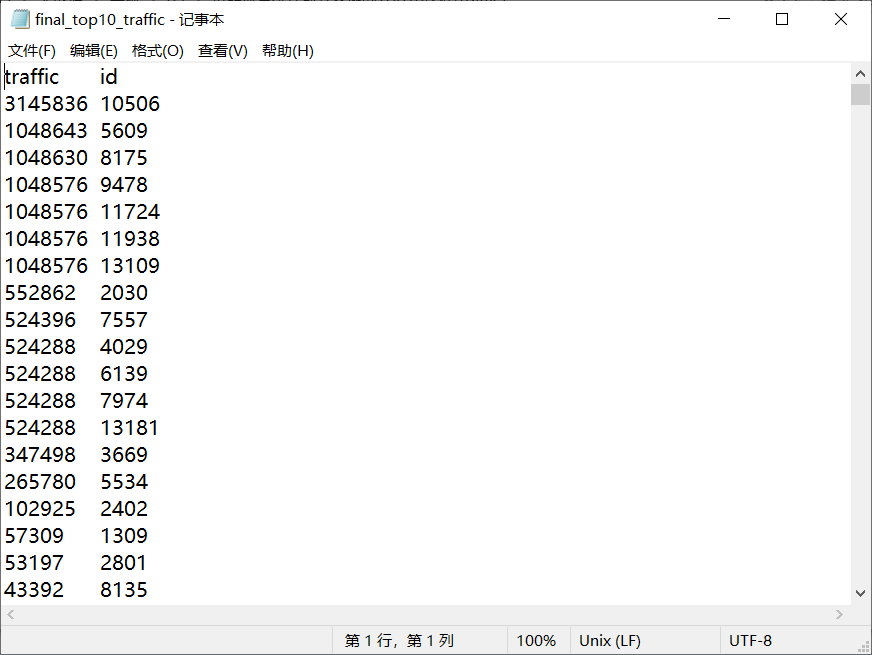
·按照流量统计最受欢迎的Top10课程 (traffic)
3、数据可视化:将统计结果倒入MySql数据库中,通过图形化展示的方式展现出来。
解答:
1、 数据清洗:按照进行数据清洗,并将清洗后的数据导入hive数据库中。
1.1 数据清洗
原始数据格式
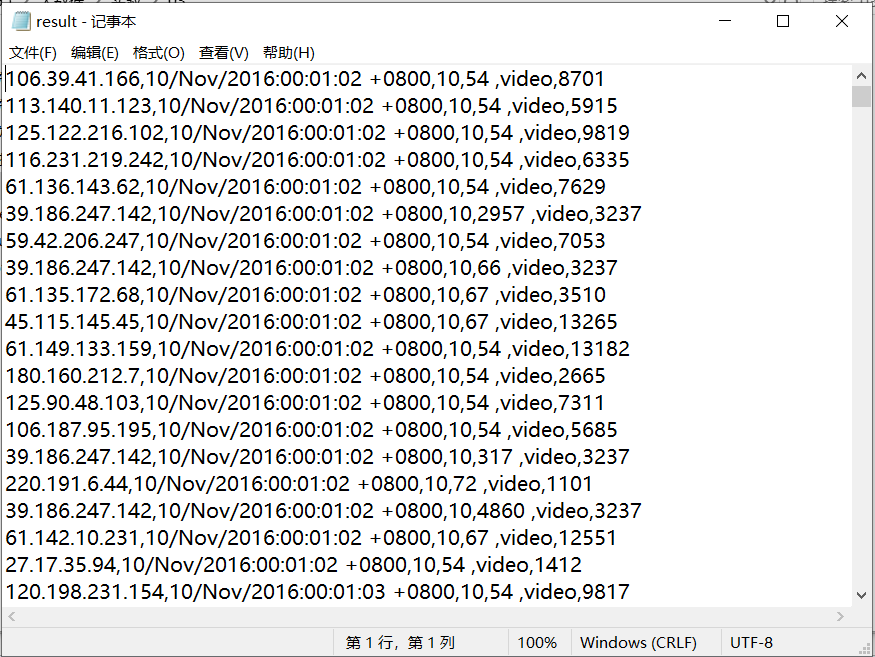
将原始数据文件result.txt上传到HDFS中,然后进行读取清洗
cleanDate.java:(读取清洗)
package com.Use;

import java.io.IOException;

import org.apache.hadoop.conf.Configuration;

import org.apache.hadoop.fs.Path;

import org.apache.hadoop.io.IntWritable;

import org.apache.hadoop.io.Text;

import org.apache.hadoop.mapreduce.Job;

import org.apache.hadoop.mapreduce.Mapper;

import org.apache.hadoop.mapreduce.Reducer;

import org.apache.hadoop.mapreduce.lib.input.FileInputFormat;

import org.apache.hadoop.mapreduce.lib.input.TextInputFormat;

import org.apache.hadoop.mapreduce.lib.output.FileOutputFormat;

import org.apache.hadoop.mapreduce.lib.output.TextOutputFormat;

public class cleanData {

    public static class Map extends Mapper<Object , Text , Text , IntWritable>{

        private static Text newKey=new Text();

        private static String chage(String data) {

            char[] str = data.toCharArray();

            String[] time = new String[7];

            int j = 0;

            int k = 0;

            for(int i=0;i<str.length;i++) {

                if(str[i]=='/'||str[i]==':'||str[i]==32) {

                    time[k] = data.substring(j,i);

                    j = i+1;

                    k++;

                }

            }

            time[k] = data.substring(j, data.length());

             switch(time[1]) { case "Jan":time[1]="01";break; case

              "Feb":time[1]="02";break; case "Mar":time[1]="03";break; case

              "Apr":time[1]="04";break; case "May":time[1]="05";break; case

              "Jun":time[1]="06";break; case "Jul":time[1]="07";break; case

              "Aug":time[1]="08";break; case "Sep":time[1]="09";break; case

              "Oct":time[1]="10";break; case "Nov":time[1]="11";break; case

              "Dec":time[1]="12";break; }

            data = time[2]+"-"+time[1]+"-"+time[0]+" "+time[3]+":"+time[4]+":"+time[5];

            return data;

        }

        public void map(Object key,Text value,Context context) throws IOException, InterruptedException{

            String line=value.toString();

            System.out.println(line);

            String arr[]=line.split(",");

            String ip = arr[0];

            String date = arr[1];

            String day = arr[2];

            String traffic = arr[3];

            String type = arr[4];

            String id = arr[5];

            date = chage(date);

            traffic = traffic.substring(0, traffic.length()-1);

            newKey.set(ip+'\t'+date+'\t'+day+'\t'+traffic+'\t'+type);

            //newKey.set(ip+','+date+','+day+','+traffic+','+type);

            int click=Integer.parseInt(id);

            context.write(newKey, new IntWritable(click));

        }

    }

    public static class Reduce extends Reducer<Text, IntWritable, Text, IntWritable>{

        public void reduce(Text key,Iterable<IntWritable> values,Context context) throws IOException, InterruptedException{

            for(IntWritable val : values){

                context.write(key, val);

            }

        }

    }

    public static void main(String[] args) throws IOException, ClassNotFoundException, InterruptedException{

        Configuration conf=new Configuration();

        System.out.println("start");

        Job job =new Job(conf,"cleanData");

        job.setJarByClass(cleanData.class);

        job.setMapperClass(Map.class);

        job.setReducerClass(Reduce.class);

        job.setOutputKeyClass(Text.class);

        job.setOutputValueClass(IntWritable.class);

        job.setInputFormatClass(TextInputFormat.class);

        job.setOutputFormatClass(TextOutputFormat.class);

        Path in=new Path("hdfs://192.168.137.112:9000/tutorial/in/result.txt");

        Path out=new Path("hdfs://192.168.137.112:9000/tutorial/out");

        FileInputFormat.addInputPath(job,in);

        FileOutputFormat.setOutputPath(job,out);

        System.exit(job.waitForCompletion(true) ? 0 : 1);

    }

}
CleanData
清洗后格式
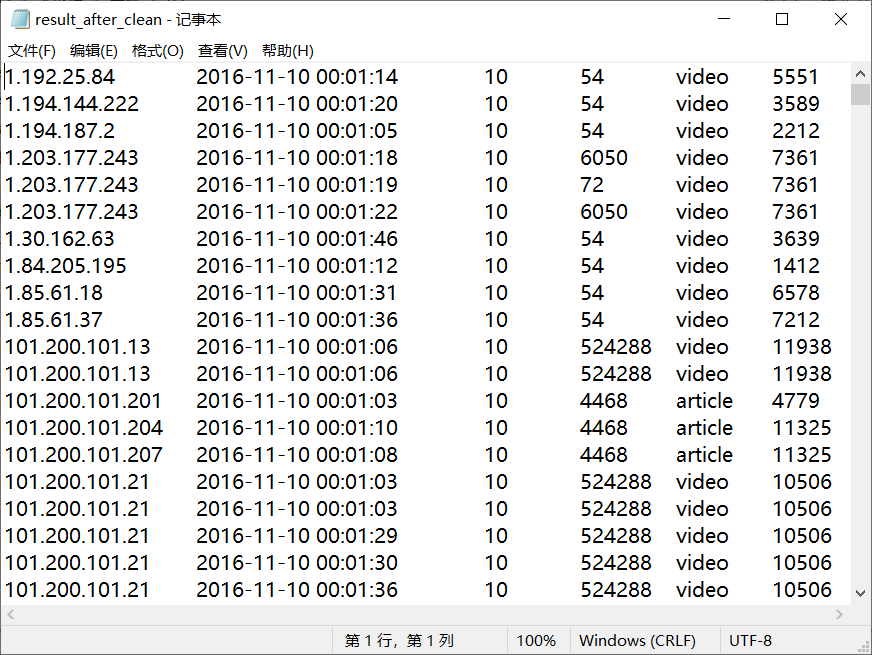
2、数据处理:
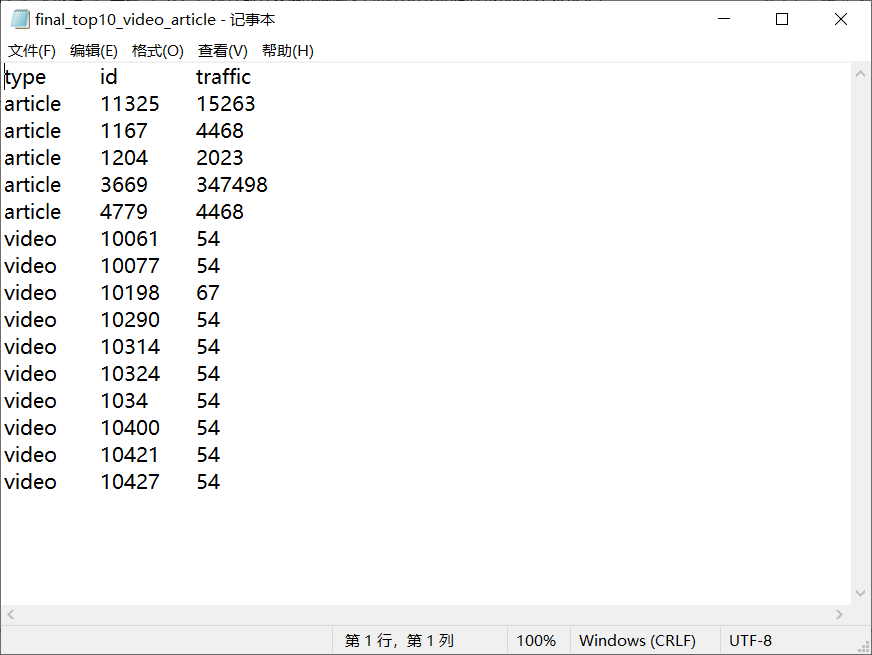
2.1统计最受欢迎的视频/文章的Top10访问次数 (video/article)
读取清洗后数据的.txt文件进行mapreduce
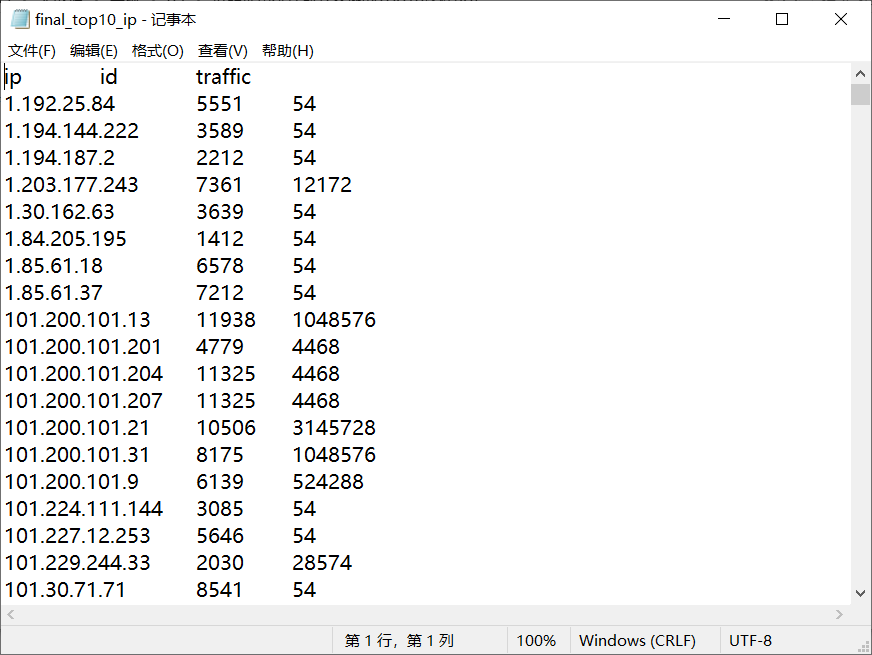
2.2按照地市统计最受欢迎的Top10课程 (ip)
读取清洗后数据的.txt文件进行mapreduce
2.3按照流量统计最受欢迎的Top10课程 (traffic)
读取清洗后数据的.txt文件进行mapreduce
3、数据可视化:将统计结果倒入MySql数据库中,通过图形化展示的方式展现出来。
2.2的统计结果:图形化展示暂未写出
2.1、2.3的统计结果:将统计结果的.txt导入到mysql数据库中,用EChart图形化进行可视化
-----------------------------------------------------------------------------------------------------------------------------
1、2题的代码:https://github.com/457352727/DSJ_tutorial01
3题的代码:https://github.com/457352727/DSJ_tutorial01_web
关于MapReduce的测试的更多相关文章
- mapreduce课堂测试结果
package mapreduce; import java.io.IOException; import java.util.StringTokenizer; import org.apache.h ...
- 使用Python实现Hadoop MapReduce程序
转自:使用Python实现Hadoop MapReduce程序 英文原文:Writing an Hadoop MapReduce Program in Python 根据上面两篇文章,下面是我在自己的 ...
- Hadoop系列(三):hadoop基本测试
下面是对hadoop的一些基本测试示例 Hadoop自带测试类简单使用 这个测试类名叫做 hadoop-mapreduce-client-jobclient.jar,位置在 hadoop/share/ ...
- 为集群配置Impala和Mapreduce
FROM: http://www.importnew.com/5881.html -- 扫描加关注,微信号: importnew -- 原文链接: Cloudera 翻译: ImportNew.com ...
- Hadoop学习笔记—22.Hadoop2.x环境搭建与配置
自从2015年花了2个多月时间把Hadoop1.x的学习教程学习了一遍,对Hadoop这个神奇的小象有了一个初步的了解,还对每次学习的内容进行了总结,也形成了我的一个博文系列<Hadoop学习笔 ...
- Hadoop 全分布模式 平台搭建
现将博客搬家至CSDN,博主改去CSDN玩玩~ 传送门:http://blog.csdn.net/sinat_28177969/article/details/54138163 Ps:主要答疑区在本帖 ...
- hadoop-ha QJM 架构部署
公司之前老的hadoop集群namenode有单点风险,最近学习此链接http://www.binospace.com/index.php /hdfs-ha-quorum-journal-manage ...
- Cloudera Hadoop 5& Hadoop高阶管理及调优课程(CDH5,Hadoop2.0,HA,安全,管理,调优)
1.课程环境 本课程涉及的技术产品及相关版本: 技术 版本 Linux CentOS 6.5 Java 1.7 Hadoop2.0 2.6.0 Hadoop1.0 1.2.1 Zookeeper 3. ...
- Ambari安装之部署单节点集群
前期博客 大数据领域两大最主流集群管理工具Ambari和Cloudera Manger Ambari架构原理 Ambari安装之Ambari安装前准备(CentOS6.5)(一) Ambari安装之部 ...
随机推荐
- Java8排序
@Data @AllArgsConstructor @NoArgsConstructor public class Apple { private int wight; } 排序 List<In ...
- 题解 UVA1316 【Supermarket】
题目链接: https://www.luogu.org/problemnew/show/UVA1316 思路: 根据题目意思,我们需要用到贪心的思想,越晚过期的商品当然是越晚卖好.同时你假如有多个商品 ...
- 【科创人上海行】Tinyfool郝培强 :始于不惑的微服务式创业,背负身心病痛贴地飞行
Intro 科创人,分享技术创业者的成长与创业经验. 何谓创业?勇于面对未知.肩负重任的人生抉择. 何谓经验?沟沟坎坎.有笑有泪,各有其宝贵. 科创人的价值支点是"人",我们不以市 ...
- 12 Mysql之工作中常用操作
Mysql 专题讲解 一.用户创建与权限管理 a) 创建和删除用户 创建用户: CREATE USER jack@localhost; UPDATE USER SET password=passwo ...
- python之初入Python
python优缺点: Python的优点很多,简单的可以总结为以下几点. 简单和明确,做一件事只有一种方法. 学习曲线低,跟其他很多语言相比,Python更容易上手. 开放源代码,拥有强大的社区和生态 ...
- 【ZJOI 2016】旅行者
题意 http://uoj.ac/problem/184 题解 大概是神题. 网格图上跑最短路有一个经典的优化方式:分治分组跑最短路. 对于这道题,设矩形长为 \(n\),宽为 \(m\),则对 \( ...
- MyBatis: Invalid bound statement (not found)错误的可能原因
MyBatis: Invalid bound statement (not found)错误的可能原因 其他原因导致此问题解决参考: 1.检查 xml 文件所在 package 名称是否和 Mappe ...
- CeSharp支持MP4
因为CefSharp不支持MP4格式(因为版权问题,MP3因为版权过期新版本已经支持了),需要自己下载源码重新编译以支持MP4,或者下载被人编译好的库.因时间问题,我直接在csdn上下载了一个(1c币 ...
- openGL中的gl,glu,glut
OpenGL函数库相关的API有核心库(gl).实用库(glu).辅助库(aux).实用工具库(glut).窗口库(glx.agl.wgl)和扩展函数库等.gl是核心,glu是对gl的部分封装.glx ...
- JAVA NIO 内存映射(转载)
原文地址:http://blog.csdn.net/fcbayernmunchen/article/details/8635427 Java类库中的NIO包相对于IO 包来说有一个新功能是内存 ...