
Java compiler level does not match the version of the installed Java project fac
Java compiler level does not match the version of the installed Java project fac
问题一:
问:项目图标报错,Problems 试图有一条错误显示“Java compiler level does not match the version of the installed Java project facet.” 。
答:这个是因为Facted Project 中的Java 版本设定与项目的Java 版本设定不一致。

如Drawing 1: Modify: Modify Faceted Project 中所示,这个时候项目的Java 的版本为5.0 。如果项目的Java Compiler 的设置如Drawing 2: Java C: Java Compiler 中所示的设置。就是会出现问题中所述的错误。修改的方式很简单,只要统一一下他们的设置。让他们保持一致就OK 了。
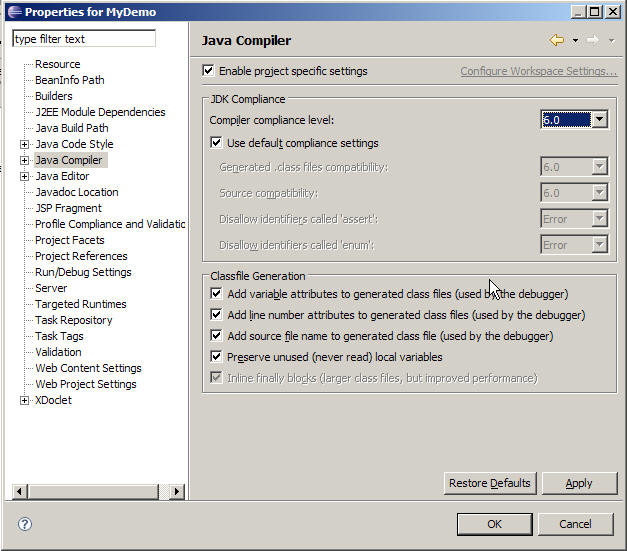
project 编译问题
1、properties->project Facets->修改右侧的version 保持一致
2、window->preferences->java->Compiler->设置右侧的Compiler compliance level
3、window->preferences->java->Installed JREs->设置或者选择右侧的Installed JREs
以上三处的jdk版本要保持一致,才能编译通过
http://www.cnblogs.com/lemonme/articles/1655894.html
http://zhoshijie.iteye.com/blog/981849
Java compiler level does not match the version of the installed Java project fac的更多相关文章
- java compiler level does not match the version of the installed java project facet 解决方案
项目出现 java compiler level does not match the version of the installed java project facet 错误,一般是项目移植出现 ...
- java compiler level does not match the version of the installed java project facet
Java compiler level does not match the version of the installed java project facet错误的解决 因工作的关系,Eclip ...
- Java compiler level does not match the version of the installed Java project facet.(转)
Java compiler level does not match解决方法 从别的地方导入一个项目的时候,经常会遇到eclipse/Myeclipse报Description Resource P ...
- maven项目 Java compiler level does not match the version of the installed Java project facet
因工作的关系,Eclipse开发的Java项目拷来拷去,有时候会报一个很奇怪的错误.明明源码一模一样,为什么项目复制到另一台机器上,就会报“java compiler level does not m ...
- Java compiler level does not match the version of the installed Java project facet.问题
从同事那里拷贝过来的web项目,导入到eclipse中,出现Java compiler level does not match the version of the installed Java p ...
- Java compiler level does not match the version of the installed Java project facet. springmvc1 和 Target runtime Apache Tomcat v7.0 is not defined.
Java compiler level does not match the version of the installed Java project facet.springmvc1 : Targ ...
- eclipse中切换jre后报错:Java compiler level does not match the version of the installed Java project facet.
项目移除原来的jre环境lib后,添加本地的jre,报错如下: Java compiler level does not match the version of the installed Java ...
- 解决Java compiler level does not match the version of the installed Java project facet.问题
其实之前遇到过Java compiler level does not match the version of the installed Java project facet.这个问题,因为当时没 ...
- Java compiler level does not match the version of the installed java project facet错误的解决
因工作的关系,Eclipse开发的Java项目拷来拷去,有时候会报一个很奇怪的错误.明明源码一模一样,为什么项目复制到另一台机器上,就会报“java compiler level does not m ...
- 解决java compiler level does not match the version of the installed java project facet【转载】
原博文地址http://blog.csdn.net/chszs/article/details/8125828 Java compiler level does not match the versi ...
随机推荐
- 使用vue脚手架工具搭建vue-webpack项目
对于Vue.js来说,如果你想要快速开始,那么只需要在你的html中引入一个<script>标签,加上CDN的地址即可.但是,这并不算是一个完整的vue实际应用.在实际应用中,我们必须要一 ...
- 关于Go语言,自己定义结构体标签的一个妙用.
在Go中首字母大写和小写,决定着这此变量能否被外部调用, 比如:在使用标准库的json编码自定一的结构的时候: <pre style="margin-top: 0px; margin- ...
- myeclipse8.6首次运行maven项目的问题解决
myeclipse8.6导入maven项目后识别为普通java项目,即项目图标上没有小M的标识.这时是无法直接运行的. 解决方法:1,打开Window --> perferences,找到mye ...
- TCP常用网络和木马使用端口对照表,常用和不常用端口一览表
[开始-运行- CMD , 输入 netstat -an 然后回车就可以查看端口] 端口: 服务:Reserved 说明:通常用于分析操作系统.这一方法能够工作是因为在一些系统中“”是无效端口,当你试 ...
- 如何更换Office 2013的product key?
第一步 第二步 第三步 ... ... ... ... ^_^ 参考资料 ======================== Change Product Key Office 2013 Home ...
- java中的深浅克隆
假设有一个对象object,在某处又需要一个跟object一样的实例object2,强调的是object和object2是两个独立的实例,只是在开始的时候,他们是具有相同状态的(属性字段的值都相同). ...
- 设置pycharm为Eclipse快捷键
Ctrl + O 根据name模糊查找当前文件中类.方法Alt + (向左箭头或者向右箭头) ,回退or前进到到之前查看或者编辑处Alt + (向上箭头或者向下箭头) ,将当前方法整体往下或者往上移动 ...
- php 获得linux 机器的性能
<?php $str = shell_exec('more /proc/stat'); $pattern = "/(cpu[0-9]? )[\s]+([0-9]+)[\s]+([0-9 ...
- Android -- 写xml到SD卡中
信息类 private ...
- (顺序表应用5.1.1)POJ 3750 小孩报数问题(基本的约瑟夫环问题:给出人数n,出发位置w,间隔数s)
/* * POJ_3750.cpp * * Created on: 2013年10月30日 * Author: Administrator */ #include <iostream> # ...