
纯css实现点击事件
 <!DOCTYPE html>

 <html lang="en">

 <head>

     <meta charset="UTF-8">

     <title>点击</title>

     <style>

         * {

             margin: 0;

             padding: 0;

         }

         .box {

             position: relative;

             display: block;

             float: left;

             width: 50px;

             height: 50px;

             margin-top: 100px;

             margin-left: 100px;

             border: 1px solid #18c250;

             border-radius: 3px;

         }

         input[type=checkbox]:checked + label .box:before {

             content: "";

             position: absolute;

             top: 28px;

             left: 2px;

             width: 23px;

             height: 3px;

             background-color: #18c250;

             transform: rotate(45deg);

             -webkit-transform: rotate(45deg);

         }

         input[type=checkbox]:checked + label .box:after {

             content: "";

             position: absolute;

             top: 24px;

             left: 15px;

             width: 37px;

             height: 3px;

             background-color: #18c250;

             transform: rotate(-45deg);

             -webkit-transform: rotate(-45deg);

         }

         .info {

             float: left;

             margin-top: 92px;

             margin-left: 10px;

             font-size: 48px;

             user-select: none;

         }

         label {

             display: inline-block;

             max-width: 100%;

         }

         input[type=checkbox]{

             display: none;

         }

     </style>

 </head>

 <body>

 <input id="input" type="checkbox">

 <label for="input">

     <span class="box"></span>

     <span class="info">已阅读协议书</span>

 </label>

 </body>

 </html>
效果:

注意点:input要写在label前面,因为 + 选择器指的是兄弟元素中的弟弟元素,不包括哥哥元素。
写这个的初衷就在于那个亘古不变的道理,能用CSS解决的就不用js
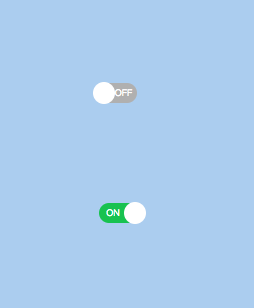
在来个炫酷点的开关
 <!DOCTYPE html>

 <html lang="en">

 <head>

     <meta charset="UTF-8">

     <title>Title</title>

     <style>

         *{

             margin: 0;

             padding: 0;

         }

         body{

             background-color: #abcdef;

         }

         input{

             display: none;

         }

         .switch{

             position: relative;

             display: block;

             width: 38px;

             height: 20px;

             cursor: pointer;

             user-select: none;

             margin-top: 100px;

             margin-left: 100px;

             border-radius: 10px;

             background-color: #b0b0b0;

         }

         .switch:before{

             content: 'OFF';

             position: absolute;

             top: 1px;

             right: 2px;

             font-size: 12px;

             color: #fff;

             transform: scale(.75);

             -webkit-transform: scale(.75);

         }

         .switch:after{

             content: "";

             position: absolute;

             top: -1px;

             left: -6px;

             width: 22px;

             height: 22px;

             border-radius: 50%;

             background-color: #fff;

             -webkit-transition: left 200ms linear;

         }

         input[type=checkbox]:checked + label .switch{

             background-color: #18c250;

         }

         input[type=checkbox]:checked + label .switch:before{

             content: "ON";

             right: 15px;

         }

         input[type=checkbox]:checked + label .switch:after{

             left: 25px;

         }

     </style>

 </head>

 <body>

 <input id="input1" type="checkbox">

 <label for="input1">

     <a class="switch">

     </a>

 </label>

 <input id="input2" type="checkbox">

 <label for="input2">

     <a class="switch">

     </a>

 </label>

 </body>

 </html>
效果:
纯css实现点击事件的更多相关文章
- 纯CSS实现点击事件展现隐藏div菜单列表/元素切换
在写移动端导航的时候经常用到点击按钮出现/隐藏导航条的情况,最常见的方法当然还是前端框架直接调用,省心省力,不易出错:当然还有使用纯JS实现的小代码段.我这里整理了纯CSS实现方式,给需要的人和给自己 ...
- CSS实现点击事件及实践
实现原理利用:target,把a标签自身的href以及id设置成一样的. 案例1:实现元素的切换 HTML: <div id="box"> <a href=&qu ...
- 超强的纯 CSS 鼠标点击拖拽效果
背景 鼠标拖拽元素移动,算是一个稍微有点点复杂的交互. 而在本文,我们就将打破常规,向大家介绍一种超强的仅仅使用纯 CSS 就能够实现的鼠标点击拖拽效果. 在之前的这篇文章中 -- 不可思议的纯 CS ...
- css 禁止点击事件触发
鼠标不可点击主要是两种表现: 1.鼠标不可点击时的显示状态 cursor: not-allowed 2.禁止触发点击事件 pointer-events:none
- css处理事件透过、点击事件透过
// 执行一些动作... $("#myModal2").css("pointer-events","none"); // 执行一些动作... ...
- css禁用鼠标点击事件
css禁用鼠标点击事件 .disabled { pointer-events: none; } <div class="main-container disabled"> ...
- 项目遇到的小问题(关于vue-cli中js点击事件不起作用和iconfont图片下载页面css样式乱的解答)
第一个:关于vue-cli中js点击事件不起作用 在vue的methods方法queryBtnFun()中拼接html和click操作事件的时候,发现点击事件一起未起作用: 后来发现是DOM执行顺序 ...
- CSS伪类选择器active模拟JavaScript点击事件
一.说明 设置元素在被用户激活(在鼠标点击与释放之间发生的事件)时的样式. IE7及更早浏览器只支持a元素的:active,从IE8开始支持其它元素的:active. 另:如果需要给超链接定义:访问前 ...
- 纯css就能实现可点击切换的轮播图,feel起来很丝滑
前言 轮播图经常会在项目里用到,但是实际上用到的轮播图都是比较简单的,没有复杂的特效,这个时候如果去引入swiper那些库的话,未免就有点杀鸡焉用牛刀了. 所以不如自己手写一个,而今天我要分享的一种写 ...
随机推荐
- 模式窗体中调用父页面js与非模式化调用非父页面的js方法
最近项目中使用模式窗体,遇到以下问题记录一下: 模式窗体:你必须关闭该窗体,才能操作其它窗体:比如说,必须按确定或取消,或者按关闭. 非模式窗体:不必关闭该窗体,就可转换到其它窗体上进行操作. 一:非 ...
- qml自定义带文字的button tabbutton
https://blog.csdn.net/u014416260/article/details/54579480
- Java基础学习-接口-概述以及成员特点
package interfaceclass; /*接口的概述: * 接口解决的问题: * 因为java中的继承的单一局限性(子类只能继承一个父类),为了打破这个局限,java语言提供了一个机制,接口 ...
- 20165202 预备作业3 Linux安装及学习
一.虚拟机安装 娄老师的<基于VirtualBox安装Ubuntu图文教程>对于安装过程的介绍很易懂,但在安装过程中还是遇到了一些问题 Q1:安装教程中下载地址的VM提示安装包损坏 解决办 ...
- Axure RP 7.0 注册码
2016.01.25安装可用 Axure RP 7.0 注册码 用户名:axureuser 序列号:8wFfIX7a8hHq6yAy6T8zCz5R0NBKeVxo9IKu+kgKh79FL6 ...
- 《Drools7.0.0.Final规则引擎教程》第4章 4.5RHS语法
RHS语法 使用说明 RHS是满足LHS条件之后进行后续处理部分的统称,该部分包含要执行的操作的列表信息.RHS主要用于处理结果,因此不建议在此部分再进行业务判断.如果必须要业务判断需要考虑规则设计的 ...
- RxJava 1.x 笔记:组合型操作符
最近去检查眼睛,发现度数又涨了,唉,各位猿多注意保护自己的眼睛吧! 前面学了 RxJava 的三种关键操作符: 创建型操作符 过滤型操作符 变换型操作符 读完本文你将了解第四种(组合型操作符): 组合 ...
- SpreadJS 在 Angular2 中支持哪些事件?
SpreadJS 纯前端表格控件是基于 HTML5 的 JavaScript 电子表格和网格功能控件,提供了完备的公式引擎.排序.过滤.输入控件.数据可视化.Excel 导入/导出等功能,适用于 .N ...
- JavaScript库基本格式写法
/********************************************************************* * JavaScript库基本格式写法 * 说明: * 由 ...
- css3公共样式
温馨提示:一下css封装,建议按需使用,否则会造成很大的代码冗余,且很多样式会造成不符合预期的效果,建议合理使用 <a href="https://meyerweb.com/eric/ ...