
纯css实现点击事件
 <!DOCTYPE html>

 <html lang="en">

 <head>

     <meta charset="UTF-8">

     <title>点击</title>

     <style>

         * {

             margin: 0;

             padding: 0;

         }

         .box {

             position: relative;

             display: block;

             float: left;

             width: 50px;

             height: 50px;

             margin-top: 100px;

             margin-left: 100px;

             border: 1px solid #18c250;

             border-radius: 3px;

         }

         input[type=checkbox]:checked + label .box:before {

             content: "";

             position: absolute;

             top: 28px;

             left: 2px;

             width: 23px;

             height: 3px;

             background-color: #18c250;

             transform: rotate(45deg);

             -webkit-transform: rotate(45deg);

         }

         input[type=checkbox]:checked + label .box:after {

             content: "";

             position: absolute;

             top: 24px;

             left: 15px;

             width: 37px;

             height: 3px;

             background-color: #18c250;

             transform: rotate(-45deg);

             -webkit-transform: rotate(-45deg);

         }

         .info {

             float: left;

             margin-top: 92px;

             margin-left: 10px;

             font-size: 48px;

             user-select: none;

         }

         label {

             display: inline-block;

             max-width: 100%;

         }

         input[type=checkbox]{

             display: none;

         }

     </style>

 </head>

 <body>

 <input id="input" type="checkbox">

 <label for="input">

     <span class="box"></span>

     <span class="info">已阅读协议书</span>

 </label>

 </body>

 </html>
效果:

注意点:input要写在label前面,因为 + 选择器指的是兄弟元素中的弟弟元素,不包括哥哥元素。
写这个的初衷就在于那个亘古不变的道理,能用CSS解决的就不用js
在来个炫酷点的开关
 <!DOCTYPE html>

 <html lang="en">

 <head>

     <meta charset="UTF-8">

     <title>Title</title>

     <style>

         *{

             margin: 0;

             padding: 0;

         }

         body{

             background-color: #abcdef;

         }

         input{

             display: none;

         }

         .switch{

             position: relative;

             display: block;

             width: 38px;

             height: 20px;

             cursor: pointer;

             user-select: none;

             margin-top: 100px;

             margin-left: 100px;

             border-radius: 10px;

             background-color: #b0b0b0;

         }

         .switch:before{

             content: 'OFF';

             position: absolute;

             top: 1px;

             right: 2px;

             font-size: 12px;

             color: #fff;

             transform: scale(.75);

             -webkit-transform: scale(.75);

         }

         .switch:after{

             content: "";

             position: absolute;

             top: -1px;

             left: -6px;

             width: 22px;

             height: 22px;

             border-radius: 50%;

             background-color: #fff;

             -webkit-transition: left 200ms linear;

         }

         input[type=checkbox]:checked + label .switch{

             background-color: #18c250;

         }

         input[type=checkbox]:checked + label .switch:before{

             content: "ON";

             right: 15px;

         }

         input[type=checkbox]:checked + label .switch:after{

             left: 25px;

         }

     </style>

 </head>

 <body>

 <input id="input1" type="checkbox">

 <label for="input1">

     <a class="switch">

     </a>

 </label>

 <input id="input2" type="checkbox">

 <label for="input2">

     <a class="switch">

     </a>

 </label>

 </body>

 </html>
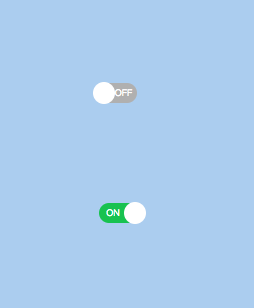
效果:
纯css实现点击事件的更多相关文章
- 纯CSS实现点击事件展现隐藏div菜单列表/元素切换
在写移动端导航的时候经常用到点击按钮出现/隐藏导航条的情况,最常见的方法当然还是前端框架直接调用,省心省力,不易出错:当然还有使用纯JS实现的小代码段.我这里整理了纯CSS实现方式,给需要的人和给自己 ...
- CSS实现点击事件及实践
实现原理利用:target,把a标签自身的href以及id设置成一样的. 案例1:实现元素的切换 HTML: <div id="box"> <a href=&qu ...
- 超强的纯 CSS 鼠标点击拖拽效果
背景 鼠标拖拽元素移动,算是一个稍微有点点复杂的交互. 而在本文,我们就将打破常规,向大家介绍一种超强的仅仅使用纯 CSS 就能够实现的鼠标点击拖拽效果. 在之前的这篇文章中 -- 不可思议的纯 CS ...
- css 禁止点击事件触发
鼠标不可点击主要是两种表现: 1.鼠标不可点击时的显示状态 cursor: not-allowed 2.禁止触发点击事件 pointer-events:none
- css处理事件透过、点击事件透过
// 执行一些动作... $("#myModal2").css("pointer-events","none"); // 执行一些动作... ...
- css禁用鼠标点击事件
css禁用鼠标点击事件 .disabled { pointer-events: none; } <div class="main-container disabled"> ...
- 项目遇到的小问题(关于vue-cli中js点击事件不起作用和iconfont图片下载页面css样式乱的解答)
第一个:关于vue-cli中js点击事件不起作用 在vue的methods方法queryBtnFun()中拼接html和click操作事件的时候,发现点击事件一起未起作用: 后来发现是DOM执行顺序 ...
- CSS伪类选择器active模拟JavaScript点击事件
一.说明 设置元素在被用户激活(在鼠标点击与释放之间发生的事件)时的样式. IE7及更早浏览器只支持a元素的:active,从IE8开始支持其它元素的:active. 另:如果需要给超链接定义:访问前 ...
- 纯css就能实现可点击切换的轮播图,feel起来很丝滑
前言 轮播图经常会在项目里用到,但是实际上用到的轮播图都是比较简单的,没有复杂的特效,这个时候如果去引入swiper那些库的话,未免就有点杀鸡焉用牛刀了. 所以不如自己手写一个,而今天我要分享的一种写 ...
随机推荐
- vim+ctags用法
vim用法 在VIM编辑器的环境下用":make"就可以编译程序,如果程序中有错误,就会显示出来. 下列命令可以快速定位,并修改错误错误 ":c ...
- vue.js 源代码学习笔记 ----- instance event
/* @flow */ import { updateListeners } from '../vdom/helpers/index' import { toArray, tip, hyphenate ...
- Python程序员不完全指南
Python 基础 Python基础 基础数据类型 深浅copy 文件操作 函数 初识函数 函数进阶 装饰器函数 迭代器和生成器 各种推导式 递归函数 内置函数和匿名函数 异常处理 常用模块 模块和包 ...
- Gcov 详解 + 内核函数覆盖率测试方法详述及产生错误解决办法
http://blog.csdn.net/wangyezi19930928/article/details/42638345 http://www.uml.org.cn/Test/201208311. ...
- 【剑指offer】栈的压入弹出序列,C++实现(举例)
原创文章,转载请注明出处! 本题牛客网地址 博客文章索引地址 博客文章中代码的github地址 1.题目 输入两个整数序列,第一个序列表示栈的压入顺序,请判断第二个序列是否为第一个序列的出栈序列.注意 ...
- SQLServer OpenRowSet 导入数据
今早上同事要求从SQLServer2008导出一部分数据到SQLServer2000中作为演示/测试数据,开始也没想多,直接去SQLServer2000的企业管理器中,用了数据导入的功能.以为完事了, ...
- BZOJ:5457: 城市(线段树合并)(尚待优化)
5457: 城市 Time Limit: 20 Sec Memory Limit: 512 MBSubmit: 18 Solved: 12[Submit][Status][Discuss] Des ...
- 浅析Java虚拟机结构与机制
转载自:http://blog.hesey.net/2011/04/introduction-to-java-virtual-machine.html http://coolshell.cn/arti ...
- 让控制台支持 ANSI 转义序列,输出下划线、修改颜色或其他控制
各种操作系统的控制台都支持 ANSI 转义序列(ANSI Escape Code).使用转义序列,可以对控制台进行很多额外的定制,例如修改颜色.修改标题栏,将文字添加下划线等. 当然,.NET 已经帮 ...
- 出让执行权:Task.Yield, Dispathcer.Yield
Yield 这个词很有意思,叫做“屈服”“放弃”“让步”,字面意义上是让出当前任务的执行权,转而让其他任务可以插入执行.Task.Dispatcher.Thread 都有 Yield() 方法,看起来 ...