
C#使用Redis的基本操作
一,引入dll
1.ServiceStack.Common.dll
2.ServiceStack.Interfaces.dll
3.ServiceStack.Redis.dll
4.ServiceStack.Text.dll
二,修改配置文件
在你的配置文件中加入如下的代码:
<appSettings>

  <add key="RedisPath" value="127.0.0.1:6379"/>  todo:这里配置自己redis的ip地址和端口号

</appSettings>
二,用到的工具类
using System;

using System.Collections.Generic;

using System.Linq;

using System.Text;

using ServiceStack.Redis;

namespace RedisDemo

{

  /// <summary>

  /// RedisManager类主要是创建链接池管理对象的

  /// </summary>

  public class RedisManager

  {

    /// <summary>

    /// redis配置文件信息

    /// </summary>

    private static string RedisPath = System.Configuration.ConfigurationSettings.AppSettings["RedisPath"];

    private static PooledRedisClientManager _prcm;

    /// <summary>

    /// 静态构造方法,初始化链接池管理对象

    /// </summary>

    static RedisManager()

    {

      CreateManager();

    }

    /// <summary>

    /// 创建链接池管理对象

    /// </summary>

    private static void CreateManager()

    {

      _prcm = CreateManager(new string[] { RedisPath }, new string[] { RedisPath });

    }

    private static PooledRedisClientManager CreateManager(string[] readWriteHosts, string[] readOnlyHosts)

    {

      //WriteServerList:可写的Redis链接地址。

      //ReadServerList:可读的Redis链接地址。

      //MaxWritePoolSize:最大写链接数。

      //MaxReadPoolSize:最大读链接数。

      //AutoStart:自动重启。

      //LocalCacheTime:本地缓存到期时间,单位:秒。

      //RecordeLog:是否记录日志,该设置仅用于排查redis运行时出现的问题,如redis工作正常,请关闭该项。

      //RedisConfigInfo类是记录redis连接信息,此信息和配置文件中的RedisConfig相呼应

      // 支持读写分离,均衡负载

      return new PooledRedisClientManager(readWriteHosts, readOnlyHosts, new RedisClientManagerConfig

      {

        MaxWritePoolSize = , // “写”链接池链接数

        MaxReadPoolSize = , // “读”链接池链接数

        AutoStart = true,

      });

    }

    private static IEnumerable<string> SplitString(string strSource, string split)

    {

      return strSource.Split(split.ToArray());

    }

    /// <summary>

    /// 客户端缓存操作对象

    /// </summary>

    public static IRedisClient GetClient()

    {

      if (_prcm == null)

      {

        CreateManager();

      }

      return _prcm.GetClient();

    }

  }

}
三,main方法执行存储操作与读取操作
using System;

using System.Collections.Generic;

using System.Linq;

using System.Text;

using ServiceStack.Redis;

using ServiceStack.Redis.Support;

namespace RedisDemo

{

  class Program

  {

    static void Main(string[] args)

    {

      try

      {

        //获取Redis操作接口

        IRedisClient Redis = RedisManager.GetClient();

        //放入内存

        Redis.Set<string>("my_name", "小张");

        Redis.Set<int>("my_age", );

        //保存到硬盘

        Redis.Save();

        //释放内存

        Redis.Dispose();

        //取出数据

        Console.WriteLine("取出刚才存进去的数据 \r\n 我的Name:{0}; 我的Age:{1}.",

          Redis.Get<string>("my_name"), Redis.Get<int>("my_age"));

        Console.ReadKey();

      }

      catch (Exception ex)

      {

        Console.WriteLine(ex.Message.ToString());

        Console.ReadKey();

      }

    }

  }

}
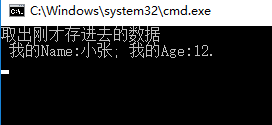
完活,下面是运行后的结果
C#使用Redis的基本操作的更多相关文章
- java对redis的基本操作,ZZ
java对redis的基本操作 http://www.cnblogs.com/edisonfeng/p/3571870.html
- python下redis的基本操作:
1. 基本操作: >>> import redis >>> print redis.__file__ /usr/local/lib/python2.7/dist-p ...
- Redis 的基本操作、Key的操作及命名规范
Redis基本操作 查看数据的状态 pong redis 给我们返回 PONG,表示 redis 服务 运行正常 redis 默认用 使用 16 个 库 • Redis 默认使用 16 个库,从 0 ...
- java对redis的基本操作
一.server端安装 1.下载 https://github.com/MSOpenTech/redis 可看到当前可下载版本:redis2.6
- java对redis的基本操作(转)
本文转自:http://www.cnblogs.com/edisonfeng/p/3571870.html 2.主要类 1)功能类 package com.redis; import java.uti ...
- Redis缓存 ava-Jedis操作Redis,基本操作以及 实现对象保存
源代码下载: http://download.csdn.net/detail/jiangtao_st/7623113 1.Maven配置 <dependency> <groupId& ...
- redis - java 基本操作
import java.util.HashMap; import java.util.Iterator; import java.util.List; import java.util.Map; im ...
- Redis缓存系统(一)Java-Jedis操作Redis,基本操作以及 实现对象保存
版权声明:本文为博主原创文章.未经博主同意不得转载. https://blog.csdn.net/jiangtao_st/article/details/37699473 源码下载: http://d ...
- java 连接redis 以及基本操作
一.首先下载安装redis 二.项目搭建 1.搭建一个maven 工程 2. 在pom.xml文件的dependencies节点下增加如下内容: <!-- resis --> <de ...
- java对redis的基本操作(初识)
一.server端安装 1.下载 https://github.com/MSOpenTech/redis 可看到当前可下载版本:redis2.6
随机推荐
- ICO流程,casestudy
https://medium.com/crypto-oracle/ico-analysis-framework-nex-case-study-bf65586b4b32
- easyui 获取当前页签选中的名称
parent.parent.$("#tabs").tabs('getSelected').panel('options').title == "收藏夹管理"
- 掌握zigbee网络里的相关的重要概论
1.zigbee无线通信,需要高频的载波来提供发射效率,zigbee模块之间要可以正常的收发,必须把接收频率设置和发射模块的载波频率一致. 2.zigbee有27个载波可以进行通信,载波叫做信道(无线 ...
- typeof()和instanceof的用法区别
typeof() typeof() 是一个一元运算,放在一个运算数之前,运算数可以是任意类型.它返回值是一个字符串,该字符串说明运算数的类型.,typeof一般只能返回如下几个结果:number,bo ...
- sql语句表连接
"Persons" 表: Id_P LastName FirstName Address City 1 Adams John Oxford Street London 2 Bush ...
- bbs3
第三天 昨日回顾: 1 验证码刷新 -$("#img_code")[0].src+="?" -本质就是向这个地址又发了一次请求 2 js中字符串拼接 -es5之 ...
- QT之Variant
QVariant识别类型的注册 QVariant识别类型的注册 QVariant为一个万能的数据类型--可以作为许多类型互相之间进行自动转换.将C++变为弱数据类型成为可能--也是许多控件中用户定义数 ...
- Hadoop有点难
从看<Hadoop权威指南>第一眼开始,我一直觉得Hadoop很难,很难.....看着这本书,我觉得好像是文言文,我是真的看不懂,我的一腔热血瞬间冷了下来!很幸运,但是也不幸运,我来到了一 ...
- hdu2653之BFS
Waiting ten thousand years for Love Time Limit: 10000/2000 MS (Java/Others) Memory Limit: 32768/3 ...
- DLL的概念、dll导出类(转贴)
1. DLL的概念DLL(Dynamic Linkable Library),动态链接库,可以向程序提供一些函数.变量或类.这些可以直接拿来使用.静态链接库与动态链接库的区别:(1)静态链接库与动态链 ...