
Flume启动运行时报错org.apache.flume.ChannelFullException: Space for commit to queue couldn't be acquired. Sinks are likely not keeping up with sources, or the buffer size is too tight解决办法(图文详解)
前期博客
Flume自定义拦截器(Interceptors)或自带拦截器时的一些经验技巧总结(图文详解)
问题详情
启动agent服务
[hadoop@master flume-1.7.0]$ bin/flume-ng agent --conf conf_MySearchAndReplaceInterceptor/ --conf-file conf_MySearchAndReplaceInterceptor/flume-conf.properties --name agent1 -Dflume.root.logger=INFO,console

我这里,出现了这个错误
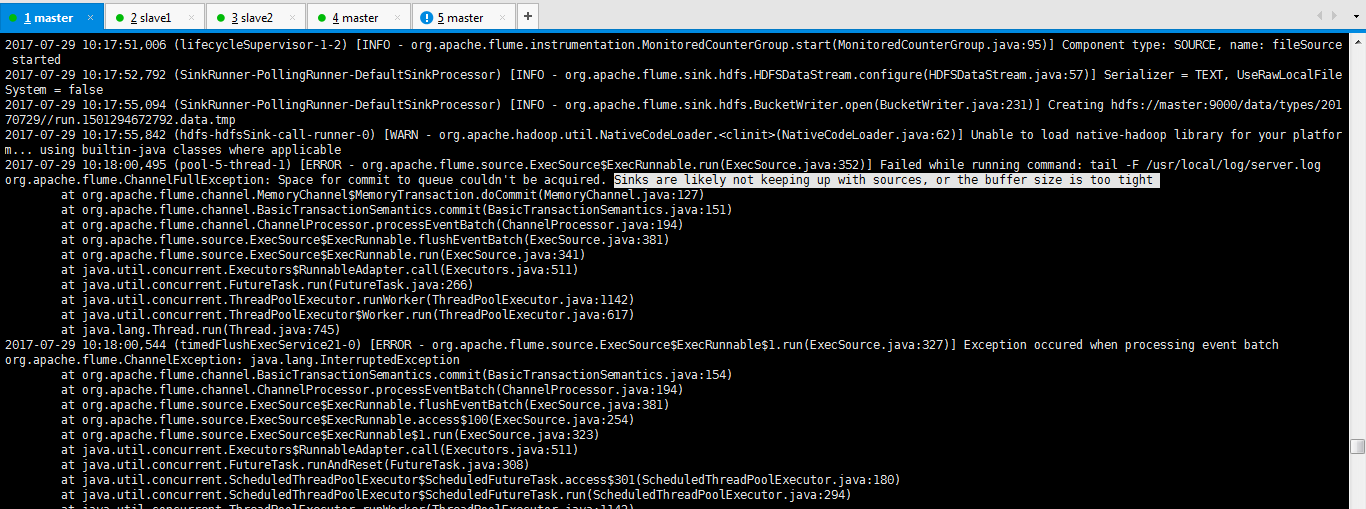

2017-07-29 10:17:51,006 (lifecycleSupervisor-1-2) [INFO - org.apache.flume.instrumentation.MonitoredCounterGroup.start(MonitoredCounterGroup.java:95)] Component type: SOURCE, name: fileSource started

2017-07-29 10:17:52,792 (SinkRunner-PollingRunner-DefaultSinkProcessor) [INFO - org.apache.flume.sink.hdfs.HDFSDataStream.configure(HDFSDataStream.java:57)] Serializer = TEXT, UseRawLocalFileSystem = false

2017-07-29 10:17:55,094 (SinkRunner-PollingRunner-DefaultSinkProcessor) [INFO - org.apache.flume.sink.hdfs.BucketWriter.open(BucketWriter.java:231)] Creating hdfs://master:9000/data/types/20170729//run.1501294672792.data.tmp

2017-07-29 10:17:55,842 (hdfs-hdfsSink-call-runner-0) [WARN - org.apache.hadoop.util.NativeCodeLoader.<clinit>(NativeCodeLoader.java:62)] Unable to load native-hadoop library for your platform... using builtin-java classes where applicable

2017-07-29 10:18:00,495 (pool-5-thread-1) [ERROR - org.apache.flume.source.ExecSource$ExecRunnable.run(ExecSource.java:352)] Failed while running command: tail -F /usr/local/log/server.log

org.apache.flume.ChannelFullException: Space for commit to queue couldn't be acquired. Sinks are likely not keeping up with sources, or the buffer size is too tight

    at org.apache.flume.channel.MemoryChannel$MemoryTransaction.doCommit(MemoryChannel.java:127)

    at org.apache.flume.channel.BasicTransactionSemantics.commit(BasicTransactionSemantics.java:151)

    at org.apache.flume.channel.ChannelProcessor.processEventBatch(ChannelProcessor.java:194)

    at org.apache.flume.source.ExecSource$ExecRunnable.flushEventBatch(ExecSource.java:381)

    at org.apache.flume.source.ExecSource$ExecRunnable.run(ExecSource.java:341)

    at java.util.concurrent.Executors$RunnableAdapter.call(Executors.java:511)

    at java.util.concurrent.FutureTask.run(FutureTask.java:266)

    at java.util.concurrent.ThreadPoolExecutor.runWorker(ThreadPoolExecutor.java:1142)

    at java.util.concurrent.ThreadPoolExecutor$Worker.run(ThreadPoolExecutor.java:617)

    at java.lang.Thread.run(Thread.java:745)

2017-07-29 10:18:00,544 (timedFlushExecService21-0) [ERROR - org.apache.flume.source.ExecSource$ExecRunnable$1.run(ExecSource.java:327)] Exception occured when processing event batch

org.apache.flume.ChannelException: java.lang.InterruptedException

    at org.apache.flume.channel.BasicTransactionSemantics.commit(BasicTransactionSemantics.java:154)

    at org.apache.flume.channel.ChannelProcessor.processEventBatch(ChannelProcessor.java:194)

    at org.apache.flume.source.ExecSource$ExecRunnable.flushEventBatch(ExecSource.java:381)

    at org.apache.flume.source.ExecSource$ExecRunnable.access$100(ExecSource.java:254)

    at org.apache.flume.source.ExecSource$ExecRunnable$1.run(ExecSource.java:323)

    at java.util.concurrent.Executors$RunnableAdapter.call(Executors.java:511)

    at java.util.concurrent.FutureTask.runAndReset(FutureTask.java:308)

    at java.util.concurrent.ScheduledThreadPoolExecutor$ScheduledFutureTask.access$301(ScheduledThreadPoolExecutor.java:180)

    at java.util.concurrent.ScheduledThreadPoolExecutor$ScheduledFutureTask.run(ScheduledThreadPoolExecutor.java:294)
解决办法

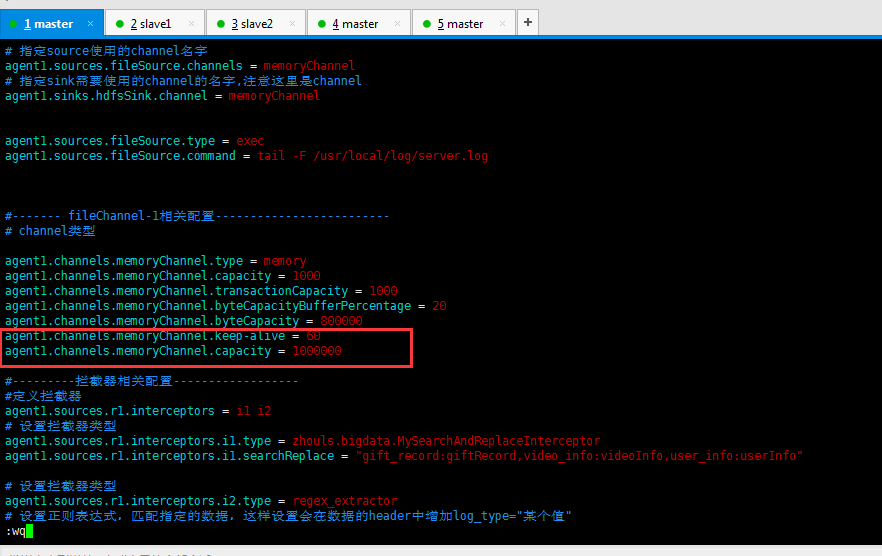
agent1.channels.memoryChannel.keep-alive = 60

agent1.channels.memoryChannel.capacity = 1000000
然后,再来修改
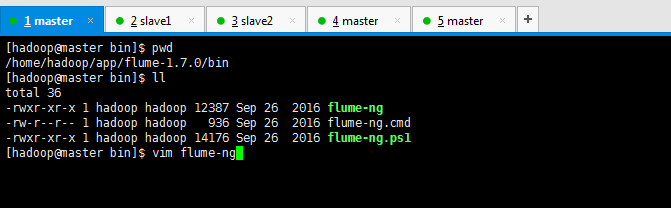
修改java最大内存大小
vi bin/flume-ng
JAVA_OPTS="-Xmx1024m"
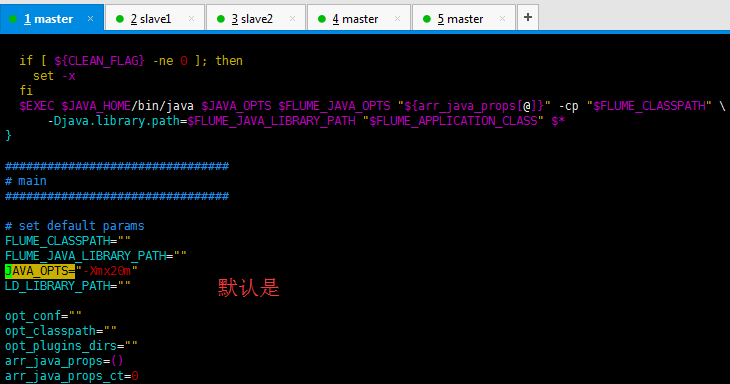
改为

即,修改后之后,再次运行
[hadoop@master flume-1.7.0]$ bin/flume-ng agent --conf conf_MySearchAndReplaceInterceptor/ --conf-file conf_MySearchAndReplaceInterceptor/flume-conf.properties --name agent1 -Dflume.root.logger=INFO,console
上述错误,得以解决了。
参考博客
Flume启动运行时报错org.apache.flume.ChannelFullException: Space for commit to queue couldn't be acquired. Sinks are likely not keeping up with sources, or the buffer size is too tight解决办法(图文详解)的更多相关文章
- Flume报 Space for commit to queue couldn't be acquired. Sinks are likely not keeping up with sources, or the buffer size is too tight
报这个错误 需要一个是flume堆内存不够.还有一个就是把channel的容器调大 在channel加配置 type - 组件类型名称必须是memory capacity 100 存储在 Channe ...
- Flume自定义拦截器(Interceptors)或自带拦截器时的一些经验技巧总结(图文详解)
不多说,直接上干货! 一.自定义拦截器类型必须是:类全名$内部类名,其实就是内部类名称 如:zhouls.bigdata.MySearchAndReplaceInterceptor$Builder 二 ...
- 使用eclipse启动系统时报错“ java.lang.OutOfMemoryError: PermGen space”问题的解决
转载请注明出处:http://blog.csdn.net/dongdong9223/article/details/76571611 本文出自[我是干勾鱼的博客] 有的时候,使用eclipse启动系统 ...
- Elasticsearch集群状态健康值处于red状态问题分析与解决(图文详解)
问题详情 我的es集群,开启后,都好久了,一直报red状态??? 问题分析 有两个分片数据好像丢了. 不知道你这数据怎么丢的. 确认下本地到底还有没有,本地要是确认没了,那数据就丢了,删除索引 ...
- PHP生成页面二维码解决办法?详解
随着科技的进步,二维码应用领域越来越广泛,今天我给大家分享下如何使用PHP生成二维码,以及如何生成中间带LOGO图像的二维码. 具体工具: phpqrcode.php内库:这个文件可以到网上下载,如果 ...
- Flume启动报错[ERROR - org.apache.flume.sink.hdfs. Hit max consecutive under-replication rotations (30); will not continue rolling files under this path due to under-replication解决办法(图文详解)
前期博客 Flume自定义拦截器(Interceptors)或自带拦截器时的一些经验技巧总结(图文详解) 问题详情 -- ::, (SinkRunner-PollingRunner-Default ...
- Flume启动时报错Caused by: java.lang.InterruptedException: Timed out before HDFS call was made. Your hdfs.callTimeout might be set too low or HDFS calls are taking too long.解决办法(图文详解)
前期博客 Flume自定义拦截器(Interceptors)或自带拦截器时的一些经验技巧总结(图文详解) 问题详情 -- ::, (agent-shutdown-hook) [INFO - org.a ...
- cloudera manager的7180 web界面访问不了的解决办法(图文详解)
说在前面的话 我的机器是总共4台,分别为ubuntucmbigdata1.ubuntucmbigdata2.ubuntucmbigdata3和ubuntucmbigdata4.(注意啦,以下是针对Ub ...
- Windows环境下执行hadoop命令出现Error: JAVA_HOME is incorrectly set Please update D:\SoftWare\hadoop-2.6.0\conf\hadoop-env.cmd错误的解决办法(图文详解)
不多说,直接上干货! 导读 win下安装hadoop 大家,别小看win下的安装大数据组件和使用 玩过dubbo和disconf的朋友们,都知道,在win下安装zookeeper是经常的事 ...
随机推荐
- 49. Group Anagrams同义词合并
[抄题]: Given an array of strings, group anagrams together. Example: Input: ["eat", "te ...
- 530.Minimum Absolute Difference in BST 二叉搜索树中的最小差的绝对值
[抄题]: Given a binary search tree with non-negative values, find the minimum absolute difference betw ...
- 制作initramfs/initrd镜像
Linux kernel在自身初始化完成之后,需要能够找到并运行第一个用户程序(这个程序通常叫做"init"程序).用户程序存在于文件系统之中,因此,内核必须找到并挂载一个文件系统 ...
- zookeeper会话超时 链接超时的排查
1.会话概述 在ZooKeeper中,客户端和服务端建立连接后,会话随之建立,生成一个全局唯一的会话ID(Session ID).服务器和客户端之间维持的是一个长连接,在SESSION_TIMEOUT ...
- SpringBoot 集成Mybatis时 使用通用插件Mapper 注意事项
1.如果在SpringBoot的启动入口类上面加入注解 @MapperScan(basePackages = "com.leecx.mapper") 使用的是 org ...
- Appium Windows安装
安装环境 1 安装Nodejs 下载nodejs安装包(http://nodejs.org/download/)安装 测试安装是否成功:运行cmd,输入node -v 2 安装android的SDK ...
- Linux编程实现蜂鸣器演奏康定情歌
Linux编程实现蜂鸣器演奏康定情歌 摘自:https://blog.csdn.net/jiazhen/article/details/3490979 2008年12月10日 15:40:00 j ...
- thinkpad t480s重装win10后小红点失灵 无法启用
问题描述: thinkpad t480s重装win10纯净版系统后,小红点失效,控制面板中Track Point设置页面被禁用. 解决方法: 可打开下述网址,下载并安装TrackPoint Firmw ...
- System.Reflection.Emit摘记
动态类型在.net中都是用什么类型来表示的.程序集:System.Reflection.Emit.AssemblyBuilder(定义并表示动态程序集)构造函数:System.Reflection.E ...
- git post-receive 待验证的代码
使用 git post-receive 钩子部署服务端代码 本站文章除注明转载外,均为本站原创或者翻译. 本站文章欢迎各种形式的转载,但请18岁以上的转载者注明文章出处,尊重我的劳动,也尊重你的智商: ...