
Flume启动运行时报错org.apache.flume.ChannelFullException: Space for commit to queue couldn't be acquired. Sinks are likely not keeping up with sources, or the buffer size is too tight解决办法(图文详解)
前期博客
Flume自定义拦截器(Interceptors)或自带拦截器时的一些经验技巧总结(图文详解)
问题详情
启动agent服务
[hadoop@master flume-1.7.0]$ bin/flume-ng agent --conf conf_MySearchAndReplaceInterceptor/ --conf-file conf_MySearchAndReplaceInterceptor/flume-conf.properties --name agent1 -Dflume.root.logger=INFO,console

我这里,出现了这个错误
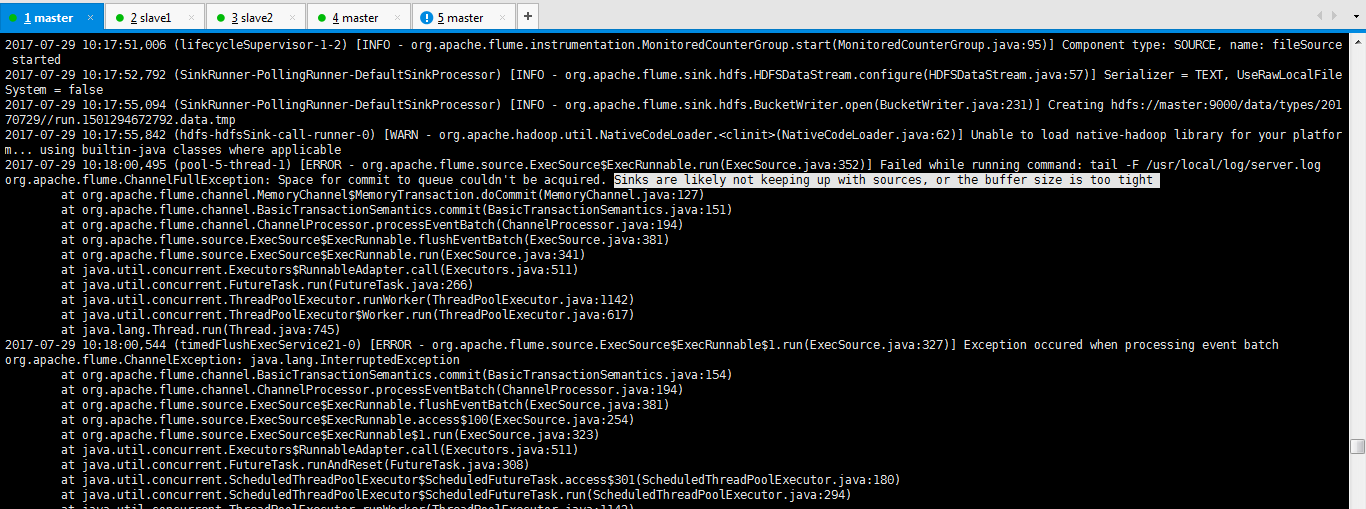

2017-07-29 10:17:51,006 (lifecycleSupervisor-1-2) [INFO - org.apache.flume.instrumentation.MonitoredCounterGroup.start(MonitoredCounterGroup.java:95)] Component type: SOURCE, name: fileSource started

2017-07-29 10:17:52,792 (SinkRunner-PollingRunner-DefaultSinkProcessor) [INFO - org.apache.flume.sink.hdfs.HDFSDataStream.configure(HDFSDataStream.java:57)] Serializer = TEXT, UseRawLocalFileSystem = false

2017-07-29 10:17:55,094 (SinkRunner-PollingRunner-DefaultSinkProcessor) [INFO - org.apache.flume.sink.hdfs.BucketWriter.open(BucketWriter.java:231)] Creating hdfs://master:9000/data/types/20170729//run.1501294672792.data.tmp

2017-07-29 10:17:55,842 (hdfs-hdfsSink-call-runner-0) [WARN - org.apache.hadoop.util.NativeCodeLoader.<clinit>(NativeCodeLoader.java:62)] Unable to load native-hadoop library for your platform... using builtin-java classes where applicable

2017-07-29 10:18:00,495 (pool-5-thread-1) [ERROR - org.apache.flume.source.ExecSource$ExecRunnable.run(ExecSource.java:352)] Failed while running command: tail -F /usr/local/log/server.log

org.apache.flume.ChannelFullException: Space for commit to queue couldn't be acquired. Sinks are likely not keeping up with sources, or the buffer size is too tight

    at org.apache.flume.channel.MemoryChannel$MemoryTransaction.doCommit(MemoryChannel.java:127)

    at org.apache.flume.channel.BasicTransactionSemantics.commit(BasicTransactionSemantics.java:151)

    at org.apache.flume.channel.ChannelProcessor.processEventBatch(ChannelProcessor.java:194)

    at org.apache.flume.source.ExecSource$ExecRunnable.flushEventBatch(ExecSource.java:381)

    at org.apache.flume.source.ExecSource$ExecRunnable.run(ExecSource.java:341)

    at java.util.concurrent.Executors$RunnableAdapter.call(Executors.java:511)

    at java.util.concurrent.FutureTask.run(FutureTask.java:266)

    at java.util.concurrent.ThreadPoolExecutor.runWorker(ThreadPoolExecutor.java:1142)

    at java.util.concurrent.ThreadPoolExecutor$Worker.run(ThreadPoolExecutor.java:617)

    at java.lang.Thread.run(Thread.java:745)

2017-07-29 10:18:00,544 (timedFlushExecService21-0) [ERROR - org.apache.flume.source.ExecSource$ExecRunnable$1.run(ExecSource.java:327)] Exception occured when processing event batch

org.apache.flume.ChannelException: java.lang.InterruptedException

    at org.apache.flume.channel.BasicTransactionSemantics.commit(BasicTransactionSemantics.java:154)

    at org.apache.flume.channel.ChannelProcessor.processEventBatch(ChannelProcessor.java:194)

    at org.apache.flume.source.ExecSource$ExecRunnable.flushEventBatch(ExecSource.java:381)

    at org.apache.flume.source.ExecSource$ExecRunnable.access$100(ExecSource.java:254)

    at org.apache.flume.source.ExecSource$ExecRunnable$1.run(ExecSource.java:323)

    at java.util.concurrent.Executors$RunnableAdapter.call(Executors.java:511)

    at java.util.concurrent.FutureTask.runAndReset(FutureTask.java:308)

    at java.util.concurrent.ScheduledThreadPoolExecutor$ScheduledFutureTask.access$301(ScheduledThreadPoolExecutor.java:180)

    at java.util.concurrent.ScheduledThreadPoolExecutor$ScheduledFutureTask.run(ScheduledThreadPoolExecutor.java:294)
解决办法

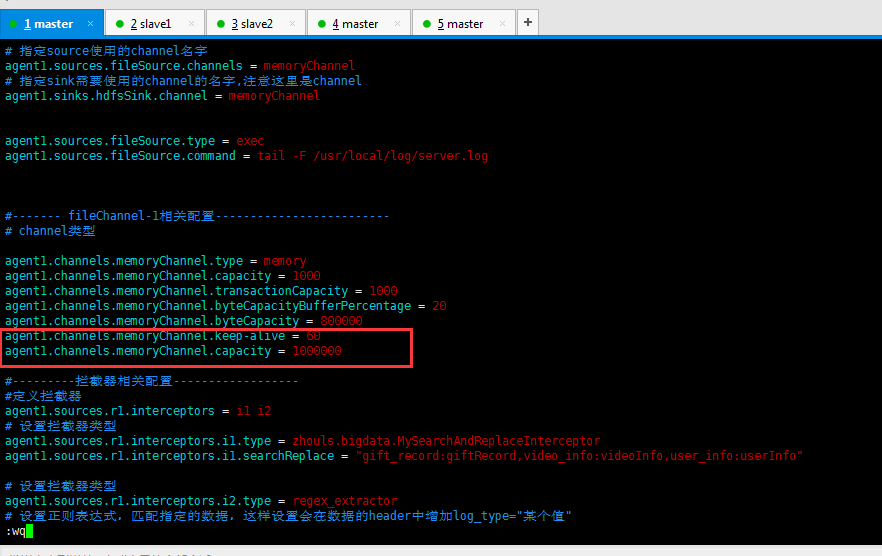
agent1.channels.memoryChannel.keep-alive = 60

agent1.channels.memoryChannel.capacity = 1000000
然后,再来修改
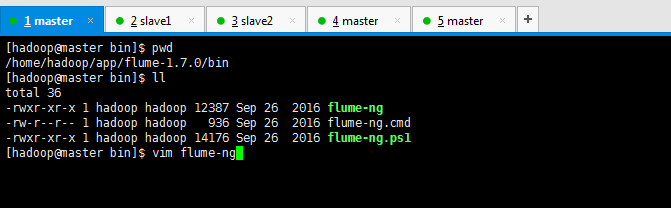
修改java最大内存大小
vi bin/flume-ng
JAVA_OPTS="-Xmx1024m"
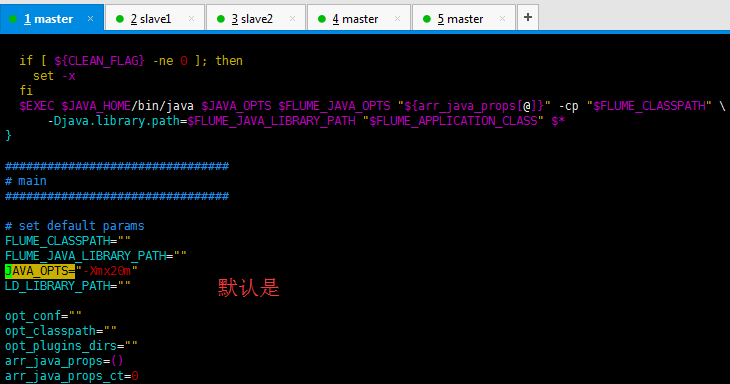
改为

即,修改后之后,再次运行
[hadoop@master flume-1.7.0]$ bin/flume-ng agent --conf conf_MySearchAndReplaceInterceptor/ --conf-file conf_MySearchAndReplaceInterceptor/flume-conf.properties --name agent1 -Dflume.root.logger=INFO,console
上述错误,得以解决了。
参考博客
Flume启动运行时报错org.apache.flume.ChannelFullException: Space for commit to queue couldn't be acquired. Sinks are likely not keeping up with sources, or the buffer size is too tight解决办法(图文详解)的更多相关文章
- Flume报 Space for commit to queue couldn't be acquired. Sinks are likely not keeping up with sources, or the buffer size is too tight
报这个错误 需要一个是flume堆内存不够.还有一个就是把channel的容器调大 在channel加配置 type - 组件类型名称必须是memory capacity 100 存储在 Channe ...
- Flume自定义拦截器(Interceptors)或自带拦截器时的一些经验技巧总结(图文详解)
不多说,直接上干货! 一.自定义拦截器类型必须是:类全名$内部类名,其实就是内部类名称 如:zhouls.bigdata.MySearchAndReplaceInterceptor$Builder 二 ...
- 使用eclipse启动系统时报错“ java.lang.OutOfMemoryError: PermGen space”问题的解决
转载请注明出处:http://blog.csdn.net/dongdong9223/article/details/76571611 本文出自[我是干勾鱼的博客] 有的时候,使用eclipse启动系统 ...
- Elasticsearch集群状态健康值处于red状态问题分析与解决(图文详解)
问题详情 我的es集群,开启后,都好久了,一直报red状态??? 问题分析 有两个分片数据好像丢了. 不知道你这数据怎么丢的. 确认下本地到底还有没有,本地要是确认没了,那数据就丢了,删除索引 ...
- PHP生成页面二维码解决办法?详解
随着科技的进步,二维码应用领域越来越广泛,今天我给大家分享下如何使用PHP生成二维码,以及如何生成中间带LOGO图像的二维码. 具体工具: phpqrcode.php内库:这个文件可以到网上下载,如果 ...
- Flume启动报错[ERROR - org.apache.flume.sink.hdfs. Hit max consecutive under-replication rotations (30); will not continue rolling files under this path due to under-replication解决办法(图文详解)
前期博客 Flume自定义拦截器(Interceptors)或自带拦截器时的一些经验技巧总结(图文详解) 问题详情 -- ::, (SinkRunner-PollingRunner-Default ...
- Flume启动时报错Caused by: java.lang.InterruptedException: Timed out before HDFS call was made. Your hdfs.callTimeout might be set too low or HDFS calls are taking too long.解决办法(图文详解)
前期博客 Flume自定义拦截器(Interceptors)或自带拦截器时的一些经验技巧总结(图文详解) 问题详情 -- ::, (agent-shutdown-hook) [INFO - org.a ...
- cloudera manager的7180 web界面访问不了的解决办法(图文详解)
说在前面的话 我的机器是总共4台,分别为ubuntucmbigdata1.ubuntucmbigdata2.ubuntucmbigdata3和ubuntucmbigdata4.(注意啦,以下是针对Ub ...
- Windows环境下执行hadoop命令出现Error: JAVA_HOME is incorrectly set Please update D:\SoftWare\hadoop-2.6.0\conf\hadoop-env.cmd错误的解决办法(图文详解)
不多说,直接上干货! 导读 win下安装hadoop 大家,别小看win下的安装大数据组件和使用 玩过dubbo和disconf的朋友们,都知道,在win下安装zookeeper是经常的事 ...
随机推荐
- spring源码学习——spring整体架构和设计理念
Spring是在Rod Johnson的<Expert One-On-One J2EE Development and Design >的基础上衍生而来的.主要目的是通过使用基本的java ...
- UVa10859 放置街灯
Placing Lampposts As a part of the mission �Beautification of Dhaka City�, the government has decide ...
- Spring.net 后处理器 可用来切换实例
.xml配置 <!--我们在Object.xml文件上将HexuObjectPostProcessor注册到上下文对象中去--> <object id="hexu" ...
- ORACLE 异机恢复
有时候需要将大的数据库发布到客户现场或转移机器时,不得不考虑在异机上恢复已经调整.测试好的库. dumpdp 全备的方法虽然易用,但在处理对象.索引.空间的时候异常的出错,比如:见有些公司,建表.索引 ...
- Perl 学习笔记-正则表达式应用篇
1.以 m// 进行匹配 如: m/roger/ , /roger/ 是它的简写; 在说明 qw// 时可以选择使用任何成对的定界符, 对应m//匹配也可以, 如写成: m(roger) ...
- windows server2012如何开启mysql远程登录
开发的首要任务就是要搭建起自己的服务器,下面主要是我这搭建记录下 我的各种环境 服务器为Windows server2012 安装的MySQL数据的版本是5.6.10 ,64位.当然了版本对于安装没 ...
- [GO]revoer的应用
error的函数只是用来报一些低等级的错误,panic是报那些会导致程序崩溃的错误,但是会有一个问题就是panic也会导致程序中断 ,如果我们需要程序在报错之后继续运行并报出错误的信息 就需要使用到r ...
- [GO]panic的应用
对于异常的处理,error表示的是不太致使的错误,但是如果遇到数组越界或者是空指针这种会导致程序崩溃无法恢复的错误时,就需要使用以panic了 我们不应该使用panic去报error的错误,而是只使用 ...
- HDU 2602 Bone Collector (01背包DP)
题意:给定一个体积,和一些物品的价值和体积,问你最大的价值. 析:最基础的01背包,dp[i] 表示体积 i 时最大价值. 代码如下: #pragma comment(linker, "/S ...
- CodeForces 834D The Bakery(线段树优化DP)
Some time ago Slastyona the Sweetmaid decided to open her own bakery! She bought required ingredient ...