
javascript 自定义动画函数
<!DOCTYPE html PUBLIC "-//W3C//DTD XHTML 1.0 Strict//EN" "http://www.w3.org/TR/xhtml1/DTD/xhtml1-strict.dtd">

<html xmlns="http://www.w3.org/1999/xhtml">

<head>

<meta http-equiv="Content-Type" content="text/html; charset=utf-8" />

<title>自定义动画DEMO</title>

<script src="http://files.cnblogs.com/siqi/jquery-1.4.4.js"></script>

<script src="http://files.cnblogs.com/siqi/jquery.easing.1.3.js"></script>

<script>

var Tween = {

    Linear:function (start,alter,curTime,dur) {return start+curTime/dur*alter;},//最简单的线性变化,即匀速运动

    Quad:{//二次方缓动

        easeIn:function (start,alter,curTime,dur) {

            return start+Math.pow(curTime/dur,2)*alter;

        },

        easeOut:function (start,alter,curTime,dur) {

            var progress =curTime/dur;

            return start-(Math.pow(progress,2)-2*progress)*alter;

        },

        easeInOut:function (start,alter,curTime,dur) {

            var progress =curTime/dur*2;

            return (progress<1?Math.pow(progress,2):-((--progress)*(progress-2) - 1))*alter/2+start;

        }

    },

    Cubic:{//三次方缓动

        easeIn:function (start,alter,curTime,dur) {

            return start+Math.pow(curTime/dur,3)*alter;

        },

        easeOut:function (start,alter,curTime,dur) {

            var progress =curTime/dur;

            return start-(Math.pow(progress,3)-Math.pow(progress,2)+1)*alter;

        },

        easeInOut:function (start,alter,curTime,dur) {

            var progress =curTime/dur*2;

            return (progress<1?Math.pow(progress,3):((progress-=2)*Math.pow(progress,2) + 2))*alter/2+start;

        }

    },

    Quart:{//四次方缓动

        easeIn:function (start,alter,curTime,dur) {

            return start+Math.pow(curTime/dur,4)*alter;

        },

        easeOut:function (start,alter,curTime,dur) {

            var progress =curTime/dur;

            return start-(Math.pow(progress,4)-Math.pow(progress,3)-1)*alter;

        },

        easeInOut:function (start,alter,curTime,dur) {

            var progress =curTime/dur*2;

            return (progress<1?Math.pow(progress,4):-((progress-=2)*Math.pow(progress,3) - 2))*alter/2+start;

        }

    },

    Quint:{//五次方缓动

        easeIn:function (start,alter,curTime,dur) {

            return start+Math.pow(curTime/dur,5)*alter;

        },

        easeOut:function (start,alter,curTime,dur) {

            var progress =curTime/dur;

            return start-(Math.pow(progress,5)-Math.pow(progress,4)+1)*alter;

        },

        easeInOut:function (start,alter,curTime,dur) {

            var progress =curTime/dur*2;

            return (progress<1?Math.pow(progress,5):((progress-=2)*Math.pow(progress,4) +2))*alter/2+start;

        }

    },

    Sine :{//正弦曲线缓动

        easeIn:function (start,alter,curTime,dur) {

            return start-(Math.cos(curTime/dur*Math.PI/2)-1)*alter;

        },

        easeOut:function (start,alter,curTime,dur) {

            return start+Math.sin(curTime/dur*Math.PI/2)*alter;

        },

        easeInOut:function (start,alter,curTime,dur) {

            return start-(Math.cos(curTime/dur*Math.PI/2)-1)*alter/2;

        }

    },

    Expo: {//指数曲线缓动

        easeIn:function (start,alter,curTime,dur) {

            return curTime?(start+alter*Math.pow(2,10*(curTime/dur-1))):start;

        },

        easeOut:function (start,alter,curTime,dur) {

            return (curTime==dur)?(start+alter):(start-(Math.pow(2,-10*curTime/dur)+1)*alter);

        },

        easeInOut:function (start,alter,curTime,dur) {

            if (!curTime) {return start;}

            if (curTime==dur) {return start+alter;}

            var progress =curTime/dur*2;

            if (progress < 1) {

                return alter/2*Math.pow(2,10* (progress-1))+start;

            } else {

                return alter/2* (-Math.pow(2, -10*--progress) + 2) +start;

            }

        }

    },

    Circ :{//圆形曲线缓动

        easeIn:function (start,alter,curTime,dur) {

            return start-alter*Math.sqrt(-Math.pow(curTime/dur,2));

        },

        easeOut:function (start,alter,curTime,dur) {

            return start+alter*Math.sqrt(1-Math.pow(curTime/dur-1));

        },

        easeInOut:function (start,alter,curTime,dur) {

            var progress =curTime/dur*2;

            return (progress<1?1-Math.sqrt(1-Math.pow(progress,2)):(Math.sqrt(1 - Math.pow(progress-2,2)) + 1))*alter/2+start;

        }

    },

    Elastic: {//指数衰减的正弦曲线缓动

        easeIn:function (start,alter,curTime,dur,extent,cycle) {

            if (!curTime) {return start;}

            if ((curTime==dur)==1) {return start+alter;}

            if (!cycle) {cycle=dur*0.3;}

            var s;

            if (!extent || extent< Math.abs(alter)) {

                extent=alter;

                s = cycle/4;

            } else {s=cycle/(Math.PI*2)*Math.asin(alter/extent);}

            return start-extent*Math.pow(2,10*(curTime/dur-1)) * Math.sin((curTime-dur-s)*(2*Math.PI)/cycle);

        },

        easeOut:function (start,alter,curTime,dur,extent,cycle) {

            if (!curTime) {return start;}

            if (curTime==dur) {return start+alter;}

            if (!cycle) {cycle=dur*0.3;}

            var s;

            if (!extent || extent< Math.abs(alter)) {

                extent=alter;

                s =cycle/4;

            } else {s=cycle/(Math.PI*2)*Math.asin(alter/extent);}

            return start+alter+extent*Math.pow(2,-curTime/dur*10)*Math.sin((curTime-s)*(2*Math.PI)/cycle);

        },

        easeInOut:function (start,alter,curTime,dur,extent,cycle) {

            if (!curTime) {return start;}

            if (curTime==dur) {return start+alter;}

            if (!cycle) {cycle=dur*0.45;}

            var s;

            if (!extent || extent< Math.abs(alter)) {

                extent=alter;

                s =cycle/4;

            } else {s=cycle/(Math.PI*2)*Math.asin(alter/extent);}

            var progress = curTime/dur*2;

            if (progress<1) {

                return start-0.5*extent*Math.pow(2,10*(progress-=1))*Math.sin( (progress*dur-s)*(2*Math.PI)/cycle);

            } else {

                return start+alter+0.5*extent*Math.pow(2,-10*(progress-=1)) * Math.sin( (progress*dur-s)*(2*Math.PI)/cycle);

            }

        }

    },

    Back:{

        easeIn: function (start,alter,curTime,dur,s){

            if (typeof s == "undefined") {s = 1.70158;}

            return start+alter*(curTime/=dur)*curTime*((s+1)*curTime - s);

        },

        easeOut: function (start,alter,curTime,dur,s) {

            if (typeof s == "undefined") {s = 1.70158;}

            return start+alter*((curTime=curTime/dur-1)*curTime*((s+1)*curTime + s) + 1);

        },

        easeInOut: function (start,alter,curTime,dur,s){

            if (typeof s == "undefined") {s = 1.70158;}

            if ((curTime/=dur/2) < 1) {

                return start+alter/2*(Math.pow(curTime,2)*(((s*=(1.525))+1)*curTime- s));

            }

            return start+alter/2*((curTime-=2)*curTime*(((s*=(1.525))+1)*curTime+ s)+2);

        }

    },

    Bounce:{

        easeIn: function(start,alter,curTime,dur){

            return start+alter-Tween.Bounce.easeOut(0,alter,dur-curTime,dur);

        },

        easeOut: function(start,alter,curTime,dur){

            if ((curTime/=dur) < (1/2.75)) {

                return alter*(7.5625*Math.pow(curTime,2))+start;

            } else if (curTime < (2/2.75)) {

                return alter*(7.5625*(curTime-=(1.5/2.75))*curTime + .75)+start;

            } else if (curTime< (2.5/2.75)) {

                return alter*(7.5625*(curTime-=(2.25/2.75))*curTime + .9375)+start;

            } else {

                return alter*(7.5625*(curTime-=(2.625/2.75))*curTime + .984375)+start;

            }

        },

        easeInOut: function (start,alter,curTime,dur){

            if (curTime< dur/2) {

                return Tween.Bounce.easeIn(0,alter,curTime*2,dur) *0.5+start;

            } else {

                return Tween.Bounce.easeOut(0,alter,curTime*2-dur,dur) *0.5 + alter*0.5 +start;

            }

        },

        easeOutBounce: function (b, c, t, d) {

            if ((t/=d) < (1/2.75)) {

                return c*(7.5625*t*t) + b;

            } else if (t < (2/2.75)) {

                return c*(7.5625*(t-=(1.5/2.75))*t + .75) + b;

            } else if (t < (2.5/2.75)) {

                return c*(7.5625*(t-=(2.25/2.75))*t + .9375) + b;

            } else {

                return c*(7.5625*(t-=(2.625/2.75))*t + .984375) + b;

            }

        }

    },

    //start,alter,curTime,dur

    easeOutBounce: function (b, c, t, d) {

        if ((t/=d) < (1/2.75)) {

            return c*(7.5625*t*t) + b;

        } else if (t < (2/2.75)) {

            return c*(7.5625*(t-=(1.5/2.75))*t + .75) + b;

        } else if (t < (2.5/2.75)) {

            return c*(7.5625*(t-=(2.25/2.75))*t + .9375) + b;

        } else {

            return c*(7.5625*(t-=(2.625/2.75))*t + .984375) + b;

        }

    }

};

jQuery(function($){

    //两种动画方式对比,在w3c浏览器中是一致的,在IE中有差异(即使用同算法)

    $("#start").click(function(){

        //自定义动画函数

        animate(Fid("song"), {opacity:0.3, left:400}, 2000, Tween.easeOutBounce);

        //jq动画效果

        $("#jian").animate( {opacity:0.3, left:400}, 2000, 'easeOutBounce')

    })

    /*

    参数说明

    o:要动画的对象

    end:元素最终的样式

    dur:动画持续多长时

    fx:效果插件

    */

    function animate(o ,end, dur, fx) {

        var curTime=0;

        var start = {};//元素的初始样式

        var alter = {};//元素的增量样式

        var t=setInterval(function () {

            if (curTime>=dur) clearTimeout(t);

            for (var i in end) {

                if(! (i in start))//注意加括号

                {

                    //不能用 parseInt.有透明度时会出问题

                    start[i] = parseFloat(getStyle(o, i));

                }

                if(! (i in alter))

                {

                    alter[i] = end[i] - start[i];

                }

                var val = fx(start[i],alter[i],curTime,dur);

                if(i == 'opacity')

                {

                    /**

                    o.style.filter, o.style.opacity 火狐下都为空字符串

                    只能用 o.style.opacity 检测

                    注意:ietester下无法测试透明度

                    */

                    if(typeof o.style.opacity == "undefined")

                    {

                        o.style.filter = "alpha(opacity="+val*100+")";

                    }else{

                        o.style[i] = val;

                    }

                }else{

                    o.style[i] = val+'px';

                }

            }

            curTime+=13;    //jquery 中也为 13

        },13);

    }

    /**

    获取元素样式

    处理透明度、元素浮动样式的获取 ,结果带有单位

    */

    function getStyle(elem, name) {

        var nameValue = null;

        if (document.defaultView) {

            var style = document.defaultView.getComputedStyle(elem, null);

            nameValue =  name in style ? style[name] : style.getPropertyValue(name);

        } else {

            var style = elem.style,

            curStyle = elem.currentStyle;

            //透明度 from youa

            if (name == "opacity") {

                if (/alpha\(opacity=(.*)\)/i.test(curStyle.filter)) {

                    var opacity = parseFloat(RegExp.$1);

                    return opacity ? opacity / 100 : 0;

                }

                return 1;

            }

            if (name == "float") {

                name = "styleFloat";

            }

            var ret = curStyle[name] || curStyle[camelize(name)];

            //单位转换 from jqury

            if (!/^-?\d+(?:px)?$/i.test(ret) && /^\-?\d/.test(ret)) {

                var left = style.left,

                rtStyle = elem.runtimeStyle,

                rsLeft = rtStyle.left;

                rtStyle.left = curStyle.left;

                style.left = ret || 0;

                ret = style.pixelLeft + "px";

                style.left = left;

                rtStyle.left = rsLeft;

            }

            nameValue = ret;

        }

        return nameValue === 'auto' ? '0px' : nameValue;

    }

    function camelize(s) {//将CSS属性名转换成驼峰式

        return s.replace(/-[a-z]/gi,function (c) {

            return c.charAt(1).toUpperCase();

        });

    }

    function Fid(id)

    {

        return document.getElementById(id);

    }

})

</script>

</head>

<style>

.main{ border:1px solid blue; height:350px;}

.pos {position:absolute; left:0px;top:50px; border:5px solid red; background:green;width:100px; height:100px;}

</style>

<body>

<div class="main">

    <div id="song" class="pos" style="display:block;">song</div>

    <div id="jian" class="pos" style="top:200px;">jian</div>

</div>

<button id="start">start</button>

</body>

</html>
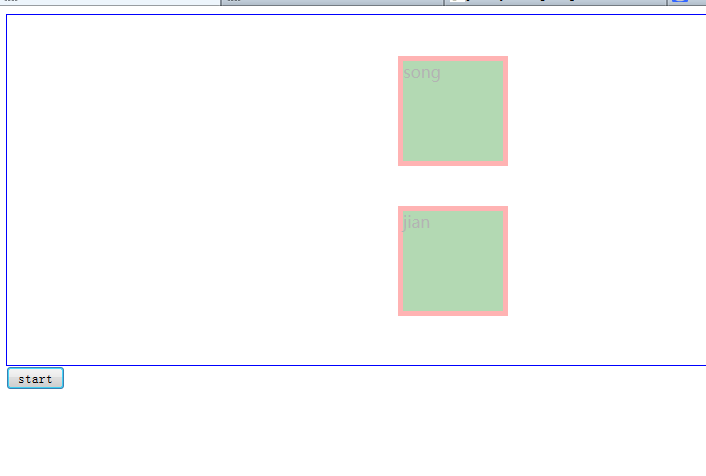
效果图:
javascript 自定义动画函数的更多相关文章
- JavaScript自定义求和函数
我爱撸码,撸码使我感到快乐!大家好,我是Counter,当看到这个标题到时候是不是感觉很简单,千万不要大意哦,你说0.1 + 0.2 = 0.3 ?有时候计算机并不是我们所说绝对精确,这个时候就要我们 ...
- 自定义动画函数JQuery实现
<!DOCTYPE html> <html lang="en"> <head> <meta charset="UTF-8&quo ...
- 原生javascript 基础动画函数封装(二)
<!DOCTYPE html> <html> <head> <title></title> <style type="tex ...
- javascript自定义日期函数
1.格式化日期(YYYY-MM-DD) 代码: var DateFormat = function (date) { if (!(date instanceof Date)) { date = dat ...
- 原生javascript 基础动画函数封装(一)
<!DOCTYPE html> <html> <head> <title></title> <style type="tex ...
- 使用原生的javascript封装动画函数(有callback功能)
<!DOCTYPE html> <html> <head lang="en"> <meta charset="UTF-8&quo ...
- asp.net中调用javascript自定义函数的方法(包括引入JavaScript文件)总结
通常javascript代码可以与HTML标签一起直接放在前 端页面中,但如果JS代码多的话一方面不利于维护,另一方面也对搜索引擎不友好,因为页面因此而变得臃肿:所以一般有良好开发习惯的程序员都会把 ...
- JavaScript中作用域回顾(避免使用全局变量)(瀑布流的实现)(scroll事件)以及Django自定义模板函数回顾
页面显示照片样式为瀑布流: 上面的div个数可以按照自己安排进行划分.img的分布可以使用模板标签以及自定义模板函数进行排布: 自定义模板函数实现可以看,最后几列:python---django中模板 ...
- 使用 JavaScript自定义函数计算出教室的体积大小,其中教室的长、宽、高分别为 8 米、5 米、3 米
查看本章节 查看作业目录 需求说明: 使用 JavaScript自定义函数计算出教室的体积大小,其中教室的长.宽.高分别为 8 米.5 米.3 米 实现思路: 创建 HTML 页面 在页面的 < ...
随机推荐
- 三周学会小程序第四讲:Heroku 绑定 Github 自动部署
这一讲是根据读者的反馈补充的一个讲解,好多读者反应安装 Heroku-cli 遇到问题,或者是操作繁琐,其实上一讲中提到的 Heroku 只是为了免费部署,而安装 Heroku-CLI只是为了部署,所 ...
- 04-RocketMQ入门及其使用(一)
视频开始主要介绍数据库逻辑以及分表相关的设计. 关键的数据库读写分析操作---
- python开发_random
和java中的random()函数一样,在python中也有类似的模块random,即随机数 下面是我做的demo 运行效果: ==================================== ...
- python gensim的第一次试用
参考于 http://blog.csdn.net/xiaoquantouer/article/details/53583980 有一个地方很重要,一定要安装anaconda,安装库简直不要太方便. 先 ...
- Delphi TFileStream 打开模式与共享模式
{ TFileStream create mode } fmCreate = $FF00; { Create a file with the given name. If a file with th ...
- 怎样加入cocostudio生成的UI到项目
cocos2dx版本号:cocos2d-x-3.2alpha0 cocostudio版本号:V1.4.0.1 1.将cocostudio生成的UI文件复制到项目Resources目录 2.加入头文件, ...
- pytest文档5-fixture之conftest.py
前言 前面一篇讲到用例加setup和teardown可以实现在测试用例之前或之后加入一些操作,但这种是整个脚本全局生效的,如果我想实现以下场景: 用例1需要先登录,用例2不需要登录,用例3需要先登录. ...
- Struts2自定义Result处理JSON
以前在采用Struts2开发的项目中,对JSON的处理一直都在Action里处理的,在Action中直接Response,最近研读了一下Struts2的源码,发现了一个更加优雅的解决办法,自己定义一个 ...
- 解决spark程序报错:Caused by: java.util.concurrent.TimeoutException: Futures timed out after [300 seconds]
报错信息: 09-05-2017 09:58:44 CST xxxx_job_1494294485570174 INFO - at org.apache.spark.sql.catalyst.erro ...
- 《Android传感器高级编程》
<Android传感器高级编程> 基本信息 原书名:Professional Android Sensor Programming 原出版社: Wrox 作者: (美)米内特(Greg M ...