
javascript 自定义动画函数
<!DOCTYPE html PUBLIC "-//W3C//DTD XHTML 1.0 Strict//EN" "http://www.w3.org/TR/xhtml1/DTD/xhtml1-strict.dtd">

<html xmlns="http://www.w3.org/1999/xhtml">

<head>

<meta http-equiv="Content-Type" content="text/html; charset=utf-8" />

<title>自定义动画DEMO</title>

<script src="http://files.cnblogs.com/siqi/jquery-1.4.4.js"></script>

<script src="http://files.cnblogs.com/siqi/jquery.easing.1.3.js"></script>

<script>

var Tween = {

    Linear:function (start,alter,curTime,dur) {return start+curTime/dur*alter;},//最简单的线性变化,即匀速运动

    Quad:{//二次方缓动

        easeIn:function (start,alter,curTime,dur) {

            return start+Math.pow(curTime/dur,2)*alter;

        },

        easeOut:function (start,alter,curTime,dur) {

            var progress =curTime/dur;

            return start-(Math.pow(progress,2)-2*progress)*alter;

        },

        easeInOut:function (start,alter,curTime,dur) {

            var progress =curTime/dur*2;

            return (progress<1?Math.pow(progress,2):-((--progress)*(progress-2) - 1))*alter/2+start;

        }

    },

    Cubic:{//三次方缓动

        easeIn:function (start,alter,curTime,dur) {

            return start+Math.pow(curTime/dur,3)*alter;

        },

        easeOut:function (start,alter,curTime,dur) {

            var progress =curTime/dur;

            return start-(Math.pow(progress,3)-Math.pow(progress,2)+1)*alter;

        },

        easeInOut:function (start,alter,curTime,dur) {

            var progress =curTime/dur*2;

            return (progress<1?Math.pow(progress,3):((progress-=2)*Math.pow(progress,2) + 2))*alter/2+start;

        }

    },

    Quart:{//四次方缓动

        easeIn:function (start,alter,curTime,dur) {

            return start+Math.pow(curTime/dur,4)*alter;

        },

        easeOut:function (start,alter,curTime,dur) {

            var progress =curTime/dur;

            return start-(Math.pow(progress,4)-Math.pow(progress,3)-1)*alter;

        },

        easeInOut:function (start,alter,curTime,dur) {

            var progress =curTime/dur*2;

            return (progress<1?Math.pow(progress,4):-((progress-=2)*Math.pow(progress,3) - 2))*alter/2+start;

        }

    },

    Quint:{//五次方缓动

        easeIn:function (start,alter,curTime,dur) {

            return start+Math.pow(curTime/dur,5)*alter;

        },

        easeOut:function (start,alter,curTime,dur) {

            var progress =curTime/dur;

            return start-(Math.pow(progress,5)-Math.pow(progress,4)+1)*alter;

        },

        easeInOut:function (start,alter,curTime,dur) {

            var progress =curTime/dur*2;

            return (progress<1?Math.pow(progress,5):((progress-=2)*Math.pow(progress,4) +2))*alter/2+start;

        }

    },

    Sine :{//正弦曲线缓动

        easeIn:function (start,alter,curTime,dur) {

            return start-(Math.cos(curTime/dur*Math.PI/2)-1)*alter;

        },

        easeOut:function (start,alter,curTime,dur) {

            return start+Math.sin(curTime/dur*Math.PI/2)*alter;

        },

        easeInOut:function (start,alter,curTime,dur) {

            return start-(Math.cos(curTime/dur*Math.PI/2)-1)*alter/2;

        }

    },

    Expo: {//指数曲线缓动

        easeIn:function (start,alter,curTime,dur) {

            return curTime?(start+alter*Math.pow(2,10*(curTime/dur-1))):start;

        },

        easeOut:function (start,alter,curTime,dur) {

            return (curTime==dur)?(start+alter):(start-(Math.pow(2,-10*curTime/dur)+1)*alter);

        },

        easeInOut:function (start,alter,curTime,dur) {

            if (!curTime) {return start;}

            if (curTime==dur) {return start+alter;}

            var progress =curTime/dur*2;

            if (progress < 1) {

                return alter/2*Math.pow(2,10* (progress-1))+start;

            } else {

                return alter/2* (-Math.pow(2, -10*--progress) + 2) +start;

            }

        }

    },

    Circ :{//圆形曲线缓动

        easeIn:function (start,alter,curTime,dur) {

            return start-alter*Math.sqrt(-Math.pow(curTime/dur,2));

        },

        easeOut:function (start,alter,curTime,dur) {

            return start+alter*Math.sqrt(1-Math.pow(curTime/dur-1));

        },

        easeInOut:function (start,alter,curTime,dur) {

            var progress =curTime/dur*2;

            return (progress<1?1-Math.sqrt(1-Math.pow(progress,2)):(Math.sqrt(1 - Math.pow(progress-2,2)) + 1))*alter/2+start;

        }

    },

    Elastic: {//指数衰减的正弦曲线缓动

        easeIn:function (start,alter,curTime,dur,extent,cycle) {

            if (!curTime) {return start;}

            if ((curTime==dur)==1) {return start+alter;}

            if (!cycle) {cycle=dur*0.3;}

            var s;

            if (!extent || extent< Math.abs(alter)) {

                extent=alter;

                s = cycle/4;

            } else {s=cycle/(Math.PI*2)*Math.asin(alter/extent);}

            return start-extent*Math.pow(2,10*(curTime/dur-1)) * Math.sin((curTime-dur-s)*(2*Math.PI)/cycle);

        },

        easeOut:function (start,alter,curTime,dur,extent,cycle) {

            if (!curTime) {return start;}

            if (curTime==dur) {return start+alter;}

            if (!cycle) {cycle=dur*0.3;}

            var s;

            if (!extent || extent< Math.abs(alter)) {

                extent=alter;

                s =cycle/4;

            } else {s=cycle/(Math.PI*2)*Math.asin(alter/extent);}

            return start+alter+extent*Math.pow(2,-curTime/dur*10)*Math.sin((curTime-s)*(2*Math.PI)/cycle);

        },

        easeInOut:function (start,alter,curTime,dur,extent,cycle) {

            if (!curTime) {return start;}

            if (curTime==dur) {return start+alter;}

            if (!cycle) {cycle=dur*0.45;}

            var s;

            if (!extent || extent< Math.abs(alter)) {

                extent=alter;

                s =cycle/4;

            } else {s=cycle/(Math.PI*2)*Math.asin(alter/extent);}

            var progress = curTime/dur*2;

            if (progress<1) {

                return start-0.5*extent*Math.pow(2,10*(progress-=1))*Math.sin( (progress*dur-s)*(2*Math.PI)/cycle);

            } else {

                return start+alter+0.5*extent*Math.pow(2,-10*(progress-=1)) * Math.sin( (progress*dur-s)*(2*Math.PI)/cycle);

            }

        }

    },

    Back:{

        easeIn: function (start,alter,curTime,dur,s){

            if (typeof s == "undefined") {s = 1.70158;}

            return start+alter*(curTime/=dur)*curTime*((s+1)*curTime - s);

        },

        easeOut: function (start,alter,curTime,dur,s) {

            if (typeof s == "undefined") {s = 1.70158;}

            return start+alter*((curTime=curTime/dur-1)*curTime*((s+1)*curTime + s) + 1);

        },

        easeInOut: function (start,alter,curTime,dur,s){

            if (typeof s == "undefined") {s = 1.70158;}

            if ((curTime/=dur/2) < 1) {

                return start+alter/2*(Math.pow(curTime,2)*(((s*=(1.525))+1)*curTime- s));

            }

            return start+alter/2*((curTime-=2)*curTime*(((s*=(1.525))+1)*curTime+ s)+2);

        }

    },

    Bounce:{

        easeIn: function(start,alter,curTime,dur){

            return start+alter-Tween.Bounce.easeOut(0,alter,dur-curTime,dur);

        },

        easeOut: function(start,alter,curTime,dur){

            if ((curTime/=dur) < (1/2.75)) {

                return alter*(7.5625*Math.pow(curTime,2))+start;

            } else if (curTime < (2/2.75)) {

                return alter*(7.5625*(curTime-=(1.5/2.75))*curTime + .75)+start;

            } else if (curTime< (2.5/2.75)) {

                return alter*(7.5625*(curTime-=(2.25/2.75))*curTime + .9375)+start;

            } else {

                return alter*(7.5625*(curTime-=(2.625/2.75))*curTime + .984375)+start;

            }

        },

        easeInOut: function (start,alter,curTime,dur){

            if (curTime< dur/2) {

                return Tween.Bounce.easeIn(0,alter,curTime*2,dur) *0.5+start;

            } else {

                return Tween.Bounce.easeOut(0,alter,curTime*2-dur,dur) *0.5 + alter*0.5 +start;

            }

        },

        easeOutBounce: function (b, c, t, d) {

            if ((t/=d) < (1/2.75)) {

                return c*(7.5625*t*t) + b;

            } else if (t < (2/2.75)) {

                return c*(7.5625*(t-=(1.5/2.75))*t + .75) + b;

            } else if (t < (2.5/2.75)) {

                return c*(7.5625*(t-=(2.25/2.75))*t + .9375) + b;

            } else {

                return c*(7.5625*(t-=(2.625/2.75))*t + .984375) + b;

            }

        }

    },

    //start,alter,curTime,dur

    easeOutBounce: function (b, c, t, d) {

        if ((t/=d) < (1/2.75)) {

            return c*(7.5625*t*t) + b;

        } else if (t < (2/2.75)) {

            return c*(7.5625*(t-=(1.5/2.75))*t + .75) + b;

        } else if (t < (2.5/2.75)) {

            return c*(7.5625*(t-=(2.25/2.75))*t + .9375) + b;

        } else {

            return c*(7.5625*(t-=(2.625/2.75))*t + .984375) + b;

        }

    }

};

jQuery(function($){

    //两种动画方式对比,在w3c浏览器中是一致的,在IE中有差异(即使用同算法)

    $("#start").click(function(){

        //自定义动画函数

        animate(Fid("song"), {opacity:0.3, left:400}, 2000, Tween.easeOutBounce);

        //jq动画效果

        $("#jian").animate( {opacity:0.3, left:400}, 2000, 'easeOutBounce')

    })

    /*

    参数说明

    o:要动画的对象

    end:元素最终的样式

    dur:动画持续多长时

    fx:效果插件

    */

    function animate(o ,end, dur, fx) {

        var curTime=0;

        var start = {};//元素的初始样式

        var alter = {};//元素的增量样式

        var t=setInterval(function () {

            if (curTime>=dur) clearTimeout(t);

            for (var i in end) {

                if(! (i in start))//注意加括号

                {

                    //不能用 parseInt.有透明度时会出问题

                    start[i] = parseFloat(getStyle(o, i));

                }

                if(! (i in alter))

                {

                    alter[i] = end[i] - start[i];

                }

                var val = fx(start[i],alter[i],curTime,dur);

                if(i == 'opacity')

                {

                    /**

                    o.style.filter, o.style.opacity 火狐下都为空字符串

                    只能用 o.style.opacity 检测

                    注意:ietester下无法测试透明度

                    */

                    if(typeof o.style.opacity == "undefined")

                    {

                        o.style.filter = "alpha(opacity="+val*100+")";

                    }else{

                        o.style[i] = val;

                    }

                }else{

                    o.style[i] = val+'px';

                }

            }

            curTime+=13;    //jquery 中也为 13

        },13);

    }

    /**

    获取元素样式

    处理透明度、元素浮动样式的获取 ,结果带有单位

    */

    function getStyle(elem, name) {

        var nameValue = null;

        if (document.defaultView) {

            var style = document.defaultView.getComputedStyle(elem, null);

            nameValue =  name in style ? style[name] : style.getPropertyValue(name);

        } else {

            var style = elem.style,

            curStyle = elem.currentStyle;

            //透明度 from youa

            if (name == "opacity") {

                if (/alpha\(opacity=(.*)\)/i.test(curStyle.filter)) {

                    var opacity = parseFloat(RegExp.$1);

                    return opacity ? opacity / 100 : 0;

                }

                return 1;

            }

            if (name == "float") {

                name = "styleFloat";

            }

            var ret = curStyle[name] || curStyle[camelize(name)];

            //单位转换 from jqury

            if (!/^-?\d+(?:px)?$/i.test(ret) && /^\-?\d/.test(ret)) {

                var left = style.left,

                rtStyle = elem.runtimeStyle,

                rsLeft = rtStyle.left;

                rtStyle.left = curStyle.left;

                style.left = ret || 0;

                ret = style.pixelLeft + "px";

                style.left = left;

                rtStyle.left = rsLeft;

            }

            nameValue = ret;

        }

        return nameValue === 'auto' ? '0px' : nameValue;

    }

    function camelize(s) {//将CSS属性名转换成驼峰式

        return s.replace(/-[a-z]/gi,function (c) {

            return c.charAt(1).toUpperCase();

        });

    }

    function Fid(id)

    {

        return document.getElementById(id);

    }

})

</script>

</head>

<style>

.main{ border:1px solid blue; height:350px;}

.pos {position:absolute; left:0px;top:50px; border:5px solid red; background:green;width:100px; height:100px;}

</style>

<body>

<div class="main">

    <div id="song" class="pos" style="display:block;">song</div>

    <div id="jian" class="pos" style="top:200px;">jian</div>

</div>

<button id="start">start</button>

</body>

</html>
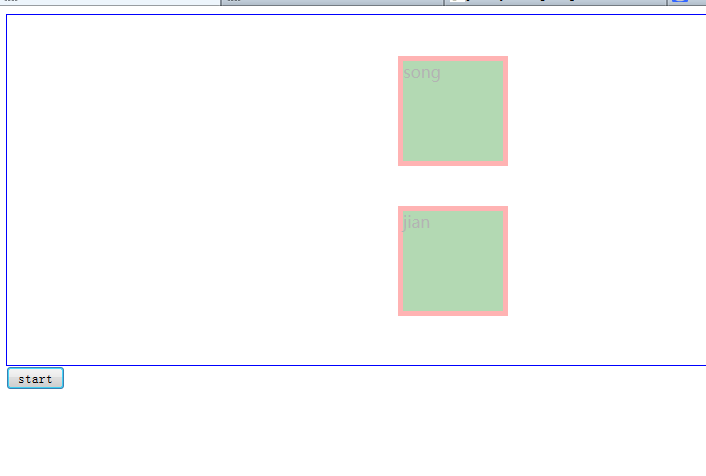
效果图:
javascript 自定义动画函数的更多相关文章
- JavaScript自定义求和函数
我爱撸码,撸码使我感到快乐!大家好,我是Counter,当看到这个标题到时候是不是感觉很简单,千万不要大意哦,你说0.1 + 0.2 = 0.3 ?有时候计算机并不是我们所说绝对精确,这个时候就要我们 ...
- 自定义动画函数JQuery实现
<!DOCTYPE html> <html lang="en"> <head> <meta charset="UTF-8&quo ...
- 原生javascript 基础动画函数封装(二)
<!DOCTYPE html> <html> <head> <title></title> <style type="tex ...
- javascript自定义日期函数
1.格式化日期(YYYY-MM-DD) 代码: var DateFormat = function (date) { if (!(date instanceof Date)) { date = dat ...
- 原生javascript 基础动画函数封装(一)
<!DOCTYPE html> <html> <head> <title></title> <style type="tex ...
- 使用原生的javascript封装动画函数(有callback功能)
<!DOCTYPE html> <html> <head lang="en"> <meta charset="UTF-8&quo ...
- asp.net中调用javascript自定义函数的方法(包括引入JavaScript文件)总结
通常javascript代码可以与HTML标签一起直接放在前 端页面中,但如果JS代码多的话一方面不利于维护,另一方面也对搜索引擎不友好,因为页面因此而变得臃肿:所以一般有良好开发习惯的程序员都会把 ...
- JavaScript中作用域回顾(避免使用全局变量)(瀑布流的实现)(scroll事件)以及Django自定义模板函数回顾
页面显示照片样式为瀑布流: 上面的div个数可以按照自己安排进行划分.img的分布可以使用模板标签以及自定义模板函数进行排布: 自定义模板函数实现可以看,最后几列:python---django中模板 ...
- 使用 JavaScript自定义函数计算出教室的体积大小,其中教室的长、宽、高分别为 8 米、5 米、3 米
查看本章节 查看作业目录 需求说明: 使用 JavaScript自定义函数计算出教室的体积大小,其中教室的长.宽.高分别为 8 米.5 米.3 米 实现思路: 创建 HTML 页面 在页面的 < ...
随机推荐
- 检测使用内存memory_get_usage,执行时间microtime
最近经常用一些扩展,适当比较所占内存,还有一些扩展执行时间长,检测一下每步的执行时间,可以加以修正调整一下源码 查看运行时间 microtime() #返回当前 Unix 时间戳和微秒数. echo ...
- 【转】代码混淆和apk反编译
代码混淆 http://blog.csdn.net/vipzjyno1/article/details/21042823 apk反编译 http://blog.csdn.net/vipzjyno1/a ...
- ES6 Javascript 实用开发技巧
ES6 实用开发技巧 定义变量/常量 ES6 中新增加了 let 和 const 两个命令,let 用于定义变量,const 用于定义常量 两个命令与原有的 var 命令所不同的地方在于,let, c ...
- 求助下 Ubuntu 15.10(64 位)下安装 pyspider 下的问题 - V2EX
https://www.v2ex.com/t/279405 求助下 Ubuntu 15.10(64 位)下安装 pyspider 下的问题 - V2EX pip 更新到最新 sudo apt inst ...
- FreeRTOS介绍与移植
http://andyhuzhill.github.io/freertos/2013/07/30/freertostransplant/ 最近在看一个实时嵌入式操作系统————FreeRTOS, 为什 ...
- 创建Windows窗体 : WinMain() 与 WndProc()
#include <windows.h> #include <mmsystem.h> LRESULT CALLBACK WndProc (HWND, UINT, WPARAM, ...
- 创建自己的Repo Server
非常久曾经出于好奇细致了解了下Repo及server的原理,可是今天突然发现有些忘了.于是想记录下来. Repo机制 Repo是google官方为管理Android项目开发出来的一个软件. 我们先来看 ...
- SharePoint 2013 代码创建应用程序目录(App Catalog)
众所周知,SharePoint App是2013版本的一大特色,那么,关于App的分发有几种方式呢?SharePoint给我们提供了两种方式,一种是上载到SharePoint应用商店,另一种是在本地S ...
- IIS7 win7 x64 MVC部署
.net4.5已经装好,mvc4setup也装了,启动IIS后打开网页还是不能正常显示页面,404错误 最后发现把win7升级到SP1就正常了,具体是那个补丁修复的就不知道了
- Spring Bean 注入 2 注解篇
1. 自动装配注解 配置applicationContext.xml开启注解 <?xml version="1.0" encoding="UTF-8"?& ...