
在 Linux 系统中安装Load Generator ,并在windows 调用
原文地址:http://www.blogjava.net/qileilove/archive/2012/03/14/371861.html
由于公司需要测试系统的最大用户承受能力,所以需要学习使用loadrunner。在安装的时候碰到了不少问题,所以写下此文章总结遇到的问题以及解决方案,希望能帮到大家。也希望大家转载注明出处。
Winsows 的Loadrunner 安装就不多讲了,这个太容易了。
以下是Linux 中安装 Load Generator 说明:
Linux 系统版本:CentOS5.4
Load Generator 版本 : Load Generator 11
安装步骤如下:
1. 到HP官网下载Load Generator 安装文件 Software,_Load_Generator_11.00_T7330-15010.iso
2.确保系统安装了c++ , gclib 相关工具(我的系统在安装前已经安装了gclib ,所以还不知道没装这个会发生什么问题)
3. 在Windows 系统下将Software,_Load_Generator_11.00_T7330-15010.iso 解压出来会有三个文件夹(HP , Linux , Solaris),这三个文件夹是相关系统的安装包。请根据你的系统选择对应的文件夹copy到 要安装的Linux 系统中。为什么要使用这种解压后copy的原因是因为我根据网上的方法copy iso 文件到Linux 系统中并使用挂载的方式进行安装,碰到了很多问题,所以使用这种方式,这可是我原创的哦。我是copy到/home/LoadRunner/目录下
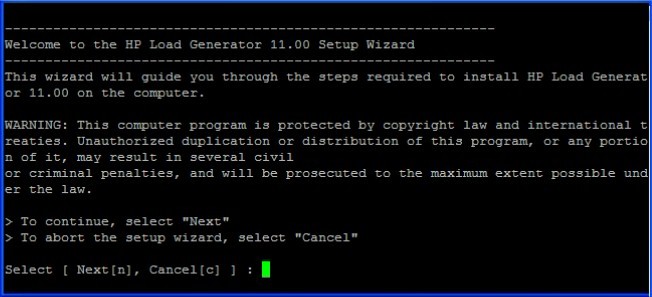
4. 紧跟着就是安装了,只需要执行指令/home/LoadRunner/Linux/installer.sh 会出现如下图中的安装向导欢迎界面,选择Next [n] 即可。
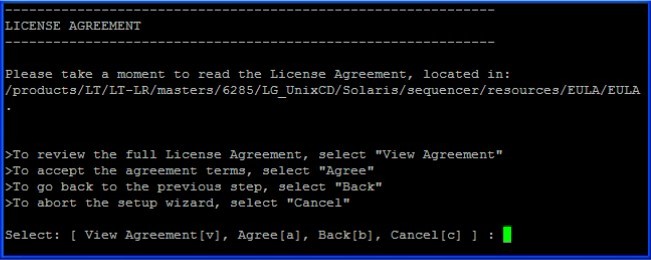
5. 出现下图许可协议界面,也只需点击Agree [a],当然你可以选择View Agreement [v] 查看协议的详细内容
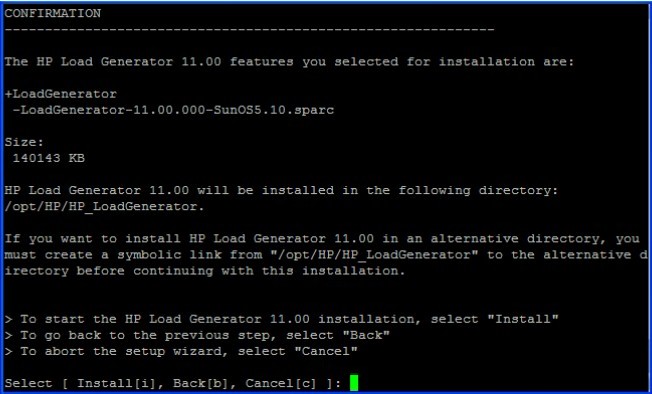
6. 出现确认安装界面,选择Install [i] 即可
7. 出现安装界面如下图

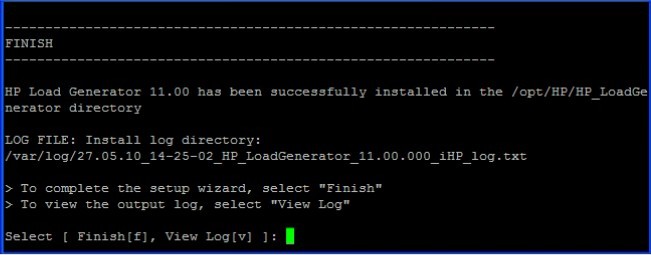
8. 完成安装,选择Finish [f] 即可,恭喜你安装成功
9. 紧跟着就是配制环境了,网上有说要配置env.csh 的,但我安装后env.csh 已经默认配置好了,这里也将的默认配置文件分享一下
setenv PRODUCT_DIR /opt/HP/HP_LoadGenerator
setenv M_LROOT $PRODUCT_DIR
if ( `uname` == SunOS ) then
setenv LD_LIBRARY_PATH ${M_LROOT}/bin
else if ( `uname` == Linux ) then
setenv LD_LIBRARY_PATH ${M_LROOT}/bin
else if ( `uname` == AIX ) then
setenv LIBPATH ${M_LROOT}/bin
else if ( `uname` == HP-UX ) then
setenv SHLIB_PATH ${M_LROOT}/bin
endif
setenv PATH ${M_LROOT}/bin:$PATH
10 .除了上文中讲到的还需要在/root/.bashrc文件中添加如下配制,保存修改后注销用户重用登录
export PRODUCT_DIR=/opt/HP/HP_LoadGenerator
export M_LROOT=$PRODUCT_DIR
export LD_LIBRARY_PATH=${M_LROOT}/bin
export PATH=${M_LROOT}/bin:$PATH
11 . Load Generator会安装到/opt/HP/HP_LoadGenerator目录下,我也是使用默认的。进行/opt/HP /HP_LoadGenerator/bin 目录执行./verify_generator (不能使用root用户,至于为什么还不清楚) 检查安装是否成功,如果成功会有以下信息,
===================================================
HP
Vuser Environment Verification Utility
===================================================
Product: LoadRunner 11.0
Version: 11.0.0.8866
Build: 8866
localhost.localdomain:
verify_generator...OK
verify_generator...OK
verify_generator...OK
Don't forget to make sure that the name of the controller machine
is also in .rhosts
Verify $M_LROOT ...Failed
_____It was not possible to set the $M_LROOT from
_____the shell dot files. One of several things might be happening:
_____1) $M_LROOT is not set at all in the shell dot files.
_____2) There is some error in the shell dot files which stops their execution
_____ before it sets $M_LROOT.
_____3) There is conditional code in the shell dot files (most likely related to
_____ interactive and non interactive shells) and $M_LROOT is set
_____ only in one of the sections.
_____Aborting virtual user tests on host localhost.localdomain
verify_generator...OK
_______________________________________________
Summary:
________
Vuser Host localhost.localdomain: Failed
这些Failed 我都忽略了,因为这些Failed并不影响运行。我很希望哪位大虾看过此文章后能在此回复解释一下这些Failed可以解决吗?
上面是正确的信息,我刚开始的时候遇到了下面这些提示,注意其实这些提示都很直观,缺少了 libstdc++.so.5 , 安装就可以了。调用 yum install libstdc++.so.5 .安装后再调用 ./verify_generator 就可以看到上面的信息了。
===================================================
HP
Vuser Environment Verification Utility
===================================================
Product: LoadRunner 11.0
Version: 11.0.0.8866
Build: 8866
localhost.localdomain:
/opt/HP/HP_LoadGenerator/bin/lrv/chk_thread_lmt: error while loading shared libraries: libstdc++.so.5: cannot open
shared object file: No such file or
directory
/opt/HP/HP_LoadGenerator/bin/lrv/limithost: line 134: [: : integer expression expected
/opt/HP/HP_LoadGenerator/bin/lrv/chk_sems_lmt: error while loading shared libraries: libstdc++.so.5: cannot open
shared object file: No such file or d
irectory
/opt/HP/HP_LoadGenerator/bin/lrv/limithost: line 154: [: : integer expression expected
verify_generator...OK
verify_generator...OK
verify_generator...OK
Warning: The file .rhosts does not exist in the home directory of the user.
Verify $M_LROOT ...Failed
_____It was not possible to set the $M_LROOT from
_____the shell dot files. One of several things might be happening:
_____1) $M_LROOT is not set at all in the shell dot files.
_____2) There is some error in the shell dot files which stops their execution
_____ before it sets $M_LROOT.
_____3) There is conditional code in the shell dot files (most likely related to
_____ interactive and non interactive shells) and $M_LROOT is set
_____ only in one of the sections.
_____Aborting virtual user tests on host localhost.localdomain
verify_generator...OK
_______________________________________________
Summary:
________
Vuser Host localhost.localdomain: Failed
12 . 启动 Load Generator ,在安装的bin目录下输入 ./m_daemon_setup start 即可开户服务了 (不能使用root 用户启动)
13 . 修改防火墙策略,对54345端口开放,或者直接关闭防火墙(不建议直接关闭)
讲到这里安装步骤就完,现在讲如何在Windows 系统下启用 刚才安装的Load Generator
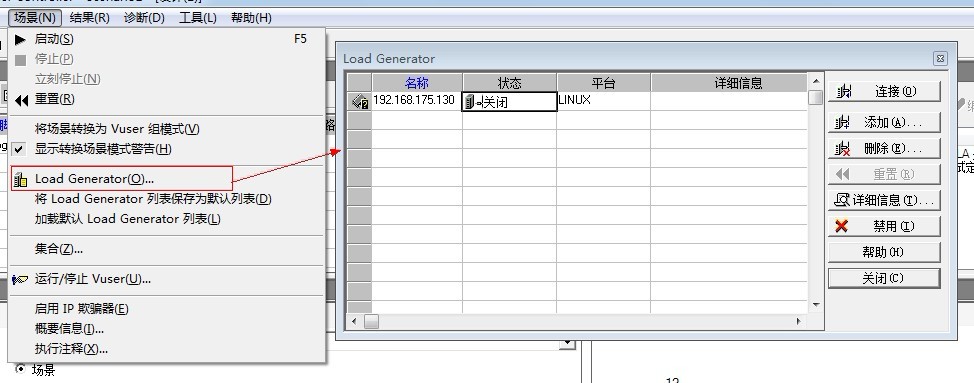
1. 打开Controller 的Load Generator 。 点击 场景--> Load Generator
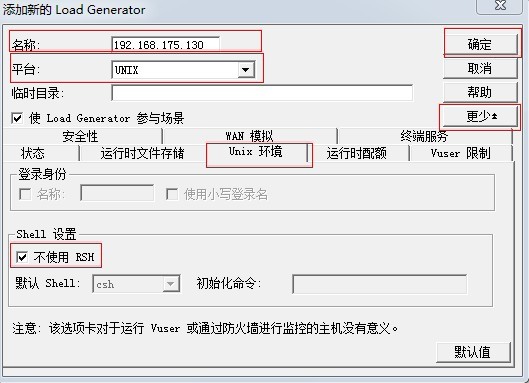
2. 添加一个Load Generator 。点击 添加--> 输入名称(名称即ip)--> 选择平台 --> 点击更多 --> 点击 Unix 环境 --> 勾选“不使用RSH” --> 确定
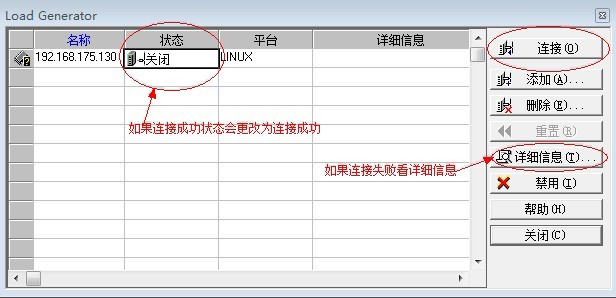
3. 添加后测试连接,如果显示连接成功就功造成了,连接时如果有其它问题建议大家多思考,注意那些连接不成功的提前。我个人觉得LoadRunner 在提示之方面做的比较好,出了问题基本上看提示就知道问题在哪里。祝大家一切顺利。
在 Linux 系统中安装Load Generator ,并在windows 调用的更多相关文章
- 在 Linux 系统中安装Load Generator ,并在windows 调用方法
在 Linux 系统中安装Load Generator ,并在windows 调用 由于公司需要测试系统的最大用户承受能力,所以需要学习使用loadrunner.在安装的时候碰到了不少问题,所以写下此 ...
- 在linux系统中安装VSCode(Visual Studio Code)
在linux系统中安装VSCode(Visual Studio Code) 1.从官网下载压缩包(话说下载下来解压就直接可以运行了咧,都不需要make) 访问Visual Studio Code官网 ...
- [转]理解Linux系统中的load average
转自:http://heipark.iteye.com/blog/1340384 谢谢,写的非常好的文章. 一.什么是load average linux系统中的Load对当前CPU工作量的度量 (W ...
- Linux系统中的load average
1. load average 定义 linux系统中的Load对当前CPU工作量的度量.简单的说是进程队列的长度. Load Average 就是一段时间 (1 分钟.5分钟.15分钟) 内平均 L ...
- 理解Linux系统中的load average(图文版)转
一.什么是load average? linux系统中的Load对当前CPU工作量的度量 (WikiPedia: the system load is a measure of the amount ...
- 在Linux系统中安装caffe
学习深度学习已经很久了,但一直没有自己动手安装过caffe,因为工作需要,需要在linux系统中安装caffe,因此,在这里对安装过程进行记录. caffe配置起来比tensorflow更麻烦一些,我 ...
- 理解Linux系统中的load average(图文版)
本文转自:http://heipark.iteye.com/blog/1340384 一.什么是load average? linux系统中的Load对当前CPU工作量的度量 (WikiPedia: ...
- 理解Linux系统中的load average
理解Linux系统中的load average(图文版) 博客分类: Linux linux load nagios 一.什么是load average? linux系统中的Load对当前CPU工作 ...
- 详解在Linux系统中安装Tomcat
本文以在CentOS 7.6中安装Tomcat8.5为例进行安装,其他系统和版本都是大同小异的. 安装JDK 安装Tomcat之前,需要先安装JDK,可以参看之前的文章详解在Linux系统中安装JDK ...
随机推荐
- web项目更改文件后缀,隐藏编程语言
从Java EE5.0开始,<servlet-mapping>标签就可以配置多个<url-pattern>.例如可以同时将urlServlet配置一下多个映射方式: <s ...
- Rule Compilation error xxx cannot be resolved
说明:在eclipse中部署服务器时不报错,但在dos窗口中部署时报如下异常 原因:规则引擎drl文件文件中两个含义相同的变量的中文注释(只能用//,不能使用/**xxx*/或/*xxx*/)要保持相 ...
- 5 Linux网络编程基础API
5.1 socket地址API 大端字节序(网络序):高位在低址,低位在高址 小端字节序(主机序):低位在低址,高位在高址 判断,利用联合的特性: #include <iostream> ...
- <<Javascript Patterns>>阅读笔记 -- 第2章 基本技巧(二)
关于for-in循环 循环数据时, 强烈不推荐使用for-in循环.因为当Array对象被扩展后, 再用for-in循环遍历数据会导致逻辑上的错误, 举例说明: var arr = ['a', 'b' ...
- LoadRunner:VuGen开发脚本步骤(一)
一.测试过程 1.规划测试:分析应用程序.定义测试目标.方案实施. 2.创建Vuser脚本. 3.创建方案:方案包括运行 Vuser 的计算机的列表.运行 Vuser 脚本的列表以及在方案执行期间运行 ...
- JS获取select的value和text值的简单实例
本篇文章主要是对JS获取select的value和text值的简单实例进行了介绍,需要的朋友可以过来参考下,希望对大家有所帮助 代码如下: <select id = "cityList ...
- matlab下mex 调用opencv库
1. 首先写好待编译的.cpp文件,使用混合编程,以人脸检测为例 #include "mex.h" // Required for the use of MEX files // ...
- thinkphp5.0 配置
ThinkPHP提供了灵活的全局配置功能,采用最有效率的PHP返回数组方式定义,支持惯例配置.公共配置.模块配置.场景配置和动态配置. 对于有些简单的应用,你无需配置任何配置文件,而对于复杂的要求,你 ...
- 【转载】okhttp源码解析
转自:http://www.open-open.com/lib/view/open1472216742720.html https://blog.piasy.com/2016/07/11/Unders ...
- EOJ 3256 拼音魔法
模拟. 有$a$先标$a$,其次是$o$和$e$,$o$和$e$在韵母中不会同时存在.最后是$u$和$i$,这两个字母在韵母中可能同时存在,标在后面的那个.输出那些字符的话直接输出就可以了. 举几个例 ...