
scrapy框架综合运用 爬取天气预报 + 定时任务
爬取目标网站:
http://www.weather.com.cn/
具体区域天气地址:
http://www.weather.com.cn/weather1d/101280601.shtm(深圳)
开始:
scrapy startproject weather

编写items.py
import scrapy

class WeatherItem(scrapy.Item):

    # define the fields for your item here like:

    # name = scrapy.Field()

    date  = scrapy.Field()

    temperature  = scrapy.Field()

    weather  = scrapy.Field()

    wind  = scrapy.Field()
编写spider:
# -*- coding: utf-8 -*-

# @Time    : 2019/8/1 15:40

# @Author  : wujf

# @Email   : 1028540310@qq.com

# @File    : weather.py

# @Software: PyCharm

import scrapy

from weather.items import WeatherItem

class weather(scrapy.Spider):

    name = 'weather'

    allowed_domains = ['www.weather.com.cn/weather/101280601.shtml']

    start_urls = [

        'http://www.weather.com.cn/weather/101280601.shtml'

    ]

    def parse(self, response):

        '''

        筛选信息的函数

        date= 日期

        temperaturature = 当天的温度

        weather = 当天的天气

        wind = 当天的风向

        :param response:

        :return:

        '''

        items = []

        day = response.xpath('//ul[@class="t clearfix"]')

        for i in list(range(7)):

            item = WeatherItem()

            item['date']= day.xpath('./li['+str(i+1)+']/h1//text()').extract_first()

            item['temperature'] = day.xpath('./li['+str(i+1)+']/p[@class="tem"]/i//text()').extract_first()

            item['weather'] = day.xpath('./li['+str(i+1)+']/p[@class="wea"]//text()').extract_first()

            item['wind'] = day.xpath('./li[' + str(i + 1) + ']/p[@class="win"]/i//text()').extract_first()

            #print(item)

            items.append(item)

        return  items
编写管道PIPELINE:
pipelines.py是用来处理收尾爬虫抓到的数据的,一般情况下,我们会将数据存到本地
1.文本形式:最基本存储方式
2.json格式:方便调用
3.数据库:数据量比较大选择的存储方式
import os

import requests

import json

import codecs

import pymysql

'''文本方式'''

class WeatherPipeline(object):

    def process_item(self, item, spider):

        #print(item)

        #获取当前目录

        base_dir = os.getcwd()

        #filename = base_dir+'\\data\\test.txt'

        filename = r'E:\Python\weather\weather\data\test.txt'

        with open(filename,'a') as f:

            f.write(item['date'] + '\n')

            f.write(item['temperature'] + '\n')

            f.write(item['weather'] + '\n')

            f.write(item['wind'] + '\n\n')

        return item
'''json数据'''
class W2json(object):

    def process_item(self, item, spider):

        '''

        讲爬取的信息保存到json

        方便其他程序员调用

        '''

        base_dir = os.getcwd()

        #filename = base_dir + '/data/weather.json'

        filename = r'E:\Python\weather\weather\data\weather.json'

        # 打开json文件,向里面以dumps的方式吸入数据

        # 注意需要有一个参数ensure_ascii=False ,不然数据会直接为utf编码的方式存入比如:“/xe15”

        with codecs.open(filename, 'a') as f:

            line = json.dumps(dict(item), ensure_ascii=False) + '\n'

            f.write(line)

        return item
class W2mysql(object):

    def process_item(self, item, spider):

        '''

        讲爬取的信息保存到mysql

        '''

        date        = item['date']

        temperature = item['temperature']

        weather     = item['weather']

        wind        = item['wind']

        connection = pymysql.connect(

            host = '127.0.0.1',

            user = 'root',

            passwd='root',

            db = 'scrapy',

           # charset='utf-8',

            cursorclass = pymysql.cursors.DictCursor

        )

        try:

            with connection.cursor() as  cursor:

                #创建更新值的sql语句

                sql = """INSERT INTO `weather` (date, temperature, weather, wind) VALUES (%s, %s, %s, %s) """

                cursor.execute(

                    sql,(date,temperature,weather,wind)

                )

                connection.commit()

        finally:

            connection.close()

        return item
然后在settings.py里面配置下
'''
设置日志等级
             ERROR : 一般错误

        WARNING : 警告

        INFO : 一般的信息

        DEBUG : 调试信息

        默认的显示级别是DEBUG

'''

LOG_LEVEL = 'INFO'
ITEM_PIPELINES = {
   'weather.pipelines.WeatherPipeline': 300,
   'weather.pipelines.W2json': 400,
    'weather.pipelines.W2mysql': 300,
}
上面三个类就展示三种数据整理方式。
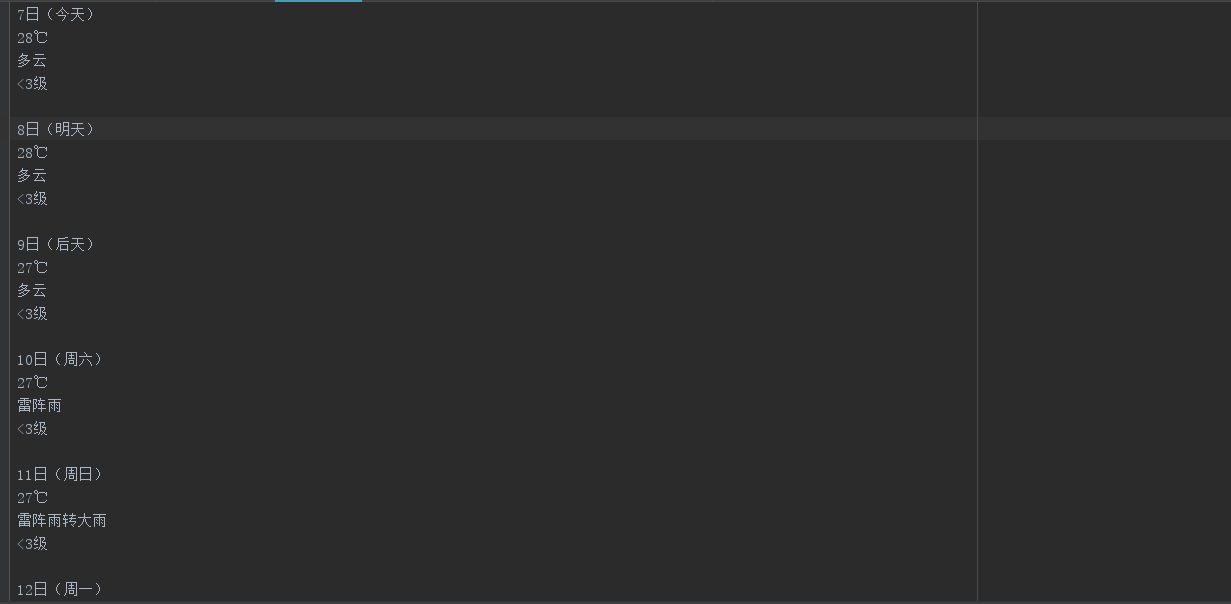
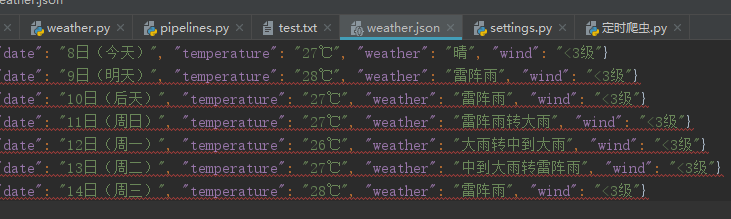
最后运行scrapy crawl weather得到三种结果:

最后写个定时爬区任务
# -*- coding: utf-8 -*-

# @Time    : 2019/8/3 15:38

# @Author  : wujf

# @Email   : 1028540310@qq.com

# @File    : 定时爬虫.py

# @Software: PyCharm

'''

第一种方法 采用sleep

'''

# import time

# import os

# while True:

#     os.system('scrapy crawl weather')

#     time.sleep(3)

# 第二种

from  scrapy import  cmdline

import os

#retal = os.getcwd() #获取当前目录

#print(retal)

os.chdir(r'E:\Python\weather\weather')  #改变目录  因为只有进入scrapy框架才能执行scrapy crawl weather

cmdline.execute(['scrapy', 'crawl', 'weather'])
还有一个中间件,但是我手上没有代理ip ,所以暂时玩不了。
OK,到此结束!
scrapy框架综合运用 爬取天气预报 + 定时任务的更多相关文章
- 基于scrapy框架输入关键字爬取有关贴吧帖子
基于scrapy框架输入关键字爬取有关贴吧帖子 站点分析 首先进入一个贴吧,要想达到输入关键词爬取爬取指定贴吧,必然需要利用搜索引擎 点进看到有四种搜索方式,分别试一次,观察url变化 我们得知: 搜 ...
- 一个scrapy框架的爬虫(爬取京东图书)
我们的这个爬虫设计来爬取京东图书(jd.com). scrapy框架相信大家比较了解了.里面有很多复杂的机制,超出本文的范围. 1.爬虫spider tips: 1.xpath的语法比较坑,但是你可以 ...
- Scrapy 框架 使用 selenium 爬取动态加载内容
使用 selenium 爬取动态加载内容 开启中间件 DOWNLOADER_MIDDLEWARES = { 'wangyiPro.middlewares.WangyiproDownloaderMidd ...
- Scrapy框架——使用CrawlSpider爬取数据
引言 本篇介绍Crawlspider,相比于Spider,Crawlspider更适用于批量爬取网页 Crawlspider Crawlspider适用于对网站爬取批量网页,相对比Spider类,Cr ...
- 使用scrapy框架来进行抓取的原因
在python爬虫中:使用requests + selenium就可以解决将近90%的爬虫需求,那么scrapy就是解决剩下10%的吗? 这个显然不是这样的,scrapy框架是为了让我们的爬虫更强大. ...
- scrapy之360图片爬取
#今日目标 **scrapy之360图片爬取** 今天要爬取的是360美女图片,首先分析页面得知网页是动态加载,故需要先找到网页链接规律, 然后调用ImagesPipeline类实现图片爬取 *代码实 ...
- 和风api爬取天气预报数据
''' 和风api爬取天气预报数据 目标:https://free-api.heweather.net/s6/weather/forecast?key=cc33b9a52d6e48de85247779 ...
- 爬虫系列---scrapy全栈数据爬取框架(Crawlspider)
一 简介 crawlspider 是Spider的一个子类,除了继承spider的功能特性外,还派生了自己更加强大的功能. LinkExtractors链接提取器,Rule规则解析器. 二 强大的链接 ...
- Scrapy爬虫框架(实战篇)【Scrapy框架对接Splash抓取javaScript动态渲染页面】
(1).前言 动态页面:HTML文档中的部分是由客户端运行JS脚本生成的,即服务器生成部分HTML文档内容,其余的再由客户端生成 静态页面:整个HTML文档是在服务器端生成的,即服务器生成好了,再发送 ...
随机推荐
- python学习(4)循环语句
循环语句主要有两个,一个是 while :一个是for in range() 以案例来说明: 写一个猜数字的游戏,正确的数字等于38.如果数字等于38,则提示正确,然后结束:如果数字大于38则提示大了 ...
- JavaScript实现计算后缀表达式(逆波兰表达式)以及将中缀表达式转为后缀表达式
逆波兰表达式,它的语法规定,表达式必须以逆波兰表达式的方式给出.逆波兰表达式又叫做后缀表达式.这个知识点在数据结构和编译原理这两门课程中都有介绍,下面是一些例子: 正常的表达式 逆波兰表达式 a+b ...
- win10CPU版TensorFlow安装详细流程(踩N个坑之后的总结)
版本说明: 多次实验后,python3.5+TensorFlow1.2+numpy1.16.4比较成功,不会报奇奇怪怪的错.(安装流程中会说到,不需要提前下载) 准备工作: 找到电脑:C:\Users ...
- HSRP 详解
简介 HSRP(Hot Standby Router Protocol 热备份路由器协议)是Cisco的专有协议.HSRP把多台路由器组成一个“热备份组”,形成一个虚拟路由器.这个组内只有一个路由器是 ...
- 杭电------2097 Sky数(C语言写)
//这个题没有一次过,哈哈哈哈,题意理解错了,开始还以为是必须加起来等于22呢 //其实就是依次算出个进制下的和,虽然每个循环最多循环四次,但是还是加上必要的判断,想办法让 //提前结束 #inclu ...
- Lua类的继承 参考实现
参考url: https://blog.codingnow.com/cloud/LuaOO 最近在思考lua类的继承实现 ,参考了云风的类实现,感觉他的更像是接口写法.于是尝试用自己的方式重写了类实例 ...
- AndroidStudio报错:Could not download gradle.jar:No cacahed version available for offline mode
场景 在讲Android Studio 的.gradle目录从默认C盘修改为 别的目录后,新建app提示: Could not download gradle.jar:No cacahed versi ...
- SecureCRT的下载、安装( 过程非常详细!!值得查看)
SecureCRT的下载.安装( 过程非常详细!!值得查看) 简单介绍下SecureCRT 一.SecureCRT的下载 二.SecureCRT的安装 简单介绍下SecureCRT SecureCRT ...
- SSM项目下Druid连接池的配置及数据源监控的使用
一,连接池的配置 在pom.xml中添加,druid的maven信息 <dependency> <groupId>com.alibaba</groupId> < ...
- RestTemplate + okhttp 实现远程调用
1. 添加依赖 <!-- https://mvnrepository.com/artifact/com.squareup.okhttp3/okhttp --> <dependency ...