
pygame 运行心理学问卷
import pygame

import sys

from pygame.locals import *

# wait for keys to putdown

def waitForKeys(keysAllowed):

    key = False # initialize the key

    pygame.event.clear() # clear the event

    while not key:

        for i in pygame.event.get(): # for every event in the event list

            if i.type == pygame.KEYDOWN or i.type == pygame.KEYUP: # if the event type is keydown

                if i.key in keysAllowed : # if key is the special key

                # 如果是 if i.key ==  K_0 or K_1 or K_2 ,那么按任意一个键都将退出,因为 or 的逻辑成了(if i.key ==  K_0) or K_1 这种形式

                    print(i.key, pygame.key.name(i.key))

                    key = True # break the while loop

    return 0 # reture the value

# draw a two sentences

def displayOneQuestion(myString):

    pygame.init() # initialize pygame

    mywin = pygame.display.set_mode((800,600), DOUBLEBUF|HWSURFACE) # create the window

    myFont = pygame.font.SysFont("华文宋体", 25,False, False) # create the font

    myStringSurface = myFont.render(myString, True,  (255,255,255), False) # create the string

    myString1 = "1 有点  2 中等 3 很多"

    myStringSurface1 = myFont.render(myString1, True, (255,255,255), None)

    mywin.blit(myStringSurface, (1,1), None, 0) # draw the font surface to another surface

    mywin.blit(myStringSurface1, (1,100), None, 0) # draw another surface

    pygame.display.flip() # flip the window

    return 0 # return 0

myString = ["你好啊","我不好","吃了吗","枯井柘城","没有呢","那好吧"]

keysAllowed = [pygame.K_1, pygame.K_2, pygame.K_3, pygame.K_4, pygame.K_5]

for element in myString:

    displayOneQuestion(element)

    waitForKeys(keysAllowed)

# 注意点1 : 如果 pygame.event.clear() # clear the event 这一句放在 while :的开头,那么程序会非常慢,而且有的还会跳过,不知为什么。

# 注意点2:  如果是 if i.key ==  K_0 or K_1 or K_2 ,那么按任意一个键都将退出,因为 or 的逻辑成了(if i.key ==  K_0) or K_1 这种形式 ,而且if i.key == (K_0 or K_1)也是不行的。
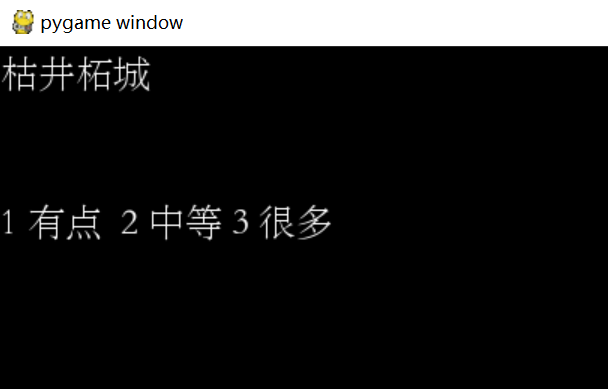
这是一张问卷的问题的界面(当然问题是我瞎编的,并且也不是很美观,后期可以调整)
需要被试按键才能看下一题,按的键包括1,2,3,4,5

这是第二个问题的界面
这是完成5道题后的结果,我打印出了按键的ASC值,以及键的名称,可以看出名称为键盘上的数字按键。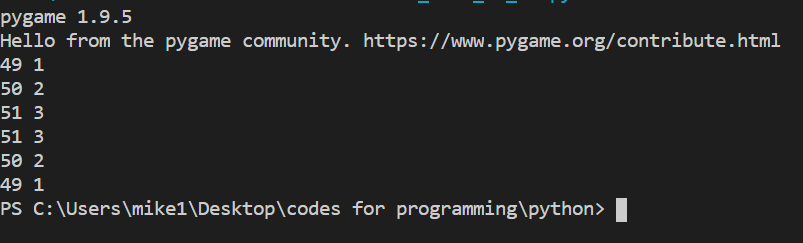
总结:界面上的问题,问题的位置,答案的内容,答案的位置都可以设置,由于现在没有拿到问卷的内容,所以问卷内容是瞎写的。用pygame的主要优势是跳过了纸笔测验,而且可以将被试的反应(按键)存入数据库。
最近看到,做心理学问卷,用pyqt5,以及tkinter写GUI,要比我上面写的心理学问卷好的多。悲哀。
继续用的pygame , 但是对自己之前的工作,做了优化。
代码如下:
import pygame

import sys

from pygame.locals import *

# wait for keys to putdown

def waitForKeys(keysAllowed,theQuestion):

    key = False # initialize the key

    pygame.event.clear() # clear the event

    while not key:

        for i in pygame.event.get(): # for every event in the event list

            if i.type == pygame.KEYDOWN or i.type == pygame.KEYUP: # if the event type is keydown

                if i.key in keysAllowed : # if key is the special key

                # 如果是 if i.key ==  K_0 or K_1 or K_2 ,那么按任意一个键都将退出,因为 or 的逻辑成了(if i.key ==  K_0) or K_1 这种形式

                    result = "{0}_{1}_{2}_{3:,<30}{4}{5}".format(participantName,participantGender,participantAge,theQuestion,"按键是: ",pygame.key.name(i.key)) # format the string , the format not only can use print() function

                    print(result) # print the result

                    key = True # break the while loop

    return result # reture the value

# draw a two sentences

def displayOneQuestion(myString):

    pygame.init() # initialize pygame

    mywin = pygame.display.set_mode((800,600), DOUBLEBUF|HWSURFACE) # create the window

    myFont = pygame.font.SysFont("华文宋体", 25,False, False) # create the font

    myStringSurface = myFont.render(myString, True,  (255,255,255), False) # create the string

    myString1 = "1 非常不符合  2 比较不符合 3 难以确定 4 比较符合 5 非常符合"

    myStringSurface1 = myFont.render(myString1, True, (255,255,255), None)

    surfaceHeight = myStringSurface.get_height() # get the suface width of picture one

    surfaceWidth = myStringSurface.get_width() # get the suface height of picture one

    surfaceHeight1 = myStringSurface1.get_height() # get the suface width of picture two

    surfaceWidth1 = myStringSurface1.get_width() # get the suface height of picture two

    finalSurfaceHeight = 250 - (surfaceHeight/2) # compute the half height of the picture one

    finalSurfaceWidth = 400 - (surfaceWidth/2) # compute the half width of the picture one

    finalSurfaceHeight1 = 250 - surfaceHeight1/2 # compute the half height of the picture two

    finalSurfaceWidth1 = 400 - surfaceWidth1/2 #compute the half width of the picture two

    mywin.blit(myStringSurface, (finalSurfaceWidth, 200), None, 0)

    # mywin.blit(myStringSurface, (400 - finalSurfaceWidth, 250 - finalSurfaceHeight), None, 0) # draw the font surface to another surface and put the font to the middle of the window

    mywin.blit(myStringSurface1, (finalSurfaceWidth1,310), None, 0) # draw another surface and put the font to the middle of the window

    pygame.display.flip() # flip the window

    return 0 # return 03

myString = ["第1题: 在社交场合,我总是显得不够自然()",

                    "第2题: 我有话就说,从来憋不住()",

                    "第3题: 在集体活动中,我总表现得很活跃()",

]

participantNumber = input("请输入您的编号:") # collect participant number

participantName = input("请输入您的名字:") # collect participant name

participantGender = input("请输入您的性别:")  # collect participant gender

participantAge = input("请输入您的年龄:") # collect participant age

keysAllowed = [pygame.K_1, pygame.K_2, pygame.K_3, pygame.K_4, pygame.K_5] # set the allowed keys which participant can push

resultList = [] # create a empty list to collect element for writing file

for element in myString: # every element in the qestionaires

    displayOneQuestion(element) # display the image

    result = waitForKeys(keysAllowed, element) # the image will stay on the screen until participant push the keyboard

    resultList.append(result + '\n') # add the key which participant push to the empty list

# open a file

with open("C:/users/mike1/desktop/data/wechatCrawlData/personality/{0}_{1}.txt".format(participantNumber,participantName), "w", encoding = "utf-8") as f1:

    f1.writelines(resultList) # write the list to the file

# 注意点1 : 如果 pygame.event.clear() # clear the event 这一句放在 while :的开头,那么程序会非常慢,而且有的还会跳过,不知为什么。

# 注意点2:  如果是 if i.key ==  K_0 or K_1 or K_2 ,那么按任意一个键都将退出,因为 or 的逻辑成了(if i.key ==  K_0) or K_1 这种形式 ,而且if i.key == (K_0 or K_1)也是不行的。

# 注意点3 :  format()函数不仅可以用于print()函数中,还可以用于文本的写入 with open()函数,比如本例中,object = format(), write(object)
上面的问卷题目只有三道题。
题目的呈现如下:

打印出结果:
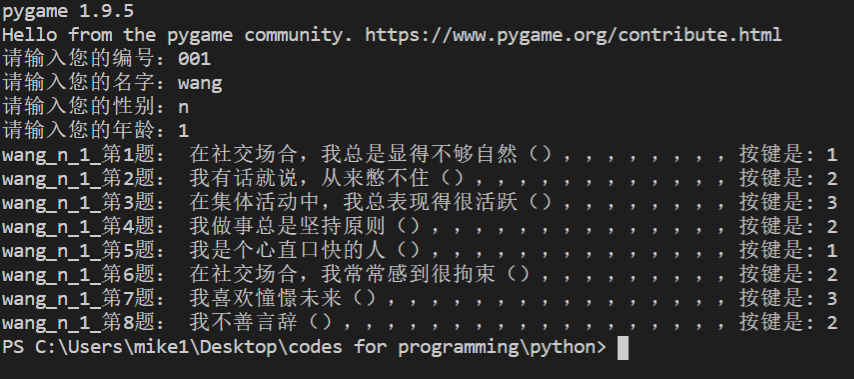
写入文件:
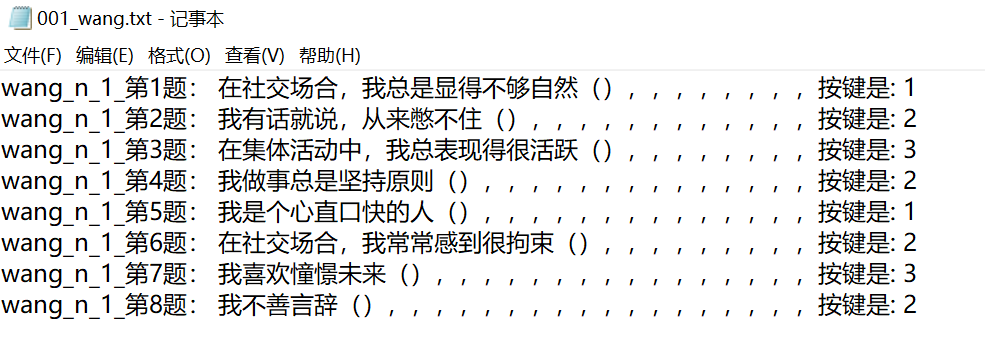
2019.12.27
pygame 运行心理学问卷的更多相关文章
- 趣味python编程之经典俄罗斯方块
国庆期间闲不住,用python把经典俄罗斯方块实现了一遍,找到了些儿时的乐趣.因此突发奇想,打算用python写点经典又确实有趣的小程序形成系列.正统编程之余也给自己找点儿乐趣,换个角度写程序. 原计 ...
- python学习笔记05:贪吃蛇游戏代码
贪吃蛇游戏截图: 首先安装pygame,可以使用pip安装pygame: pip install pygame 运行以下代码即可: #!/usr/bin/env python import pygam ...
- npm学习(五)之使用package.json
使用package.json 管理本地安装的npm包的最佳方法是创建一个package.json文件. 一个packagejson文件: 列出项目所依赖的包. 允许使用语义版本控制规则指定项目可以使用 ...
- 20184302 2019-2020-2 《Python程序设计》实验四报告
20184302 2019-2020-2 <Python程序设计>实验四报告 课程:<Python程序设计> 班级: 1843 姓名: 李新锐 学号:184302 实验教师:王 ...
- 少儿编程:python趣味编程第一课
本文仅针对8-16岁的青少年,所以流程是按如何去教好中小学生走的,并不适合成人找工作学习,因为进度也是按照青少年走的 大家好,我是C大叔,从事少儿编程行业三年有余(2016年从事少儿编程行业,少儿编程 ...
- python pygame 安装和运行的一些问题
1.python安装过程中可以选择自动配置环境变量,可以避免手动配置,但是缺点是如果环境变量有问题,就得自己重新学习配置环境变量. 2.我自己想用python从游戏方面入手,所以在安装pygame过程 ...
- 学习python及Pygame的安装及运行
Python: 注意勾上Add Python 2.7 to PATH,然后点“Install Now”即可完成安装. 或手动修改环境变量,win7:右击我的电脑->属性->高级->环 ...
- linux的七大运行级别及级别修改
运行级别 级别说明 0 所有进程将被终止,机器将有序的停止,关机时系统处于这个运行级别 1 单用户模式,用于系统维护,只有少数进程运行,同时所有服务也不 ...
- pygame开发PC端微信打飞机游戏
pygame开发PC端微信打飞机游戏 一.项目简介 1. 介绍 本项目类似曾经火爆的微信打飞机游戏.游戏将使用Python语言开发,主要用到pygame的API.游戏最终将会以python源文件gam ...
随机推荐
- 我的一个配置redux(实现一次存储与调用方法)之旅
前言 : 今天呢,就配置一下redux,redux的重要性呢,就叭叭叭一大堆,什么也没有带着配置一次来的重要,因为许多涉及到的属性和方法,用法是活的,但格式是需要记忆的. 过程中不要嫌我唠叨,有的地方 ...
- CSS实现按钮点击后根据背景色加深效果-一颗优雅草bigniu
具体代码如下 button{ position: relative; } button:active::before { display: block; content: ''; position: ...
- 提升命令行效率的Bash快捷键
转自:http://linuxtoy.org/archives/bash-shortcuts.html 生活在 Bash shell 中,熟记以下快捷键,将极大的提高你的命令行操作效率. 大部分对其他 ...
- axios中qs的使用
首先qs是一个npm仓库所管理的包,可通过npm install qs命令进行安装. 地址: https://www.npmjs.com/package/qs qs.parse().qs.string ...
- 【Java并发工具类】原子类
前言 为保证计数器中count=+1的原子性,我们在前面使用的都是synchronized互斥锁方案,加锁独占访问的方式未免太过霸道,于是我们来介绍另一种解决原子性问题的无锁方案:原子变量.在正式介绍 ...
- linux传输文件-sftp
SFTP sftp登陆远程服务器 sftp username@ip 例如:sftp mqadmin@10.10.1.150 然后输入password即可 put:上传文件 例如:put iosta ...
- Linux监控-历史细项数据回溯
Linux监控数据回溯 网络服务监控 应用场景: lvs 后端内网端机器网络波动监控: nginx 80.443端口连接监控: mysql 连接监控 以上为抛砖引玉,根据环境安装到监控工具(open ...
- Win环境下安装vue及运行vue开发的前端项目
vue安装及配置 首先下载node.js要求版本在8.9以上 官网:https://nodejs.org/zh-cn/ 下载完可检查在windows任务命令行里输入node -v 使用淘 ...
- Flink知识散点
1.KeyBy 操作后,只有当 Key 的数量大于算子的并发实例数才能获得较好的计算性能. A.而若Key 的数量比实例数量少,就会导致部分实例收不到数据,这些实例就得不到执行,这些实例的计算能力得不 ...
- kernel定制,编译内核
定制kernel,就需要手动编译内核 一,准备开发环境 1,包组:Development Tools,Server Platform Development 2,包:ncurses和ncurses-d ...