
SRTE测试
网络拓扑:
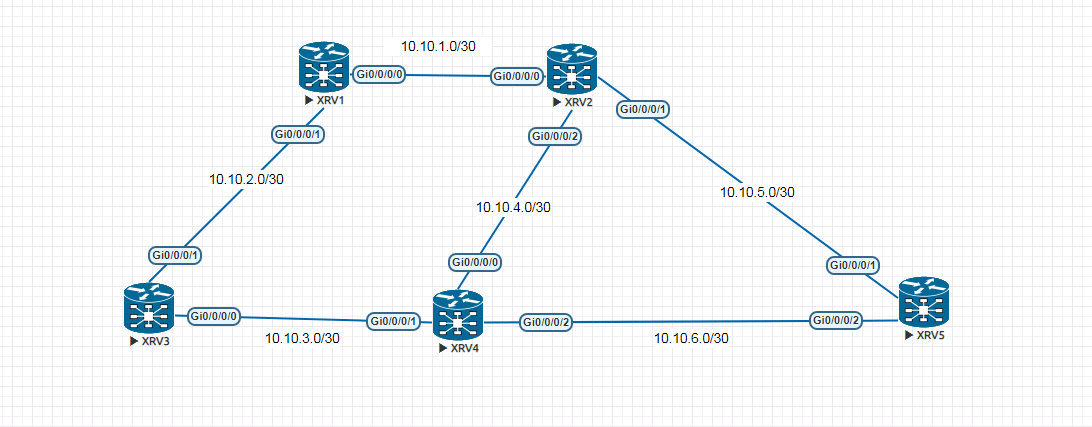
XRV1
=======================================================================
hostname XRV1
explicit-path name SRTE
index 10 next-address strict ipv4 unicast 10.10.2.2
index 20 next-address strict ipv4 unicast 10.10.3.2
index 30 next-address strict ipv4 unicast 10.10.4.1
index 40 next-address strict ipv4 unicast 10.10.5.2
!
interface Loopback0
ipv4 address 192.168.1.1 255.255.255.255
!
interface tunnel-te16
ipv4 unnumbered Loopback0
autoroute announce
!
destination 192.168.1.5
path-option 1 explicit name SRTE segment-routing
!
interface MgmtEth0/0/CPU0/0
shutdown
!
interface GigabitEthernet0/0/0/0
ipv4 address 10.10.1.1 255.255.255.252
!
interface GigabitEthernet0/0/0/1
ipv4 address 10.10.2.1 255.255.255.252
!
interface GigabitEthernet0/0/0/2
shutdown
!
router ospf 100
router-id 192.168.1.1
segment-routing mpls
segment-routing forwarding mpls
area 0
mpls traffic-eng
interface Loopback0
passive enable
prefix-sid index 1
!
interface GigabitEthernet0/0/0/0
network point-to-point
!
interface GigabitEthernet0/0/0/1
network point-to-point
!
!
mpls traffic-eng router-id Loopback0
!
mpls traffic-eng
!
end
XRV2
=======================================================================
!
hostname XRV2
interface Loopback0
ipv4 address 192.168.1.2 255.255.255.255
!
interface MgmtEth0/0/CPU0/0
shutdown
!
interface GigabitEthernet0/0/0/0
ipv4 address 10.10.1.2 255.255.255.252
!
interface GigabitEthernet0/0/0/1
ipv4 address 10.10.5.1 255.255.255.252
!
interface GigabitEthernet0/0/0/2
ipv4 address 10.10.4.1 255.255.255.252
!
router ospf 100
router-id 192.168.1.2
segment-routing mpls
segment-routing forwarding mpls
area 0
mpls traffic-eng
interface Loopback0
passive enable
prefix-sid index 2
!
interface GigabitEthernet0/0/0/0
network point-to-point
!
interface GigabitEthernet0/0/0/1
network point-to-point
!
interface GigabitEthernet0/0/0/2
network point-to-point
!
!
mpls traffic-eng router-id Loopback0
!
mpls traffic-eng
!
segment-routing
!
end
XRV3
=======================================================================
hostname XRV3
interface Loopback0
ipv4 address 192.168.1.3 255.255.255.255
!
interface MgmtEth0/0/CPU0/0
shutdown
!
interface GigabitEthernet0/0/0/0
ipv4 address 10.10.3.1 255.255.255.252
!
interface GigabitEthernet0/0/0/1
ipv4 address 10.10.2.2 255.255.255.252
!
interface GigabitEthernet0/0/0/2
shutdown
!
router ospf 100
router-id 192.168.1.3
segment-routing mpls
segment-routing forwarding mpls
area 0
mpls traffic-eng
interface Loopback0
passive enable
prefix-sid index 3
!
interface GigabitEthernet0/0/0/0
network point-to-point
!
interface GigabitEthernet0/0/0/1
network point-to-point
!
!
mpls traffic-eng router-id Loopback0
!
mpls traffic-eng
!
segment-routing
!
end
XRV4
=======================================================================
hostname XRV4
interface Loopback0
ipv4 address 192.168.1.4 255.255.255.255
!
interface MgmtEth0/0/CPU0/0
shutdown
!
interface GigabitEthernet0/0/0/0
ipv4 address 10.10.4.2 255.255.255.252
!
interface GigabitEthernet0/0/0/1
ipv4 address 10.10.3.2 255.255.255.252
!
interface GigabitEthernet0/0/0/2
ipv4 address 10.10.6.1 255.255.255.252
!
router ospf 100
router-id 192.168.1.4
segment-routing mpls
segment-routing forwarding mpls
area 0
mpls traffic-eng
interface Loopback0
passive enable
prefix-sid index 4
!
interface GigabitEthernet0/0/0/0
network point-to-point
!
interface GigabitEthernet0/0/0/1
network point-to-point
!
interface GigabitEthernet0/0/0/2
network point-to-point
!
!
mpls traffic-eng router-id Loopback0
!
mpls traffic-eng
!
segment-routing
!
end
XRV5
=======================================================================
hostname XRV5
explicit-path name SRTE
index 10 next-address strict ipv4 unicast 10.10.5.1
index 20 next-address strict ipv4 unicast 10.10.4.2
index 30 next-address strict ipv4 unicast 10.10.3.1
index 40 next-address strict ipv4 unicast 10.10.2.1
!
interface Loopback0
ipv4 address 192.168.1.5 255.255.255.255
!
interface tunnel-te16
ipv4 unnumbered Loopback0
autoroute announce
!
destination 192.168.1.1
path-option 1 explicit name SRTE segment-routing
!
interface MgmtEth0/0/CPU0/0
shutdown
!
interface GigabitEthernet0/0/0/0
shutdown
!
interface GigabitEthernet0/0/0/1
ipv4 address 10.10.5.2 255.255.255.252
!
interface GigabitEthernet0/0/0/2
ipv4 address 10.10.6.2 255.255.255.252
!
router ospf 100
router-id 192.168.1.5
segment-routing mpls
segment-routing forwarding mpls
area 0
mpls traffic-eng
interface Loopback0
passive enable
prefix-sid index 5
!
interface GigabitEthernet0/0/0/1
network point-to-point
!
interface GigabitEthernet0/0/0/2
network point-to-point
!
!
mpls traffic-eng router-id Loopback0
!
mpls traffic-eng
!
segment-routing
!
end
做TE要求如下:
XRV1-----> XRV5
10.10.2.2 -> 10.10.3.2 ->10.10.4.1 ->10.10.5.2
XRV5----->XRV1
10.10.5.1 ->10.10.4.2 ->10.10.3.1 ->10.10.2.1
测试如下:
XRV1-----> XRV5
RP/0/0/CPU0:XRV1#traceroute 192.168.1.5
Mon Jul 22 07:43:31.705 UTC
Type escape sequence to abort.
Tracing the route to 192.168.1.5
1 10.10.2.2 [MPLS: Labels 24001/24001/24003 Exp 0] 19 msec 9 msec 9 msec
2 10.10.3.2 [MPLS: Labels 24001/24003 Exp 0] 19 msec 29 msec 19 msec
3 10.10.4.1 [MPLS: Label 24003 Exp 0] 29 msec 29 msec 29 msec
4 10.10.5.2 19 msec * 19 msec
XRV5----->XRV1
RP/0/0/CPU0:XRV5#traceroute 192.168.1.1
Mon Jul 22 07:44:16.853 UTC
Type escape sequence to abort.
Tracing the route to 192.168.1.1
1 10.10.5.1 [MPLS: Labels 24005/24003/24003 Exp 0] 9 msec 9 msec 9 msec
2 10.10.4.2 [MPLS: Labels 24003/24003 Exp 0] 9 msec 9 msec 9 msec
3 10.10.3.1 [MPLS: Label 24003 Exp 0] 9 msec 9 msec 9 msec
4 10.10.2.1 9 msec * 19 msec
SRTE测试的更多相关文章
- SRv6规模部署,离不开测试技术保驾护航!
什么是SRv6? SRv6技术就是采用现有的IPv6转发技术,通过扩展IPv6报文的头域,实现类似标签转发的处理.SRv6将一些IPv6地址定义成实例化的SID(Segment ID),每个SID有着 ...
- SignalR系列续集[系列8:SignalR的性能监测与服务器的负载测试]
目录 SignalR系列目录 前言 也是好久没写博客了,近期确实很忙,嗯..几个项目..头要炸..今天忙里偷闲.继续我们的小系列.. 先谢谢大家的支持.. 我们来聊聊SignalR的性能监测与服务器的 ...
- Apache Ignite之集群应用测试
集群发现机制 在Ignite中的集群号称是无中心的,而且支持命令行启动和嵌入应用启动,所以按理说很简单.而且集群有自动发现机制感觉对于懒人开发来说太好了,抱着试一试的心态测试一下吧. 在Apache ...
- 测试一下StringBuffer和StringBuilder及字面常量拼接三种字符串的效率
之前一篇里写过字符串常用类的三种方式<java中的字符串相关知识整理>,只不过这个只是分析并不知道他们之间会有多大的区别,或者所谓的StringBuffer能提升多少拼接效率呢?为此写个简 ...
- TechEmpower 13轮测试中的ASP.NET Core性能测试
应用性能直接影响到托管服务的成本,因此公司在开发应用时需要格外注意应用所使用的Web框架,初创公司尤其如此.此外,糟糕的应用性能也会影响到用户体验,甚至会因此受到相关搜索引擎的降级处罚.在选择框架时, ...
- .NET Core系列 :4 测试
2016.6.27 微软已经正式发布了.NET Core 1.0 RTM,但是工具链还是预览版,同样的大量的开源测试库也都是至少发布了Alpha测试版支持.NET Core, 这篇文章 The Sta ...
- 渗透测试工具BurpSuite做网站的安全测试(基础版)
渗透测试工具BurpSuite做网站的安全测试(基础版) 版权声明:本文为博主原创文章,未经博主允许不得转载. 学习网址: https://t0data.gitbooks.io/burpsuite/c ...
- 在ubuntu16.10 PHP测试连接MySQL中出现Call to undefined function: mysql_connect()
1.问题: 测试php7.0 链接mysql数据库的时候发生错误: Fatal error: Uncaught Error: Call to undefined function mysqli_con ...
- 【初学python】使用python调用monkey测试
目前公司主要开发安卓平台的APP,平时测试经常需要使用monkey测试,所以尝试了下用python调用monkey,代码如下: import os apk = {'j': 'com.***.test1 ...
随机推荐
- Python学习之路2☞数据类型与变量
变量 变量作用:保存状态:说白了,程序运行的状态就是状态的变化,变量是用来保存状态的,变量值的不断变化就产生了运行程序的最终输出结果 一:声明变量 #!/usr/bin/env python # -* ...
- CAD安装失败怎样卸载重新安装CAD,解决CAD安装失败的方法总结
技术帖:CAD没有按照正确方式卸载,导致CAD安装失败.楼主也查过网上关于如何解决CAD安装失败的一些文章,是说删除几个CAD文件和CAD软件注册表就可以解决CAD安装失败的问题,实际的情况并没有这么 ...
- 因为对 Docker 不熟悉建了 N 多个 Nginx
因为对 Docker 不熟悉建了 N 多个 Nginx 一直不停的 docker run nginx 结果出现无数个 nginx. 然后最原来的 nginx 启动不了了. 使用 docker ps - ...
- qt 自定义窗口显示鼠标划过的轨迹
鼠标事件分为四种: 1.按下 2.抬起 3.移动 4.双击 鼠标事件继承与QWidget void mouseDoubleClickEvent(QMouseEvent *event) void mou ...
- @codeforces - 455E@ Function
目录 @description@ @solution@ @accepted code@ @details@ @description@ 已知 a 序列,并给定以下关系: \[\begin{cases} ...
- 根据花瓶的侧面投影图,用Matlab绘制花瓶的三维立体图
现有一花瓶侧面投影如图 问题: 1) 做出该花瓶三维立体图: 2) 计算其表面积: 计算其体积. 第一次参加数学建模,从来没有接触过Matlab语言,一上来就碰到这种数字图像处理的问题就 ...
- 18-2 djanjo中间件和orm多对多操作,以及ajax
一 中间件 0 怎样使用中间件 在setting配置文件里面注册你的中间件,如下: 'mymiddleware.MD1', 前面是文件名,后面是类名 然后在你的mymiddleware文件里导入: ...
- 15个非常重要的Apache开源项目汇总
15个非常重要的Apache开源项目汇总 自1999年创立以来,Apache软件基金会如今已成了众多重要的开源软件项目之家.本文列举了15个多年来非常重要的Apache项目,这些项目不仅对开源运动来说 ...
- wamp环境搭建(Apache2.4.34+PHP7.2.7+MySQL5.5.60)
1 添加环境变量 1.1 添加Apache bin目录 1.2 添加PHP目录 2 配置Apache 2.1 修改conf/httpd.conf 将第38行SRVROOT值修改为当前Apache文件夹 ...
- UTF-8与UTF-8 BOM
在我们通常使用的windows系统中,我发现了一个有趣的现象.我新建一个空的文本文档,点击文件-另存为-编码选择UTF-8,然后保存.此时这个文件明明是空的,却占了3字节大小.原因在于:此时保存的编码 ...