
THE R QGRAPH PACKAGE: USING R TO VISUALIZE COMPLEX RELATIONSHIPS AMONG VARIABLES IN A LARGE DATASET, PART ONE
The R qgraph Package: Using R to Visualize Complex Relationships Among Variables in a Large Dataset, Part One
A Tutorial by D. M. Wiig, Professor of Political Science, Grand View University
In my most recent tutorials I have discussed the use of the tabplot()package to visualize multivariate mixed data types in large datasets. This type of table display is a handy way to identify possible relationships among variables, but is limited in terms of interpretation and the number of variables that can be meaningfully displayed.
Social science research projects often start out with many potential independent predictor variables for a given dependant variable. If these variables are all measured at the interval or ratio level a correlation matrix often serves as a starting point to begin analyzing relationships among variables.
In this tutorial I will use the R packages SemiPar, qgraph and Hmisc in addition to the basic packages loaded when R is started. The code is as follows:
###################################################
#data from package SemiPar; dataset milan.mort
#dataset has 3652 cases and 9 vars
##################################################
install.packages(“SemiPar”)
install.packages(“Hmisc”)
install.packages(“qgraph”)
library(SemiPar)
####################################################
One of the datasets contained in the SemiPar packages is milan.mort. This dataset contains nine variables and data from 3652 consecutive days for the city of Milan, Italy. The nine variables in the dataset are as follows:
rel.humid (relative humidity)
tot.mort (total number of deaths)
resp.mort (total number of respiratory deaths)
SO2 (measure of sulphur dioxide level in ambient air)
TSP (total suspended particles in ambient air)
day.num (number of days since 31st December, 1979)
day.of.week (1=Monday; 2=Tuesday; 3=Wednesday; 4=Thursday; 5=Friday; 6=Saturday; 7=Sunday
holiday (indicator of public holiday: 1=public holiday, 0=otherwise
mean.temp (mean daily temperature in degrees celsius)
To look at the structure of the dataset use the following
#########################################
library(SemiPar)
data(milan.mort)
str(milan.mort)
###############################################
Resulting in the output:
> str(milan.mort)
‘data.frame’: 3652 obs. of 9 variables:
$ day.num : int 1 2 3 4 5 6 7 8 9 10 …
$ day.of.week: int 2 3 4 5 6 7 1 2 3 4 …
$ holiday : int 1 0 0 0 0 0 0 0 0 0 …
$ mean.temp : num 5.6 4.1 4.6 2.9 2.2 0.7 -0.6 -0.5 0.2 1.7 …
$ rel.humid : num 30 26 29.7 32.7 71.3 80.7 82 82.7 79.3 69.3 …
$ tot.mort : num 45 32 37 33 36 45 46 38 29 39 …
$ resp.mort : int 2 5 0 1 1 6 2 4 1 4 …
$ SO2 : num 267 375 276 440 354 …
$ TSP : num 110 153 162 198 235 …
As is seen above, the dataset contains 9 variables all measured at the ratio level and 3652 cases.
In doing exploratory research a correlation matrix is often generated as a first attempt to look at inter-relationships among the variables in the dataset. In this particular case a researcher might be interested in looking at factors that are related to total mortality as well as respiratory mortality rates.
A correlation matrix can be generated using the cor function which is contained in the stats package. There are a variety of functions for various types of correlation analysis. The cor function provides a fast method to calculate Pearson’s r with a large dataset such as the one used in this example.
To generate a zero order Pearson’s correlation matrix use the following:
###############################################
#round the corr output to 2 decimal places
#put output into variable cormatround
#coerce data to matrix
#########################################
library(Hmisc)
cormatround round(cormatround, 2)
#################################################
The output is:
> cormatround > round(cormatround, 2) |
|
|
The matrix can be examined to look at intercorrelations among the nine variables, but it is very difficult to detect patterns of correlations within the matrix. Also, when using the cor() function raw Pearson’s coefficients are reported, but significance levels are not.
A correlation matrix with significance can be generated by using thercorr() function, also found in the Hmisc package. The code is:
#############################################
library(Hmisc)
rcorr(as.matrix(milan.mort, type=”pearson”))
###################################################
The output is:
> rcorr(as.matrix(milan.mort, type="pearson")) |
|
|
In a future tutorial I will discuss using significance levels and correlation strengths as methods of reducing complexity in very large correlation network structures.
The recently released package qgraph () provides a number of interesting functions that are useful in visualizing complex inter-relationships among a large number of variables. To quote from the CRAN documentation file qraph() “Can be used to visualize data networks as well as provides an interface for visualizing weighted graphical models.” (see CRAN documentation for ‘qgraph” version 1.4.2. See also http://sachaepskamp.com/qgraph).
The qgraph() function has a variety of options that can be used to produce specific types of graphical representations. In this first tutorial segment I will use the milan.mort dataset and the most basicqgraph functions to produce a visual graphic network of intercorrelations among the 9 variables in the dataset.
The code is as follows:
###################################################
library(qgraph)
#use cor function to create a correlation matrix with milan.mort dataset
#and put into cormat variable
###################################################
cormat=cor(milan.mort) #correlation matrix generated
###################################################
###################################################
#now plot a graph of the correlation matrix
###################################################
qgraph(cormat, shape=”circle”, posCol=”darkgreen”, negCol=”darkred”, layout=”groups”, vsize=10)
###################################################
This code produces the following correlation network:

The correlation network provides a very useful visual picture of the intercorrelations as well as positive and negative correlations. The relative thickness and color density of the bands indicates strength of Pearson’s r and the color of each band indicates a positive or negative correlation – red for negative and green for positive.
By changing the “layout=” option from “groups” to “spring” a slightly different perspective can be seen. The code is:
########################################################
#Code to produce alternative correlation network:
#######################################################
library(qgraph)
#use cor function to create a correlation matrix with milan.mort dataset
#and put into cormat variable
##############################################################
cormat=cor(milan.mort) #correlation matrix generated
##############################################################
###############################################################
#now plot a circle graph of the correlation matrix
##########################################################
qgraph(cormat, shape=”circle”, posCol=”darkgreen”, negCol=”darkred”, layout=”spring”, vsize=10)
###############################################################
The graph produced is below:
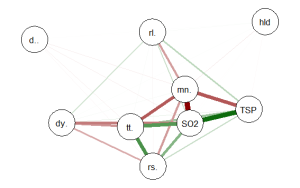
Once again the intercorrelations, strength of r and positive and negative correlations can be easily identified. There are many more options, types of graph and procedures for analysis that can be accomplished with the qgraph() package. In future tutorials I will discuss some of these.
转自:https://dmwiig.net/2017/03/10/the-r-qgraph-package-using-r-to-visualize-complex-relationships-among-variables-in-a-large-dataset-part-one/
THE R QGRAPH PACKAGE: USING R TO VISUALIZE COMPLEX RELATIONSHIPS AMONG VARIABLES IN A LARGE DATASET, PART ONE的更多相关文章
- R安装package报ERROR: a 'NAMESPACE' file is required
R安装package报错: [root@Hadoop-NN-01 mysofts]# R CMD INSTALL trimcluster_0.1-1.tar.gz * installing to li ...
- R(二): http与R脚本通讯环境安装
结合实际的工作环境,在开始R研究的时候,首先着手收集的就是能以Web方式发布R运行结果的基础框架,无耐的是,R一直以来常使用于个人电脑的客户端程序上,大家习惯性的下载R安装包,在自己的电脑上安装 -- ...
- 【R语言系列】R语言初识及安装
一.R是什么 R语言是由新西兰奥克兰大学的Ross Ihaka和Robert Gentleman两个人共同发明. 其词法和语法分别源自Schema和S语言. R定义:一个能够自由幼小的用于统计计算和绘 ...
- python中换行,'\r','\n'及'、'\r\n'
'\r'的本意是回到行首,'\n'的本意是换行. 所以回车相当于做的是'\r\n'或者'\n\r'.'\r'就是换行并回行首, '\n'就是换行并回行首,用'\r\n'表示换行并回行首. window ...
- 【R笔记】给R加个编译器——notepad++
R的日记-给R加个编译器 转载▼ R是一款强大免费且开源的统计分析软件,这是R的长处,可也是其“缺陷”的根源:不似商业软件那样user-friendly.记得初学R时,给我留下最深印象的不是其功能的强 ...
- 【R语言入门】R语言中的变量与基本数据类型
说明 在前一篇中,我们介绍了 R 语言和 R Studio 的安装,并简单的介绍了一个示例,接下来让我们由浅入深的学习 R 语言的相关知识. 本篇将主要介绍 R 语言的基本操作.变量和几种基本数据类型 ...
- R下载package的一些小问题
1.Error in install.packages : unable to create ‘C:/Users/???/Documents/R/win-library\3.5 采用管理员身份运行,先 ...
- R统计建模与R软件
教材目录 第一章 概率统计的基本知识 第二章 R软件的使用 第三章 数据描述性分析 第四章 参数估计 第五章 假设检验 第六章 回归分析 第七章 方差分析 第八章 应用多元分析(I) 第九章 应用多元 ...
- linux CentOS 权限问题修复(chmod 777 -R 或者chmod 755 -R问题修复)
我个人曾经有一次经历: 就是在修改文件夹权限的时候,本来该执行: #chmod 777 -R ./ 结果我漏掉了那个".";执行的命令是chmod 777 -R /. 这个命令一定 ...
随机推荐
- scss的初级学习随笔小计
$white: #fff;$three: #333;$six: #666;$nine: #999;$red: #fff;$orange: #f63;$yellow: #fc0;$opcity: rgb ...
- tab栏切换,内容为不断实时刷新数据的vue实现方法
先说一下产品需求,就是有几个tab栏,每个tab栏对应的ajax请求不一样,内容区域一样,内容为实时刷新数据,每3s需要重新请求,返回的数据在内容区域展示,每点击一次tab栏需停止其他tab栏ajax ...
- Java ---Listener监听器
在我们的web容器中,一直不断的触发着各种事件,例如:web应用启动和关闭,request请求到达和结束等.但是这些事件通常对于开发者来说是透明的,我们可以根据这些接口开发符合我们自身需求的功能.在w ...
- ORACLE中关于外键缺少索引的探讨和总结
在ORACLE数据库中,定义外键约束时,ORACLE是不会自动创建对应索引的,必须手动在外键约束相关的列上创建索引.那么外键字段上是否有必要创建索引呢?如果有必要的话,巡检时,如何找出外键字段上没有创 ...
- angular apply
<div ng-controller="firstController"> {{date}} </div> <script> var first ...
- EF的DbSet属性的Where查询,注意事项
#1 Func<T,bool>与 Expression<Func<T,bool>>的区别 Func<T,bool>本身就是一个委托(delegate), ...
- 开始奇妙的DP之旅
铭记各位大佬教导,开始看一些很迷的动态规划,那就从比较典型的01背包开始吧,想想还是从比较简单的导弹拦截开始吧,说简单都是骗人的,还是看采药吧. 一.动态规划 刚听到动态规划这个东西,据HLT大佬所言 ...
- eclipse code style template
<?xml version="1.0" encoding="UTF-8" standalone="no"?><templa ...
- css3 transition 和 animation实现走马灯
这段时间在做一个App,H5的开发.页面上有公告 以走马灯的形式显示出来. 在开始直接用的marquee标签,后来发现在ios客户端,走马灯移动不够平滑,有抖动现象. 对于有强迫症的我而言是无法忍受的 ...
- codeforces 803B Distances to Zero
Distances to Zero 题目链接:http://codeforces.com/problemset/problem/803/B 题目大意: 给一串数字,求每个数字到离他最近数字0的距离.. ...