
WebSocket In ASP.NET Core(二)
.NET-Core Series
- Server in ASP.NET-Core
- DI in ASP.NET-Core
- Routing in ASP.NET-Core
- Error Handling in ASP.NET-Core
- WebSocket in ASP.NET-Core(一)
- WebSocket in ASP.NET-Core(二)
- To Be Continue...
Introduce
上篇博文中,介绍了WebSocket 的基本原理,以及一个简单的Demo用来对其有一个大致的认识。这篇博文讲的是我们平常在网站上可能会经常遇到的——实时聊天,本文就是来讲在.NET-Core 使用WebSocket来实现一个“乞丐版”的在线实时聊天Demo。
关键词:Middleware,Real-Time,WebSocket
Before You Read.
这个和我们上一篇博文中Demo 有何不同的呢?有何共同之处呢?
相同的点是,都是网页作为客户端,使用JavaScript 来发送和接收请求,.NET-Core 服务端接收到请求,发送该请求给客户端。
不同的地方呢,就像我下面这张图这样:
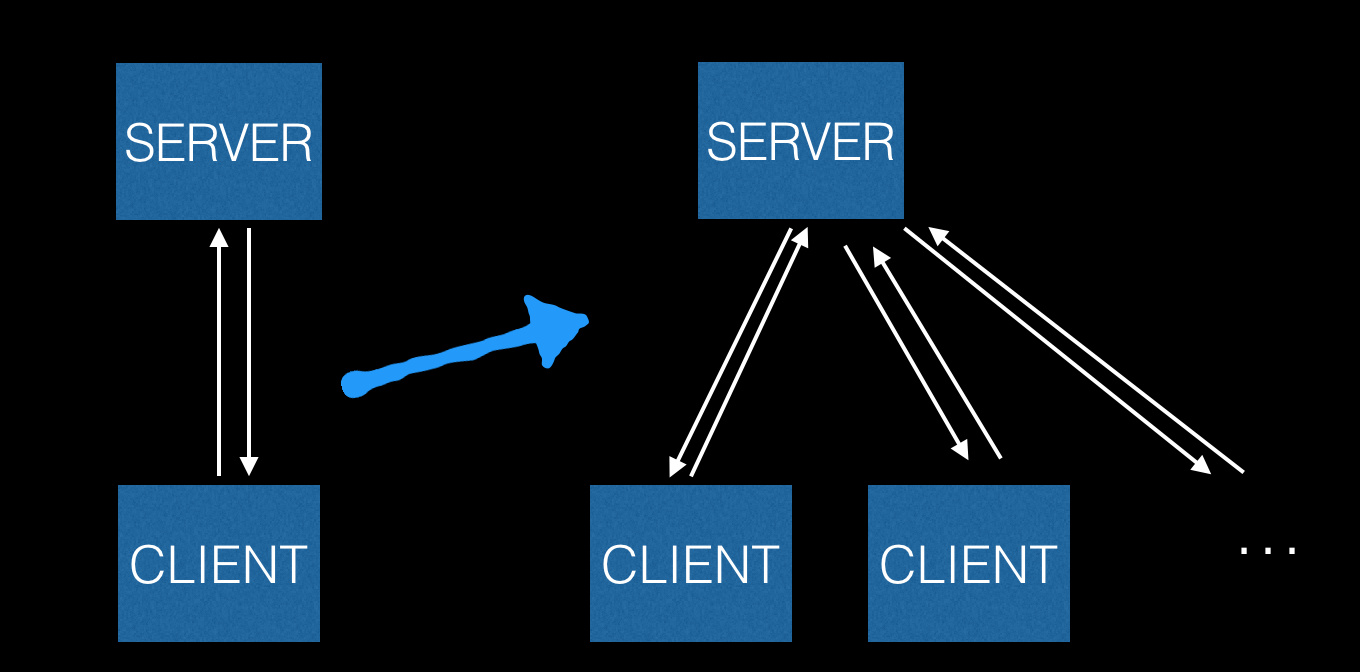
一次同时有多个客户端在,所以应该很清楚,我们只要在上面例子的基础上,对当前的已存在的Socket进行轮询,发送回应即可达到我们想要的效果。
Create WebSocket Middleware
在上个Demo的例子中,我们直接在Startup 的Configure 中直接写接受WebSocket请求。这次我们换成Middleware形式来处理。在写Middleware之前,在之前的介绍中,我们知道,需要有多个WebSocket,那么肯定需要一些对WebSocket 的Get/Set 处理。我简单的写了一个下面WebScoket Manger Class
//WebSocketManager.cs

using System;

using System.Collections.Concurrent;

using System.Collections.Generic;

using System.Linq;

using System.Net.WebSockets;

using System.Text;

using System.Threading;

using System.Threading.Tasks;

namespace WebSocketManage

{

    public class WSConnectionManager

    {

        private static ConcurrentDictionary<string, WebSocket> _socketConcurrentDictionary = new ConcurrentDictionary<string, WebSocket>();

        public void AddSocket(WebSocket socket)

        {

            _socketConcurrentDictionary.TryAdd(CreateGuid(), socket);

        }

        public async Task RemoveSocket(WebSocket socket)

        {

            _socketConcurrentDictionary.TryRemove(GetSocketId(socket), out WebSocket aSocket);

            await aSocket.CloseAsync(

                closeStatus: WebSocketCloseStatus.NormalClosure,

                statusDescription: "Close by User",

                cancellationToken: CancellationToken.None).ConfigureAwait(false);

        }

        public string GetSocketId(WebSocket socket)

        {

            return _socketConcurrentDictionary.FirstOrDefault(k => k.Value == socket).Key;

        }

        public ConcurrentDictionary<string, WebSocket> GetAll()

        {

            return _socketConcurrentDictionary;

        }

        public string CreateGuid()

        {

            return Guid.NewGuid().ToString();

        }

    }

}
上面主要是对 WebSocket 进行了简单的存取操作进行了封装。下面也把WebSocket 的Send 和Recieve 操作进行了封装。
using System;

using System.Collections.Generic;

using System.IO;

using System.Net.WebSockets;

using System.Text;

using System.Threading;

using System.Threading.Tasks;

namespace WebSocketManage

{

    public class WSHandler

    {

        protected WSConnectionManager _wsConnectionManager;

        public WSHandler(WSConnectionManager wSConnectionManager)

        {

            _wsConnectionManager = wSConnectionManager;

        }

        public async Task SendMessageAsync(

            WebSocket socket,

            string message,

            CancellationToken cancellationToken = default(CancellationToken))

        {

            var buffer = Encoding.UTF8.GetBytes(message);

            var segment = new ArraySegment<byte>(buffer);

            await socket.SendAsync(segment, WebSocketMessageType.Text, true, cancellationToken);

        }

        public async Task<string> RecieveAsync(WebSocket webSocket, CancellationToken cancellationToken)

        {

            var buffer = new ArraySegment<byte>(new byte[1024 * 8]);

            using (var ms = new MemoryStream())

            {

                WebSocketReceiveResult result;

                do

                {

                    cancellationToken.ThrowIfCancellationRequested();

                    result = await webSocket.ReceiveAsync(buffer, cancellationToken);

                    ms.Write(buffer.Array, buffer.Offset, result.Count);

                }

                while (!result.EndOfMessage);

                ms.Seek(0, SeekOrigin.Begin);

                if (result.MessageType != WebSocketMessageType.Text)

                {

                    return null;

                }

                using (var reader = new StreamReader(ms, Encoding.UTF8))

                {

                    return await reader.ReadToEndAsync();

                }

            }

        }

    }

}
有了上面两个辅助类之后,接下来就可以写我们自己的RealTimeWebSocketMiddlerware 了,
using Microsoft.AspNetCore.Http;

using System;

using System.Collections.Generic;

using System.IO;

using System.Net.WebSockets;

using System.Text;

using System.Threading;

using System.Threading.Tasks;

using WebSocketManage;

namespace Robert.Middleware.WebSockets

{

    public class RealTimeWSMiddleware

    {

        private readonly RequestDelegate _next;

        private WSConnectionManager _wSConnectionManager { get; set; }

        private WSHandler _wsHanlder { get; set; }

        public RealTimeWSMiddleware(

            RequestDelegate next,

            WSConnectionManager wSConnectionManager,

            WSHandler wsHandler)

        {

            _next = next;

            _wSConnectionManager = wSConnectionManager;

            _wsHanlder = wsHandler;

        }

        public async Task Invoke(HttpContext httpContext)

        {

            if (httpContext.WebSockets.IsWebSocketRequest)

            {

                var cancellationToken = httpContext.RequestAborted;

                var currentWebSocket = await httpContext.WebSockets.AcceptWebSocketAsync();

                _wSConnectionManager.AddSocket(currentWebSocket);

                while (true)

                {

                    if (cancellationToken.IsCancellationRequested) break;

                    var response = await _wsHanlder.ReceiveAsync(currentWebSocket, cancellationToken);

                    if (string.IsNullOrEmpty(response) && currentWebSocket.State != WebSocketState.Open) break;

                    foreach (var item in _wSConnectionManager.GetAll())

                    {

                        if (item.Value.State == WebSocketState.Open)

                        {

                            await _wsHanlder.SendMessageAsync(item.Value, response, cancellationToken);

                        }

                        continue;

                    }

                }

                await _wSConnectionManager.RemoveSocket(currentWebSocket);

            }

            else

            {

                await _next(httpContext);

            }

        }

    }

}
其实到这里,核心部分已经讲完了,接下来就是页面显示,发现信息,交互的问题了。在客户端还是像上篇文章中的一样,直接使用 JavaScript 发送WebScoket请求。
下面主要演示一下效果,在上篇博文的基础上,加上了用户名。
<script>

    $(function () {

        var protocol = location.protocol === "https:" ? "wss:" : "ws:";

        var Uri = protocol + "//" + window.location.host + "/ws";

        var socket = new WebSocket(Uri);

        socket.onopen = e => {

            console.log("socket opened", e);

        };

        socket.onclose = function (e) {

            console.log("socket closed", e);

        };

        //function to receive from server.

        socket.onmessage = function (e) {

            console.log("Message:" + e.data);

            $('#msgs').append(e.data + '<br />');

        };

        socket.onerror = function (e) {

            console.error(e.data);

        };

    });

</script>
当写好了页面文件后,运行站点。最终运行的效果图,界面以实用为主,不求美观。
WebSocket In ASP.NET Core(二)的更多相关文章
- WebSocket in ASP.NET Core
一.WebSocket WebSocket是HTML5出的东西(协议),也就是说HTTP协议没有变化,或者说没关系,但HTTP是不支持持久连接的(长连接,循环连接的不算) 首先HTTP有1.1和1.0 ...
- WebSocket In ASP.NET Core(一)
.NET-Core Series Server in ASP.NET-Core DI in ASP.NET-Core Routing in ASP.NET-Core Error Handling in ...
- K8S+GitLab-自动化分布式部署ASP.NET Core(二) ASP.NET Core DevOps
一.介绍 前一篇,写的K8S部署环境的文章,简单的介绍下DevOps(Development和Operations的组合词),高效交付, 自动化流程,来减少软件开发人员和运维人员的沟通.Martin ...
- asp.net core 二 Nginx Supervisor 负载,监听
ASP.NET Core负载均衡集群搭建(CentOS7+Nginx+Supervisor+Kestrel) asp.net core在linux运行下,一但命令行退出 ...
- ASP.NET Core (二):入门
上一篇:ASP.NET Core(一):简介 下一篇:(待续) 英文原版:Getting Started 1. 安装 .NET Core 2. 创建 .NET Core 项目 在命令提示符窗口输入命令 ...
- asp.net core系列 70 即时通迅-WebSocket+Redis发布订阅
一.概述 在asp.net core 中可以用WebSocket 或asp.net core SignalR来开发即时通迅.在项目中由于开发前后端分离,对于SignalR前端技术人员不想依赖juqer ...
- 使用websocket连接(对接)asp.net core signalr
使用通用websocket连接asp.net core signalr 一.背景介绍 signalr的功能很强大,可以为我们实现websocket服务端节省不少的时间.但是可能由于不同的环境,我们在对 ...
- 在ASP.NET Core下使用SignalR技术
一.前言 上次我们讲到过如何在ASP.NET Core中使用WebSocket,没有阅读过的朋友请参考 WebSocket in ASP.NET Core 文章 .这次的主角是SignalR它为我们提 ...
- ASP.NET Core (一):简介
下一篇:ASP.NET Core(二):入门 英文原版:Introduction to ASP.NET Core 关于ASP.NET Core ASP.NET Core 是一个全新的开源.跨平台框架, ...
随机推荐
- fedora20 安装搜狗输入法及各种问题的解决
http://blog.csdn.NET/g457499940/article/details/38656719 0 环境描述: 系统环境:Fedora20 64位 截止2014年09月 8日17:5 ...
- 【Ubuntu 16】 SSH免密码登录
免密码登录时两个机器的普通用户名都要相同,这里都是dream361 ,主机名可以不同,这里的主机名都是ubuntu 1.目前有两台机器master 和 slave 在这两台机器上都安装并启动ssh服务 ...
- php Yii2使用registerJs或registerCss报错syntax error, unexpected end of file
解决方法: 注册时$js=<<<JS .....JS;//结尾处JS;应单独成行并且没有空格 JS;//这样就会报错,多了空格JS;//这样就不会
- The C++ Programming Language 学习笔记 第四章 类型和声明
1.关于main 函数中的 return 0 C99标准中,main 函数的返回值类型必须是 int ,这样返回值才能传递给程序的激活者(如操作系统).如果 main 函数的最后没有写 return ...
- 谈谈个人网站的建立(二)—— lucene的使用
首先,帮忙点击一下我的网站http://www.wenzhihuai.com/ .谢谢啊,如果可以,GitHub上麻烦给个star,以后面试能讲讲这个项目,GitHub地址https://github ...
- java调取数据库
import java.sql.Connection;import java.sql.DriverManager;import java.sql.ResultSet;import java.sql.S ...
- 程序员也是弱势群体?——从WePhone开发者事件说起
作为一名不爱凑热闹的人,今天一直在持续关注一个热点事件--WePhone开发者自杀,即使前几天热议的孕妇跳楼新闻我都不太关注,但是这个事件却让我深深的震撼,花了几个小时在微博上搜索了相关的信息,去了解 ...
- java 多线程Callable和Runable执行顺序问题详解
详见:http://blog.yemou.net/article/query/info/tytfjhfascvhzxcyt125 毫无疑问 Runnable会进行异步执行,此处不多说,主要说明Call ...
- 集美大学网络1413第十次作业成绩(团队六) -- 展示博客(Alpha版本)
题目 团队作业6--展示博客(Alpha版本) 团队作业6成绩 团队/分值 简介& 项目地址 项目目标 (典型用户. 功能描述. 预期用户数量) 如何满足 用户需求 已完成目标 团队分工 团 ...
- 【Beta】Daily Scrum Meeting——Day5
站立式会议照片 1.本次会议为第五次Meeting会议: 2.本次会议在早上9:35,在陆大2楼机房召开,本次会议为25分钟讨论今天要完成的任务以及接下来的任务安排. 燃尽图 每个人的工作分配 成 员 ...