
浅谈Vue不同场景下组件间的数据交流

父子组件间的数据交流
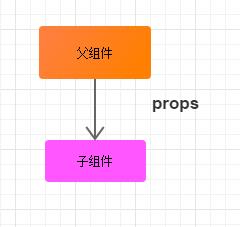
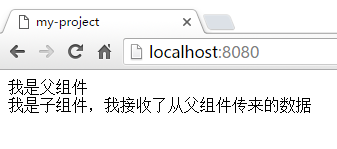
父组件传递数据给子组件——props

<template>

  <div id="father">

    {{ '我是父组件' }}

    <son :text = "text"></son>

  </div>

</template>


<script>

import son from './son.vue'

export default {

  data: function () {

    return {

      text: '从父组件传来的数据'

    }

  },

  components: {

    son: son

  }

}

</script>


<style scoped>

</style>
<template>

  <div>

    {{ '我是子组件,我接收了' + text }}

  </div>

</template>


<script>

export default {

  props: {

    text: { type: String, default: '' }

  }

}

</script>


<!-- Add "scoped" attribute to limit CSS to this component only -->

<style scoped>

</style>
子组件传递数据给父组件
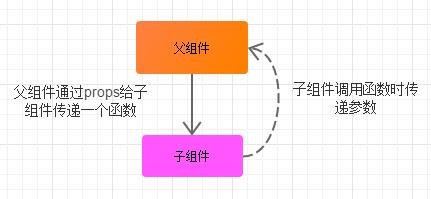
子组件传递数据给父组件 方式一:回调传参

<template>

  <div id="father">

    {{ '我是父组件,名称是' + componentName }}

    <son  :changeComponentName = "changeComponentName"></son>

  </div>

</template>


<script>

import son from './son.vue'

export default {

  data: function () {

    return {

      componentName: '组件A'

    }

  },


  methods: {

    changeComponentName: function (newComponentName) {

      this.componentName = newComponentName

    }

  },


  components: {

    son: son

  }

}

</script>


<style scoped>

  #father div{

    padding: 10px;

    margin: 10px;

    border: 1px solid gray;

  }

</style>
<template>

  <div>

    <p>我是子组件:一个button</p>

    <button @click="() => changeComponentName(newComponentName)">

      把父组件的名称修改为:彭湖湾的组件

    </button>

  </div>

</template>


<script>

export default {

  data: function () {

    return {

      newComponentName: '彭湖湾的组件'

    }

  },

  props: {

    changeComponentName: {

      type: Function,

      default: () => { }

    }

  }

}

</script>


<!-- Add "scoped" attribute to limit CSS to this component only -->

<style scoped>

</style>
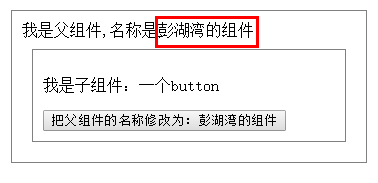
demo:
点击前:
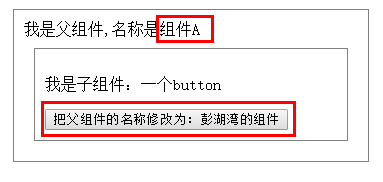
点击后:
图解:

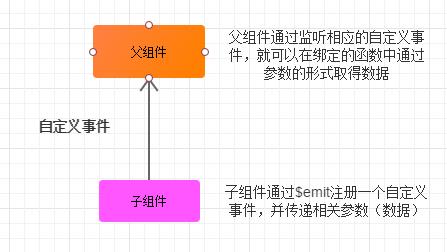
子组件传递数据给父组件 方式二:自定义事件

<template>

  <div id="father">

    <div>

      {{ '我是父组件,我的名称是:' + fatherComponentName }}

      <son  v-on:changeComponentName = "changeComponentName"></son>

    </div>

  </div>

</template>


<script>

import son from './son.vue'

export default {

  data: function () {

    return {

      fatherComponentName: 'A组件'

    }

  },


  methods: {

    changeComponentName: function (componentName) {

      this.fatherComponentName = componentName

    }

  },


  components: {

    son: son

  }

}

</script>


<style scoped>

  #father div{

    padding: 10px;

    margin: 10px;

    border:1px solid grey;

  }

</style>
<template>

  <div>

    <p>我是子组件:一个按钮</p>

    <button @click="clickCallback">

      修改父组件的名称为:彭湖湾的组件

    </button>

  </div>

</template>


<script>

export default {

  data: function () {

    return {

      fatherComponentName: '彭湖湾的组件'

    }

  },

  methods: {

    clickCallback: function () {

      this.$emit('changeComponentName', this.fatherComponentName)

    }

  }

}

</script>


<!-- Add "scoped" attribute to limit CSS to this component only -->

<style scoped>

</style>
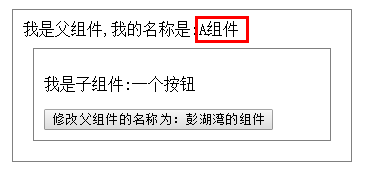
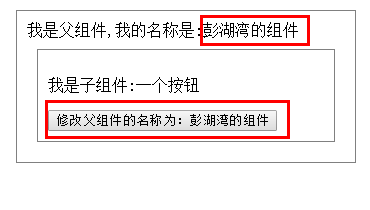
demo:
点击前:
点击后:

兄弟组件间的数据交流(有共同父组件的兄弟组件)

<template>

  <div id="father">

    <div>

      {{ '我是父组件:father' }}

      <eldest-son :text = "text"></eldest-son>

      <youngest-son :changeText="changeText"></youngest-son>

    </div>

  </div>

</template>


<script>

import eldestSon from './eldestSon.vue'

import youngestSon from './youngestSon.vue'


export default {

  data: function () {

    return {

      text: '我是一行文本'

    }

  },


  methods: {

    changeText: function () {

      this.text = '我是经过改动的一行文本'

    }

  },


  components: {

    eldestSon: eldestSon,

    youngestSon: youngestSon

  }

}

</script>


<style>

    #father div{

      border: 1px solid grey;

      padding: 10px;

      margin: 10px;

    }

</style>
<template>

  <div>

    <p>我是兄弟组件:eldestSon</p>

    <p>我有一个可变数据text:{{ text }}</p>

  </div>

</template>


<script>

export default {

  props: {

    text: {

      type: String,

      default: ''

    }

  }

}

</script>


<!-- Add "scoped" attribute to limit CSS to this component only -->

<style scoped>

</style>
<template>

  <div>

    <p>我是兄弟组件:youngestSon</p>

    <button @click="changeText">更改eldestSon兄弟组件中的文本</button>

  </div>

</template>


<script>

export default {

  props: {

    changeText: {

      type: Function,

      default: () => {}

    }

  }

}

</script>


<!-- Add "scoped" attribute to limit CSS to this component only -->

<style scoped>

</style>
点击前:


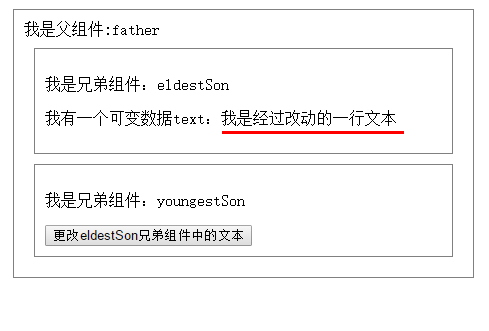
图解:


全局组件间的数据交流——Vuex

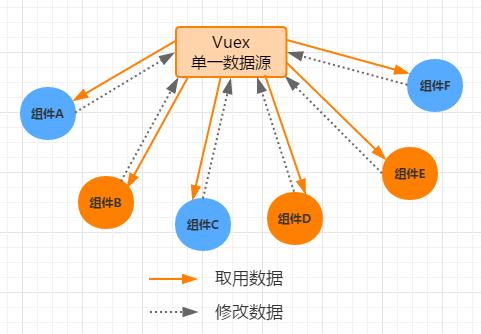
实现View层的数据和model层的解耦

浅谈Vue不同场景下组件间的数据交流的更多相关文章
- 【Vue】浅谈Vue不同场景下组件间的数据交流
浅谈Vue不同场景下组件间的数据“交流” Vue的官方文档可以说是很详细了.在我看来,它和react等其他框架文档一样,讲述的方式的更多的是“方法论”,而不是“场景论”,这也就导致了:我们在阅读完 ...
- 浅谈Vue下的components模板
浅谈Vue下的components模板在我们越来越深入Vue时,我们会发现我们对HTML代码的工程量会越来越少,今天我们来谈谈Vue下的 components模板的 初步使用方法与 应用 我们先来简单 ...
- 浅谈Vue.js
作为一名Vue.js的忠实用户,我想有必要写点文章来歌颂这一门美好的语言了,我给它的总体评价是“简单却不失优雅,小巧而不乏大匠”,下面将围绕这句话给大家介绍Vue.js,希望能够激发你对Vue.js的 ...
- 浅谈Vue模板的那些事儿
接触过vue的童鞋都知道,组件的模板一般都是在template选项内定义的,如 Vue.component('child-component', { template: '<h3>我是闰土 ...
- 浅谈Vue响应式(数组变异方法)
很多初使用Vue的同学会发现,在改变数组的值的时候,值确实是改变了,但是视图却无动于衷,果然是因为数组太高冷了吗? 查看官方文档才发现,不是女神太高冷,而是你没用对方法. 看来想让女神自己动,关键得用 ...
- 浅谈在ES5环境下实现const
最近看到一个面试题--用ES5实现const.作为JS初学者的笔者知道在ES6中有const命令,可以用来声明常量,一旦声明,常量的值就不可改变.例如: 1234567891011 const Pi ...
- 040——VUE中组件之组件间的数据参props的使用实例操作
<!DOCTYPE html> <html lang="en"> <head> <meta charset="UTF-8&quo ...
- Vue – 基础学习(2):组件间 通信及参数传递
Vue – 基础学习(2):组件间 通信及参数传递
- 浅谈Vue中计算属性(computed)和方法(methods)的差别
浅谈Vue中计算属性(computed)和方法(methods)的差别 源码地址 methods方法和computed计算属性,两种方式的最终结果确实是完全相同 计算属性是基于它们的响应式依赖进行缓存 ...
随机推荐
- Vue-cli 记录
出自http://www.cnblogs.com/nutritious/p/6494479.html 先给出能正确安装的步骤: 1.进盘符 2,为啥不用npm,这是国外的东西,有些电脑无法FQ,会导致 ...
- Python的初步认识与基本模块的导入
由于公司开发都使用了Python,老大说要每个人都会,前端也要学,所以就看着老大写的博客一步步来了,但是对于小白而言,一门新的语言总得跳许多坑.尤其是Mac安装Python,各种坑. 坑一.由于Mac ...
- 【转载】The Elements of Programming Style之代码风格金科玉律
原始日期: 2017-02-06 16:20 <The Elements of Programming Style >是一本很古老的书.尽管 Fortran 我们不太使用,尽管新奇的语言层 ...
- mysql update 批量更新
UPDATE cntheater SET title = (SELECT title FROM cntheater_copy WHERE cntheater.id = cntheater_copy.i ...
- Java+XSL合并多个XML文件
使用 Java 解析 XML 文件有许多成熟的工具,如 dom4j 等等.但在一些场景中,我们可能使用 Ant.Maven 等构建工具对多个 XML 文件进行合并,我们希望可以直接通过脚本文件,或者简 ...
- python连接impala(安装impyla)
相关环境如下: Python3.4 Win7 64位 参照官网https://github.com/cloudera/impyla中的安装步骤执行: 1.pip install six 2.pip i ...
- memcached使用文档
使用memcached进行内存缓存 通常的网页缓存方式有动态缓存和静态缓存等几种,在ASP.NET中已经可以实现对页面局部进行缓 存,而使用memcached的缓存比ASP.NET的局部缓存更加灵活, ...
- Spring Boot 集成swagger实例
原文:https://github.com/x113773/testall/issues/5 1. 首先添加maven依赖``` <dependency> <groupId>i ...
- Kafka 源代码分析之FileMessageSet
这里主要分析FileMessageSet类 这个类主要是管理log消息的内存对象和文件对象的类.源代码文件在log目录下.这个类被LogSegment类代理调用用来管理分片. 下面是完整代码.代码比较 ...
- 执行3小时超长SQL的分析优化过程:从索引遇见IS NULL,到最佳实践
月底高峰期,对一个典型项目抽查分析时,发现了一个超级慢.全表扫描的SQL,语句很简单,AWR中赫然在列,在我统计的截止时间内还没有结束... 使用v$active_session_history进一步 ...