
使用docker+jenkins构建nodejs前端项目
前文使用Docker搭建Jenkins+Docker持续集成环境我们已经搭建了基于docker+jenkins的持续集成环境,并构建了基于maven的项目。这一节,我们继续扩展功能,增加对Nodejs的支持,实现nodejs项目构建、并打包成docker镜像和自动部署。
1. 配置Nodejs环境
1.1 安装nodejs插件
打开系统管理——管理插件——可选插件,搜索NodeJS,选择NodeJS Plugin安装
1.2 配置nodejs 版本
系统管理 —— 全局工具配置 —— NodeJS,选择安装nodejs,选择当前最新版本9.4,命名NodeJS 9.4。
2. 配置项目
2.1 新建项目
新建jenkins项目,选择自由项目,按前文说明配置好SVN、触发器。
在构建环境里,选择Provide Node & npm bin/ folder to PATH,选择我们配置的9.4版本nodejs
2.2 配置构建命令
一般是通过npm命令构建,我们选择增加构建步骤 —— Excute shell,输入构建命令:
alias cnpm="npm --registry=https://registry.npm.taobao.org \

--cache=$HOME/.npm/.cache/cnpm \

--disturl=https://npm.taobao.org/dist \

--userconfig=$HOME/.cnpmrc"

cnpm install

cnpm run build
注意,这里为了构建更快,选择通过alias增加cnpm指令,指定使用淘宝的仓库。
2.3 构建docker镜像
由于我们构建出来的已经是可访问的资源了,放在dis目录,所以我们可以基于nginx作为基础镜像。
编写DockerFile:
FROM nginx

ADD ./dist /usr/share/nginx/html

EXPOSE 80
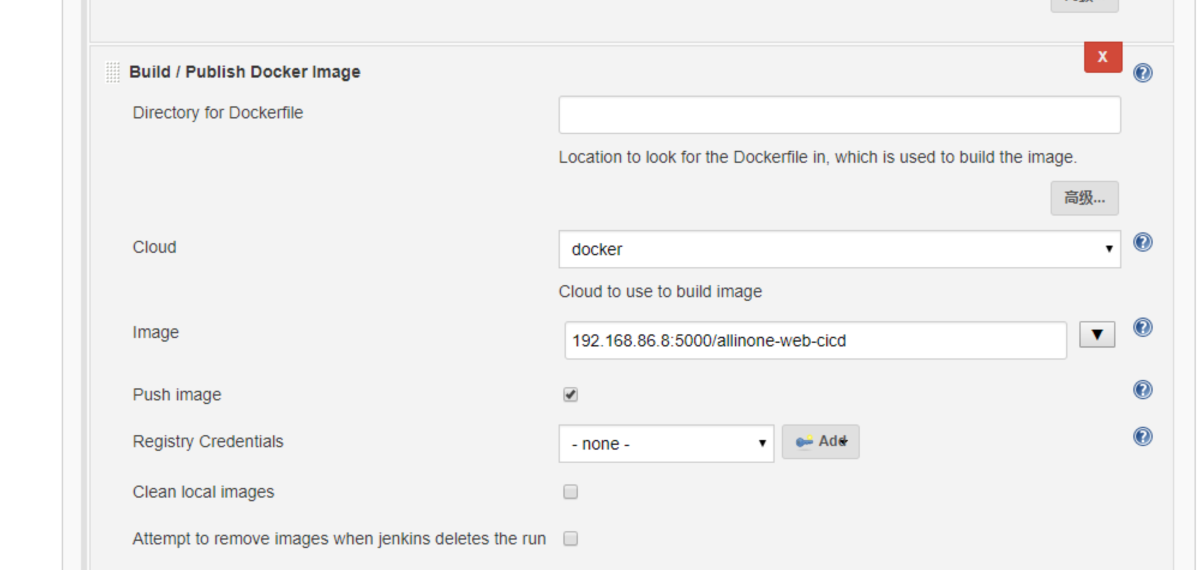
然后,增加构建步骤,ADD build/publish docker image
设置image:192.168.86.8:5000/allinone-web-cicd
勾上push image,会自动push到192.168.86.8:5000仓库
2.4 自动部署镜像
和上文一样,这里继续使用ssh实现docker镜像部署。
增加构建步骤,Execute shell script on remote host using ssh:
选择docker swarm的manager机器,输入命令:
docker service rm  allinone-web-cicd

docker service create --name allinone-web-cicd --replicas 1 --publish 10081:80 192.168.86.8:5000/allinone-web-cicd
这次,我们使用docker service来实现部署,先service rm掉老服务,然后create新服务。
3.测试构建
点击立即构建:
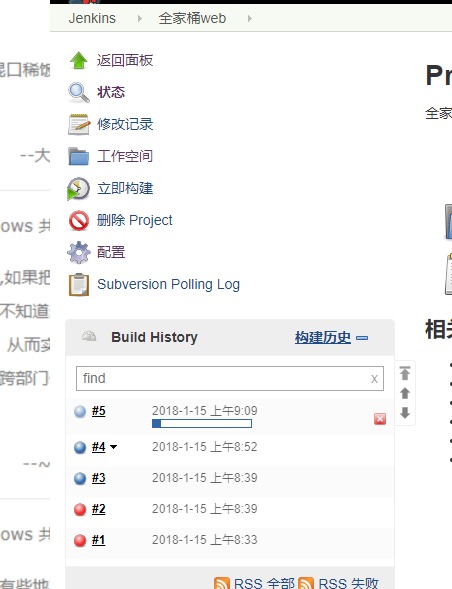
稍等片刻,就构建成功了;
[SSH] executing...

allinone-web-cicd

mj9dwq00ath03i05b8bfe5plx

overall progress: 0 out of 1 tasks

1/1:

overall progress: 0 out of 1 tasks

overall progress: 0 out of 1 tasks

overall progress: 0 out of 1 tasks

overall progress: 0 out of 1 tasks

overall progress: 0 out of 1 tasks

overall progress: 0 out of 1 tasks

overall progress: 1 out of 1 tasks

verify: Waiting 5 seconds to verify that tasks are stable...

verify: Waiting 5 seconds to verify that tasks are stable...

verify: Waiting 5 seconds to verify that tasks are stable...

verify: Waiting 5 seconds to verify that tasks are stable...

verify: Waiting 5 seconds to verify that tasks are stable...

verify: Waiting 4 seconds to verify that tasks are stable...

verify: Waiting 4 seconds to verify that tasks are stable...

verify: Waiting 4 seconds to verify that tasks are stable...

verify: Waiting 4 seconds to verify that tasks are stable...

verify: Waiting 4 seconds to verify that tasks are stable...

verify: Waiting 3 seconds to verify that tasks are stable...

verify: Waiting 3 seconds to verify that tasks are stable...

verify: Waiting 3 seconds to verify that tasks are stable...

verify: Waiting 3 seconds to verify that tasks are stable...

verify: Waiting 3 seconds to verify that tasks are stable...

verify: Waiting 2 seconds to verify that tasks are stable...

verify: Waiting 2 seconds to verify that tasks are stable...

verify: Waiting 2 seconds to verify that tasks are stable...

verify: Waiting 2 seconds to verify that tasks are stable...

verify: Waiting 2 seconds to verify that tasks are stable...

verify: Waiting 1 seconds to verify that tasks are stable...

verify: Waiting 1 seconds to verify that tasks are stable...

verify: Waiting 1 seconds to verify that tasks are stable...

verify: Waiting 1 seconds to verify that tasks are stable...

verify: Waiting 1 seconds to verify that tasks are stable...

verify: Service converged

[SSH] completed

[SSH] exit-status: 0

Finished: SUCCESS
这个时候,访问swarm集群的任一http://ip:10081,就可以看到效果了。
作者:Jadepeng
出处:jqpeng的技术记事本--http://www.cnblogs.com/xiaoqi
您的支持是对博主最大的鼓励,感谢您的认真阅读。
本文版权归作者所有,欢迎转载,但未经作者同意必须保留此段声明,且在文章页面明显位置给出原文连接,否则保留追究法律责任的权利。
使用docker+jenkins构建nodejs前端项目的更多相关文章
- Docker+Jenkins持续集成环境(2)使用docker+jenkins构建nodejs前端项目
前文使用Docker搭建Jenkins+Docker持续集成环境我们已经搭建了基于docker+jenkins的持续集成环境,并构建了基于maven的项目.这一节,我们继续扩展功能,增加对Nodejs ...
- docker+jenkins实现spring boot项目持续集成自动化部署
一.首先jenkins与docker的安装参考下面链接 安装jenkins: https://www.cnblogs.com/jescs/p/7644635.html 安装docker:ht ...
- 部署基于Gitlab+Docker+Rancher+Harbor的前端项目这一篇就够了
部署基于Gitlab+Docker+Rancher+Harbor的前端项目这一篇就够了 安大虎 momenta 中台开发工程师 6 人赞同了该文章 就目前的形势看,一家公司的运维体系不承载在 Do ...
- jenkins 构建一个前端web项目
Jenkins发布web前端代码 “系统管理”“管理插件”“已安装” 检查是否有“Git plugin”和“Publish Over SSH”两个插件,如果没有,则需点击“可选插件”,找到它并安装 ...
- docker | jenkins 实现自动化部署项目,后端躺着把运维的钱挣了!(上)
前言 背景 最近在帮学校导师写项目,团队有4个人,项目前后端分离.如果是选择瀑布式开发:(在约定好接口的情况下)A.B同学写前端,C.D同学写后端,然后约定一个时间统一联调,最后将项目交付安装到客户机 ...
- 使用gulp来构建一个前端项目
什么是gulp? gulp是一个前端项目构建工具,是自动化项目的构建利器,它不仅能对网站资源进行优化,而且在开发过程中很多重复的任务能够使用正确的工具自动完成.你可以使用gulp及其插件对你的项目代码 ...
- [Vue 牛刀小试]:第十七章 - 优化 Vue CLI 3 构建的前端项目模板(1)- 基础项目模板介绍
一.前言 在上一章中,我们开始通过 Vue CLI 去搭建属于自己的前端 Vue 项目模板,就像我们 .NET 程序员在使用 asp.net core 时一样,我们更多的会在框架基础上按照自己的开发习 ...
- jenkins构建一个maven项目[五]
标签(linux): jenkins 笔者Q:972581034 交流群:605799367.有任何疑问可与笔者或加群交流 构建一个maven项目,即为构建java项目.模拟实验之前先把实验代码推送到 ...
- nodejs 前端项目编译时内存溢出问题的原因及解决方案
现象描述 昨天用webpack打包Vue的项目时,node内存溢出而停止build项目,即是项目构建过程中频繁报内存溢出:FATAL ERROR: CALL_AND_RETRY_LAST Alloca ...
随机推荐
- Java序列化框架性能比較
博客: http://colobu.com jvm-serializers提供了一个非常好的比較各种Java序列化的的測试套件. 它罗列了各种序列化框架. 能够自己主动生成測试报告. 我在AWS c3 ...
- One-Based Arithmetic
One-Based Arithmetic time limit per test 0.5 seconds memory limit per test 256 megabytes input stand ...
- 支持国内版Office 365的PowerShell模块现已发布
作者:陈希章 发表于2017年5月12日 上一篇文章我详细介绍了如何在PowerShell中访问到Office 365的Graph API,在文章结尾处我留了一个问题,希望有朋友可以根据那个思路,尝试 ...
- inline-block并列排序时候的影响
当两个设置了inline-block属性的元素并列排放时,它们的位置能够互相影响. 元素结构: <div class="container"> <div clas ...
- CentOS 7 安装.NET Core 2.0
一.添加dotnet产品Feed 在安装.NET Core之前,您需要注册Microsoft产品Feed. 这只需要做一次. 首先,注册Microsoft签名密钥,然后添加Microsoft产品Fee ...
- MPSOC之3——centos环境配置及petalinux安装及使用
ubuntu虽然能正常安装,但是build时会出现闪退情况,闪退后一切归零,没啥错误提示,改用centos来安装petalinux. 0.环境 vmware pro 14,centos 7.3 pet ...
- springboot 项目maven 打包错误
Execution default of goal org.springframework.boot:spring-boot-maven-plugin:1.5.6.RELEASE:repackage ...
- 在IDEA中实战Git(转载自)
转载自:http://blog.csdn.net/autfish/article/details/52513465 工作中多人使用版本控制软件协作开发,常见的应用场景归纳如下: 假设小组中有两个人,组 ...
- iOS PickerView选择视图
原文demo: @interface ViewController ()<UIPickerViewDelegate,UIPickerViewDataSource> { UIPickerVi ...
- 并行rsync
#!/bin/bash ]; then echo -e "usage : \n\t$0 hostList src_file dst_path" echo -e "exam ...