
springboot集成swagger
对于搬砖的同学来说,写接口容易,写接口文档很烦,接口变动,维护接口文档就更更更烦,所以经常能发现文档与程序不匹配。
等过一段时间就连开发者也蒙圈了
Swagger2快速方便的解决了以上问题。一个能与Spring MVC程序配合组织出强大RESTful API文档的新宠儿。
下面直接上代码
pom.xml
<?xml version="1.0" encoding="UTF-8"?>

<project xmlns="http://maven.apache.org/POM/4.0.0" xmlns:xsi="http://www.w3.org/2001/XMLSchema-instance"

	xsi:schemaLocation="http://maven.apache.org/POM/4.0.0 http://maven.apache.org/xsd/maven-4.0.0.xsd">

	<modelVersion>4.0.0</modelVersion>

	<groupId>com.zhongxin.wealth</groupId>

	<artifactId>wealthweb</artifactId>

	<version>0.0.1-SNAPSHOT</version>

	<packaging>jar</packaging>

	<name>wealthweb</name>

	<description>Demo project for Spring Boot</description>

	<parent>

		<groupId>org.springframework.boot</groupId>

		<artifactId>spring-boot-starter-parent</artifactId>

		<version>1.5.9.RELEASE</version>

		<relativePath/> <!-- lookup parent from repository -->

	</parent>

	<properties>

		<project.build.sourceEncoding>UTF-8</project.build.sourceEncoding>

		<project.reporting.outputEncoding>UTF-8</project.reporting.outputEncoding>

		<java.version>1.8</java.version>

	</properties>

	<dependencies>

		<dependency>

			<groupId>org.springframework.boot</groupId>

			<artifactId>spring-boot-starter-web</artifactId>

		</dependency>

		<dependency>

			<groupId>org.springframework.boot</groupId>

			<artifactId>spring-boot-starter-test</artifactId>

			<scope>test</scope>

		</dependency>

		<dependency>

			<groupId>io.springfox</groupId>

			<artifactId>springfox-swagger2</artifactId>

			<version>2.7.0</version>

		</dependency>

		<dependency>

			<groupId>io.springfox</groupId>

			<artifactId>springfox-swagger-ui</artifactId>

			<version>2.7.0</version>

		</dependency>

	</dependencies>

</project>
创建配置类
package com.zhongxin.wealth.apiConfig;

import org.springframework.context.annotation.Bean;

import org.springframework.context.annotation.Configuration;

import springfox.documentation.builders.ApiInfoBuilder;

import springfox.documentation.builders.PathSelectors;

import springfox.documentation.builders.RequestHandlerSelectors;

import springfox.documentation.service.ApiInfo;

import springfox.documentation.spi.DocumentationType;

import springfox.documentation.spring.web.plugins.Docket;

import springfox.documentation.swagger2.annotations.EnableSwagger2;

/**

 * Created by DingYS on 2017/12/8.

 */

@Configuration

@EnableSwagger2

public class Swagger2 {

    @Bean

    public Docket createRestApi() {

        return new Docket(DocumentationType.SWAGGER_2)

                .apiInfo(apiInfo())

                .select()

                .apis(RequestHandlerSelectors.basePackage("com.zhongxin.wealth.web"))

                .paths(PathSelectors.any())

                .build();

    }

    private ApiInfo apiInfo() {

        return new ApiInfoBuilder()

                .title("廊坊委贷大数据统计结果输出接口")

                .version("1.0")

                .build();

    }

}
controller编写
package com.zhongxin.wealth.web;

import io.swagger.annotations.ApiOperation;

import org.springframework.web.bind.annotation.RequestMapping;

import org.springframework.web.bind.annotation.RequestMethod;

import org.springframework.web.bind.annotation.RestController;

/**

 * Created by DingYS on 2017/12/7.

 */

@RestController

@RequestMapping("/hello")

public class HelloWordController {

    @ApiOperation(value="测试接口", notes="这只是一个测试controller调用的接口,没有任何的业务逻辑")

    @RequestMapping(value = {"/test"},method = RequestMethod.GET)

    public String testHello(){

        return "hello";

    }

}
代码完成,准备看效果
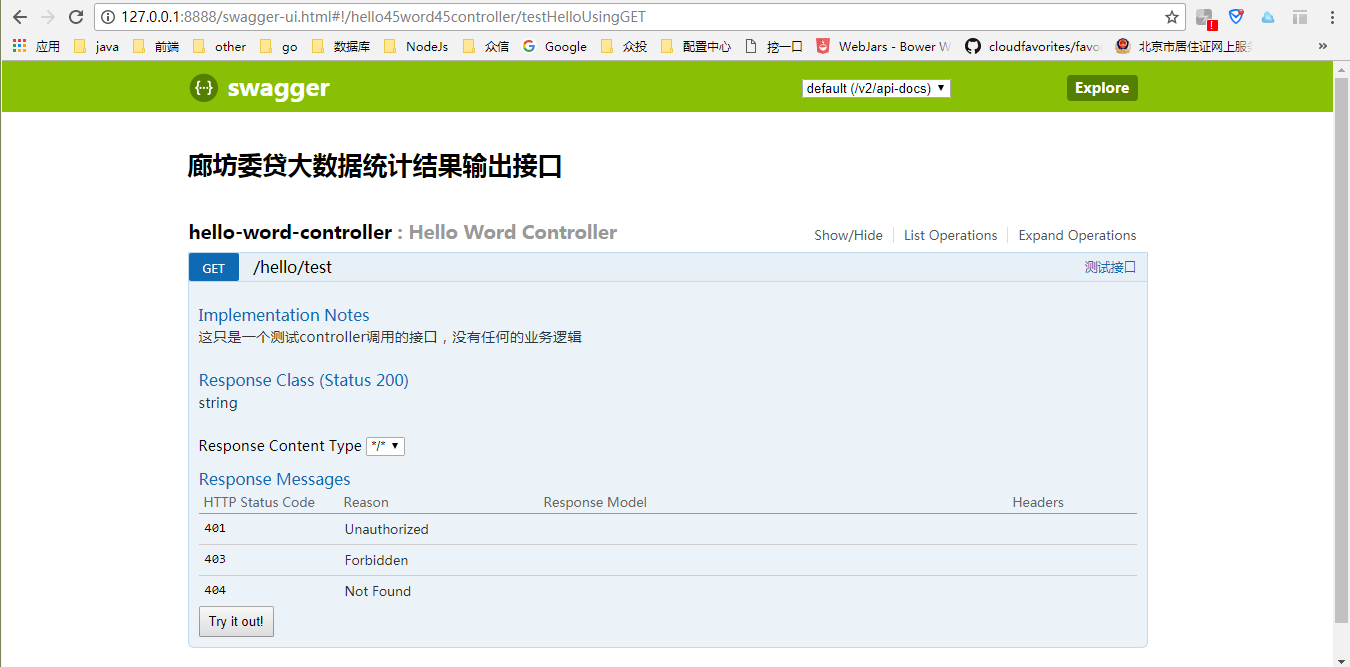
点击Try it out!
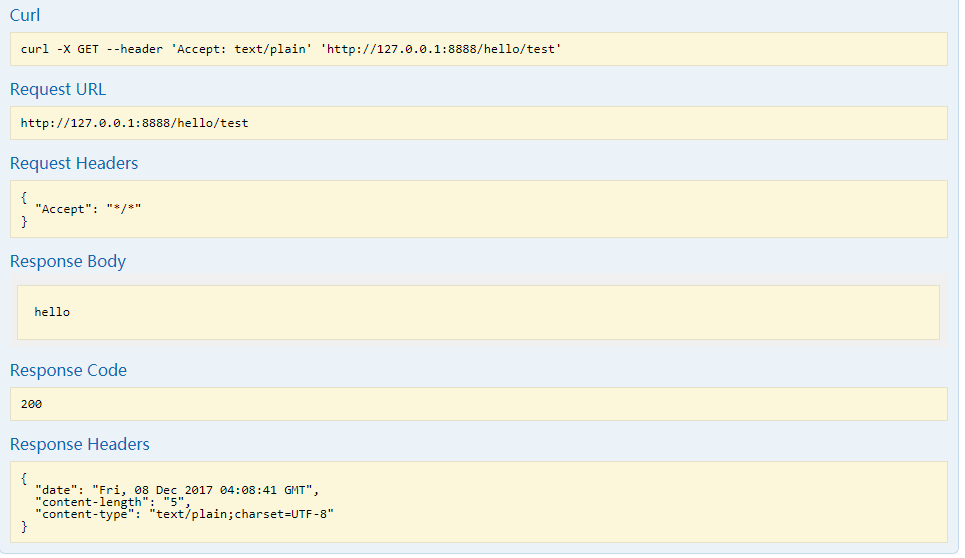
是不是很详细,很高大上。
注:集成过程中刚开始用的swagger2.2.2版本,会在首页出现一个error的错误提醒
{“schemaValidationMessages”:[{“level”:”error”,”message”:”Can’t read from file http://127.0.0.1:8888/v2/api-docs"}]}
但是浏览器访问:http://127.0.0.1:8888/v2/api-docs 又能获取 结果
{“swagger”:”2.0”,”info”:{“version”:”1.0”,”title”:”廊坊委贷大数据统计结果输出接口”,”contact”:{},”license”:{}},”host”:”127.0.0.1:8888”,”basePath”:”/“,”tags”:[{“name”:”hello-word-controller”,”description”:”Hello Word Controller”}],”paths”:{“/hello/test”:{“get”:{“tags”:[“hello-word-controller”],”summary”:”测试接口”,”description”:”这只是一个测试controller调用的接口,没有任何的业务逻辑”,”operationId”:”testHelloUsingGET”,”consumes”:[“application/json”],”produces”:[“/“],”responses”:{“200”:{“description”:”OK”,”schema”:{“type”:”string”}},”401”:{“description”:”Unauthorized”},”403”:{“description”:”Forbidden”},”404”:{“description”:”Not Found”}}}}}}
具体原因本人不明,换成2.7.0版本以后没在出现。
springboot集成swagger的更多相关文章
- spring-boot 集成 swagger 问题的解决
spring-boot 集成 swagger 网上有许多关于 spring boot 集成 swagger 的教程.按照教程去做,发现无法打开接口界面. 项目由 spring mvc 迁移过来,是一个 ...
- 20190909 SpringBoot集成Swagger
SpringBoot集成Swagger 1. 引入依赖 // SpringBoot compile('org.springframework.boot:spring-boot-starter-web' ...
- SpringBoot集成Swagger,Postman,newman,jenkins自动化测试.
环境:Spring Boot,Swagger,gradle,Postman,newman,jenkins SpringBoot环境搭建. Swagger简介 Swagger 是一款RESTFUL接口的 ...
- springboot集成swagger添加消息头(header请求头信息)
springboot集成swagger上篇文章介绍: https://blog.csdn.net/qiaorui_/article/details/80435488 添加头信息: package co ...
- springboot 集成 swagger 自动生成API文档
Swagger是一个规范和完整的框架,用于生成.描述.调用和可视化RESTful风格的Web服务.简单来说,Swagger是一个功能强大的接口管理工具,并且提供了多种编程语言的前后端分离解决方案. S ...
- SpringBoot集成Swagger接口管理工具
手写Api文档的几个痛点: 文档需要更新的时候,需要再次发送一份给前端,也就是文档更新交流不及时. 接口返回结果不明确 不能直接在线测试接口,通常需要使用工具,比如postman 接口文档太多,不好管 ...
- springboot 集成swagger ui
springboot 配置swagger ui 1. 添加依赖 <!-- swagger ui --> <dependency> <groupId>io.sprin ...
- springboot集成swagger实战(基础版)
1. 前言说明 本文主要介绍springboot整合swagger的全过程,从开始的swagger到Knife4j的进阶之路:Knife4j是swagger-bootstarp-ui的升级版,包括一些 ...
- springboot集成swagger文档
//此处省略springboot创建过程 1.引入swagger相关依赖(2个依赖必须版本相同) <dependency> <groupId>io.springfox</ ...
随机推荐
- Windows下Mysql常用操作命令
以下命令中的服务启动及停止需要使用以管理员身份运行cmd.exe. 1.启动Mysql服务:net start [mysql服务名].示例: net start mysql57 结果: 2.停止Mys ...
- PHP异常处理机制
1. 异常: 异常(Exception)用于在指定的错误发生时改变脚本的正常流程. 当异常被触发时,通常会发生: (1)当前代码状态被保存: (2)代码执行被切换到预定义的异常处理器函数: (3)根据 ...
- VS2012环境下C#调用C++生成的DLL
1.VS2012 C++生成DLL 这个过程仿照http://www.cnblogs.com/LCCRNblog/p/3625200.html创建DLL即可,暂时不用创建测试工程,因为下面有测试工程的 ...
- 暑假练习赛 006 B Bear and Prime 100
Bear and Prime 100Crawling in process... Crawling failed Time Limit:1000MS Memory Limit:262144KB ...
- 用iptables 做NAT代理上网
背景:有一台A服务器不能上网,和B服务器通过内网来连接,B服务器可以上网,要实现A服务器也可以上网. 内网主机: A eth1:172.16.1.8 外网主机: B eth0:10.0.0.61外网主 ...
- 节点遍历 element traversal
任何一个node节点都可以作为遍历的根(traversal root),然后遍历该节点本身以及后代元素,不能遍历祖先或者兄弟元素,方向可以反转 <div id=”div1”> < ...
- 【Kafka源码】SocketServer启动过程
SocketServer主要用于接收外部的网络请求,并把请求添加到请求队列中. 一.入口 在KafkaServer.scala中的start方法中,有这样的入口: socketServer = new ...
- CSS3详解:transform、transition
CSS3 transform是什么? transform的含义是:改变,使-变形:转换 CSS3 transform都有哪些常用属性? transform的属性包括:rotate() / skew() ...
- 由Python通过__new__实现单例模式,所想到的__new__和__init__方法的区别
之前通过读书,了解到在Python中可以通过__new__方法来实现单例模式,代码一个示例如下,我就有了几个疑问,什么是单例模式?__new__方法是用来做什么的?用__new__方法实现的单例模式, ...
- Java--集合(一)
一.前序 前几篇文章我结合数据结构说了一些常用的集合,但是我感觉那样可能不系统,于是乎想着重写,按照由整体到细节的方式去写,这样才能更好的把握集合,废话不多说开始吧: 二.集合框架 ...