
一个比较完善的httpWebRequest 封装,适合网络爬取及暴力破解
大家在模拟http请求的时候,对保持长连接及cookies,http头部信息等了解的不是那么深入。在各种网络请求过程中,发送N种问题。
可能问题如下:
1)登录成功后session保持
2)保证所有cookies回传到服务器
3)http头这么多,少一个,请求可能会失败
4)各种编码问题,gzip等压缩问题
为了解决这些问题,本人花了一天时间写了以下一个类,专门做http请求
using System;
using System.Collections.Generic;
using System.IO;
using System.IO.Compression;
using System.Linq;
using System.Net;
using System.Text;
using System.Threading.Tasks; namespace ScanWeb
{
//zetee
//不能Host、Connection、User-Agent、Referer、Range、Content-Type、Content-Length、Expect、Proxy-Connection、If-Modified-Since
//等header. 这些header都是通过属性来设置的 。
public class HttpRequestClient
{
static HashSet<String> UNCHANGEHEADS = new HashSet<string>();
static HttpRequestClient()
{
UNCHANGEHEADS.Add("Host");
UNCHANGEHEADS.Add("Connection");
UNCHANGEHEADS.Add("User-Agent");
UNCHANGEHEADS.Add("Referer");
UNCHANGEHEADS.Add("Range");
UNCHANGEHEADS.Add("Content-Type");
UNCHANGEHEADS.Add("Content-Length");
UNCHANGEHEADS.Add("Expect");
UNCHANGEHEADS.Add("Proxy-Connection");
UNCHANGEHEADS.Add("If-Modified-Since");
UNCHANGEHEADS.Add("Keep-alive");
UNCHANGEHEADS.Add("Accept"); ServicePointManager.DefaultConnectionLimit = ;//最大连接数 } /// <summary>
/// 默认的头
/// </summary>
public static string defaultHeaders = @"Accept:text/html,application/xhtml+xml,application/xml;q=0.9,image/webp,*/*;q=0.8
Accept-Encoding:gzip, deflate, sdch
Accept-Language:zh-CN,zh;q=0.8
Cache-Control:no-cache
Connection:keep-alive
Pragma:no-cache
Upgrade-Insecure-Requests:1
User-Agent:Mozilla/5.0 (Windows NT 6.1; WOW64) AppleWebKit/537.36 (KHTML, like Gecko) Chrome/45.0.2454.101 Safari/537.36"; /// <summary>
/// 是否跟踪cookies
/// </summary>
bool isTrackCookies = false;
/// <summary>
/// cookies 字典
/// </summary>
Dictionary<String, Cookie> cookieDic = new Dictionary<string, Cookie>(); /// <summary>
/// 平均相应时间
/// </summary>
long avgResponseMilliseconds = -; /// <summary>
/// 平均相应时间
/// </summary>
public long AvgResponseMilliseconds
{
get
{
return avgResponseMilliseconds;
} set
{
if (avgResponseMilliseconds != -)
{
avgResponseMilliseconds = value + avgResponseMilliseconds / ;
}
else
{
avgResponseMilliseconds = value;
} }
} public HttpRequestClient(bool isTrackCookies = false)
{
this.isTrackCookies = isTrackCookies;
}
/// <summary>
/// http请求
/// </summary>
/// <param name="url"></param>
/// <param name="method">POST,GET</param>
/// <param name="headers">http的头部,直接拷贝谷歌请求的头部即可</param>
/// <param name="content">content,每个key,value 都要UrlEncode才行</param>
/// <param name="contentEncode">content的编码</param>
/// <param name="proxyUrl">代理url</param>
/// <returns></returns>
public string http(string url, string method, string headers, string content, Encoding contentEncode, string proxyUrl)
{
HttpWebRequest request = (HttpWebRequest)WebRequest.Create(url);
request.Method = method;
if(method.Equals("GET",StringComparison.InvariantCultureIgnoreCase))
{
request.MaximumAutomaticRedirections = ;
request.AllowAutoRedirect = false;
} fillHeaders(request, headers);
fillProxy(request, proxyUrl); #region 添加Post 参数
if (contentEncode == null)
{
contentEncode = Encoding.UTF8;
}
if (!string.IsNullOrWhiteSpace(content))
{
byte[] data = contentEncode.GetBytes(content);
request.ContentLength = data.Length;
using (Stream reqStream = request.GetRequestStream())
{
reqStream.Write(data, , data.Length);
reqStream.Close();
}
}
#endregion HttpWebResponse response = null;
System.Diagnostics.Stopwatch sw = new System.Diagnostics.Stopwatch();
try
{
sw.Start();
response = (HttpWebResponse)request.GetResponse();
sw.Stop();
AvgResponseMilliseconds = sw.ElapsedMilliseconds;
CookieCollection cc = new CookieCollection();
string cookieString = response.Headers[HttpResponseHeader.SetCookie];
if (!string.IsNullOrWhiteSpace(cookieString))
{
var spilit = cookieString.Split(';');
foreach (string item in spilit)
{
var kv = item.Split('=');
if (kv.Length == )
cc.Add(new Cookie(kv[].Trim(), kv[].Trim()));
}
}
trackCookies(cc);
}
catch (Exception ex)
{
sw.Stop();
AvgResponseMilliseconds = sw.ElapsedMilliseconds;
return "";
} string result = getResponseBody(response);
return result;
} /// <summary>
/// post 请求
/// </summary>
/// <param name="url"></param>
/// <param name="headers"></param>
/// <param name="content"></param>
/// <param name="contentEncode"></param>
/// <param name="proxyUrl"></param>
/// <returns></returns>
public string httpPost(string url, string headers, string content, Encoding contentEncode, string proxyUrl = null)
{
return http(url, "POST", headers, content, contentEncode, proxyUrl);
} /// <summary>
/// get 请求
/// </summary>
/// <param name="url"></param>
/// <param name="headers"></param>
/// <param name="content"></param>
/// <param name="proxyUrl"></param>
/// <returns></returns>
public string httpGet(string url, string headers, string content=null, string proxyUrl=null)
{
return http(url, "GET", headers, null, null, proxyUrl);
} /// <summary>
/// 填充代理
/// </summary>
/// <param name="proxyUri"></param>
private void fillProxy(HttpWebRequest request, string proxyUri)
{
if (!string.IsNullOrWhiteSpace(proxyUri))
{
WebProxy proxy = new WebProxy();
proxy.Address = new Uri(proxyUri);
request.Proxy = proxy;
}
} /// <summary>
/// 跟踪cookies
/// </summary>
/// <param name="cookies"></param>
private void trackCookies(CookieCollection cookies)
{
if (!isTrackCookies) return;
if (cookies == null) return;
foreach (Cookie c in cookies)
{
if (cookieDic.ContainsKey(c.Name))
{
cookieDic[c.Name] = c;
}
else
{
cookieDic.Add(c.Name, c);
}
} } /// <summary>
/// 格式cookies
/// </summary>
/// <param name="cookies"></param>
private string getCookieStr()
{
StringBuilder sb = new StringBuilder();
foreach (KeyValuePair<string, Cookie> item in cookieDic)
{
if (!item.Value.Expired)
{
if (sb.Length == )
{
sb.Append(item.Key).Append("=").Append(item.Value.Value);
}
else
{
sb.Append("; ").Append(item.Key).Append(" = ").Append(item.Value.Value);
}
}
}
return sb.ToString(); } /// <summary>
/// 填充头
/// </summary>
/// <param name="request"></param>
/// <param name="headers"></param>
private void fillHeaders(HttpWebRequest request, string headers, bool isPrint = false)
{
if (request == null) return;
if (string.IsNullOrWhiteSpace(headers)) return;
string[] hsplit = headers.Split(new String[] { "\r\n" }, StringSplitOptions.RemoveEmptyEntries);
foreach (string item in hsplit)
{
string[] kv = item.Split(':');
string key = kv[].Trim();
string value = string.Join(":", kv.Skip()).Trim();
if (!UNCHANGEHEADS.Contains(key))
{
request.Headers.Add(key, value);
}
else
{
#region 设置http头
switch (key)
{ case "Accept":
{
request.Accept = value;
break;
}
case "Host":
{
request.Host = value;
break;
}
case "Connection":
{
if (value == "keep-alive")
{
request.KeepAlive = true;
}
else
{
request.KeepAlive = false;//just test
}
break;
}
case "Content-Type":
{
request.ContentType = value;
break;
} case "User-Agent":
{
request.UserAgent = value;
break;
}
case "Referer":
{
request.Referer = value;
break;
} case "Content-Length":
{
request.ContentLength = Convert.ToInt64(value);
break;
}
case "Expect":
{
request.Expect = value;
break;
}
case "If-Modified-Since":
{
request.IfModifiedSince = Convert.ToDateTime(value);
break;
}
default:
break;
}
#endregion
}
}
CookieCollection cc = new CookieCollection();
string cookieString = request.Headers[HttpRequestHeader.Cookie];
if (!string.IsNullOrWhiteSpace(cookieString))
{
var spilit = cookieString.Split(';');
foreach (string item in spilit)
{
var kv = item.Split('=');
if (kv.Length == )
cc.Add(new Cookie(kv[].Trim(), kv[].Trim()));
}
}
trackCookies(cc);
if (!isTrackCookies)
{
request.Headers[HttpRequestHeader.Cookie] = "";
}
else
{
request.Headers[HttpRequestHeader.Cookie] = getCookieStr();
} #region 打印头
if (isPrint)
{
for (int i = ; i < request.Headers.AllKeys.Length; i++)
{
string key = request.Headers.AllKeys[i];
System.Console.WriteLine(key + ":" + request.Headers[key]);
}
}
#endregion } /// <summary>
/// 打印ResponseHeaders
/// </summary>
/// <param name="response"></param>
private void printResponseHeaders(HttpWebResponse response)
{
#region 打印头
if (response == null) return;
for (int i = ; i < response.Headers.AllKeys.Length; i++)
{
string key = response.Headers.AllKeys[i];
System.Console.WriteLine(key + ":" + response.Headers[key]);
}
#endregion
} /// <summary>
/// 返回body内容
/// </summary>
/// <param name="response"></param>
/// <returns></returns>
private string getResponseBody(HttpWebResponse response)
{
Encoding defaultEncode = Encoding.UTF8;
string contentType = response.ContentType;
if (contentType != null)
{
if (contentType.ToLower().Contains("gb2312"))
{
defaultEncode = Encoding.GetEncoding("gb2312");
}
else if (contentType.ToLower().Contains("gbk"))
{
defaultEncode = Encoding.GetEncoding("gbk");
}
else if (contentType.ToLower().Contains("zh-cn"))
{
defaultEncode = Encoding.GetEncoding("zh-cn");
}
} string responseBody = string.Empty;
if (response.ContentEncoding.ToLower().Contains("gzip"))
{
using (GZipStream stream = new GZipStream(response.GetResponseStream(), CompressionMode.Decompress))
{
using (StreamReader reader = new StreamReader(stream))
{
responseBody = reader.ReadToEnd();
}
}
}
else if (response.ContentEncoding.ToLower().Contains("deflate"))
{
using (DeflateStream stream = new DeflateStream(response.GetResponseStream(), CompressionMode.Decompress))
{
using (StreamReader reader = new StreamReader(stream, defaultEncode))
{
responseBody = reader.ReadToEnd();
}
}
}
else
{
using (Stream stream = response.GetResponseStream())
{
using (StreamReader reader = new StreamReader(stream, defaultEncode))
{
responseBody = reader.ReadToEnd();
}
}
}
return responseBody;
} public static string UrlEncode(string item, Encoding code)
{
return System.Web.HttpUtility.UrlEncode(item.Trim('\t').Trim(), Encoding.GetEncoding("gb2312"));
} public static string UrlEncodeByGB2312(string item)
{
return UrlEncode(item, Encoding.GetEncoding("gb2312"));
} public static string UrlEncodeByUTF8(string item)
{
return UrlEncode(item, Encoding.GetEncoding("utf-8"));
} public static string HtmlDecode(string item)
{
return WebUtility.HtmlDecode(item.Trim('\t').Trim());
} }
}
完整的封装类
使用方式:
1)打开谷歌浏览器,或者F12
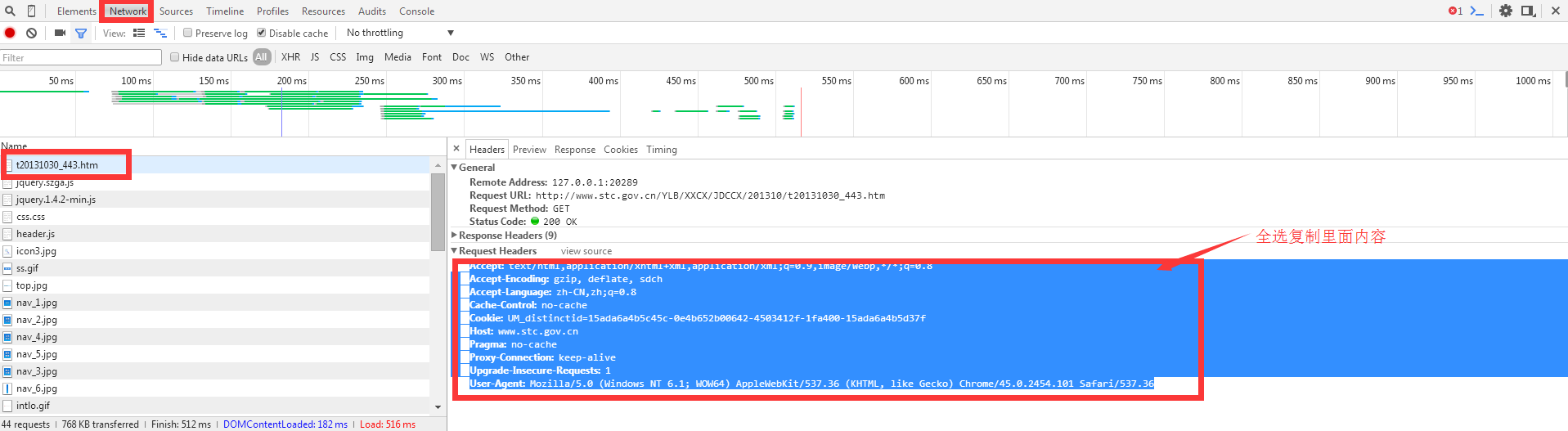
复制Request Headers 里面的所有内容,然后执行代码:
string heads = @"Accept:text/javascript, application/javascript, application/ecmascript, application/x-ecmascript, */*; q=0.01

Accept-Encoding:gzip, deflate

Accept-Language:zh-CN,zh;q=0.8

Cache-Control:no-cache

Content-Length:251

Content-Type:application/x-www-form-urlencoded; charset=UTF-8

Cookie:JSESSIONID=B1716F5DAC2F78D1E592F5421D859CFA; Hm_lvt_f44f38cf69626ed8bcfe92d72ed55922=1498099203; Hm_lpvt_f44f38cf69626ed8bcfe92d72ed55922=1498099203; cache_cars=152%7C152%7CBDL212%7C111111%7C111111%2C152%7C152%7CBy769x%7C111111%7C111111%2C152%7C152%7Cd12881%7C111111%7C111111

Host:www.xxxxxxxx.com

Origin:http://www.xxxxxxxx.com

Pragma:no-cache

Proxy-Connection:keep-alive

Referer:http://www.cheshouye.com/api/weizhang/

User-Agent:Mozilla/5.0 (Windows NT 6.1; WOW64) AppleWebKit/537.36 (KHTML, like Gecko) Chrome/45.0.2454.101 Safari/537.36

X-Requested-With:XMLHttpRequest";

            string url = "http://www.xxxxxxxxxxxx.com/api/weizhang/open_task?callback=jQuery1910816327";

            HttpRequestClient s = new HttpRequestClient(true);

            string content = "chepai_no=b21451&chejia_no=111111&engine_no=111111&city_id=152&car_province_id=12&input_cost=0&vcode=%7B%22cookie_str%22%3A%22%22%2C%22verify_code%22%3A%22%22%2C%22vcode_para%22%3A%7B%22vcode_key%22%3A%22%22%7D%7D&td_key=qja5rbl2d97n&car_type=02&uid=0";

            string response= s.httpPost(url, heads, content, Encoding.UTF8);
就这样,你会惊喜的发现,卧槽!反回来的值和谷歌上显示值一个样子,
只要域名没变化,HttpRequestClient 对象就不要去改变, 多线程请使用ThreadLocal<HttpRequestClient >
配合我很久之前写的多线类 QueueThreadBase 让你起飞.
你想暴力破解网站登录密码吗?基本思路如下:
1)强大的用户名+密码字典
2)多线程Http+代理(代理可以不用,如果服务器做了ip限制,那么代理就非常有用了,最好是透明的http代理,并且有规则剔除慢的代理)
3)验证码破解.(只要验证码不复杂,在某宝就能买的dll 可用,1000块钱上下)
4)慢慢等......看奇迹发生,(我已经做好了一个,各位程序员我屁股已经翘好,等你一脚)
一个比较完善的httpWebRequest 封装,适合网络爬取及暴力破解的更多相关文章
- 使用Node.js实现简单的网络爬取
由于最近要实现一个爬取H5游戏的代理服务器,隧看到这么一篇不错的文章(http://blog.miguelgrinberg.com/post/easy-web-scraping-with-nodejs ...
- pyhton 网络爬取软考题库保存text
#-*-coding:utf-8-*-#参考文档#https://www.crummy.com/software/BeautifulSoup/bs4/doc/index.zh.html#find-al ...
- seo-mask -- 为单页应用创建一个适合蜘蛛爬取的seo网站
seo-mask seo-mask是利用搜索引擎蜘蛛的爬取原理(蜘蛛只会爬取网页的内容,并不会关心解析网页里的css和js),制作一套专门针对seo的镜像网站,鄙人称它为针对seo的mask,让蜘蛛看 ...
- B站真的是一个神奇的地方,初次用Python爬取弹幕。
"网上冲浪""886""GG""沙发"--如果你用过这些,那你可能是7080后: "杯具"" ...
- Python3爬虫(1)_使用Urllib进行网络爬取
网络爬虫 又被称为网页蜘蛛,网络机器人,在FOAF社区中间,更经常的称为网页追逐者,是一种按照一定的规则,自动地抓取万维网信息的程序或者脚本.另外一些不常使用的名字还有蚂蚁.自动索引.模拟程序或者蠕虫 ...
- python Requests库网络爬取IP地址归属地的自动查询
#IP地址查询全代码import requestsurl = "http://m.ip138.com/ip.asp?ip="try: r = requests.get(url + ...
- Python Requests库网络爬取全代码
#爬取京东商品全代码 import requestsurl = "http://item.jd.com/2967929.html"try: r = requests.get(url ...
- 用WebCollector制作一个爬取《知乎》并进行问题精准抽取的爬虫(JAVA)
简单介绍: WebCollector是一个无须配置.便于二次开发的JAVA爬虫框架(内核),它提供精简的的API.仅仅需少量代码就可以实现一个功能强大的爬虫. 怎样将WebCollector导入项目请 ...
- 基于java的网络爬虫框架(实现京东数据的爬取,并将插入数据库)
原文地址http://blog.csdn.net/qy20115549/article/details/52203722 本文为原创博客,仅供技术学习使用.未经允许,禁止将其复制下来上传到百度文库等平 ...
随机推荐
- Intellij IDEA快捷键(必备)
快捷键 功能描述 Ctrl + Shift + Space 智能代码提示(必备) Ctrl + R 在当前文件进行文本替换 Ctrl + F 在当前文件进行文本查找 Ctrl + Y 删除光标所在行 ...
- Gartner:当商业智能成熟度低时,如何加快分析采用率
文 | 水手哥 本文出自:知乎专栏<帆软数据应用研究院>--数据干货&资讯集中地 根据Gartner近7年的调查结果,71%的受访企业处于低成熟度阶段,也就是Gartner五级BI ...
- php学习之string
1. php str_replace函数: str_replace() 函数使用一个字符串替换字符串中的另一些字符. str_replace(find,replace,string,count) fi ...
- hdu4597 Play Game 区间DP
题目链接:http://acm.hdu.edu.cn/showproblem.php?pid=4597 全国邀请赛通化赛区第8题--题目重现 思路: 区间DP的思想,想法是队友想出来的,感觉很秒,自己 ...
- [笔记]我的Linux入门之路 - 05.Eclipse的Python开发环境搭建与Numpy、Scipy库安装
一.Python环境 直接终端查询下python安装没:python --version Python 2.7.12 Ubuntu竟然已经装了Python2.7,那就好说了.不然自己装和装jdk差不多 ...
- TCP三次握手(建立连接)/四次挥手(关闭连接)
TCP数据包格式 顺序号(32位):用来标识从TCP源端向TCP目的端发送的数据字节流,它表示在这个报文段中的第一个数据字节的顺序号.如果将字节流看作在两个应用程序间的单向流动,则TCP用顺序号对每个 ...
- PHP 类的封装和使用
类:相似的数据和数据操作的封装 class 成员量:普通的量加上一定的修饰就变成了成员量 public,protected,private 成员方法:普通的函数,加上一定的修饰,放入到类中就变成了成 ...
- repo版本切换
repo init -u https://android.googlesource.com/platform/manifest repo sync 之后 这样初始化之后,相当于下载了全部的分支, 本想 ...
- CentOS6.7 防火墙规则(Iptables)
查看防火墙的状态 /etc/init.d/iptables status 开启防火墙 /etc/init.d/iptables start 关闭防火墙 /etc/init.d/iptables sto ...
- [oracle]Oracle数据库安全管理
目录 + 1.数据库安全控制策略概述 + 2.用户管理 + 3.资源限制与口令管理 + 4.权限管理 + 5.角色管理 + 6.审计 1.数据库安全控制策略概述 安全性是评估一个数据库的重 ...