
Hierarchy Viewer工具使用
目前,在eclipse的ADT Android插件中,还不能启动Hierachy Viewer,但可以从Android SDK工具包中,通过命令行的方式可以启动,具体方法为,到Android SDK下的tools目录下,在命令行方式下运行hierachyviewer即可:
D:\android-sdk\tools>hierarchyviewer.bat
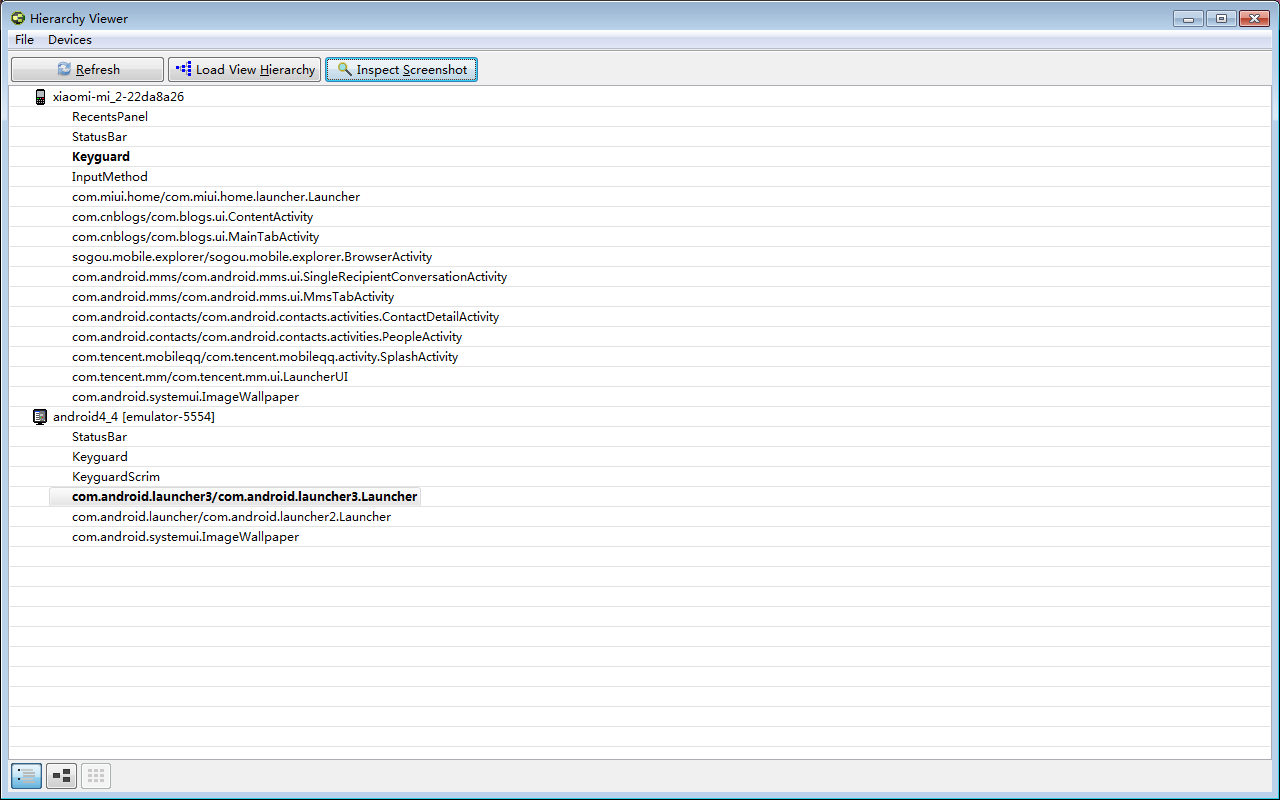
点上你要选择的应用。

看别人程序的布局:

抠图功能:

双击任何一个地方就可以保存成psd。

实例对比:
<LinearLayout xmlns:android="http://schemas.android.com/apk/res/android"

    xmlns:tools="http://schemas.android.com/tools"

    android:layout_width="match_parent"

    android:layout_height="match_parent"

    android:gravity="center"

    android:background="@drawable/ccb_comm_bg0"

    android:orientation="horizontal" >

  <!-- android:background="@drawable/bg" -->

    <com.example.health.util.CircleMenuLayout

        android:id="@+id/id_menulayout"

        android:layout_width="match_parent"

        android:layout_height="match_parent"

        android:padding="100dp"

        android:background="@drawable/circle_bg3" >

        <RelativeLayout

            android:id="@id/id_circle_menu_item_center"

            android:layout_width="wrap_content"

            android:layout_height="wrap_content" >

            <ImageView

                android:layout_width="104.0dip"

                android:layout_height="104.0dip"

                android:layout_centerInParent="true"

                android:background="@drawable/turnplate_center_unlogin" />

            <ImageView

                android:layout_width="116.0dip"

                android:layout_height="116.0dip"

                android:layout_centerInParent="true"

                android:background="@drawable/turnplate_mask_unlogin_normal" />

        </RelativeLayout>

    </com.example.health.util.CircleMenuLayout>

</LinearLayout>
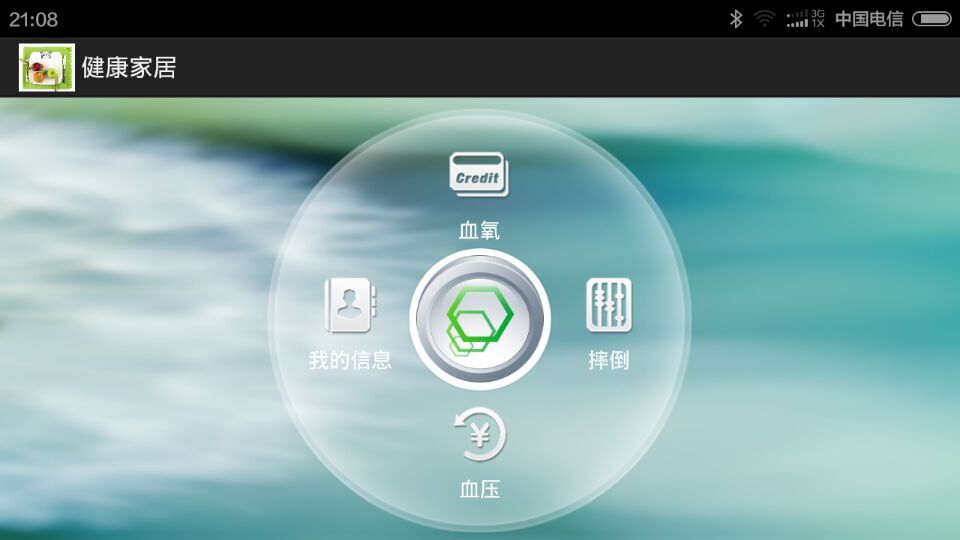
要实现的效果:

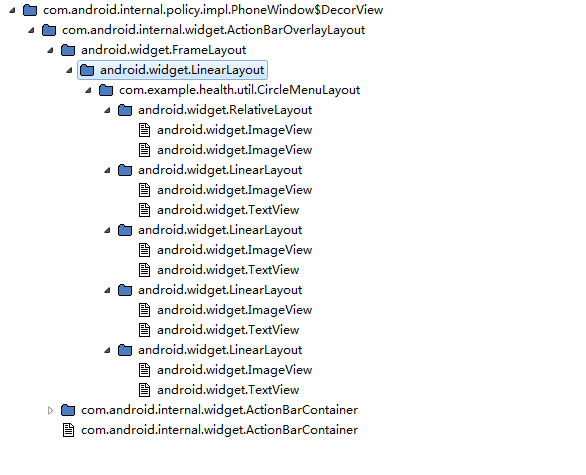
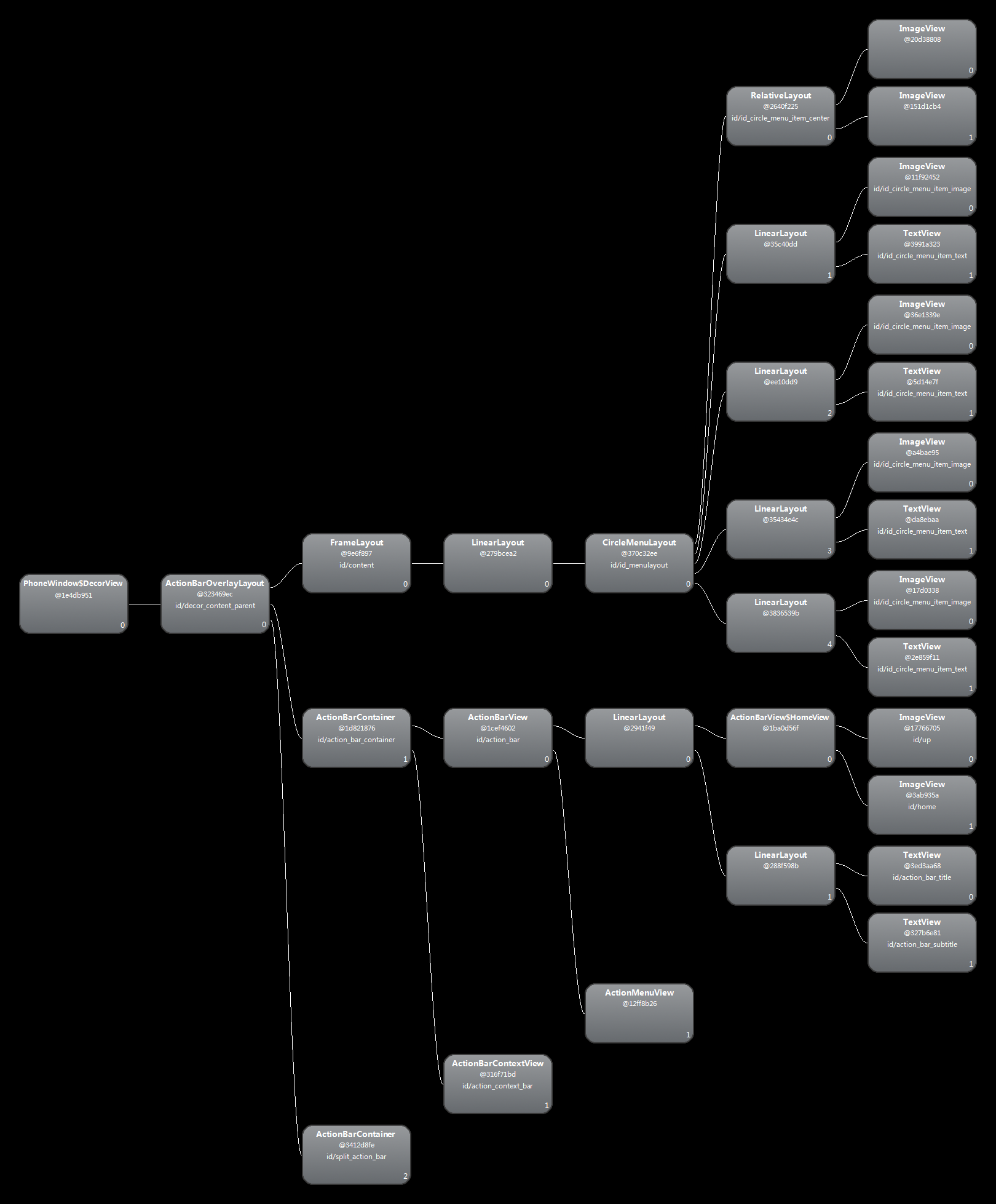
TreeView:

点击某个视图,还可看见预览视图
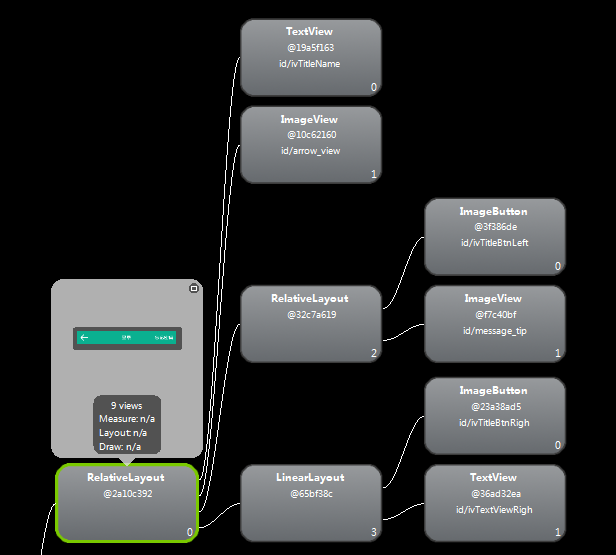
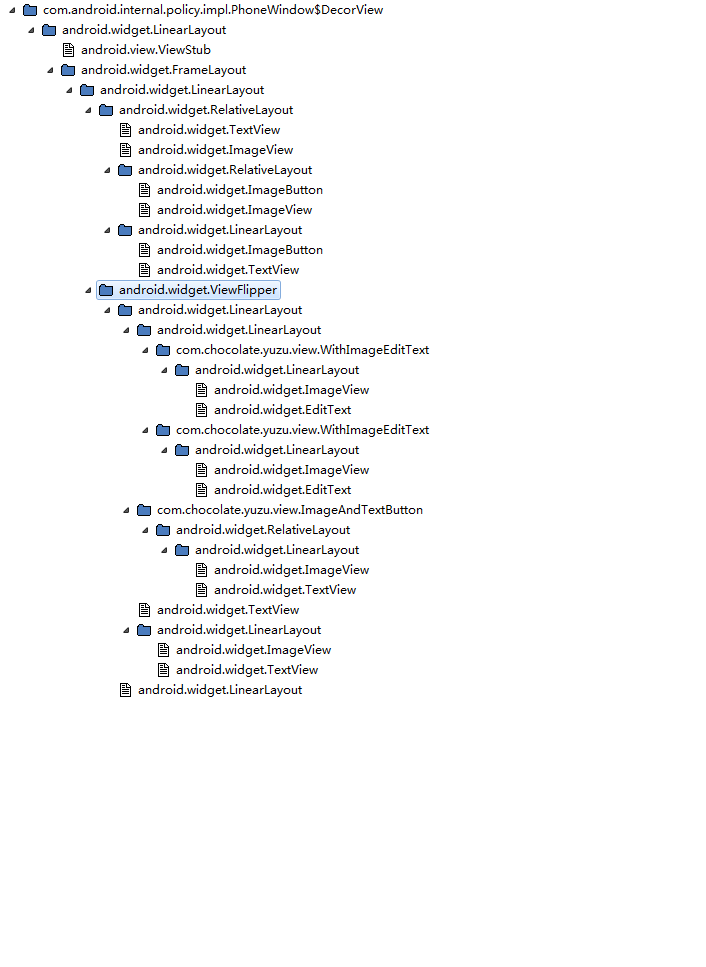
抠图功能:

模仿版:
<?xml version="1.0" encoding="UTF-8"?>

<LinearLayout xmlns:android="http://schemas.android.com/apk/res/android"

    android:layout_width="fill_parent"

    android:layout_height="fill_parent"

    android:background="#fff2f0eb"

    android:orientation="vertical" >

    <RelativeLayout

        android:layout_width="fill_parent"

        android:layout_height="@dimen/height_top_bar"

        android:layout_weight="0"

        android:background="@color/common_top_bar_blue" >

        <TextView

            android:id="@+id/ivTitleName"

            android:layout_width="wrap_content"

            android:layout_height="wrap_content"

            android:layout_centerInParent="true"

            android:text="登陆"

            android:textColor="#ffffffff"

            android:textSize="20.0sp" />

        <ImageButton

            android:id="@+id/ivTitleBtnLeft"

            android:layout_width="wrap_content"

            android:layout_height="wrap_content"

            android:layout_marginLeft="10dp"

            android:layout_alignParentLeft="true"

            android:layout_centerVertical="true"

            android:background="@drawable/top_icon_back" />

         <TextView

            android:id="@+id/ivTextViewRigh"

            android:layout_width="wrap_content"

            android:layout_height="wrap_content"

            android:layout_marginRight="10dp"

            android:layout_alignParentRight="true"

            android:layout_centerVertical="true"

            android:textColor="#ffffffff"

            android:textSize="16.0sp"

            android:text="忘记密码"

            android:clickable="true" />

    </RelativeLayout>

    <ViewFlipper

        android:id="@+id/mainFlipper"

        android:layout_width="fill_parent"

        android:layout_height="0dp"

        android:layout_weight="1"

        >

          <LinearLayout

            android:id="@+id/content1"

            android:layout_width="match_parent"

            android:layout_height="match_parent"

             android:gravity="center_horizontal"

            android:background="@color/login_background"

            android:orientation="vertical" >

                <LinearLayout

                    android:layout_margin="10dp"

                    android:padding="8dp"

                    android:layout_width="match_parent"

                    android:layout_height="wrap_content"

                    android:background="@color/white"

                    android:orientation="vertical" >

                       <LinearLayout

                            android:layout_width="match_parent"

                            android:layout_height="match_parent"

                            android:gravity="center_vertical"

                            android:orientation="horizontal"

                            android:background="@drawable/inputbox_bg">

                            <ImageView

                                android:layout_width="wrap_content"

                                android:layout_height="wrap_content"

                                android:layout_weight="1"

                                android:src="@drawable/input_phone"

                                />

                            <EditText

                                android:layout_width="wrap_content"

                                android:layout_height="wrap_content"

                                android:layout_weight="6"

                                android:background="@null"

                                android:textSize="15.0sp"

                                android:hint="填写您的手机号">

                                 <requestFocus />

                            </EditText>

                        </LinearLayout>

                       <LinearLayout

                            android:layout_width="match_parent"

                            android:layout_height="match_parent"

                            android:gravity="center_vertical"

                            android:orientation="horizontal"

                            android:layout_marginTop="15dp"

                            android:background="@drawable/inputbox_bg">

                            <ImageView

                                android:layout_width="wrap_content"

                                android:layout_height="wrap_content"

                                android:layout_weight="1"

                                android:src="@drawable/input_key"

                                />

                            <EditText

                                android:layout_width="wrap_content"

                                android:layout_height="wrap_content"

                                android:layout_weight="6"

                                android:background="@null"

                                android:textSize="15.0sp"

                                android:hint="输入您的登录密码"/>

                        </LinearLayout>

                </LinearLayout>

                 <Button

                    android:id="@+id/sendBtn"

                    style="@style/style_common_btn"

                    android:layout_width="match_parent"

                    android:layout_height="wrap_content"

                    android:layout_margin="10dp"

                    android:background="@drawable/selector_common_btn"

                    android:text="登录" />

                <TextView

                     android:id="@+id/regster_text"

                     android:layout_width="wrap_content"

                     android:layout_height="wrap_content"

                     android:layout_margin="5dp"

                     android:textColor="@color/common_top_bar_blue"

                     android:text="立即注册"

                    />

          </LinearLayout>

           <LinearLayout

                    android:id="@+id/content2"

                    android:layout_width="match_parent"

                    android:layout_height="match_parent"

                    android:orientation="vertical" >

                </LinearLayout>

    </ViewFlipper>

</LinearLayout>
效果:


ViewFlipper的使用:
 regster_text.setOnClickListener(new OnClickListener() {

        @Override

        public void onClick(View v) {

            ib_menu.setVisibility(View.VISIBLE);

            ivTitleName.setText("注册新账号");

            vf.showNext();

            ib_back.setVisibility(View.GONE);

        }

      });

      ib_menu.setOnClickListener(new OnClickListener() {

        @Override

        public void onClick(View v) {

            ib_back.setVisibility(View.VISIBLE);

            ivTitleName.setText("登录");

            vf.showPrevious();

            ib_menu.setVisibility(View.GONE);

        }

      });
Hierarchy Viewer工具使用的更多相关文章
- 看了一本书,说可以利用Hierarchy Viewer优化布局
看了一本书,说可以利用Hierarchy Viewer优化布局,今以志之. 参考:http://www.cnblogs.com/Rocky_/archive/2011/11/04/2236243.ht ...
- 利用Hierarchy Viewer优化布局
好久没更新博客了,趁着清明来写点什么. 今天来讲下如何使用android中提供的工具优化我们的布局.首先我们写一个最简单的框架布局. <?xml version="1.0" ...
- Android 实用工具Hierarchy Viewer实战
在Android的SDK工具包中,有很多十分有用的工具,可以帮助程序员开发和测试Android应用程序,大大提高其工作效率.其中的一款叫Hierachy Viewer的可视化调试工具,可以很方便地在开 ...
- 【转】【Android工具】被忽略的UI检视利器:Hierarchy Viewer
原文:http://blog.csdn.net/ddna/article/details/5527072 Hierarchy Viewer是随AndroidSDK发布的工具,位置在tools文件夹下, ...
- Android 卡顿优化 3 布局优化 工具 Hierarchy Viewer
欲善其事, 先利其器. 分析布局, 就不得不用到Hierarchy Viewer了. 本文工具使用皆以GithubApp的详情界面RepoDetailActivity为例说明. 为了不影响阅读体验, ...
- Android工具 Hierarchy Viewer 分析
Hierarchy Viewer是随AndroidSDK发布的工具,位置在tools文件夹下,名为hierarchyviewer.bat.它是Android自带的非常有用而且使用简单的工具,可以帮助我 ...
- Android 性能优化(22)*性能工具之「Hierarchy Viewer」 Hierarchy Viewer Walkthrough
Hierarchy Viewer Walkthrough 1.In this document Prerequisites Setting the ANDROID_HVPROTO variable W ...
- Android 性能优化(2)性能工具之「Hierarchy Viewer 」Optimizing Your UI:分析哪个view有性能问题,查看屏幕上某像素点的坐标,颜色等
Optimizing Your UI In this document Using Hierarchy Viewer Running Hierarchy Viewer and choosing a w ...
- Android工具:Hierarchy Viewer
Hierarchy Viewer 用途: 即可以用来优化自己的布局,也可以用来参考别人优秀的布局 打开方式: 运行工程,然后在\android-sdk-windows\tools目录下双击hierar ...
随机推荐
- POPTEST老李谈JVM、JRE、JDK、java ee sdk with jdk区别
POPTEST老李谈JVM.JRE.JDK.java ee sdk with jdk区别 poptest是国内唯一一家培养测试开发工程师的培训机构,以学员能胜任自动化测试,性能测试,测试工具开发等 ...
- 老李推荐:第4章1节《MonkeyRunner源码剖析》ADB协议及服务: ADB协议概览 1
老李推荐:第4章1节<MonkeyRunner源码剖析>ADB协议及服务: ADB协议概览 poptest是国内唯一一家培养测试开发工程师的培训机构,以学员能胜任自动化测试,性能测试, ...
- 如何在IDEA中调试 Jar文件
原创文章,转载请注明出处:http://www.cnblogs.com/acm-bingzi/p/6668333.html 问题: 一般情况下,可以打成Jar包的项目,它的源码运行Applicat ...
- 五分钟秒懂Java日志组件
Java中有许多种日志记录方式,有些API有占位符,有些API没占位符,初学的人可能会搞不清楚这些日志组件的由来.我一开始的时候也是很懵逼的,后来一点点弄懂了于是就又了这篇文章. 在Java中进行日志 ...
- 轻量级代码生成器-OnlyCoder
程序猿利器:代码生成器,使用代码生成器已经好几年了,增删改查各种生成,从UI到DATA层均生成过.之前有使用过动软的,T4模板等.... T4生成实体还是没有问题的,但是生成MVC视图就有点烦杂了, ...
- AOP学习笔记二
Spring AOP采用Java作为AOP的实现语言(AOL),学习曲线平滑,Spring AOP对AspectJ也提供了很好的集成与支持.最为第二代的AOP,采用动态代理机制和字节码生产技术实现,在 ...
- Python爬虫 Urllib库的高级用法
1.设置Headers 有些网站不会同意程序直接用上面的方式进行访问,如果识别有问题,那么站点根本不会响应,所以为了完全模拟浏览器的工作,我们需要设置一些Headers 的属性. 首先,打开我们的浏览 ...
- windows编程初步
#include <windows.h> const char g_szClassName[] = "myWindowClass"; LRESULT CALLBACK ...
- git常见操作指令
由于公司用的是git进行版本管理,所以零零散散的学了一些常用到的git指令: 近日把廖雪峰前辈的git教程看了一遍,感觉操作起来更得心应手,在此做个记录,如有错漏望指正: git init //初始化 ...
- [编织消息框架][JAVA核心技术]动态代理应用8-IRpcReceive实现
private static Map<Short, Map<Byte, Method>> RECEIVE_METHOD_INFO = new HashMap<>() ...