
轻量级应用开发之(08)UITableView
一 UITableView基本介绍
在众多移动应⽤用中,能看到各式各样的表格数据 。
在iOS中,要实现表格数据展示,最常用的做法就是使用UITableView,UITableView继承自UIScrollView,因此支持垂直滚动,⽽且性能极佳 。
UITableview有分组和不分组两种样式,可以在storyboard或者是用代码设置。
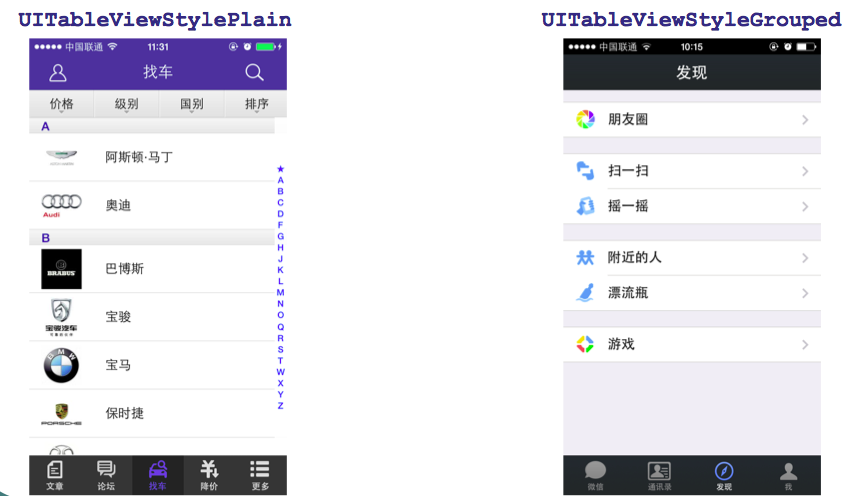
二、数据展示
UITableView需要⼀一个数据源(dataSource)来显示数据
UITableView会向数据源查询一共有多少行数据以及每⼀行显示什么数据等
没有设置数据源的UITableView只是个空壳
凡是遵守UITableViewDataSource协议的OC对象,都可以是UITableView的数据源
展示数据的过程:
(1)调用数据源的下面⽅法得知⼀一共有多少组数据
- (NSInteger)numberOfSectionsInTableView:(UITableView *)tableView;
(2)调用数据源的下面⽅法得知每一组有多少行数据
- (NSInteger)tableView:(UITableView *)tableView numberOfRowsInSection:(NSInteger)section;
(3)调⽤数据源的下⾯⽅法得知每⼀⾏显示什么内容
- (UITableViewCell *)tableView:(UITableView *)tableView cellForRowAtIndexPath:(NSIndexPath *)indexPath;
三 代码展示
example1-一个简单的UITableView
1. 新建一个工程
新建一个工程,在Main.storyboard里添加一个UITablew控件。然后建立一个全屏约束
1)点击添加约束按钮
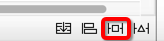
2)去掉Constrain to Margins
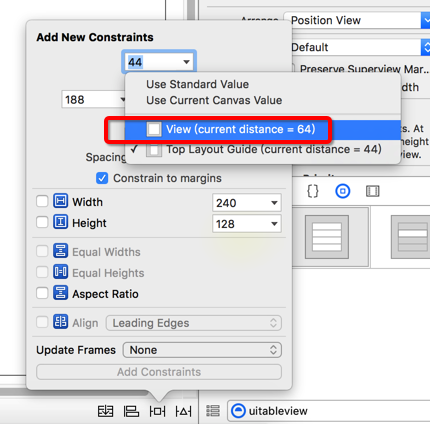
3) top, left,right, bottom的约束值设为0.
4)UPdate Frame选择 “items of New Constraints”
2 展示基本的数据
 #import "ViewController.h"

 @interface ViewController ()<UITableViewDataSource>

    @property (weak, nonatomic) IBOutlet UITableView *tableView;

 @end

 @implementation ViewController

 - (void)viewDidLoad {

     [super viewDidLoad];

     self.tableView.dataSource = self;

 }

 #pragma mark - <UITableViewSource>

 //这一组 返回多少行, section:告诉现在是第几组

 - (NSInteger)tableView:(UITableView *)tableView

  numberOfRowsInSection:(NSInteger)section{

     if(section == ){

         return ;

     }else  if(section == ){

         return ;

     }else{

         return ;

     }

 }

 //告诉tableview一共有多少组

 - (NSInteger)numberOfSectionsInTableView:(UITableView *)tableView{

     return ;

 }

 //告诉tableview 你要显示什么数据

 - (UITableViewCell *)tableView:(UITableView *)tableView cellForRowAtIndexPath:(NSIndexPath *)indexPath{

     UITableViewCell *cell = [[UITableViewCell alloc] init];

     cell.textLabel.text = @"";

     return cell;

 }

 @end
运行效果默认如下:
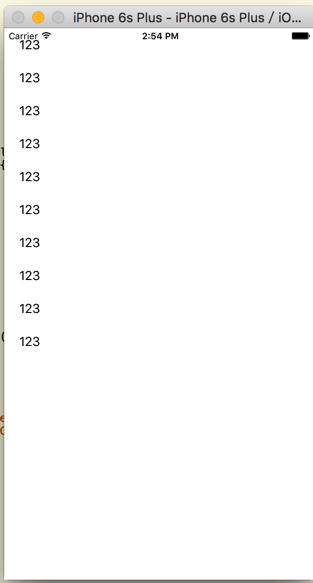
UIViewTable的默认style是plain,选中 grouped,
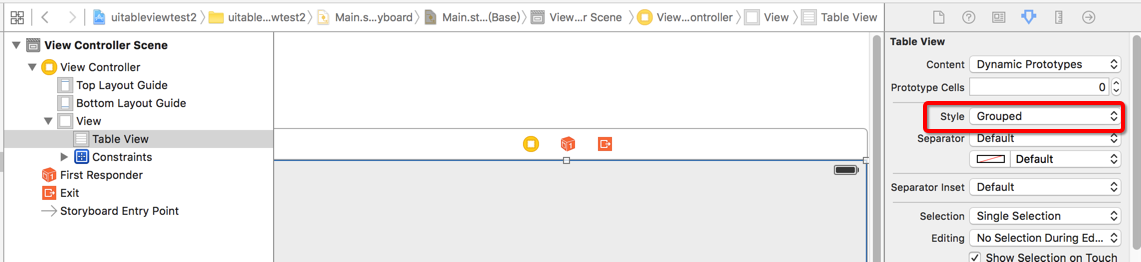
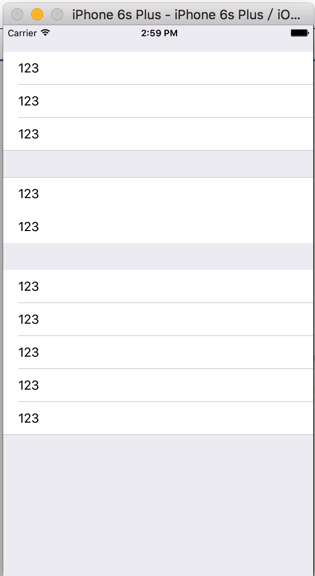
修改 UIViewTable的Style为Grouped 后,运行结果如下:
优化后的代码
 #import "ViewController.h"

 @interface ViewController ()<UITableViewDataSource>

    @property (weak, nonatomic) IBOutlet UITableView *tableView;

 @end

 @implementation ViewController

 - (void)viewDidLoad {

     [super viewDidLoad];

     self.tableView.dataSource =self;

 }

 #pragma mark - <UITableViewSource>

 //这一组 返回多少行, section:告诉现在是第几组

 - (NSInteger)tableView:(UITableView *)tableView

  numberOfRowsInSection:(NSInteger)section{

     if(section == ){

         return ;

     }else  if(section == ){

         return ;

     }else{

         return ;

     }

 }

 //告诉tableview一共有多少组

 - (NSInteger)numberOfSectionsInTableView:(UITableView *)tableView{

     return ;

 }

 //告诉tableview 你要显示什么数据

 - (UITableViewCell *)tableView:(UITableView *)tableView cellForRowAtIndexPath:(NSIndexPath *)indexPath{

     /**

      indexPath.row 行

      indexPath.section 列

  **/

     UITableViewCell *cell = [[UITableViewCell alloc] initWithStyle:UITableViewCellStyleSubtitle reuseIdentifier:nil];

     if( indexPath.section == ){

         if( indexPath.row ==){

              cell.textLabel.text = @"奥迪";

              cell.imageView.image = [UIImage imageNamed:@"m_2_100"];

              cell.detailTextLabel.text = @"哈哈哈哈哈!!!";

         }else  if( indexPath.row == ){

              cell.textLabel.text = @"奔驰";

              cell.imageView.image = [UIImage imageNamed:@"m_3_100"];

         }else  if( indexPath.row == ){

              cell.textLabel.text = @"宝马";

              cell.imageView.image = [UIImage imageNamed:@"m_4_100"];

         }

     }else if( indexPath.section == ){

         if( indexPath.row ==){

             cell.textLabel.text = @"法拉利";

             cell.imageView.image = [UIImage imageNamed:@"m_2_100"];

         }else  if( indexPath.row == ){

             cell.textLabel.text = @"奔驰";

             cell.imageView.image = [UIImage imageNamed:@"m_3_100"];

         }else  if( indexPath.row == ){

             cell.textLabel.text = @"宝马";

              cell.imageView.image = [UIImage imageNamed:@"m_4_100"];

         }

     }else if( indexPath.section == ){

         if( indexPath.row ==){

             cell.textLabel.text = @"法拉利";

             cell.imageView.image = [UIImage imageNamed:@"m_2_100"];

         }else  if( indexPath.row == ){

             cell.textLabel.text = @"奔驰";

             cell.imageView.image = [UIImage imageNamed:@"m_3_100"];

         }else  if( indexPath.row == ){

             cell.textLabel.text = @"宝马";

             cell.imageView.image = [UIImage imageNamed:@"m_4_100"];

         }

     }

     return cell;

 }

 //告诉tableView 每组头部显示什么东西

 - (NSString *) tableView:(UITableView *)tableView titleForHeaderInSection:(NSInteger)section{

     if( section == ){

        return @"header第0组";

     }else if( section == ){

        return @"header第1组";

     }else {

        return @"header第2组";

     }

 }

 //告诉tableView 每组尾部显示什么东西

 - (NSString *) tableView:(UITableView *)tableView titleForFooterInSection:(NSInteger)section{

     if( section == ){

         return @"footer第0组";

     }else if( section == ){

         return @"footer第1组";

     }else {

         return @"footer第2组";

     }

 }

 @end
example2-使用模型展示 UITableView
1. 创建数据模型
新建XPCar
XPCar.h
#import <Foundation/Foundation.h>

@interface XPCar : NSObject

    @property(copy, nonatomic) NSString * name; //名称

    @property(copy, nonatomic) NSString * icon; //图标

    + (instancetype ) carWithName:(NSString *)name icon:(NSString *) icon ;

@end
XPCar.m
 #import "XPCar.h"

 @implementation XPCar

 + (instancetype)carWithName:(NSString *)name icon:(NSString *)icon{

     XPCar * car =[[XPCar alloc]init];

     car.name = name;

     car.icon = icon;

     return car;

 }

 @end
新建XPCarGroup
XPCarGroup.h
 #import <Foundation/Foundation.h>

 @interface XPCarGroup : NSObject

   @property(copy, nonatomic) NSString *header; //头部标题

   @property(copy, nonatomic) NSString *footer; //尾部标题

   @property(copy, nonatomic) NSArray * cars; // 里面装着所有的车辆模型,这个数组里存放的都是 XPCar。

 @end
XPCarGroup.m
ViewController.m
 #import "ViewController.h"

 #import "XPCarGroup.h"

 #import "XPCar.h"

 @interface ViewController ()<UITableViewDataSource>

    @property (weak, nonatomic) IBOutlet UITableView *tableView;

     @property (nonatomic,strong) NSArray *groups; //所有组的数组模型数组

 @end

 @implementation ViewController

 - (void)viewDidLoad {

     [super viewDidLoad];

     self.tableView.dataSource =self;

     XPCarGroup * group0 = [[XPCarGroup alloc]init];

     group0.header = @"头部-哈哈1";

     group0.footer = @"尾部-车库里的车";

     group0.cars = @[  [XPCar carWithName:@"奥迪 aaa" icon:@"m_2_100"] ,

                       [XPCar carWithName:@"奔驰" icon:@"m_3_100"] ,

                       [XPCar carWithName:@"宝马" icon:@"m_4_100"]

                       ];

     XPCarGroup * group1 = [[XPCarGroup alloc]init];

     group1.header = @"头部-哈哈2";

     group1.footer = @"尾部-车库里的车";

     group1.cars = @[  [XPCar carWithName:@"奥迪" icon:@"m_2_100"] ,

                       [XPCar carWithName:@"奔驰" icon:@"m_3_100"] ,

                       [XPCar carWithName:@"宝马" icon:@"m_4_100"]

                       ];

     XPCarGroup * group2 = [[XPCarGroup alloc]init];

     group2.header = @"头部-哈哈3";

     group2.footer = @"尾部-车库里的车";

     group2.cars = @[  [XPCar carWithName:@"奥迪" icon:@"m_2_100"] ,

                       [XPCar carWithName:@"奔驰" icon:@"m_3_100"] ,

                       [XPCar carWithName:@"宝马" icon:@"m_4_100"]

                       ];

     self.groups= @[group0, group1, group2,group0,group1];

 }

 #pragma mark - <UITableViewSource>

 //这一组 返回多少行, section:告诉现在是第几组

 - (NSInteger)tableView:(UITableView *)tableView

  numberOfRowsInSection:(NSInteger)section{

     //拿出对应的组

     XPCarGroup *group = self.groups[section];

     return group.cars.count;

 }

 //告诉tableview一共有多少组

 - (NSInteger)numberOfSectionsInTableView:(UITableView *)tableView{

     return  self.groups.count;

 }

 //告诉tableview 你要显示什么数据

 - (UITableViewCell *)tableView:(UITableView *)tableView cellForRowAtIndexPath:(NSIndexPath *)indexPath{

     /**

      indexPath.row 行

      indexPath.section 列

  **/

     UITableViewCell *cell = [[UITableViewCell alloc] initWithStyle:UITableViewCellStyleSubtitle reuseIdentifier:nil];

     //取出模型

     XPCarGroup * group = self.groups[indexPath.section];

     XPCar * car = group.cars[indexPath.row];

     cell.textLabel.text = car.name;

     cell.imageView.image =[UIImage imageNamed: car.icon];

     return cell;

 }

 //告诉tableView 每组头部显示什么东西

 - (NSString *) tableView:(UITableView *)tableView titleForHeaderInSection:(NSInteger)section{

     //取出数据模型

     XPCarGroup * group = self.groups[section];

     return group.header;

 }

 //告诉tableView 每组尾部显示什么东西

 - (NSString *) tableView:(UITableView *)tableView titleForFooterInSection:(NSInteger)section{

     //取出数据模型

     XPCarGroup * group = self.groups[section];

     return group.footer;

 }

 @end
知识点:
1. 通过拖线设置代理
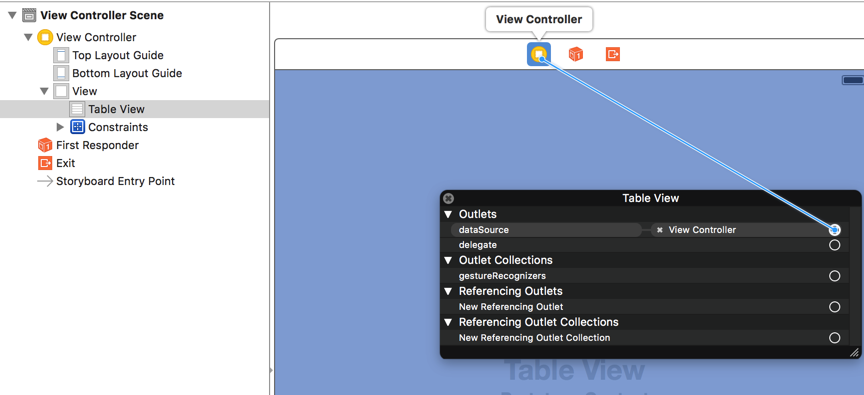
代码设置代理的方式如下:
self.tableView.datasource = self;
资料参考:
http://www.cnblogs.com/wendingding/p/3756027.html
轻量级应用开发之(08)UITableView的更多相关文章
- iOS开发UI篇—UITableview控件简单介绍
iOS开发UI篇—UITableview控件简单介绍 一.基本介绍 在众多移动应⽤用中,能看到各式各样的表格数据 . 在iOS中,要实现表格数据展示,最常用的做法就是使用UITableView,UIT ...
- iOS开发UI篇—UITableview控件基本使用
iOS开发UI篇—UITableview控件基本使用 一.一个简单的英雄展示程序 NJHero.h文件代码(字典转模型) #import <Foundation/Foundation.h> ...
- iOS开发UI篇—UITableview控件使用小结
iOS开发UI篇—UITableview控件使用小结 一.UITableview的使用步骤 UITableview的使用就只有简单的三个步骤: 1.告诉一共有多少组数据 方法:- (NSInteger ...
- 使用ionic与cordova(phonegap)进行轻量级app开发前的环境配置与打包安卓apk过程记录
前言 有人说:"如果你恨一个人,就让ta去接触cordova(phonegap)",这是因为这里面的水很深,坑很多,真让人不是一般地发狂.或许有幸运的人儿基本顺顺利利就配置完环境 ...
- 基于flask的轻量级webapi开发入门-从搭建到部署
基于flask的轻量级webapi开发入门-从搭建到部署 注:本文的代码开发工作均是在python3.7环境下完成的. 关键词:python flask tornado webapi 在python虚 ...
- iOS开发——UI_swift篇&UITableView实现索引功能
UITableView实现索引功能 关于UItableView的索引在平时项目中所见不多,最多的就是跟联系人有关的界面,虽然如此,但是作为一个swift开发的程序必须知道的一个技术点,所以今天 ...
- IOS开发中实现UITableView按照首字母将集合进行检索分组
在开发公司项目中遇到了将图书目录进行按照首字母分组排序的问题 1.在项目添加解析汉字拼音的Pinyin.h文件 /* * pinyin.c */ #define HANZI_START 19968 # ...
- IOS开发UI基础UITableView的属性
UITableView UITableView内置了两种样式:UITableViewStylePlain,UITableViewStyleGrouped <UITableViewDataSour ...
- Objective-c——UI基础开发第六天(UITableView)
一.UITableView的简单使用 显示要素: 1.显示多少给区组 2.显示多少行数据 3.每行显示什么内容 代理不会提醒你有什么方法没调用,但是UITableViewDataSource会 1)用 ...
- iOS开发——UI_swift篇&UITableView实现单元格展开与隐藏
UITableView实现单元格展开与隐藏 关于UITableView的展开的收缩在前面的文章我已经结束,就是使用代理,通知,block传值的时候实现的,当时是使用一个Bool值来实现,最后使用着三 ...
随机推荐
- P1195 口袋的天空
P1195 口袋的天空 题目背景 小杉坐在教室里,透过口袋一样的窗户看口袋一样的天空. 有很多云飘在那里,看起来很漂亮,小杉想摘下那样美的几朵云,做成棉花糖. 题目描述 给你云朵的个数N,再给你M个关 ...
- 04JavaIO详解_DataInputStream(属于过滤l流)
DataInputStream这个类是二进制读写的.并且 是过滤流,会一层套一层的.这里就是装饰者模式. public class DataStream1 { public static void m ...
- 28Spring_的事务管理_银行转账业务加上事务控制_基于注解进行声明式事务管理
将applicationContext.xml 和 AccountServiceImpl 给备份一个取名为applicationContext2.xml 和 AccountServiceImpl2.j ...
- 24Spring_事务管理机制
第一部分:Spring事务管理高层抽象接口 我们介绍三个接口:1.PlatformTransactionManager 2.TransactionDefinition 3.TransactionSt ...
- SEO在网页制作中的应用
1.什么是SEOSEO(Search Engine Optimization)中文意译为“搜索引擎优化”.SEO是指通过网站内部调整优化及站外优化,使网站满足搜索引擎收录排名需求,在搜索引擎中提高关键 ...
- C# 鼠标穿透窗体功能
通过以下代码,在窗体启动后调用方法SetPenetrate() 即可实现窗体的穿透功能. 同样该功能需要加载命名空间 using System.Runtime.InteropServices; pri ...
- 静态时序分析(static timing analysis)
静态时序分析(static timing analysis,STA)会检测所有可能的路径来查找设计中是否存在时序违规(timing violation).但STA只会去分析合适的时序,而不去管逻辑操作 ...
- zabbix一件漂亮的外衣配置
http://www.cnblogs.com/yyhh/archive/2015/09/08/4792830.html
- Android开发探秘之一:创建可以点击的Button
感觉到自己有必要学习下手机开发方面的知识,不论是为了以后的工作需求还是目前的公司项目. 当然,任何新东西的开始,必然伴随着第一个HelloWorld,Android学习也不例外.既然才开始,我就不做过 ...
- ActionBar在Android2.x的实现,类似新版微信界面。
ActionBar完美兼容Android4.x的机型,虽然现在Android2.x的系统越来越少,还有有一部分人使用的仍是2.x的系统,所以我们还得考虑着兼容性问题. 对比图: Test例子与微信的对 ...