
C# 集合-并发处理-锁OR线程
每次写博客,第一句话都是这样的:程序员很苦逼,除了会写程序,还得会写博客!当然,希望将来的一天,某位老板看到此博客,给你的程序员职工加点薪资吧!因为程序员的世界除了苦逼就是沉默。我眼中的程序员大多都不爱说话,默默承受着编程的巨大压力,除了技术上的交流外,他们不愿意也不擅长和别人交流,更不乐意任何人走进他们的内心!
最近悟出来一个道理,在这儿分享给大家:学历代表你的过去,能力代表你的现在,学习代表你的将来。我们都知道计算机技术发展日新月异,速度惊人的快,你我稍不留神,就会被慢慢淘汰!因此:每日不间断的学习是避免被淘汰的不二法宝。
当然,题外话说多了,咱进入正题!
简单的总结下对预防并发的理解:预防并发其实就是将并行执行修改为串行执行。(关于数据库并发问题大家可参考我的博客:C# 数据库并发的解决方案(通用版、EF版))
背景
C#命名空间:System.Collenctions和System.Collenctions.Generic 中提供了很多列表、集合和数组。例如:List<T>集合,数组Int[],String[] ......,Dictory<T,T>字典等等。但是这些列表、集合和数组的线程都不是安全的,不能接受并发请求。下面通过一个例子来加以说明,如下:
 class Program

    {

        private static object o = new object();

        private static List<Product> _Products { get; set; }

        /*  coder:天才卧龙

         *  代码中 创建三个并发线程 来操作_Products 集合

         *  System.Collections.Generic.List 这个列表在多个线程访问下,不能保证是安全的线程,所以不能接受并发的请求,我们必须对ADD方法的执行进行串行化

         */

        static void Main(string[] args)

        {

            _Products = new List<Product>();

            /*创建任务 t1  t1 执行 数据集合添加操作*/

            Task t1 = Task.Factory.StartNew(() =>

            {

                AddProducts();

            });

            /*创建任务 t2  t2 执行 数据集合添加操作*/

            Task t2 = Task.Factory.StartNew(() =>

            {

                AddProducts();

            });

            /*创建任务 t3  t3 执行 数据集合添加操作*/

            Task t3 = Task.Factory.StartNew(() =>

            {

                AddProducts();

            });

            Task.WaitAll(t1, t2, t3);

            Console.WriteLine(_Products.Count);

            Console.ReadLine();

        }

        /*执行集合数据添加操作*/

        static void AddProducts()

        {

            Parallel.For(, , (i) =>

            {

                Product product = new Product();

                product.Name = "name" + i;

                product.Category = "Category" + i;

                product.SellPrice = i;

                _Products.Add(product);

            });

        }

    }

    class Product

    {

        public string Name { get; set; }

        public string Category { get; set; }

        public int SellPrice { get; set; }

    }
本例中,开辟了三个线程,通过循环向集合中添加数据,每个线程执行1000次(三个线程之间的操作是同时进行的,也是并行的),那么,理论上结果应该是3000。
上文中我们讲到: C#命名空间:System.Collenctions和System.Collenctions.Generic 下的列表,数组,集合并不能保证线程安全,并不能防止并发的发生。
本例运行的结果也证明了上述结论的正确性,其结果如下:

由此可见:C#命名空间:System.Collenctions和System.Collenctions.Generic 下的列表,数组,集合确实不能保证线程安全,确实不能预防并发。那么我们应当怎么解决上述问题呢?
还好,自C#2.0以来,LOCK是一直存在的。使用LOCK(互斥锁)是可以做到防止并发的,示例代码如下:
 class Program

    {

        private static object o = new object();

        private static List<Product> _Products { get; set; }

        /*  coder:天才卧龙

         *  代码中 创建三个并发线程 来操作_Products 集合

         *  System.Collections.Generic.List 这个列表在多个线程访问下,不能保证是安全的线程,所以不能接受并发的请求,我们必须对ADD方法的执行进行串行化

         */

        static void Main(string[] args)

        {

            _Products = new List<Product>();

            /*创建任务 t1  t1 执行 数据集合添加操作*/

            Task t1 = Task.Factory.StartNew(() =>

            {

                AddProducts();

            });

            /*创建任务 t2  t2 执行 数据集合添加操作*/

            Task t2 = Task.Factory.StartNew(() =>

            {

                AddProducts();

            });

            /*创建任务 t3  t3 执行 数据集合添加操作*/

            Task t3 = Task.Factory.StartNew(() =>

            {

                AddProducts();

            });

            Task.WaitAll(t1, t2, t3);

            Console.WriteLine(_Products.Count);

            Console.ReadLine();

        }

        /*执行集合数据添加操作*/

        static void AddProducts()

        {

            Parallel.For(, , (i) =>

               {

                   lock (o)

                   {

                       Product product = new Product();

                       product.Name = "name" + i;

                       product.Category = "Category" + i;

                       product.SellPrice = i;

                       _Products.Add(product);

                   }

               });

        }

    }

    class Product

    {

        public string Name { get; set; }

        public string Category { get; set; }

        public int SellPrice { get; set; }

    }
引入了Lock,运行结果也正常了,如下:
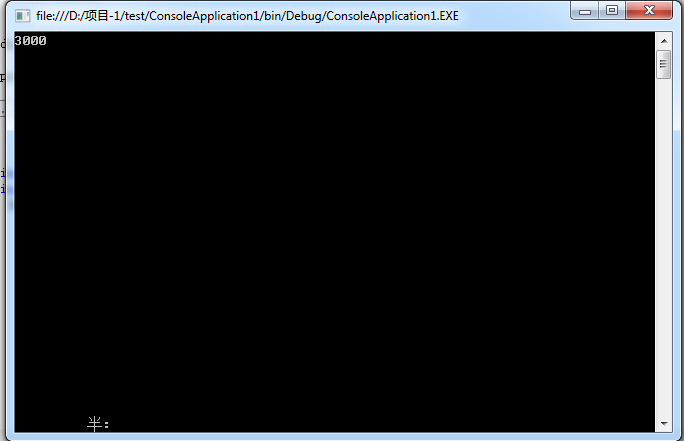
但是锁的引入,带来了一定的开销和性能的损耗,并降低了程序的扩展性,而且还会有死锁的发生(虽说概率不大,但也不能不防啊),因此:使用LOCK进行并发编程显然不太适用。
还好,微软一直在更新自己的东西:
.NET Framework 4提供了新的线程安全和扩展的并发集合,它们能够解决潜在的死锁问题和竞争条件问题,因此在很多复杂的情形下它们能够使得并行代码更容易编写,这些集合尽可能减少使用锁的次数,从而使得在大部分情形下能够优化为最佳性能,不会产生不必要的同步开销。
需要注意的是:在串行代码中使用并发集合是没有意义的,因为它们会增加无谓的开销。
在.NET Framework4.0以后的版本中提供了命名空间:System.Collections.Concurrent 来解决线程安全问题,通过这个命名空间,能访问以下为并发做好了准备的集合。
1.BlockingCollection 与经典的阻塞队列数据结构类似,能够适用于多个任务添加和删除数据,提供阻塞和限界能力。
2.ConcurrentBag 提供对象的线程安全的无序集合
3.ConcurrentDictionary 提供可有多个线程同时访问的键值对的线程安全集合
4.ConcurrentQueue 提供线程安全的先进先出集合
5.ConcurrentStack 提供线程安全的后进先出集合
这些集合通过使用比较并交换和内存屏障等技术,避免使用典型的互斥重量级的锁,从而保证线程安全和性能。
ConcurrentQueue
ConcurrentQueue 是完全无锁的,能够支持并发的添加元素,先进先出。下面贴代码,详解见注释:
class Program

    {

        private static object o = new object();

        /*定义 Queue*/

        private static Queue<Product> _Products { get; set; }

        private static ConcurrentQueue<Product> _ConcurrenProducts { get; set; }

        /*  coder:天才卧龙

         *  代码中 创建三个并发线程 来操作_Products 和 _ConcurrenProducts 集合,每次添加 10000 条数据 查看 一般队列Queue 和 多线程安全下的队列ConcurrentQueue 执行情况

         */

        static void Main(string[] args)

        {

            Thread.Sleep();

            _Products = new Queue<Product>();

            Stopwatch swTask = new Stopwatch();//用于统计时间消耗的

            swTask.Start();

            /*创建任务 t1  t1 执行 数据集合添加操作*/

            Task t1 = Task.Factory.StartNew(() =>

            {

                AddProducts();

            });

            /*创建任务 t2  t2 执行 数据集合添加操作*/

            Task t2 = Task.Factory.StartNew(() =>

            {

                AddProducts();

            });

            /*创建任务 t3  t3 执行 数据集合添加操作*/

            Task t3 = Task.Factory.StartNew(() =>

            {

                AddProducts();

            });

            Task.WaitAll(t1, t2, t3);

            swTask.Stop();

            Console.WriteLine("List<Product> 当前数据量为:" + _Products.Count);

            Console.WriteLine("List<Product> 执行时间为:" + swTask.ElapsedMilliseconds);

            Thread.Sleep();

            _ConcurrenProducts = new ConcurrentQueue<Product>();

            Stopwatch swTask1 = new Stopwatch();

            swTask1.Start();

            /*创建任务 tk1  tk1 执行 数据集合添加操作*/

            Task tk1 = Task.Factory.StartNew(() =>

            {

                AddConcurrenProducts();

            });

            /*创建任务 tk2  tk2 执行 数据集合添加操作*/

            Task tk2 = Task.Factory.StartNew(() =>

            {

                AddConcurrenProducts();

            });

            /*创建任务 tk3  tk3 执行 数据集合添加操作*/

            Task tk3 = Task.Factory.StartNew(() =>

            {

                AddConcurrenProducts();

            });

            Task.WaitAll(tk1, tk2, tk3);

            swTask1.Stop();

            Console.WriteLine("ConcurrentQueue<Product> 当前数据量为:" + _ConcurrenProducts.Count);

            Console.WriteLine("ConcurrentQueue<Product> 执行时间为:" + swTask1.ElapsedMilliseconds);

            Console.ReadLine();

        }

        /*执行集合数据添加操作*/

        /*执行集合数据添加操作*/

        static void AddProducts()

        {

            Parallel.For(, , (i) =>

            {

                Product product = new Product();

                product.Name = "name" + i;

                product.Category = "Category" + i;

                product.SellPrice = i;

                lock (o)

                {

                    _Products.Enqueue(product);

                }

            });

        }

        /*执行集合数据添加操作*/

        static void AddConcurrenProducts()

        {

            Parallel.For(, , (i) =>

            {

                Product product = new Product();

                product.Name = "name" + i;

                product.Category = "Category" + i;

                product.SellPrice = i;

                _ConcurrenProducts.Enqueue(product);

            });

        }

    }

    class Product

    {

        public string Name { get; set; }

        public string Category { get; set; }

        public int SellPrice { get; set; }

    }
结果如下:

从执行时间上来看,使用 ConcurrentQueue 相比 LOCK 明显快了很多!
1.BlockingCollection 与经典的阻塞队列数据结构类似,能够适用于多个任务添加和删除数据,提供阻塞和限界能力。
2.ConcurrentBag 提供对象的线程安全的无序集合
3.ConcurrentDictionary 提供可有多个线程同时访问的键值对的线程安全集合
4.ConcurrentQueue 提供线程安全的先进先出集合
5.ConcurrentStack 提供线程安全的后进先出集合
上面的实例可以使用ConcurrentBag吗?当然是可以的啦,因为:ConcurrentBag 和 ConcurrentQueue一样,操作的对象都是集合,只不过方式不同罢了!同理:小虎斑们也可以尝试使用 ConcurrentStack 在这里,我仅仅贴上使用ConcurrentBag的代码,如下:
 class Program

    {

        private static object o = new object();

        /*定义 Queue*/

        private static Queue<Product> _Products { get; set; }

        private static ConcurrentBag<Product> _ConcurrenProducts { get; set; }

        /*  coder:天才卧龙

         *  代码中 创建三个并发线程 来操作_Products 和 _ConcurrenProducts 集合,每次添加 10000 条数据 查看 一般队列Queue 和 多线程安全下的队列ConcurrentQueue 执行情况

         */

        static void Main(string[] args)

        {

            Thread.Sleep();

            _Products = new Queue<Product>();

            Stopwatch swTask = new Stopwatch();//用于统计时间消耗的

            swTask.Start();

            /*创建任务 t1  t1 执行 数据集合添加操作*/

            Task t1 = Task.Factory.StartNew(() =>

            {

                AddProducts();

            });

            /*创建任务 t2  t2 执行 数据集合添加操作*/

            Task t2 = Task.Factory.StartNew(() =>

            {

                AddProducts();

            });

            /*创建任务 t3  t3 执行 数据集合添加操作*/

            Task t3 = Task.Factory.StartNew(() =>

            {

                AddProducts();

            });

            Task.WaitAll(t1, t2, t3);

            swTask.Stop();

            Console.WriteLine("List<Product> 当前数据量为:" + _Products.Count);

            Console.WriteLine("List<Product> 执行时间为:" + swTask.ElapsedMilliseconds);

            Thread.Sleep();

            _ConcurrenProducts = new ConcurrentBag<Product>();

            Stopwatch swTask1 = new Stopwatch();

            swTask1.Start();

            /*创建任务 tk1  tk1 执行 数据集合添加操作*/

            Task tk1 = Task.Factory.StartNew(() =>

            {

                AddConcurrenProducts();

            });

            /*创建任务 tk2  tk2 执行 数据集合添加操作*/

            Task tk2 = Task.Factory.StartNew(() =>

            {

                AddConcurrenProducts();

            });

            /*创建任务 tk3  tk3 执行 数据集合添加操作*/

            Task tk3 = Task.Factory.StartNew(() =>

            {

                AddConcurrenProducts();

            });

            Task.WaitAll(tk1, tk2, tk3);

            swTask1.Stop();

            Console.WriteLine("ConcurrentQueue<Product> 当前数据量为:" + _ConcurrenProducts.Count);

            Console.WriteLine("ConcurrentBag<Product> 执行时间为:" + swTask1.ElapsedMilliseconds);

            Console.ReadLine();

        }

        /*执行集合数据添加操作*/

        /*执行集合数据添加操作*/

        static void AddProducts()

        {

            Parallel.For(, , (i) =>

            {

                Product product = new Product();

                product.Name = "name" + i;

                product.Category = "Category" + i;

                product.SellPrice = i;

                lock (o)

                {

                    _Products.Enqueue(product);

                }

            });

        }

        /*执行集合数据添加操作*/

        static void AddConcurrenProducts()

        {

            Parallel.For(, , (i) =>

            {

                Product product = new Product();

                product.Name = "name" + i;

                product.Category = "Category" + i;

                product.SellPrice = i;

                _ConcurrenProducts.Add(product);

            });

        }

    }

    class Product

    {

        public string Name { get; set; }

        public string Category { get; set; }

        public int SellPrice { get; set; }

    }
执行结果如下:
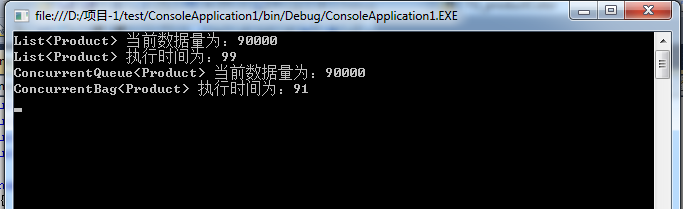
对于并发下的其他集合,我这边就不做代码案列了!如有疑问,欢迎指正!
@陈卧龙的博客
C# 集合-并发处理-锁OR线程的更多相关文章
- C# 集合-并发处理-锁OR线程 (转载)
每次写博客,第一句话都是这样的:程序员很苦逼,除了会写程序,还得会写博客!当然,希望将来的一天,某位老板看到此博客,给你的程序员职工加点薪资吧!因为程序员的世界除了苦逼就是沉默.我眼中的程序员大多都不 ...
- C#并发处理-锁OR线程安全?
每次写博客,第一句话都是这样的:程序员很苦逼,除了会写程序,还得会写博客! 当然,题外话说多了,咱进入正题! 背景 基于任务的程序设计.命令式数据并行和任务并行都要求能够支持并发更新的数组.列表和集合 ...
- C#多线程实践——锁和线程安全
锁实现互斥的访问,用于确保在同一时刻只有一个线程可以进入特殊的代码片段,考虑下面的类: class ThreadUnsafe { static int val1, val2; static void ...
- python网络编程--线程(锁,GIL锁,守护线程)
1.线程 1.进程与线程 进程有很多优点,它提供了多道编程,让我们感觉我们每个人都拥有自己的CPU和其他资源,可以提高计算机的利用率.很多人就不理解了,既然进程这么优秀,为什么还要线程呢?其实,仔细观 ...
- C#多线程实践-锁和线程安全
锁实现互斥的访问,用于确保在同一时刻只有一个线程可以进入特殊的代码片段,考虑下面的类: class ThreadUnsafe { static int val1, val2; static void ...
- Lock锁_线程_线程域
using System;using System.Collections.Generic;using System.ComponentModel;using System.Data;using Sy ...
- 无锁,线程安全,延迟加载的单例实现(C#)
单例(singleton)是非常常见,也非常有用的设计模式,当然了, 面试中也是经常会被问到的:)在几乎所有的项目中都能看到它的身影.简而言之,单例保证了一个自定义类型在整个程序的生命周期只被创建一次 ...
- 不使用synchronized和lock 锁实现线程安全单例
单例实现方式一,锁机制 public class Singleton { private static Singleton singleton=null; public Singleton() { } ...
- “全栈2019”Java多线程第三十一章:中断正在等待显式锁的线程
难度 初级 学习时间 10分钟 适合人群 零基础 开发语言 Java 开发环境 JDK v11 IntelliJ IDEA v2018.3 文章原文链接 "全栈2019"Java多 ...
随机推荐
- 【翻译】Kinect Studio是? 三月 SDK Update的新机能
Kinect应用软件开发支援工具「Kinect Studio」的功能和用法的说明.由于可以记录/再生数据,让开发和调试变得更加简单. Kinect SDK v2预览版的RTM版的预定在发布之前 ...
- 免费手机号码归属地API查询接口和PHP使用实例分享
免费手机号码归属地API查询接口和PHP使用实例分享 最近在做全国性的行业分类信息网站,需要用到手机号归属地显示功能,于是就穿梭于各大权威站点之间偷来了API的接口地址. 分享出来,大家可以用到就拿去 ...
- HTML: 文檔流是什麼?
[作者好人]:http://www.nowamagic.net/librarys/veda/detail/1190 文档流 将窗体自上而下分成一行行, 并在每行中按从左至右的顺序排放元素,即为文档流. ...
- page fault rate
COMPUTER ORGANIZATION AND ARCHITECTURE DESIGNING FOR PERFORMANCE NINTH EDITION A program computes th ...
- 02/07/2106 @ 6:28am (UTC)
<?php echo pow(2,32); 4294967296 http://www.unixtimestamp.com/index.php 4294967296 Is equivalent ...
- Android Gradle 编译错误Java finished with non-zero exit value 2
出现这个错误主要有两类错误 依赖包重复 方法数超过65K 针对第一种错误,可能是由于build.gradle里写了 compile fileTree(dir: 'libs', include: ['* ...
- 深入了解Windows句柄到底是什么
深入了解Windows句柄到底是什么 http://blog.csdn.net/wenzhou1219/article/details/17659485 总是有新入门的Windows程序员问我Wind ...
- error: jump to label ‘XXXX’ [-fpermissive]
http://www.cnblogs.com/foohack/p/4090124.html 下面的类似的源码在MSVC上能正确编译通过.但是gcc/g++上就会错: 1. if(expr)2. got ...
- 通过驱动向打印机发送一段(ESC)控制指令
这个功能看起来挺奇葩的, 写这个是因为有客户在使用驱动连接票据打印机, 但是又要开钱箱, 驱动里只能每张单据都开钱箱, 而这个打印机又不是只打印结帐单 所以就需要用软件控制打印机开钱箱 票据打印机一般 ...
- FTS抓包看蓝牙验证的过程
1.概述 在进行蓝牙设备的连接时,为了保护个人隐私和数据保密的需要,需要进行验证. 2.一些Frame Frame74:本地发送Authentication requset command ...