
【python游戏编程之旅】第五篇---嗷大喵爱吃鱼小游戏开发实例
本系列博客介绍以python+pygame库进行小游戏的开发。有写的不对之处还望各位海涵。
我们一同在前几期的博客中已经学到了很多pygame的基本知识了,现在该做个小游戏实战一下了。
前几期博客链接:
第一篇:初识pygame http://www.cnblogs.com/msxh/p/4966899.html
第二篇:pygame中的IO、数据 http://www.cnblogs.com/msxh/p/4973003.html
第三篇:pygame事件与设备轮询 http://www.cnblogs.com/msxh/p/4979380.html
第四篇:pygame中加载位图及些常用的数学函数 http://www.cnblogs.com/msxh/p/4990435.html
本次我们要做一个很简单的小游戏:从天上会随机的掉下鱼,你需要使用鼠标操纵猫去接住鱼,丢失一条鱼损失一条命,一共有10条命,同时还要避免接到炸弹。接住鱼会有积分。
游戏效果图如下:


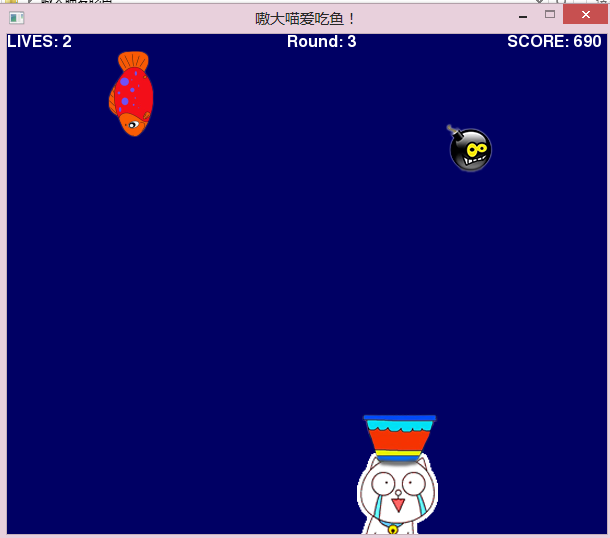
游戏下载地址:http://pan.baidu.com/s/1qWA4xZ2
源代码下载地址:http://pan.baidu.com/s/1i3is15j
还是先上一下完整的源代码吧:
 # -*-coding:utf-8-*- s = '

 #AoDaMiao Like Eating Fish

 import sys, random, time, pygame

 from pygame.locals import *

 def print_text(font, x, y, text, color=(255,255,255)):

     imgText = font.render(text, True, color)

     screen.blit(imgText, (x,y))

 #main program begins

 pygame.init()

 screen = pygame.display.set_mode((600,500))

 pygame.display.set_caption("嗷大喵爱吃鱼!")

 font1 = pygame.font.Font(None, 24)

 font2 = pygame.font.Font(None, 18)

 font3 = pygame.font.Font(None, 34)

 pygame.mouse.set_visible(False)

 white = 255,255,255

 red = 220, 50, 50

 yellow = 230,230,50

 black = 0,0,0

 cat=pygame.image.load("aodamiao_2.png")

 width,height=cat.get_size()

 pic=pygame.transform.scale(cat,(width,height))

 fish=pygame.image.load("fish.png")

 width,height=fish.get_size()

 fish=pygame.transform.smoothscale(fish,(width//3,height//3))

 init=pygame.image.load("init.png")

 lives = 10

 score = 0

 clock_start = 0

 game_over = 1

 mouse_x = mouse_y = 0

 Round =1

 mine=0

 mine_png=pygame.image.load("mine.png")

 cat2=pygame.image.load("aodamiao_3.png")

 flag=0

 pos_x = 300

 pos_y = 410-40

 bomb_x = random.randint(0,500)

 mine_x=random.randint(0,500)

 bomb_y = -50

 vel_y = 0.4

 vel_yy=0.6

 mine_y=-100

 #repeating loop

 while True:

     for event in pygame.event.get():

         if event.type == pygame.QUIT:

             #sys.exit()

             pygame.quit()

             exit()

         elif event.type == MOUSEMOTION:

             mouse_x,mouse_y = event.pos

             move_x,move_y = event.rel

         elif event.type == MOUSEBUTTONUP:

             if game_over:

                 game_over = False

                 lives = 10

                 score = 0

                 Round =1

                 vel_y=0.4

                 mine=0

                 flag=0

                 pic=cat

                 bomb_y = -50

     keys = pygame.key.get_pressed()

     if keys[K_ESCAPE]:

         sys.exit()

     screen.fill((0,0,100))

     if game_over:

         screen.blit(init,(60, 60))

         print_text(font3, 200, 400,"Clicked To Play!")

         print_text(font2, 310, 480,"Copyright@2015 developed by xiaoxiami")

     else:

         #Round setting

         if score >300 and score <600:

              Round=2

         elif score >600 and score <900:

              Round =3

         elif score >900 and score <1200:

              Round=4

         elif score >1200 and score <1500:

              Round =5

         elif score >=1500:

              Round =6

         #draw the Round

         print_text(font1, 280, 0, "Round: " + str(Round))

         #speed setting

         if Round ==1:

             vel_y=0.4

         elif Round ==2:

             vel_y=0.6

         elif Round ==3:

             vel_y=0.8

         elif Round ==4:

             vel_y=1.0

         elif Round ==5:

             vel_y=1.2

         #mine number setting

         #mine=random.randint(1,9)

         #move the fish

         bomb_y += vel_y

         mine_y+=vel_yy

         #has the player missed the fish?

         if bomb_y > 500:

             bomb_x = random.randint(0, 500)

             bomb_y = -50

             lives -= 1

             if lives == 0:

                 game_over = True

         #see if player has caught the fish

         elif bomb_y > pos_y:

             if bomb_x > pos_x-10 and bomb_x < pos_x + 70:

                 score += 10

                 bomb_x = random.randint(0, 500)

                 bomb_y = -50

         if Round >2:

         #has the player missed the mine?

             if mine_y > 500:

                 mine_x = random.randint(0, 500)

                 mine_y = -50

         #see if player has caught the mine

             elif mine_y > pos_y:

                 if mine_x > pos_x and mine_x < pos_x + 40:

                     mine_x = random.randint(0, 500)

                     mine_y = -50

                     lives-=1

                     pic=cat2

                     if lives == 0:

                         game_over = True

         #draw the fish

         screen.blit(fish,(bomb_x,int(bomb_y)))

         #draw the mine

         if Round >2:

             screen.blit(mine_png,(mine_x,int(mine_y)))

         #set cat position

         pos_x = mouse_x

         if pos_x < 0:

             pos_x = 0

         elif pos_x > 510:

             pos_x = 500

         #draw cat

         if lives<5:

             pic=cat2

         screen.blit(pic,(pos_x,pos_y))

     #print # of lives

     print_text(font1, 0, 0, "LIVES: " + str(lives))

     #print score

     print_text(font1, 500, 0, "SCORE: " + str(score))

     pygame.display.update()
关于位图的加载,设备轮询等等的内容我们就不在这里赘述了,不熟悉的可以查看前几期的博客。
为了让游戏更有趣味性,我们设置一下鱼的速度是可以变的。当得到的分数在不同区间的时候,会有不同的速度。(速度会越来快。)详见代码83-107行。
为了判断玩家是否错过鱼或者接到鱼,我们还需要写一个简单的碰撞检测函数:
        #如果错过鱼的话,就重置鱼的位置,给它一个随机的x值,然后生命值   减一

        if bomb_y > 500:

            bomb_x = random.randint(0, 500)

            bomb_y = -50

            lives -= 1

            if lives == 0:

                game_over = True

        #简单碰撞检测函数,查看是否接住鱼

        elif bomb_y > pos_y:

            if bomb_x > pos_x-10 and bomb_x < pos_x + 70:

                score += 10

                bomb_x = random.randint(0, 500)

                bomb_y = -50
同理炸弹的检测和这个是类似的。
if bomb_y > 500:

            bomb_x = random.randint(0, 500)

            bomb_y = -50

            lives -= 1

            if lives == 0:

                game_over = True
为了控制猫的坐标不超出屏幕范围,我们加入了如下的代码:
        pos_x = mouse_x

        if pos_x < 0:

            pos_x = 0

        elif pos_x > 510:

            pos_x = 500
猫在接到炸弹。或者生命值小于5的时候,会变成哭脸,因此我们还需要加载一张哭脸的位图,然后在程序中添加一些相应的逻辑代码:
#加载猫的哭脸位图

cat2=pygame.image.load("aodamiao_3.png")

#当接到炸弹的时候,猫变成哭脸

elif mine_y > pos_y:

                if mine_x > pos_x and mine_x < pos_x + 40:

                    mine_x = random.randint(0, 500)

                    mine_y = -50

                    lives-=1

                    pic=cat2

                    if lives == 0:

                        game_over = True

#当猫的生命值小于5时,猫变成哭脸

        if lives<5:

            pic=cat2
最后我们可以使用py2exe将其打包成exe并发布。py2exe打包流程请看这里:http://www.cnblogs.com/msxh/p/4886628.html
通过这个十分简陋的游戏,我们大概回顾了一下之前学到的知识。(游戏相当的简陋了,连声音都没有。。。)
下个博客我们将深入学习pygame中的Sprite(精灵)模块,并且了解如何加载动画和Sprite中的碰撞检测函数。
【python游戏编程之旅】第五篇---嗷大喵爱吃鱼小游戏开发实例的更多相关文章
- 【python游戏编程之旅】第九篇---嗷大喵快跑小游戏开发实例
本系列博客介绍以python+pygame库进行小游戏的开发.有写的不对之处还望各位海涵. 前几期博客我们一起学习了,pygame中的冲突检测技术以及一些常用的数据结构. 这次我们来一起做一个简单的酷 ...
- 【python游戏编程之旅】第二篇--pygame中的IO、数据
本系列博客介绍以python+pygame库进行小游戏的开发.有写的不对之处还望各位海涵. 在上一篇中,我们介绍了pygame的入门操作http://www.cnblogs.com/msxh/p/49 ...
- 【python游戏编程之旅】第一篇---初识pygame
本系列博客介绍以python+pygame库进行小游戏的开发.有写的不对之处还望各位海涵. 一.pygame简介 Pygame 是一组用来开发游戏软件的 Python 程序模块,基于 SDL 库的基础 ...
- 【python游戏编程之旅】第七篇---pygame中的冲突检测技术
本系列博客介绍以python+pygame库进行小游戏的开发.有写的不对之处还望各位海涵. 上一个博客我们一起学习了pygame中的Sprite模块和如何加载动画:http://www.cnblogs ...
- 【python游戏编程之旅】第六篇---pygame中的Sprite(精灵)模块和加载动画
本系列博客介绍以python+pygame库进行小游戏的开发.有写的不对之处还望各位海涵. 直到现在我们已经学了很多pygame基础知识了,从这篇博客开始我们将会学习pygame中高级部分,更多和精灵 ...
- 【python游戏编程之旅】第八篇---pygame游戏开发常用数据结构
本系列博客介绍以python+pygame库进行小游戏的开发.有写的不对之处还望各位海涵. 上一个博客我们一起学习了pygame中冲突检测技术:http://www.cnblogs.com/msxh/ ...
- Python之路【第十五篇】:Web框架
Python之路[第十五篇]:Web框架 Web框架本质 众所周知,对于所有的Web应用,本质上其实就是一个socket服务端,用户的浏览器其实就是一个socket客户端. 1 2 3 4 5 6 ...
- 13本热门书籍免费送!(Python、SpingBoot、Entity Framework、Ionic、MySQL、深度学习、小程序开发等)
七月第一周,网易云社区联合清华大学出版社为大家送出13本数据分析以及移动开发的书籍(Python.SpingBoot.Entity Framework.Ionic.MySQL.深度学习.小程序开发等) ...
- html+css+js实现狼吃羊小游戏
html+css+js实现狼吃羊小游戏 一.总结 一句话总结:给动的元素下标记,这里表现为将要活动的标签动态增加class,这是一种很好的思想. 1.如何实现棋子走动的时候简单精确定位? 用重构坐标系 ...
随机推荐
- JS获取汉字首字母
//获取 汉字首字母 function makePy(str) { if (typeof (str) != "string") throw new Error(-1, " ...
- 淘宝(阿里百川)手机客户端开发日记第二篇 android首页之顶部轮播特效制作 (二)
1.我们来设计flash_slide.xml 布局,这个xml主要做成模块化,方便其它的activity可以动态去调用. flash_slide.xml内容如下: <?xml version=& ...
- 经典sql语句
经典SQL语句大全 一.基础 1.说明:创建数据库CREATE DATABASE database-name 2.说明:删除数据库drop database dbname3.说明:备份sql serv ...
- crontab添加定时任务
(这些文章都是从我的个人主页上粘贴过来的,大家也可以访问我的主页 www.iwangzheng.com) crontab是LINUX系统下的定时任务触发器,常用的方法如下: crontab -l ...
- cocos2d::Vector
C++中的vector使用范例 一.概述 vector是C++标准模板库中的部分内容,它是一个多功能的,能够操作多种数据结构和算法的模板类和函数库.vector是一个容器,它能够存放各种类型的对象,简 ...
- ASP.NET MVC 入门系列教程
ASP.NET MVC 入门系列教程 博客园ASP.NET MVC 技术专题 http://kb.cnblogs.com/zt/mvc/ 一个居于ASP.NET MVC Beta的系列入门文章,有朋友 ...
- 15.含有指针成员的类的拷贝[ClassCopyConstructorWithPointerMember]
[题目] 下面是一个数组类的声明与实现.请分析这个类有什么问题,并针对存在的问题提出几种解决方案. C++ Code 123456789101112131415161718192021222324 ...
- mybatis There is no getter for property named 'xx' in 'class java.lang.String
转载自://http://www.cnblogs.com/anee/p/3324140.html 用mybatis查询时,传入一个字符串传参数,且进行判断时,会报 There is no getter ...
- atan函数与atan2函数
atan函数:传送门. atan2函数:传送门. atan 和 atan2 都是求反正切函数,如:有两个点 point(x1,y1), 和 point(x2,y2); 那么这两个点形成的斜率的角度计算 ...
- MFC 线程
//新开一个线程去处理新的工作,可以传一个参数 class MyClass//自定义一个类 { void fun(){} ... } MyClass* myObject=new MyClass;Afx ...